
Revised Date:
Event Commission Report
The Event Commission Report is a powerful financial management tool designed to streamline travel agency payouts and enhance financial transparency. Built to complement EventKey's advanced IATA (International Air Transport Association) profile capabilities, this dedicated report provides accounting and sales teams with a single, comprehensive view of all commissionable event bookings.
By automatically aggregating booking details, itemized revenue streams, and commission structures, the report eliminates manual calculations and ensures accurate, timely agency payouts.
Report Date Range: This report can render the data for up to 365 days in the past.
Event Commission Report
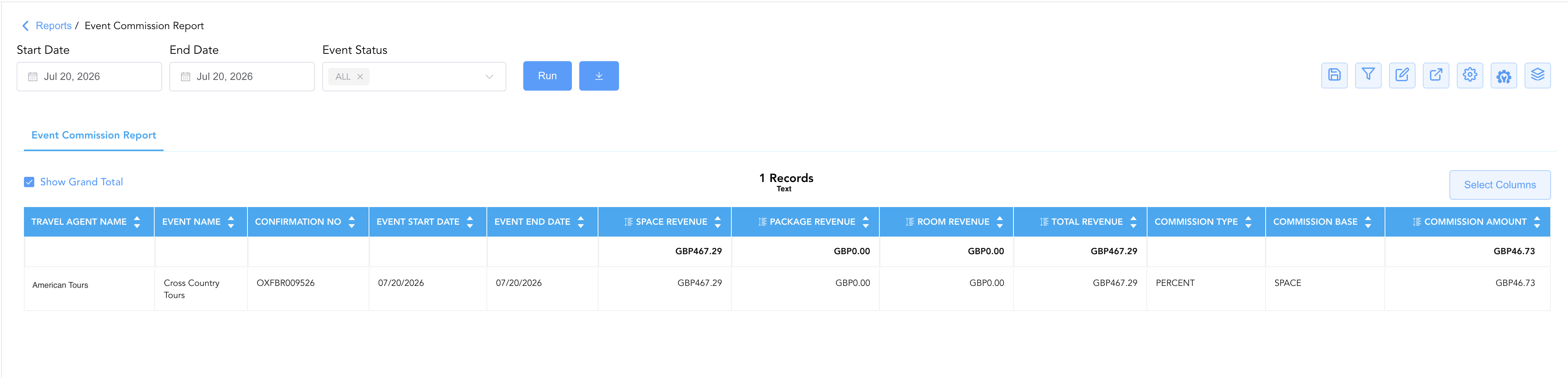
Event Commission Report – Dynamic View Overview
The Event Commission Report (Dynamic View) includes 12 columns of data. Users can customize the view by repositioning or hiding columns using the Configure (⚙️) icon located on the report page.
Below is a list of all available column names along with their descriptions.
|
Column Name |
Column Description |
Amount Includes Taxes and Fees |
Amount Calculation or Source of Data |
|
Commission Amount |
The final, automatically calculated dollar amount due to the travel agency based on the Commission Type and Base. |
|
The value is sourced from the Travel Agent Profile selected on Select Travel Agent screen.
|
|
Commission Base |
The specific revenue amount used to calculate the payout (e.g., whether commission is calculated against Total Revenue or just Room Revenue). |
|
The value is sourced from the Travel Agent Profile selected on Select Travel Agent screen.
|
|
Commission Type |
Indicates how the payout is structured—either as a Percentage of revenue or a Fixed flat fee. |
|
The value is sourced from the Travel Agent Profile selected on Select Travel Agent screen.
|
|
Confirmation Number |
The unique tracking number generated by EventKey to identify this specific event booking. |
|
The value is system generated once the event booking is made.
|
|
Event End Date |
The scheduled final day of the event. |
|
The value is sourced from the When Do You Want to Schedule this Event date picker entered on the Basic Data > Event Information screen.
|
|
Event Name |
The official title of the function or conference as recorded in EventKey (e.g., Smith Corporate Retreat). |
|
The value is sourced from the Name field entered on the Basic Data > Event Information Screen.
|
|
Event Start Date |
The scheduled first day of the event. |
|
The value is sourced from the When Do You Want to Schedule this Event date picker entered on the Basic Data > Event Information screen.
|
|
Package Revenue |
The revenue generated from bundled event packages, such as Day Delegate Packages (DDP) or all-inclusive catering options. |
|
The value is sourced from the Package Revenue filed under Revenue Summary on the event reservation screen.
|
|
Room Revenue |
The total revenue earned from guest room blocks attached to the event booking. |
|
The value is sourced from the Room Revenue filed under Revenue Summary on the event reservation screen.
|
|
Space Revenue |
The total revenue earned strictly from renting out meeting rooms, ballrooms, or event spaces. |
|
The value is sourced from the Space Revenue filed under Revenue Summary on the event reservation screen.
|
|
Total Revenue |
The combined sum of all revenue streams (Space + Package + Room) generated by the booking. |
|
total revenue = (room revenue + space revenue + package revenue)
|
|
Travel Agent Name |
The name of the travel agency or IATA partner associated with the booking who is eligible to receive a commission. |
|
The value is sourced from the Travel Agent Profile selected on Select Travel Agent screen.
|
Miscellaneous Report Information
Available Features:
-
Export
Allows you to download and save the report in different file formats (e.g., Excel, PDF) for offline use or sharing. -
Filter
Enables you to narrow down the data by applying criteria you define, so you can focus on specific information. -
Highlight (Conditional Formatting)
Automatically highlights certain values based on rules you set, making key data easier to spot at a glance.
Available Configuration:
-
User Preferences
Customize your personal report view by rearranging, showing, or hiding columns according to your needs. -
Property Preferences
Configure the default report layout for all users at the property level by repositioning or disabling columns to streamline the view.
Baseline Configuration:
-
Property Preferences Settings
The following columns will be disabled for the initial deployment:
Not Applicable