
Event Cancellation Reason Code Report Overview
Parent Hub: 🤝 Sales, Groups & Events Reports
Category: 🥂 Event Management (EventKey)
Target Roles: Catering & Event Directors, Banquet Sales Managers, Directors of Sales, Revenue Managers, Hotel Controllers, General Managers
Key Value: Monitor catering and event cancellation trends, audit root causes for lost event revenue, track staff cancellation processing, analyze reason code distributions, and optimize sales conversion strategies.
Executive Summary
The Event Cancellation Reason Code Report is an essential catering sales audit, revenue loss analysis, and commercial trend document within the 🥂 Event Management (EventKey) category of the 🤝 Sales, Groups & Events Reports hub. Designed to provide full transparency over cancelled banquet functions, meeting space bookings, and catering agreements, it itemizes cancellation dates, reason codes, processing staff credentials, and total event cancellation counts over specified reporting periods.
-
By organizing cancellation data into 2 defined report sections: Details and Summary, this report enables catering directors, sales managers, and revenue leaders to evaluate individual cancelled event records (
Details) alongside aggregated daily reason code totals (Summary). It correlates cancellation dates (Date) and event confirmation identifiers (Event Confirmation Number) with event duration types (Event Type, e.g.,HALF,FULL), standardized cancellation categories (Name,Code, e.g.,ANOTHER LOCATION_OTHER,TRAINING AND SUPPORT,EVENT PRICE TOO HIGH,CATERING LIMITATIONS), staff user credentials (Username), operational comments (Remarks), and aggregated event volumes (Number of Events).
Key Capabilities
-
Two-Section Multi-Tier Audit Structure: Evaluates individual line-item cancellation events (
Details) alongside aggregated daily reason code totals (Summary). -
Standardized Reason Code Categorization: Group cancellation events into standardized system categories (
Name,Code) to identify recurring drivers of lost business (such as price resistance, competitor location preference, or catering capability limits). -
Staff Audit & Accountability: Logs the exact staff user (
Username) who processed each cancellation record to ensure operational protocol compliance. -
Duration & Event Type Classification: Differentiates cancellation events by duration types (
Event Type, e.g., Half-Day vs. Full-Day functions) to evaluate revenue impact severity. -
Free-Text Notes Analysis: Captures granular staff comments (
Remarks) explaining specific cancellation circumstances and guest feedback.
Report Views & Functional Breakdown
The Event Cancellation Reason Code Report presents cancellation and revenue loss data across 2 defined sections:
┌────────────────────────────────────────────────────────────────────────┐
│             EVENT CANCELLATION REASON CODE REPORT                      │
├────────────────────────────────────────────────────────────────────────┤
│                       2 Defined Report Sections                        │
├──────────────────────────┬──────────────────────────┬──────────────────┤
│ 1. Details Section       │ 2. Summary Section       │                  │
│    (Line-Item Events)    │    (Aggregated Totals)   │                  │
└──────────────────────────┴──────────────────────────┴──────────────────┘
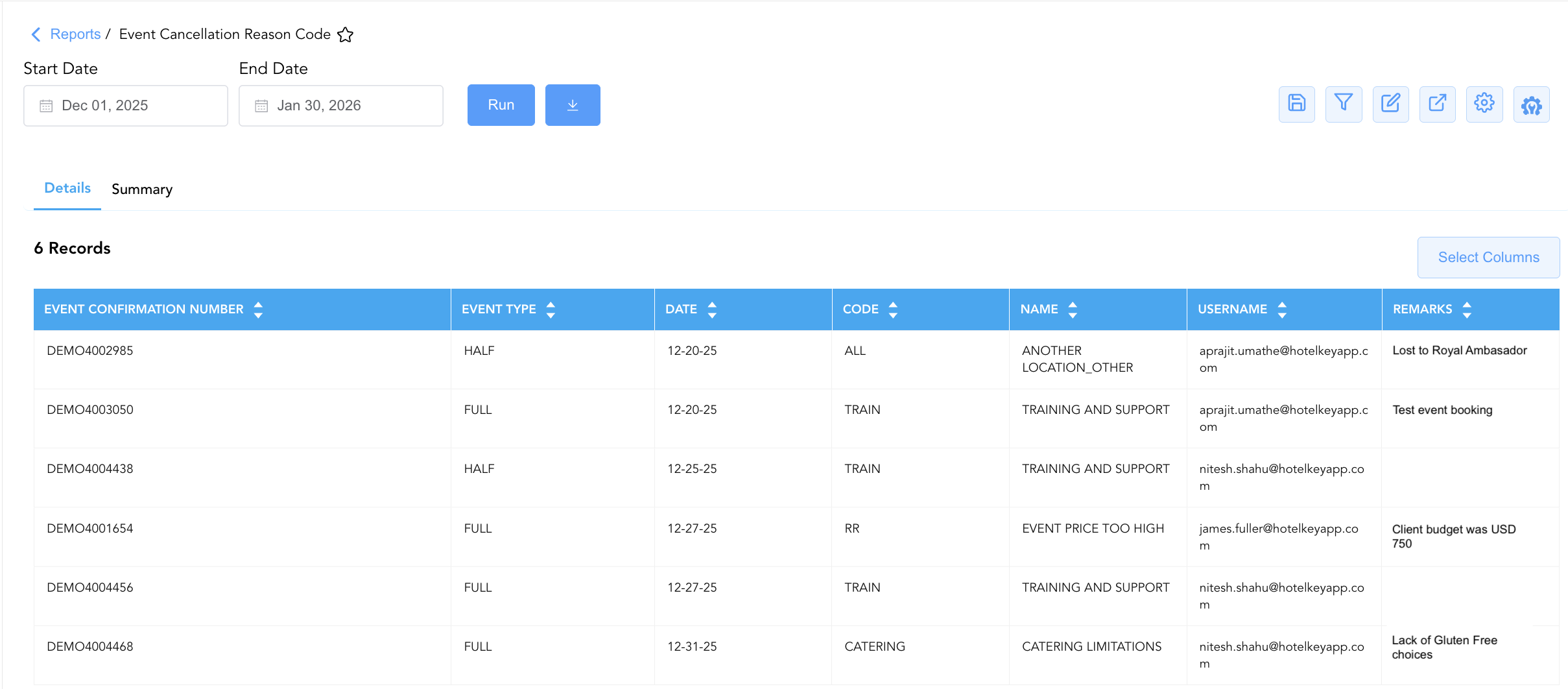
1. Details Section (Line-Item Events)
Monitors individual cancelled event bookings, detailing cancellation timestamps, processing staff user IDs, master event confirmation numbers, event types, attached cancellation reason codes, and staff remarks.
-
Primary Use: Conducting forensic audits on specific cancelled events, reviewing staff cancellation notes, and verifying cancellation reason code accuracy.
-
Key Metrics: Date, Username, Event Confirmation Number, Event Type, Name, Code, Remarks.
2. Summary Section (Aggregated Totals)
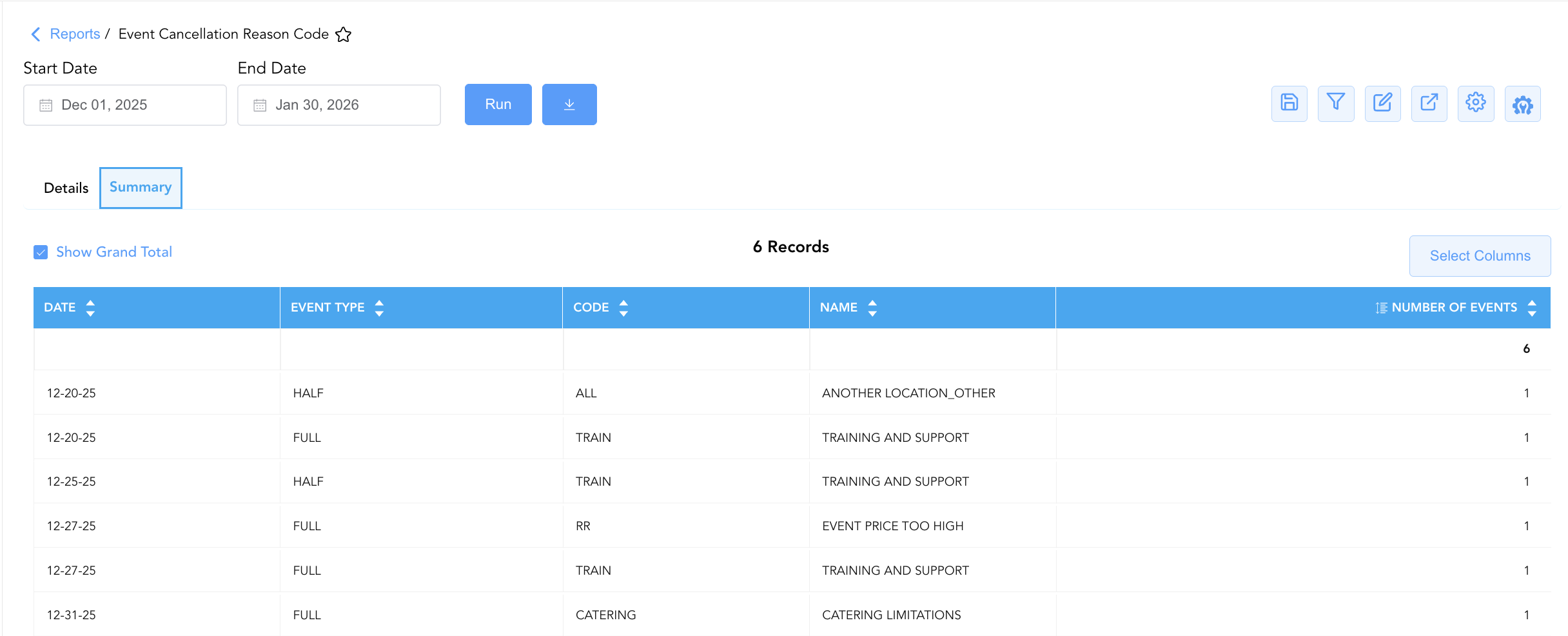
Aggregates total cancellation volumes grouped by cancellation date, event type, reason name, and reason code.
-
Primary Use: Analyzing cancellation trends over time, evaluating high-frequency cancellation categories, and presenting monthly sales loss summaries to executive leadership.
-
Key Metrics: Date, Event Type, Name, Code, Number of Events.
Data Dictionary (Dynamic View Columns)
Customize your default view using the Configure (⚙️) icon on the report page. Below is the full data dictionary representing all 8 exact unique columns available across the 2 report sections, sorted in alphabetical order by column name:
|
Column Name |
Section Applicability |
Description |
Data Source / System Mapping |
Includes Taxes & Fees? |
|---|---|---|---|---|
|
Code |
Both Sections |
Alphanumeric short code representing the cancellation reason category (e.g., |
Event Cancellation Engine > Reason Code |
N/A |
|
Date |
Both Sections |
Calendar date on which the event cancellation was recorded. |
Event Engine > Cancellation Timestamp |
N/A |
|
Event Confirmation Number |
Section 1 |
Primary unique alphanumeric confirmation ID assigned to the cancelled master event (e.g., |
Event Master > Confirmation ID |
N/A |
|
Event Type |
Both Sections |
Classification duration or category type of the event (e.g., |
Event Master > Category Type |
N/A |
|
Name |
Both Sections |
Descriptive title or full name of the cancellation reason (e.g., |
Event Cancellation Engine > Reason Name |
N/A |
|
Number of Events |
Section 2 |
Aggregated numerical count of cancelled events associated with the specific date, event type, and cancellation reason code. |
SUM(Cancelled Events) |
N/A |
|
Remarks |
Section 1 |
Free-text operational notes or staff comments explaining the cancellation circumstance. |
Event Master > Cancellation Remarks |
N/A |
|
Username |
Section 1 |
Email address or login user ID of the staff member who processed the event cancellation. |
Security Audit Trail > Logging User |
N/A |
Customization & Platform Features
User & Property Preferences
-
Personal Preference: Tailor your individual view by hiding or dragging columns. Your preferences save automatically for future sessions.
-
Property Defaults: System Admins can configure standard default layouts across all property users to streamline operational reporting. To maximize audit efficiency, group the columns into the below logical blocks:
-
Section 1: Details
-
Event Identifiers & Schedule (Cols 1–3):
Event Confirmation Number|Event Type|Date -
Cancellation Reason Categorization (Cols 4–5):
Code|Name -
User Accountability & Operational Notes (Cols 6–7):
Username|Remarks
-
-
Section 2: Summary
-
Date & Event Classification (Cols 1–2):
Date|Event Type -
Cancellation Reason Categorization (Cols 3–4):
Code|Name -
Volume Aggregate Metric (Col 5):
Number of Events
-
-
Report Toolbar & Quick Actions
Use the top-right toolbar icons on the report page to manage and export your data view:
|
Icon |
Action / Feature |
Description |

|
Knowledge Article |
Opens the knowledge base article to learn how to interpret this report. |

|
Saved Views |
Saves your column filtering, sorting, and highlight preferences so you can easily reload your custom view later without reconfiguring the report. |

|
Filter |
Opens filter controls to isolate specific data within a column based on your selected criteria. |

|
Highlight |
Highlights column values in a designated color based on selected conditions. |

|
Export |
Exports and downloads the report in various formats (Excel, PDF, CSV) for offline analysis or printing. |

|
Configure |
Opens column selection controls to toggle visibility, reorder columns, or hide rows with all zeros. |

|
Additional Configuration |
Provides advanced report configuration and display formatting options to customize data presentation. |
Advanced Controls
-
Sales Loss & Conversion Audits: Review Section 2 reason code distributions (
Name,Code) monthly to adjust pricing policies or sales pitch strategies based on lost business feedback (e.g.,EVENT PRICE TOO HIGH). -
Staff Processing Verification: Filter Section 1 by
Usernameto audit staff compliance with mandatory cancellation remark entries (Remarks). -
Highlighting (Conditional Formatting): Apply custom rules to automatically highlight high-frequency cancellation categories, cancellations due to competitor selection (
ANOTHER LOCATION_OTHER), or missing cancellation notes.
🔗 Related Reports & Next Steps
Within 🤝 Sales, Groups & Events Reports & 🥂 Event Management (EventKey):
-
All Events Report – Two-section master event summary and sub-event execution log.
-
Event Books Report – Three-section catering sales audit tracking status-based yields, sub-event revenues, and attached room blocks.
-
Event Detail – Detailed chronological timeline of all daily functions and space allocations.
Cross-Pillar Deep Dives:
-
👥 Group Block: Cross-reference event cancellations with Group Activity, Group Pickup Details, and Group Reservations to evaluate combined room block and catering cancellation impacts.
-
📊 Financial & Food & Beverage Management: Reconcile lost catering revenue from cancelled events with event pace report and sales manager production.