
Group Reservation Details Report Overview
Parent Hub: 🤝 Sales, Groups & Events Reports
Category: 👥 Group Block
Target Roles: Directors of Sales, Group Sales Managers, Convention Services Managers, Revenue Managers, Front Office Managers, Hotel Controllers, General Managers
Key Value: Monitor granular date-by-date room category pick-up, track contractual room block allocations against attendee reservations, evaluate group block financial revenue yields, audit cutoff enforcement, and manage room wash and shoulder stay parameters.
Executive Summary
The Group Reservation Details Report is a comprehensive group sales audit, room block inventory tracking, and revenue management document within the 👥 Group Block category of the 🤝 Sales, Groups & Events Reports hub. Designed to deliver deep, date-by-date visibility into active group block commitments and reservation pick-up performance, it itemizes contractual room allocations, attendee booking realization, operational notes, and financial yield metrics across specified date windows.
-
By organizing group reservation data into 2 defined report sections: Details (Room Type Level) and Summary (Master Block Level), this report enables sales managers, revenue leads, and hotel controllers to evaluate room-category-specific pick-up (
Details) alongside aggregated daily block totals (Summary). It maps master block contracts (Group Number,Group Name,Group Code,Group Status,Group Type,Check In Date,Check Out Date) and distribution rules (Pickup Restriction,Guarantee Method,Pricing Method,Billing Type,Billing Remarks,Elastic,Shoulder Date Start,Shoulder Date End) against daily room category allocations (Room Type Code,Room Type Name,Rate Plan,Contracted Rooms,Authorised Rooms,Total Picked Up,Contracted Rooms Available For Pick Up,Available For Pick Up,Released Rooms,Washed Rooms,Cut Off Date), operational notes (Group Remarks,Reservation Notes,Housekeeping Notes), guest demographics (Adults,Children), and financial revenue metrics (ADR,Total Group Block Gross Revenue,Total Group Block Net Revenue,Total Taxes,Total Fees,Total Taxes And Fees,Allocation Revenue).
Key Capabilities
-
Two-Section Granular Audit Structure: Separates room-type-specific daily pick-up entries (
Details) from aggregated daily block totals (Summary) for precise inventory and revenue auditing. -
Category-Level Pick-Up & Wash Tracking: Itemizes contracted rooms (
Contracted Rooms), authorized caps (Authorised Rooms), actual reservations (Total Picked Up), remaining pick-up inventory (Available For Pick Up), released rooms (Released Rooms), and washed allocations (Washed Rooms) per room category. -
Comprehensive Financial & Revenue Yield Analysis: Calculates net room revenue (
Total Group Block Net Revenue), gross revenue (Total Group Block Gross Revenue), Average Daily Rate (ADR), applied taxes/fees (Total Taxes,Total Fees,Total Taxes And Fees), and total allocation revenue potential (Allocation Revenue). -
Operational & Departmental Notes Integration: Captures group-level remarks (
Group Remarks), front desk handling notes (Reservation Notes), and special cleaning instructions (Housekeeping Notes) to streamline event execution. -
Contractual & Distribution Policy Oversight: Tracks booking distribution rules (
Pickup Restriction), elastic pick-up flags (Elastic), pre/post shoulder date windows (Shoulder Date Start,Shoulder Date End), and master billing routing setups (Billing Type,Billing Remarks).
Report Views & Functional Breakdown
The Group Reservation Details Report presents group block pick-up and financial data across 2 defined sections:
┌────────────────────────────────────────────────────────────────────────┐
│                   GROUP RESERVATION DETAILS REPORT                     │
├────────────────────────────────────────────────────────────────────────┤
│                       2 Defined Report Sections                        │
├──────────────────────────┬──────────────────────────┬──────────────────┤
│ 1. Details Section       │ 2. Summary Section       │                  │
│    (Room Type Level)     │    (Master Block Level)  │                  │
└──────────────────────────┴──────────────────────────┴──────────────────┘
1. Details Section (Room Type Level)
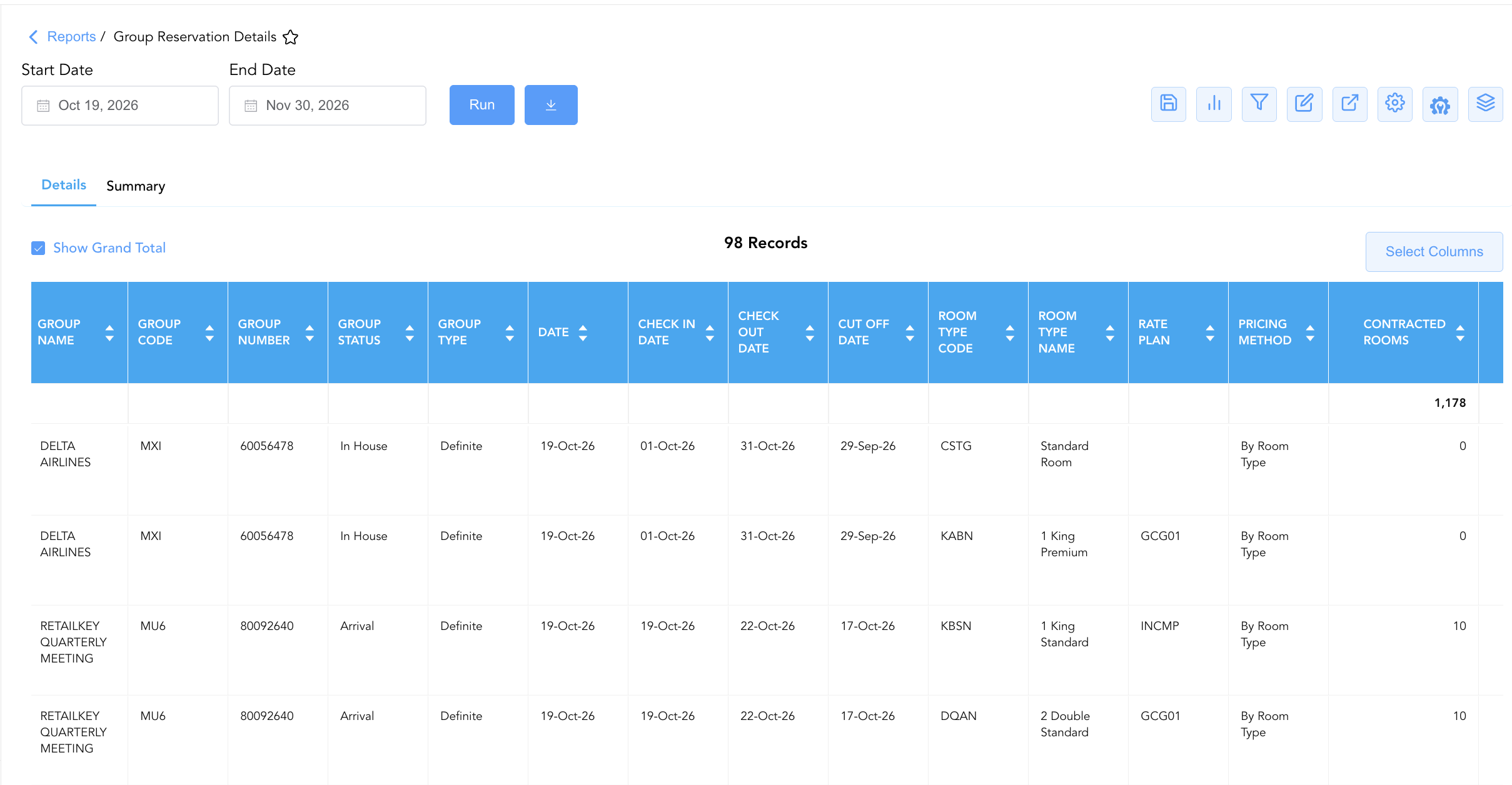
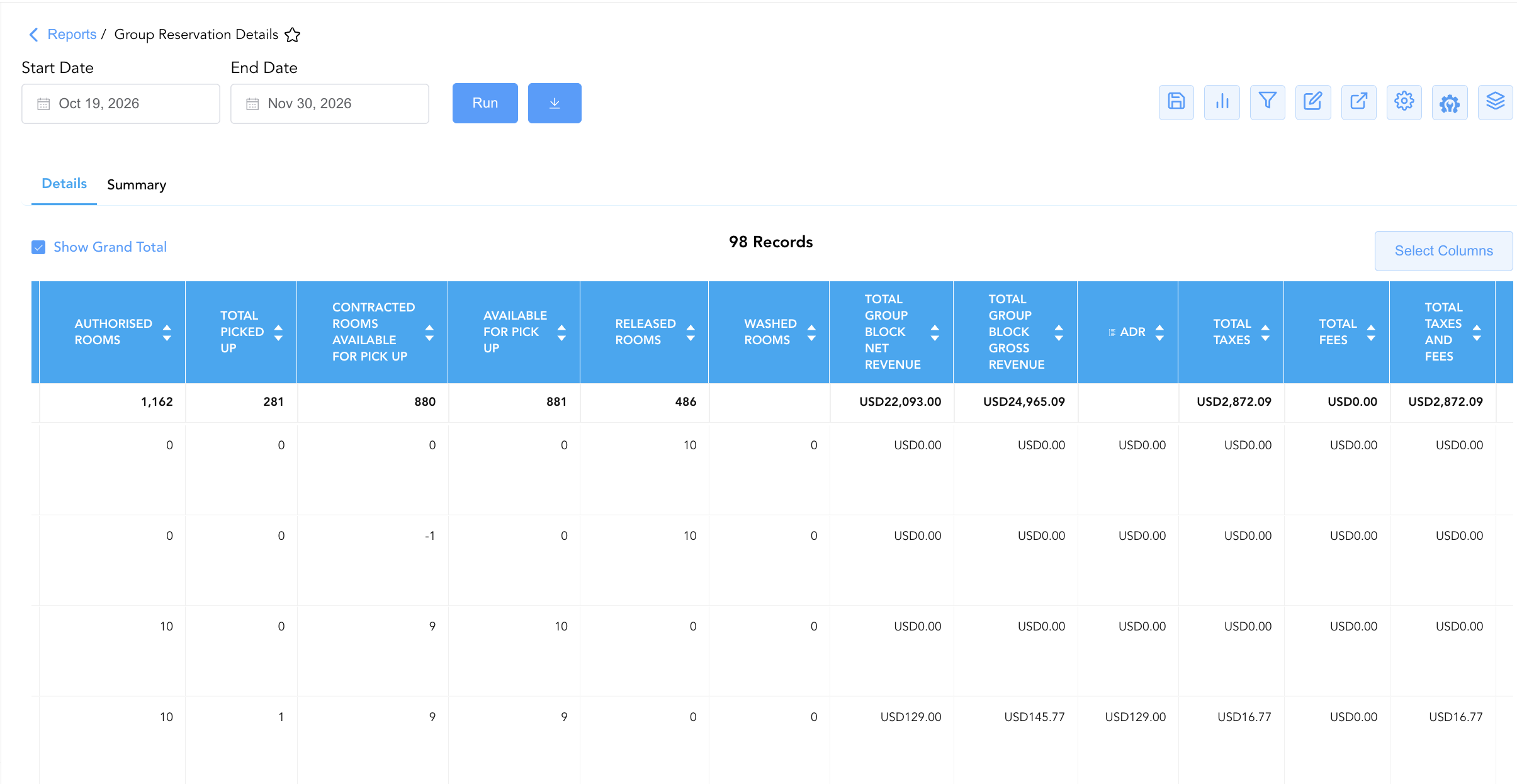
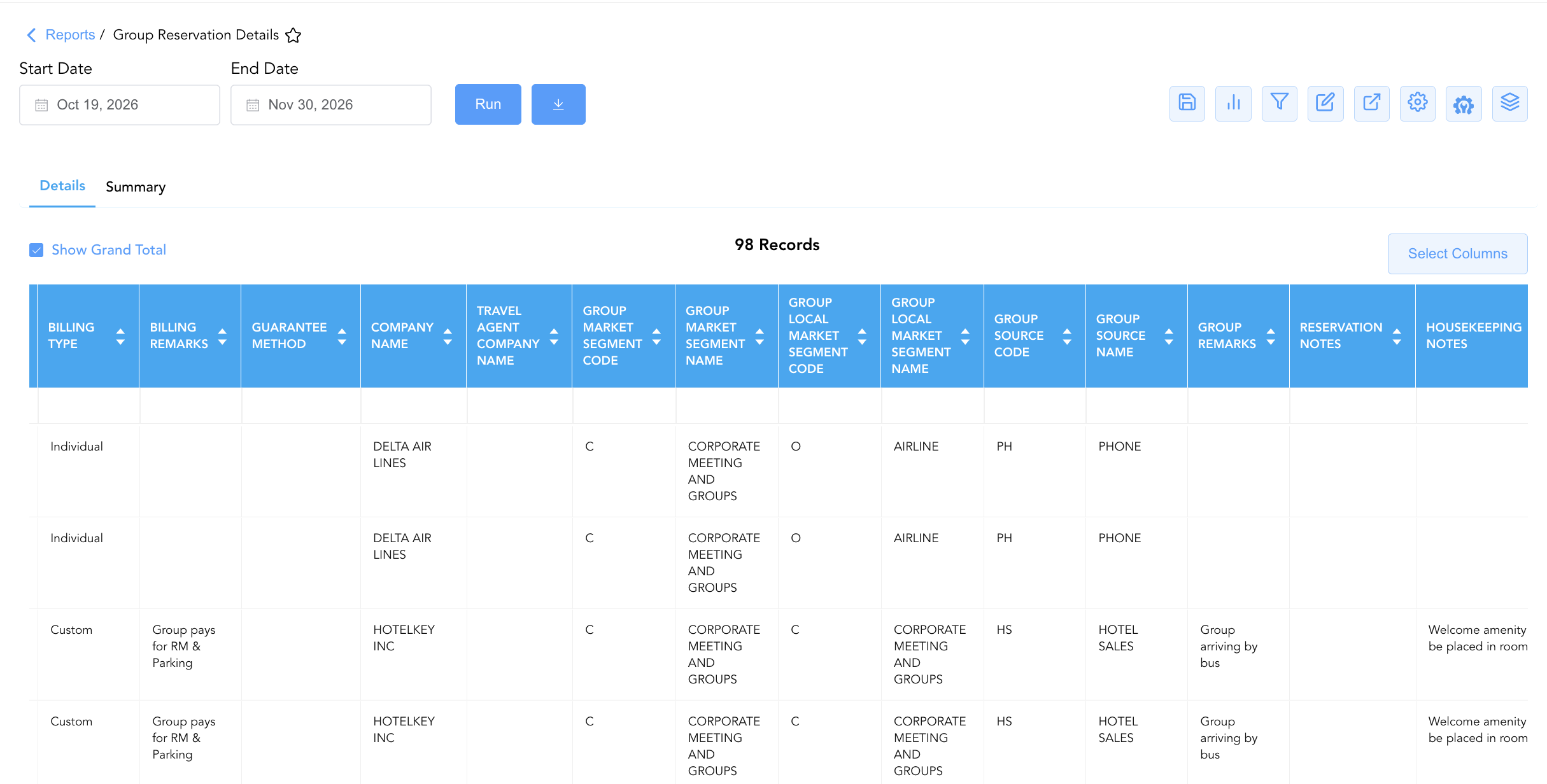
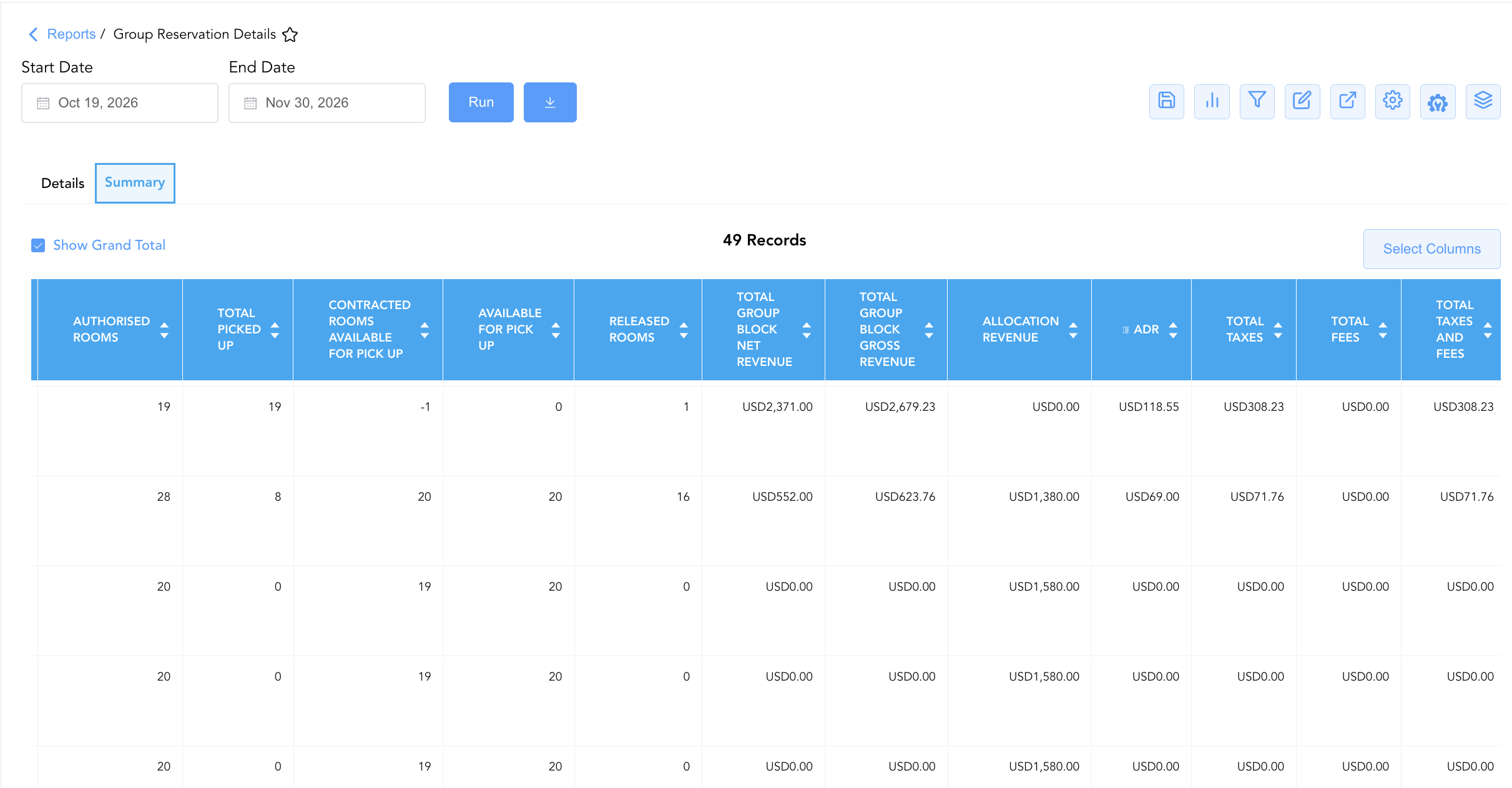
Monitors date-by-date room block allocations, reservation pick-up, remaining inventory, operational notes, and revenue yield disaggregated by specific room type categories (e.g., Standard Room, 1 King Premium, 2 Double Standard).
-
Primary Use: Reviewing room-category pick-up realization, tracking room wash by room type, and reading front desk or housekeeping handling notes.
-
Key Metrics: Date, Group Number, Group Name, Room Type Code, Room Type Name, Rate Plan, Contracted Rooms, Total Picked Up, Available For Pick Up, ADR, Total Group Block Net Revenue, Reservation Notes, Housekeeping Notes.
2. Summary Section (Master Block Level)
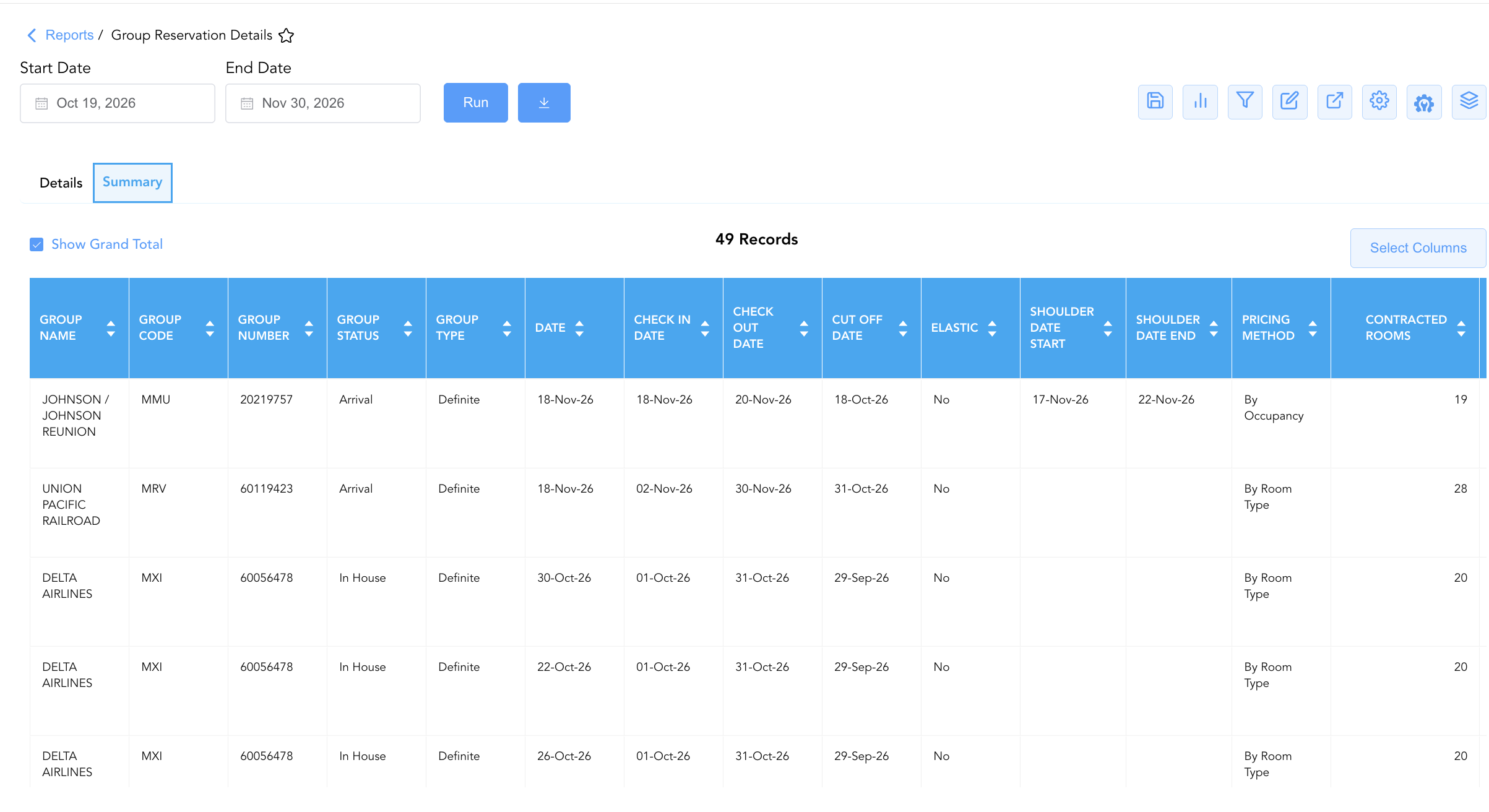
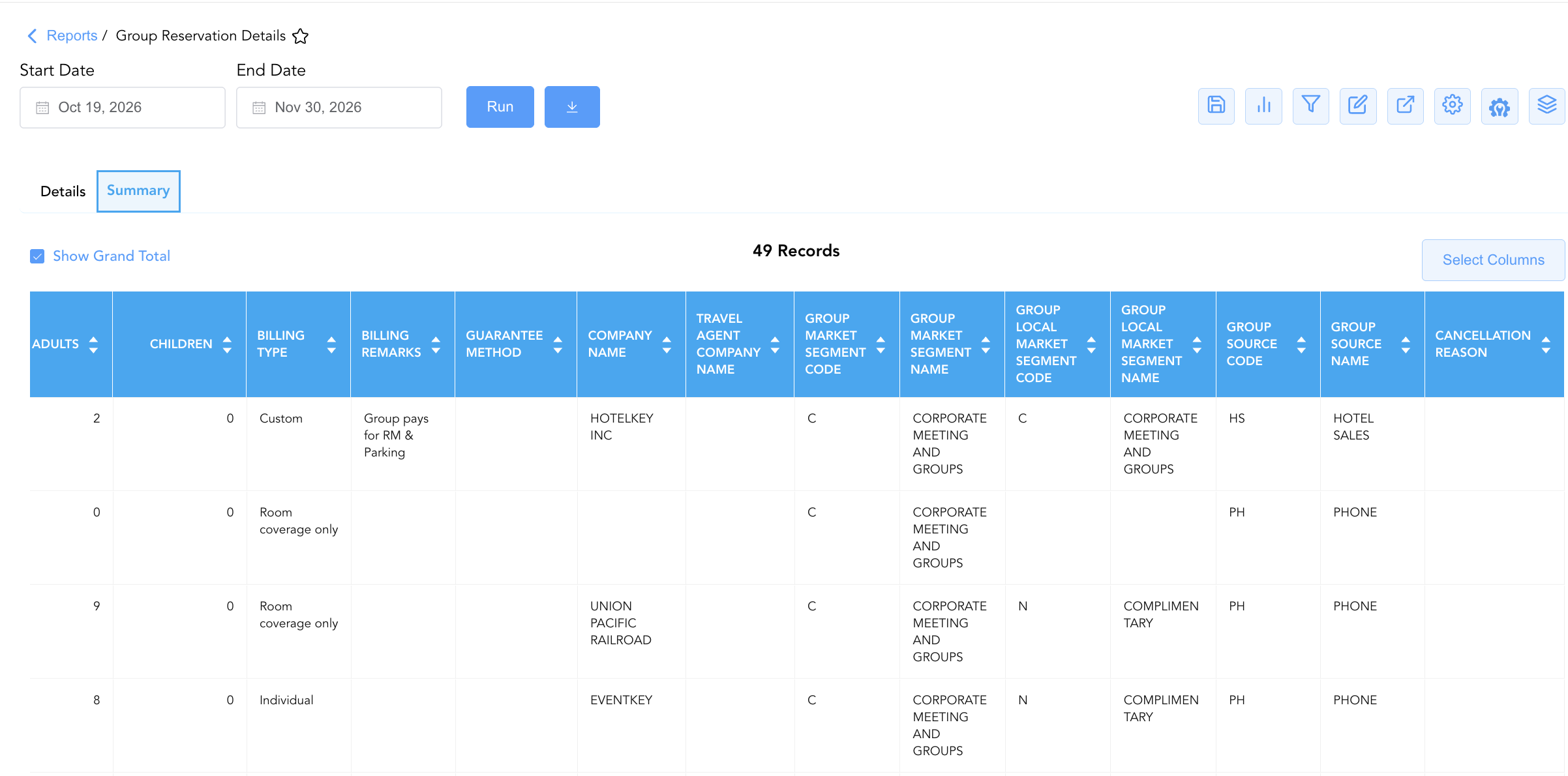
Aggregates total contracted rooms, authorized limits, picked-up reservations, remaining pick-up availability, released rooms, guest headcounts, and cumulative financial revenue totals across all room types for each calendar date.
-
Primary Use: Auditing total daily group block performance, evaluating block wash and shoulder stay rules, and checking total gross/net revenue yields.
-
Key Metrics: Date, Group Number, Group Name, Group Status, Contracted Rooms, Authorised Rooms, Total Picked Up, Available For Pick Up, Released Rooms, Cut Off Date, ADR, Total Group Block Gross Revenue, Total Group Block Net Revenue, Allocation Revenue, Elastic, Shoulder Date Start, Shoulder Date End.
Data Dictionary (Dynamic View Columns)
Customize your default view using the Configure (⚙️) icon on the report page. Below is the full data dictionary representing all 49 unique columns available across the 2 report sections, sorted in alphabetical order by column name:
💰 Financial Posting Logic: Figures in
Total Group Block Net Revenue,Total Group Block Gross Revenue,Total Taxes,Total Fees, andAllocation Revenuereflect net or gross charges posted for attendee reservations or calculated for block allocations.ADRis dynamically calculated as Total Group Block Net Revenue ÷ Total Picked Up.
|
Column Name |
Section Applicability |
Description |
Data Source / System Mapping |
Includes Taxes & Fees? |
|
ADR |
Both Sections |
Calculated Average Daily Rate for the group block on the specified date (Total Group Block Net Revenue ÷ Total Picked Up). |
Calculated: Net Rate Yield |
❌ No |
|
Adults |
Both Sections |
Total registered adult headcount across reservations booked under the group block. |
Group Res Engine > Adult Count |
N/A |
|
Allocation Revenue |
Section 2 |
Total monetary revenue potential calculated for full contractual room block allocation. |
Calculated: Potential Allocation Yield |
❌ No |
|
Authorised Rooms |
Both Sections |
Maximum upper threshold of guest rooms authorized for pick-up under the group block agreement. |
Group Block Master > Authorized Cap |
N/A |
|
Available For Pick Up |
Both Sections |
Count of remaining unreserved rooms in the group block available for attendee pick-up. |
Group Block Engine > Remaining Allocation |
N/A |
|
Billing Remarks |
Both Sections |
Special billing notes, folio routing instructions, or payment terms linked to the group contract. |
Group Block Master > Billing Notes |
N/A |
|
Billing Type |
Both Sections |
Method of folio payment and billing settlement configured for the group block (e.g., |
Group Block Master > Settlement Type |
N/A |
|
Cancellation Reason |
Both Sections |
Primary recorded reason code for group block cancellation (if applicable). |
Group Block Master > Cancellation Code |
N/A |
|
Check In Date |
Both Sections |
Contractual start date (arrival date) of the group block stay window. |
Group Block Master > Arrival Date |
N/A |
|
Check Out Date |
Both Sections |
Contractual end date (departure date) of the group block stay window. |
Group Block Master > Departure Date |
N/A |
|
Children |
Both Sections |
Total registered child headcount across reservations booked under the group block. |
Group Res Engine > Child Count |
N/A |
|
Company Name |
Both Sections |
Name of the corporate company profile attached to the group block (e.g., |
Account Master > Profile Name |
N/A |
|
Contracted Rooms |
Both Sections |
Agreed count of guest rooms formally contracted for the group block per night. |
Group Block Master > Contracted Commitment |
N/A |
|
Contracted Rooms Available For Pick Up |
Both Sections |
Count of remaining unreserved contracted rooms available for pick-up. |
Calculated: Contracted - Picked Up |
N/A |
|
Cut Off Date |
Both Sections |
Contractual cut-off date after which unpicked-up group block allocations release back to general property inventory. |
Group Block Master > Cutoff Date |
N/A |
|
Date |
Both Sections |
Calendar date within the group block stay window. |
PMS Calendar > Stay Date |
N/A |
|
Elastic |
Section 2 |
Flag indicating whether the group block allows elastic pick-up beyond authorized allocations (e.g., |
Group Block Master > Elastic Flag |
N/A |
|
Group Code |
Both Sections |
Alphanumeric short block code assigned to identify the group in the PMS/CRS (e.g., |
Group Block Master > Block Code |
N/A |
|
Group Local Market Segment Code |
Both Sections |
Alphanumeric code representing the local market sub-segment. |
PMS Setup > Local Segment Code |
N/A |
|
Group Local Market Segment Name |
Both Sections |
Descriptive name of the local market sub-segment classification (e.g., |
PMS Setup > Local Segment Name |
N/A |
|
Group Market Segment Code |
Both Sections |
Alphanumeric code representing the primary market segment. |
PMS Setup > Market Segment Code |
N/A |
|
Group Market Segment Name |
Both Sections |
Descriptive name of the primary market segment classification (e.g., |
PMS Setup > Market Segment Name |
N/A |
|
Group Name |
Both Sections |
Official descriptive title or event name of the group block (e.g., |
Group Block Master > Block Name |
N/A |
|
Group Number |
Both Sections |
Primary unique master identification number assigned to the group block in the PMS (e.g., |
Group Block Master > Group ID |
N/A |
|
Group Remarks |
Section 1 |
General operational notes or special event handling instructions recorded on the group profile. |
Group Block Master > General Notes |
N/A |
|
Group Source Code |
Both Sections |
Alphanumeric code representing the booking channel or source of the group block (e.g., |
Group Block Master > Source Code |
N/A |
|
Group Source Name |
Both Sections |
Descriptive name of the booking source channel (e.g., |
Group Block Master > Source Name |
N/A |
|
Group Status |
Both Sections |
Operational lifecycle state of the group block contract (e.g., |
Group Block Master > Lifecycle Status |
N/A |
|
Group Type |
Both Sections |
Classification status of the group contract (e.g., |
Group Block Master > Contract Status |
N/A |
|
Guarantee Method |
Both Sections |
Required reservation guarantee type or credit card policy attached to the group block. |
Group Block Master > Guarantee Policy |
N/A |
|
Housekeeping Notes |
Section 1 |
Special cleaning, room setup, or housekeeping instructions linked to the group block. |
Group Block Master > HK Notes |
N/A |
|
Pickup Restriction |
Section 1 |
Channel distribution restriction governing how group reservations can be booked (e.g., |
Group Block Master > Distribution Rule |
N/A |
|
Pricing Method |
Both Sections |
Pricing structure model applied to the group block rate agreement (e.g., |
Group Block Master > Rate Model |
N/A |
|
Projected Occupancy |
Both Sections |
Projected occupancy percentage for the group block on the target date. |
Group Block Engine > Occupancy % |
N/A |
|
Rate Plan |
Section 1 |
Contracted group rate code linked to the block agreement (e.g., |
Group Block Master > Attached Rate |
N/A |
|
Released Rooms |
Both Sections |
Count of unpicked-up group block rooms formally released back to general property inventory. |
Group Block Engine > Released Count |
N/A |
|
Reservation Notes |
Section 1 |
Special guest service, amenity, or front desk handling notes linked to the group block (e.g., |
Group Block Master > Front Desk Notes |
N/A |
|
Room Type Code |
Section 1 |
Alphanumeric code representing the room type category (e.g., |
PMS Setup > Room Category Code |
N/A |
|
Room Type Name |
Section 1 |
Descriptive commercial name of the room type category (e.g., |
PMS Setup > Room Category Description |
N/A |
|
Shoulder Date End |
Section 2 |
Ending date of the authorized shoulder stay window for pre/post group extension stays. |
Group Block Master > Shoulder End Date |
N/A |
|
Shoulder Date Start |
Section 2 |
Starting date of the authorized shoulder stay window for pre/post group extension stays. |
Group Block Master > Shoulder Start Date |
N/A |
|
Total Fees |
Both Sections |
Total net surcharge fees posted to the group block allocation. |
Sales Ledger > Fee Charges |
🟢 Yes |
|
Total Group Block Gross Revenue |
Both Sections |
Total gross revenue generated combining room revenue, taxes, and fees. |
Sales Ledger > Gross Total |
🟢 Yes |
|
Total Group Block Net Revenue |
Both Sections |
Total net lodging revenue generated by the group block allocation. |
Sales Ledger > Net Lodging Revenue |
❌ No |
|
Total Picked Up |
Both Sections |
Total numerical count of attendee reservations picked up under the group block for the target date. |
Group Res Engine > Picked Up Count |
N/A |
|
Total Taxes |
Both Sections |
Total lodging and sales taxes posted to the group block allocation. |
Sales Ledger > Tax Charges |
🟢 Yes |
|
Total Taxes And Fees |
Both Sections |
Total combined taxes and fees posted to the group block allocation. |
Sales Ledger > Combined Taxes/Fees |
🟢 Yes |
|
Travel Agent Company Name |
Both Sections |
Name of the travel agency or intermediary profile linked to the group block. |
Travel Agency Profile > Company Name |
N/A |
|
Washed Rooms |
Section 1 |
Count of group block rooms removed or washed from the block allocation prior to cutoff. |
Group Block Engine > Washed Count |
N/A |
Customization & Platform Features
User & Property Preferences
-
Personal Preference: Tailor your individual view by hiding or dragging columns. Your preferences save automatically for future sessions.
-
Property Defaults: System Admins can configure standard default layouts across all property users to streamline operational reporting. To maximize audit efficiency, group the columns into the below logical blocks:
-
Section 1: Details
-
Group Identification & Confirmation Status (Cols 1–5):
Group Name|Group Code|Group Number|Group Status|Group Type -
Schedule Window & Cutoff Dates (Cols 6–9):
Date|Check In Date|Check Out Date|Cut Off Date -
Room Category & Rate Plan Setup (Cols 10–13):
Room Type Code|Room Type Name|Rate Plan|Pricing Method -
Inventory Allocation & Pickup Metrics (Cols 14–20):
Contracted Rooms|Authorised Rooms|Total Picked Up|Contracted Rooms Available For Pick Up|Available For Pick Up|Released Rooms|Washed Rooms -
Financial Revenue & Rate KPIs (Cols 21–27):
Total Group Block Net Revenue|Total Group Block Gross Revenue|ADR|Total Taxes|Total Fees|Total Taxes And Fees|Projected Occupancy -
Occupant Headcount (Cols 28–29):
Adults|Children -
Billing Setup & Accounts (Cols 30–34):
Billing Type|Billing Remarks|Guarantee Method|Company Name|Travel Agent Company Name -
Market Segment & Source Classifications (Cols 35–40):
Group Market Segment Code|Group Market Segment Name|Group Local Market Segment Code|Group Local Market Segment Name|Group Source Code|Group Source Name -
Operational Remarks & Notes (Cols 41–45):
Group Remarks|Reservation Notes|Housekeeping Notes|Pickup Restriction|Cancellation Reason
-
-
Section 2: Summary
-
Group Identification & Confirmation Status (Cols 1–5):
Group Name|Group Code|Group Number|Group Status|Group Type -
Schedule Window & Cutoff Dates (Cols 6–9):
Date|Check In Date|Check Out Date|Cut Off Date -
Contract Terms & Elastic Shoulder Dates (Cols 10–13):
Elastic|Shoulder Date Start|Shoulder Date End|Pricing Method -
Inventory Allocation & Pickup Metrics (Cols 14–19):
Contracted Rooms|Authorised Rooms|Total Picked Up|Contracted Rooms Available For Pick Up|Available For Pick Up|Released Rooms -
Financial Revenue & Rate KPIs (Cols 20–27):
Total Group Block Net Revenue|Total Group Block Gross Revenue|Allocation Revenue|ADR|Total Taxes|Total Fees|Total Taxes And Fees|Projected Occupancy -
Occupant Headcount (Cols 28–29):
Adults|Children -
Billing Setup & Accounts (Cols 30–34):
Billing Type|Billing Remarks|Guarantee Method|Company Name|Travel Agent Company Name -
Market Segment & Source Classifications (Cols 35–40):
Group Market Segment Code|Group Market Segment Name|Group Local Market Segment Code|Group Local Market Segment Name|Group Source Code|Group Source Name -
Cancellation Audit (Col 41):
Cancellation Reason
-
-
Report Toolbar & Quick Actions
Use the top-right toolbar icons on the report page to manage and export your data view:
|
Icon |
Action / Feature |
Description |

|
Knowledge Article |
Opens the knowledge base article to learn how to interpret this report. |

|
Saved Views |
Saves your column filtering, sorting, and highlight preferences so you can easily reload your custom view later without reconfiguring the report. |

|
Bar Chart |
Displays report data in a visual bar chart format. |

|
Filter |
Opens filter controls to isolate specific data within a column based on your selected criteria. |

|
Highlight |
Highlights column values in a designated color based on selected conditions. |

|
Export |
Exports and downloads the report in various formats (Excel, PDF, CSV) for offline analysis or printing. |

|
Configure |
Opens column selection controls to toggle visibility, reorder columns, or hide rows with all zeros. |

|
Additional Configuration |
Provides advanced report configuration and display formatting options to customize data presentation. |

|
Group By |
Summarize and group report data dynamically in real time. |
Interactive Visualizations & Grouping Controls
-
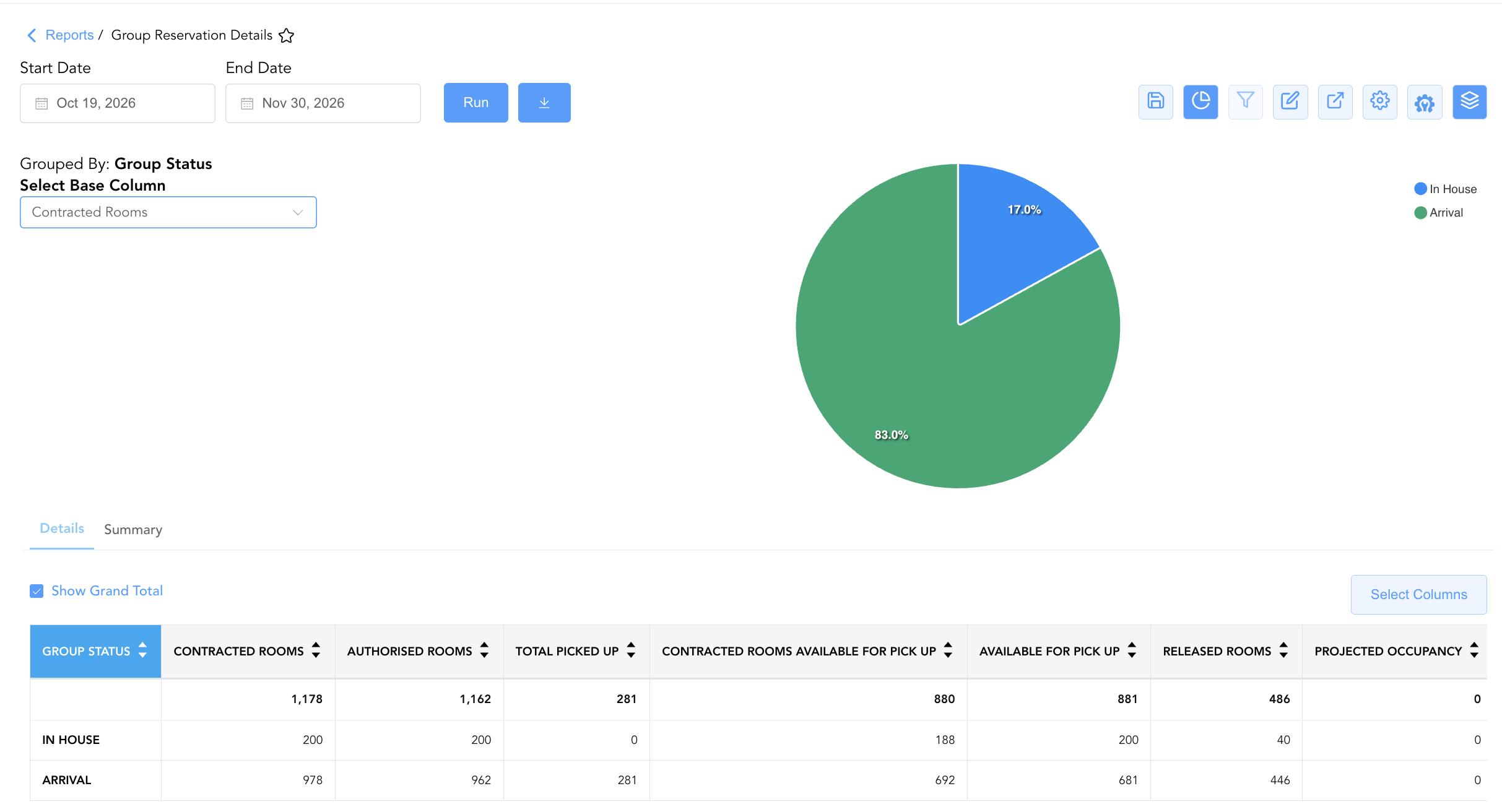
Group By & Pie Chart Visualization: The Group Reservation Details report features an interactive pie chart to help analyze group block pickup performance and commitment share distributions. Users can toggle or expand/collapse the Group Status sections to analyze room-category-level pick-up or master block totals independently. By selecting a metric from the Select Base Column dropdown menu—such as Contracted Rooms, Authorised Rooms, Total Picked Up, Contracted Rooms Available For Pick Up, Available For Pick Up, Released Rooms, Projected Occupancy, or Total Group Block Gross Revenue—the chart dynamically renders percentage share breakdowns accompanied by an interactive color-coded legend.
-
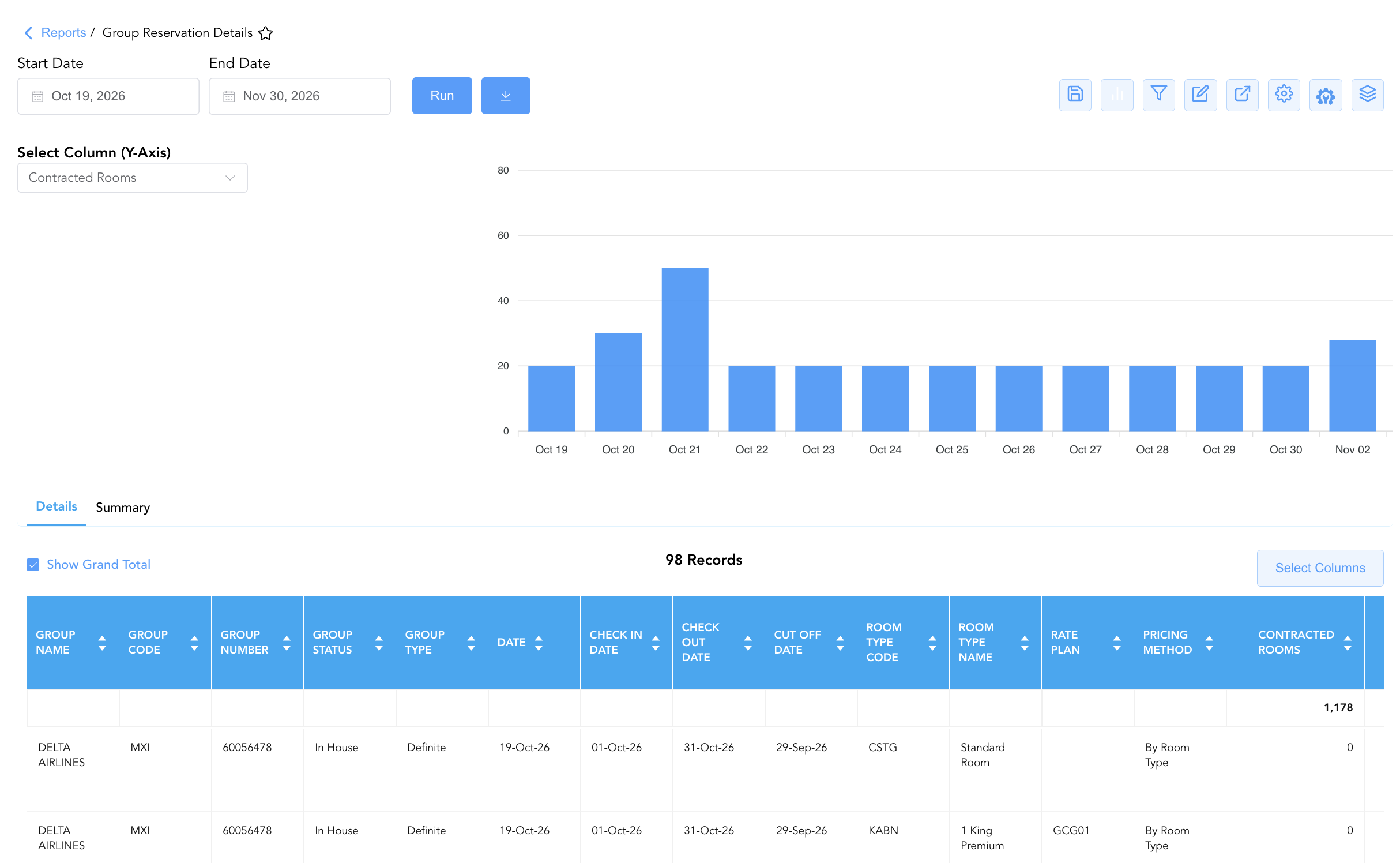
Bar Chart Visualizer: The Group Reservation Details report includes an interactive bar chart to help analyze group block pick-up performance, room commitments, and projected revenue trends over time. By adjusting the Select Column (Y-Axis) dropdown menu, users can dynamically toggle the chart view to plot metrics such as Contracted Rooms, Authorised Rooms, Total Picked Up, Available For Pick Up, Released Rooms, Projected Occupancy, or Total Group Block Gross Revenue chronologically alongside the detailed group reservation data grid.
Advanced Controls
-
Pre-Arrival Operational Audits: Filter Section 1 by
Reservation NotesorHousekeeping Notesto review special arrival instructions (e.g., "Group arriving by bus", "Welcome amenity to be placed in room") prior to group check-in. -
Inventory Wash & Cutoff Audits: Compare
Contracted RoomsagainstTotal Picked Upin Section 2 asCut Off Dateapproaches to make manual block wash adjustments. -
Highlighting (Conditional Formatting): Apply custom rules to automatically highlight fully picked-up room categories (
Available For Pick Up = 0), under-performing room blocks, or impending cut-off dates.
🔗 Related Reports & Next Steps
Within 🤝 Sales, Groups & Events Reports & 👥 Group Block:
-
Group Activity Report – Two-section report tracking operational stay statistics and financial revenue production across group blocks.
-
Group Pickup Details – Daily block inventory pick-up velocity and contractual release rule tracking.
-
Group Recap By Arrival – Chronological arrival summary of upcoming group blocks and master billing setups.
-
Group Rooming List – Detailed attendee reservation list associated with active group blocks.
Cross-Pillar Deep Dives:
-
🛎️ Front Desk & Guest Services: Reconcile group reservation notes (
Reservation Notes) with Today's Guests and Special Assistance to ensure front desk readiness. -
📊 Financial & Revenue Management: Cross-reference net group room revenue (
Total Group Block Net Revenue) with monthly trial balance and occupancy forecast and history.