
Occupancy Forecast and History Report Overview
Parent Hub: 📈 Revenue & Analytics
Category: 🔭 Yield & Forecasting
Target Roles: Directors of Revenue Management, Revenue Analysts, General Managers, Hotel Controllers, Directors of Sales & Marketing
Key Value: Evaluate historical and forward-looking daily occupancy and revenue metrics, track confirmed group versus transient room nights, monitor out-of-order (OOO) inventory impacts, analyze ADR and RevPAR variations under multiple occupancy calculation formulas, and optimize property yield strategies.
Executive Summary
The Occupancy Forecast and History Report is a primary demand analysis, inventory tracking, and revenue forecasting document within the 🔭 Yield & Forecasting category of the 📈 Revenue & Analytics hub. Designed to deliver comprehensive daily operational and financial intelligence across past and future stay dates, it aggregates confirmed revenue, room night sales, movement counters, average daily rates (ADR), occupancy percentages, and RevPAR metrics.
-
By mapping daily reservation parameters (Date, Day Of Week) to revenue streams (Confirmed Revenue, Group Confirmed Revenue, Transient Confirmed Revenue, Allocation Revenue, Total Revenue), inventory metrics (Total Rooms, Total Sold Rooms, OOO, Available Rooms, Group Allocations/Pickup), guest movement counters (Arrivals, Departures, Stay Overs, Adults, Children), and multi-formula performance indicators (ADR, Occupancy %, RevPAR), this report enables revenue managers, general managers, and sales teams to evaluate demand buildup, monitor group block utilization, audit inventory capacity, and execute dynamic pricing strategies.
Key Capabilities
-
Dual Historical & Forward-Looking Analysis: Provides a continuous daily timeline displaying historical actuals alongside future booking forecasts for comprehensive trend monitoring.
-
Group vs. Transient Revenue & Room Breakdown: Itemizes confirmed revenue and room night sales into group (
Group Confirmed Revenue), transient (Transient Confirmed Revenue), and unpicked group allocation (Allocation Revenue) components. -
Multi-Formula Occupancy & RevPAR Benchmarking: Offers multi-perspective yield analysis by calculating Occupancy % and RevPAR both with and without Out-Of-Order (OOO) rooms, complimentary stays, and unpicked group blocks.
-
Operational Movement & Guest Counter Tracking: Captures daily operational movement (Arrivals, Departures, Stay Overs, Guaranteed vs. Non-Guaranteed) alongside guest headcounts (Adults, Children, Total Guests, Day Use, Comp Reservations).
Report Views & Functional Breakdown
The Occupancy Forecast and History Report presents daily operational and financial metrics in a unified single-table ledger that supports three key analytical perspectives:
┌────────────────────────────────────────────────────────────────────────┐
│             OCCUPANCY FORECAST AND HISTORY REPORT                      │
├────────────────────────────────────────────────────────────────────────┤
│                         Unified Matrix View                            │
├──────────────────────────┬──────────────────────────┬──────────────────┤
│ 1. Revenue & Yield       │ 2. Room Inventory &      │ 3. Operational   │
│    Performance           │    Capacity Management   │    Movement &    │
│                          │                          │    Guest Metrics │
└──────────────────────────┴──────────────────────────┴──────────────────┘
1. Revenue & Yield Performance
Monitors daily revenue generation across market segments and evaluates rate yield under multiple calculation rules.
-
Primary Use: Evaluating group vs. transient revenue mix, tracking unpicked group allocation value, and auditing ADR and RevPAR performance with or without OOO rooms.
-
Key Metrics: Date, Day Of Week, Confirmed Revenue, Group Confirmed Revenue, Transient Confirmed Revenue, Allocation Revenue, Total Revenue, ADR, Revpar With OOO Rooms, Revpar Without OOO Rooms.
2. Room Inventory & Capacity Management
Tracks total property room stock, out-of-order room deductions, available bookable inventory, and group block pickup.
-
Primary Use: Monitoring physical room capacity, auditing out-of-order room impacts on available inventory, tracking group block allocations versus actual pickup, and analyzing multi-formula occupancy percentages.
-
Key Metrics: Total Rooms, Total Sold Rooms, OOO, Available Rooms, Group Allocations, Group Rooms Picked Up, Occupancy Including/Excluding OOO.
3. Operational Movement & Guest Metrics
Provides front office and housekeeping operational movement counters alongside guest headcount breakdowns.
-
Primary Use: Planning front desk staffing based on arrival/departure volume, auditing guaranteed vs. non-guaranteed booking mix, and tracking total guest headcounts, day-use rooms, and complimentary stays.
-
Key Metrics: Arrivals, Departures, Stay Overs, Guaranteed, Non Guaranteed, Adults, Children, Total Guests, Day Use Rooms, Comp Reservations.
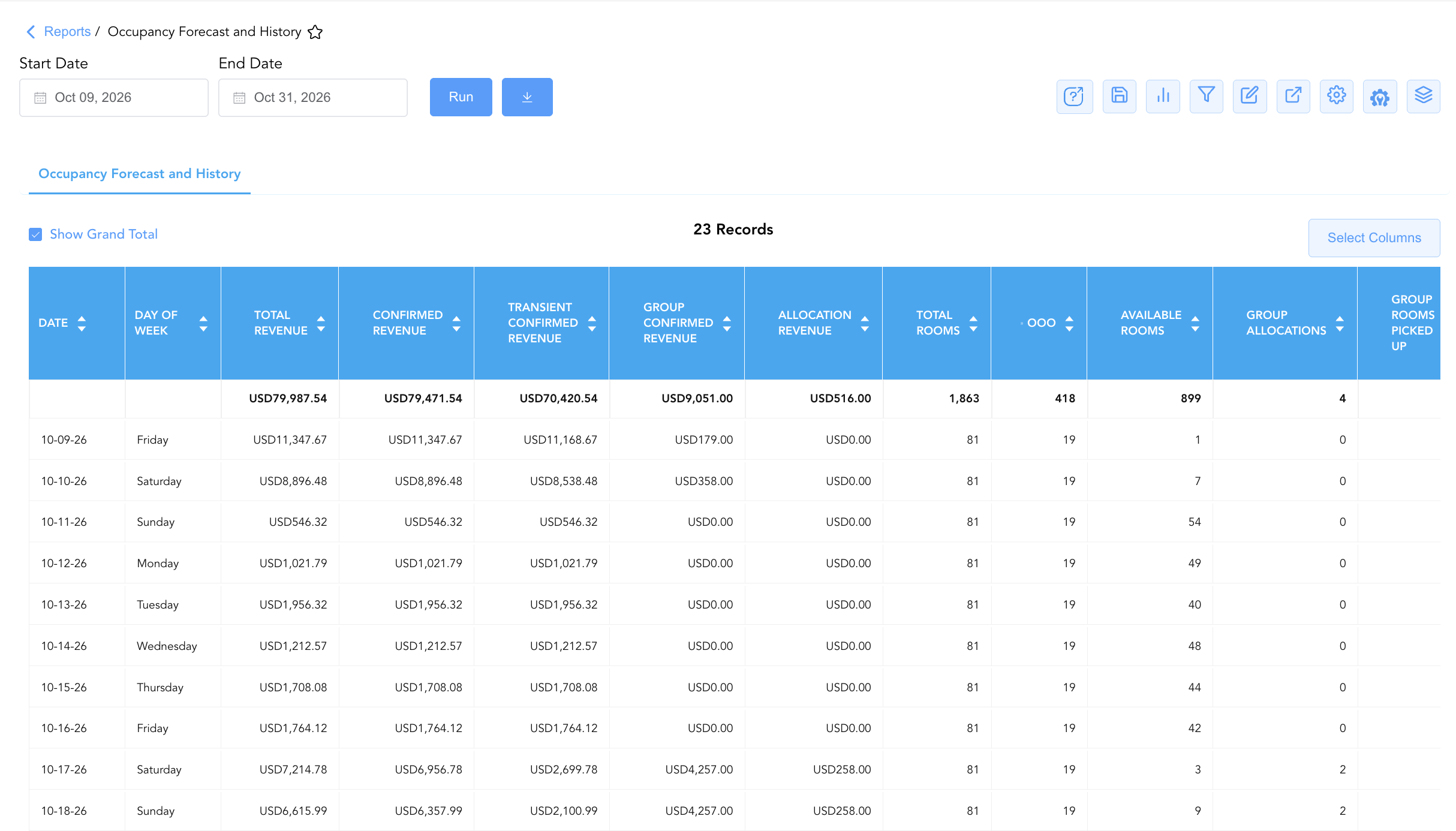
Data Dictionary (Dynamic View Columns)
Customize your default view using the Configure (⚙️) icon on the report page. Below is the full data dictionary representing every column available in this report:
💡 Yield & Calculation Note: Base room revenue excludes taxes and fees. ADR is calculated as ADR=Room Revenue÷Sold Rooms. RevPAR is calculated as RevPAR=Total Room Revenue÷Room Capacity (where room capacity varies depending on whether OOO rooms are included or excluded).
|
Column Name |
Description |
Data Source / System Mapping |
Includes Taxes & Fees? |
|---|---|---|---|
|
Date |
Calendar date of the historical or forecasted stay night. |
System Calendar > Stay Date |
N/A |
|
Day Of Week |
Day of the week corresponding to the stay date (e.g., Friday, Saturday). |
System Calendar > Day Of Week |
N/A |
|
Confirmed Revenue |
Net room revenue generated by confirmed individual and group bookings. |
SUM(Confirmed Base Room Revenue) |
❌ No |
|
Group Confirmed Revenue |
Net room revenue generated specifically by confirmed group reservations. |
SUM(Group Base Room Revenue) |
❌ No |
|
Transient Confirmed Revenue |
Net room revenue generated by individual transient reservations. |
SUM(Transient Base Room Revenue) |
❌ No |
|
Allocation Revenue |
Estimated potential revenue from unpicked group block allocations. |
SUM(Unpicked Group Block Value) |
❌ No |
|
Total Revenue |
Total combined room revenue (Confirmed Revenue+Allocation Revenue). |
SUM(Confirmed + Allocation Revenue) |
❌ No |
|
Total Rooms |
Total physical room capacity / room count of the property. |
Physical Room Inventory Count |
N/A |
|
Total Sold Rooms |
Total number of rooms sold and occupied for the stay date. |
SUM(Occupied & Sold Rooms) |
N/A |
|
Sold Rooms Excluding Groups And Picked Up |
Individual transient sold rooms excluding group block pickup. |
Total Sold Rooms - Group Pickup |
N/A |
|
Total Rooms Sold Excluding Complimentary And House Rooms |
Paid room nights sold, excluding non-revenue house use and comp stays. |
Total Sold Rooms - (Comp + House Use) |
N/A |
|
OOO |
Number of Out-Of-Order rooms deducted from physical inventory. |
PMS Housekeeping > Out-Of-Order Count |
N/A |
|
Available Rooms |
Net bookable rooms available (Total Rooms−OOO−Total Sold Rooms). |
Total Rooms - OOO - Sold Rooms |
N/A |
|
Group Allocations |
Total room nights remaining in unpicked group blocks. |
SUM(Unpicked Group Block Rooms) |
N/A |
|
Group Rooms Picked Up |
Group block rooms that have been converted to confirmed reservations. |
SUM(Picked Up Group Block Rooms) |
N/A |
|
Total Rooms Sold Allocated |
Combined total of sold rooms plus remaining unpicked group allocations. |
Total Sold Rooms + Group Allocations |
N/A |
|
Arrivals |
Total number of reservations scheduled to check in on the date. |
Reservation System > Arrival Count |
N/A |
|
Guaranteed |
Number of arrivals backed by a valid credit card or deposit guarantee. |
Reservation System > Guaranteed Count |
N/A |
|
Non Guaranteed |
Number of unconfirmed or 6 PM drop reservations without guarantee. |
Reservation System > Non-Guaranteed Count |
N/A |
|
Stay Overs |
In-house reservations continuing their stay through the night. |
Reservation System > Stayover Count |
N/A |
|
Departures |
Total number of reservations scheduled to check out on the date. |
Reservation System > Departure Count |
N/A |
|
Adults |
Total headcount of registered adult occupants across all in-house rooms. |
SUM(Adult Guests) |
N/A |
|
Children |
Total headcount of registered child occupants across all in-house rooms. |
SUM(Child Guests) |
N/A |
|
Total Guests |
Combined guest headcount (Adults+Children). |
SUM(Adults + Children) |
N/A |
|
ADR |
Average Daily Rate earned per sold room (Room Revenue÷Sold Rooms). |
Room Revenue / Sold Rooms |
❌ No |
|
ADR Without Complimentary And House Use Rooms |
Average Daily Rate calculated strictly across paid, revenue-generating stays. |
Revenue / Paid Sold Rooms |
❌ No |
|
Occupancy Including OOO Comp and House Use |
Occupancy % including comp/house rooms in sold rooms and OOO in total rooms. |
Sold Rooms / Total Rooms |
N/A |
|
Occupancy Excluding OOO Comp and House Use |
Occupancy % excluding comp/house rooms and deducting OOO from total rooms. |
Paid Rooms / (Total Rooms - OOO) |
N/A |
|
Occupancy Including OOO Excluding Comp and House Use |
Occupancy % excluding comp/house rooms but keeping OOO in total rooms. |
Paid Rooms / Total Rooms |
N/A |
|
Occupancy Excluding OOO Including Comp and House Use |
Occupancy % including comp/house rooms and deducting OOO from total rooms. |
Sold Rooms / (Total Rooms - OOO) |
N/A |
|
Occupancy Including Group Allocated |
Occupancy % including unpicked group allocations in total sold volume. |
(Sold Rooms + Group Allocations) / Total Rooms |
N/A |
|
Occupancy Excluding Group Allocated |
Occupancy % based strictly on confirmed sold rooms, ignoring unpicked allocations. |
Sold Rooms / Total Rooms |
N/A |
|
Occupancy Including Definitive Group Allocated |
Occupancy % incorporating contracted/definitive group allocations into total volume. |
(Sold + Definitive Allocations) / Total Rooms |
N/A |
|
Revpar With OOO Rooms |
Revenue Per Available Room calculated using gross room capacity (Revenue÷Total Rooms). |
Total Revenue / Total Rooms |
❌ No |
|
Revpar Without OOO Rooms |
Revenue Per Available Room calculated using net available capacity (Revenue÷(Total Rooms−OOO)). |
Total Revenue / (Total Rooms - OOO) |
❌ No |
|
Day Use Rooms |
Count of non-overnight day-use room reservations. |
SUM(Day Use Stays) |
N/A |
|
Day Use Group Rooms |
Count of non-overnight day-use group room reservations. |
SUM(Day Use Group Stays) |
N/A |
|
Comp Reservations |
Count of complimentary (zero-rate) guest reservations. |
SUM(Complimentary Stays) |
N/A |
Customization & Platform Features
User & Property Preferences
-
Personal Preference: Tailor your individual view by hiding or dragging columns. Your preferences save automatically for future sessions.
-
Property Defaults: System Admins can configure standard default layouts across all property users to streamline operational reporting. To maximize audit efficiency, group the columns into the below logical blocks.
-
Time & Date Identification (Cols 1–2):
Date|Day Of Week -
Revenue Breakdown (Cols 3–7):
Total Revenue|Confirmed Revenue|Transient Confirmed Revenue|Group Confirmed Revenue|Allocation Revenue -
Room Capacity & Inventory Supply (Cols 8–13):
Total Rooms|OOO|Available Rooms|Group Allocations|Group Rooms Picked Up|Total Rooms Sold Allocated -
Room Sales & Volume Metrics (Cols 14–16):
Total Sold Rooms|Sold Rooms Excluding Groups And Picked Up|Total Rooms Sold Excluding Complimentary And House Rooms -
Guest Movement & Reservation Status (Cols 17–21):
Arrivals|Departures|Stay Overs|Guaranteed|Non Guaranteed -
Guest Demographics & Headcount (Cols 22–24):
Adults|Children|Total Guests -
Rate Metrics (Cols 25–26):
ADR|ADR Without Complimentary And House Use Rooms -
Occupancy Percentages (Cols 27–33):
Occupancy Including OOO Comp and House Use|Occupancy Excluding OOO Comp and House Use|Occupancy Including OOO Excluding Comp and House Use|Occupancy Excluding OOO Including Comp and House Use|Occupancy Including Group Allocated|Occupancy Excluding Group Allocated|Occupancy Including Definitive Group Allocated -
RevPAR & Day Use Metrics (Cols 34–38):
Revpar With OOO Rooms|Revpar Without OOO Rooms|Day Use Rooms|Day Use Group Rooms|Comp Reservations
-
Report Toolbar & Quick Actions
Use the top-right toolbar icons on the report page to manage and export your data view:
|
Icon |
Action / Feature |
Description |

|
Knowledge Article |
Opens the knowledge base article to learn how to interpret this report. |

|
Saved Views |
Saves your column filtering, sorting, and highlight preferences so you can easily reload your custom view later without reconfiguring the report. |

|
Bar Chart |
Displays report data in a visual bar chart format. |

|
Filter |
Opens filter controls to isolate specific data within a column based on your selected criteria. |

|
Highlight |
Highlights column values in a designated color based on selected conditions. |

|
Export |
Exports and downloads the report in various formats (Excel, PDF, CSV) for offline analysis or printing. |

|
Configure |
Opens column selection controls to toggle visibility, reorder columns, or hide rows with all zeros. |

|
Additional Configuration |
Provides advanced report configuration and display formatting options to customize data presentation. |

|
Group By |
Summarize and group report data dynamically in real time. |
Interactive Visualizations & Grouping Controls
-
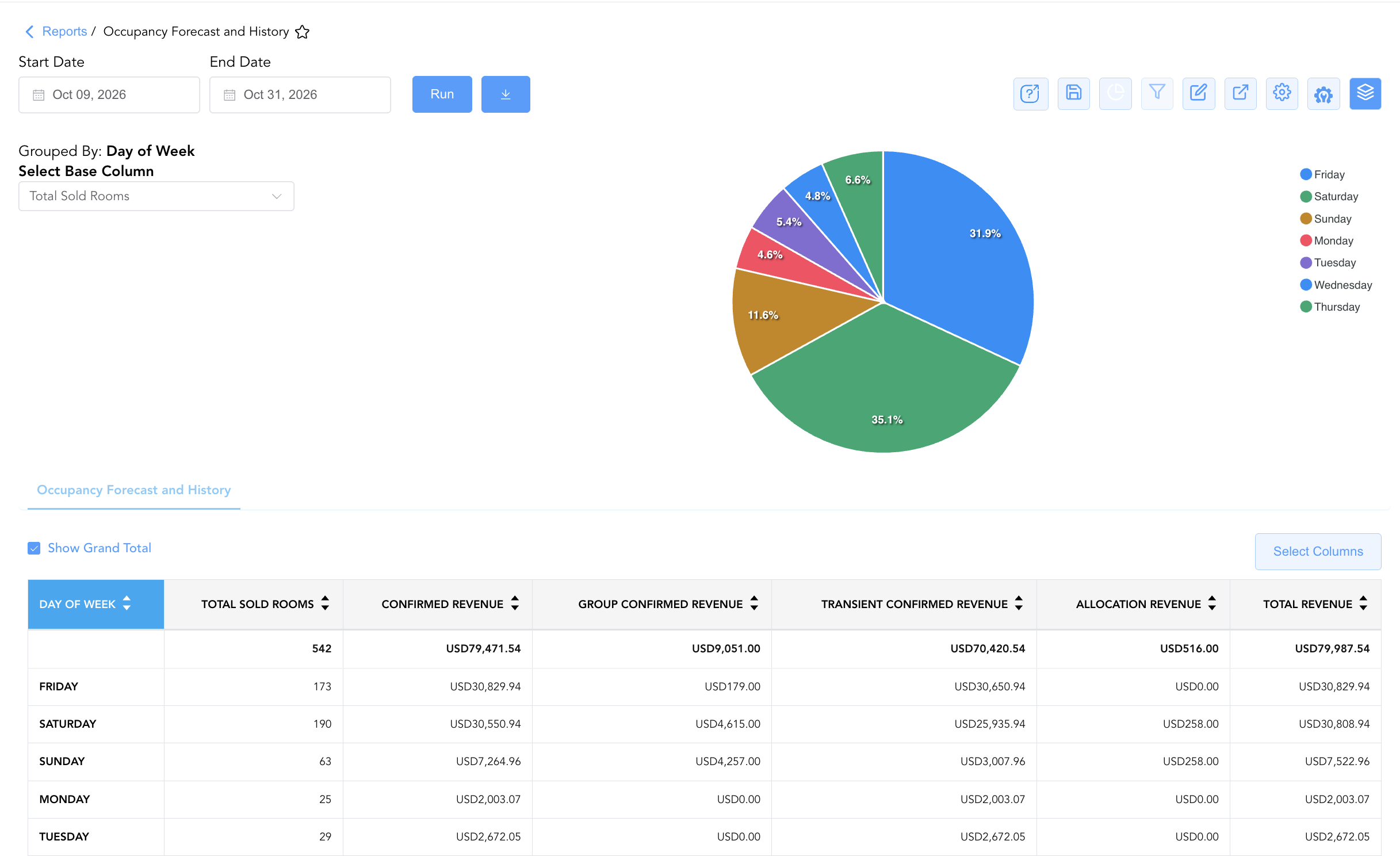
Group By & Pie Chart Visualization: The Occupancy Forecast and History report features an interactive pie chart to help analyze room night volume and revenue mix distributions. Users can group performance entries on the fly by Day Of Week or date ranges to analyze weekday versus weekend demand patterns. By selecting a metric from the Select Base Column dropdown menu—such as Total Sold Rooms, Confirmed Revenue, Group Confirmed Revenue, Transient Confirmed Revenue, Allocation Revenue, or Total Revenue—the chart dynamically renders percentage share breakdowns accompanied by an interactive color-coded legend.
-
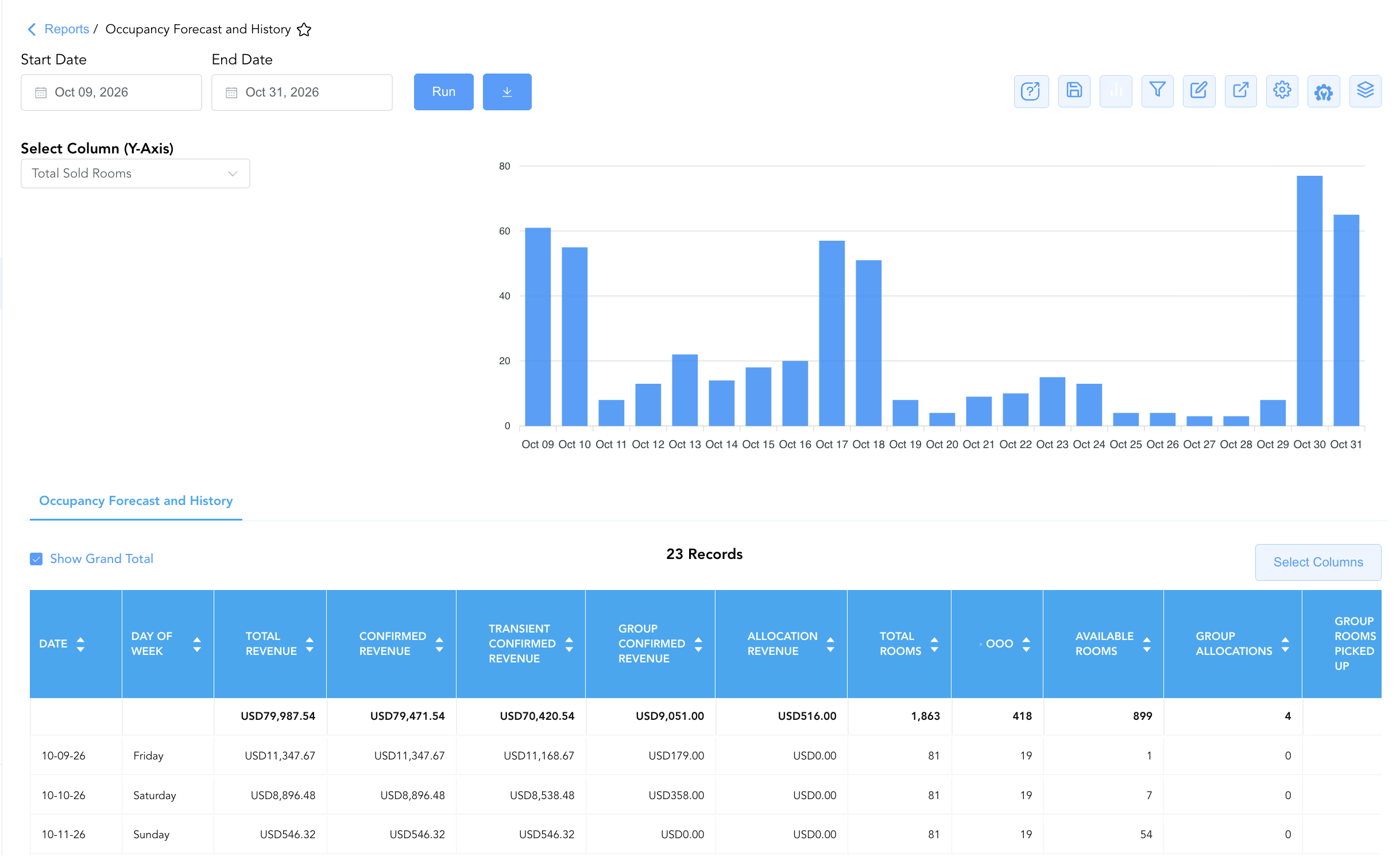
Bar Chart Visualizer: The Occupancy Forecast and History report includes an interactive bar chart to help evaluate room demand trends and revenue performance over time. By adjusting the Select Column (Y-Axis) dropdown menu, users can dynamically toggle the chart view to plot room sales (Total Sold Rooms) or financial streams (Confirmed Revenue, Group Confirmed Revenue, Transient Confirmed Revenue, Allocation Revenue, Total Revenue) chronologically alongside the detailed occupancy data grid.
Advanced Controls
-
Exporting & Forecast Analysis: Download in Excel or PDF format to support weekly revenue strategy meetings, monthly financial forecasting models, and owner presentation decks.
-
Filtering: Filter data by specific date windows, isolate high OOO impact days (
OOO > 0), or filter for high group allocation dates. -
Highlighting (Conditional Formatting): Apply custom rules to automatically highlight high-occupancy dates (e.g., Occupancy > 85%), negative available room counts, or low-ADR dates.
🔗 Related Reports & Next Steps
Within 📈 Revenue & Analytics & 🔭 Yield & Forecasting:
-
Booking Pace – Multi-section tracking report evaluating pickup velocity across Revenue, Rooms Sold, ADR, and Occupancy.
-
Market Segment Details Forecast – Forward-looking demand forecast breakdown by market segment and rate code.
-
Length of Stay Statistics – Analysis of stay duration patterns and minimum stay rule impact on property yield.
Cross-Pillar Deep Dives:
-
🥧 Market & Segmentation: Reconcile forecasted occupancy against Market Segment Overview and Local Market Segment.
-
⚖️ Ledgers & Trial Balance: Reconcile historical daily room revenue postings against General Ledger control accounts in Trial Balance.