
Rate Group Summary Report Overview
Parent Hub: 📈 Revenue & Analytics
Category: 🏷️ Rate Management
Target Roles: Directors of Revenue Management, Revenue Analysts, General Managers, Hotel Controllers, Central Reservations System (CRS) Administrators
Key Value: Evaluate daily and cumulative revenue performance across rate groups, monitor rate group stay volume and Average Daily Rates (ADR), track rate group contribution to total occupancy and RevPAR, and optimize rate bucketing strategies for streamlined inventory control and rate shopping.
⚠️ SPECIAL SYSTEM NOTE: HOTELKEY RATE GROUP MANAGEMENT > This report and Knowledge Base Article are specifically designed for hotels managing Property Management System (PMS) rates through HotelKey. In HotelKey, Rate Groups allow the bucketing of multiple individual rate plans into centralized rate groups (e.g., CRS, Loyalty, Direct, Corporate). This enables revenue managers and property administrators to efficiently manage group-level inventory controls, streamline rate shopping, and analyze macro-level yield performance across grouped rate plans.
Executive Summary
The Rate Group Summary Report is a primary rate strategy and revenue yield document within the 🏷️ Rate Management category of the 📈 Revenue & Analytics hub. Designed to deliver high-level financial intelligence on grouped rate plans, it aggregates daily stay production, room revenue, Average Daily Rate (ADR), occupancy contribution, and RevPAR contribution for every configured rate group.
-
By mapping rate group structures (Date, Day Of Week, Rate Group) to stay production and monetary performance metrics (Revenue, Stays, ADR, Occupancy Contribution, RevPAR Contribution), this report enables revenue managers, general managers, and financial controllers to evaluate the profitability of grouped rate categories, track rate shopping bucketing performance, monitor yield distribution across channels, and align rate group inventory controls.
Key Capabilities
-
HotelKey Rate Group Yield Audit: Itemizes daily room stay volume (Stays), gross room revenue (Revenue), and Average Daily Rate (ADR) across all active rate group buckets.
-
Grouped Inventory & Rate Shopping Optimization: Provides structured performance data across rate groups to support competitive rate shopping analysis and inventory fencing in HotelKey.
-
Occupancy & RevPAR Impact Tracking: Measures the exact contribution of each rate group toward total hotel occupancy share (Occupancy Contribution) and overall RevPAR (RevPAR Contribution).
-
Daily & Time-Series Trend Analysis: Tracks day-by-day revenue fluctuations by rate group across specified date ranges to identify demand patterns, weekday versus weekend yield variances, and promotional group impacts.
Report Views & Functional Breakdown
The Rate Group Summary Report presents rate group financial performance in a unified single-table ledger that supports three key analytical perspectives:
┌────────────────────────────────────────────────────────────────────────┐
│                   RATE GROUP SUMMARY REPORT                            │
├────────────────────────────────────────────────────────────────────────┤
│                         Unified Matrix View                            │
├──────────────────────────┬──────────────────────────┬──────────────────┤
│ 1. Rate Group Revenue &  │ 2. Daily Stay Volume &   │ 3. Rate Group    │
│    Yield Performance     │    Rate Realization      │    Contribution  │
└──────────────────────────┴──────────────────────────┴──────────────────┘
1. Rate Group Revenue & Yield Performance
Monitors gross room revenue generation and Average Daily Rates across individual rate group categories.
-
Primary Use: Evaluating which rate groups generate the highest total room revenue (Revenue), auditing rate yield premiums (ADR), and ranking top rate buckets.
-
Key Metrics: Rate Group, Revenue, Stays, ADR.
2. Daily Stay Volume & Rate Realization
Tracks room night sales volume and realized rate performance by rate group over daily timeframes.
-
Primary Use: Measuring total stay production (Stays), analyzing day-of-week rate group fluctuations, and tracking daily ADR realization across grouped rate plans.
-
Key Metrics: Date, Day Of Week, Rate Group, Stays, ADR.
3. Rate Group Contribution Analysis
Identifies rate group-level contribution to overall property capacity, occupancy, and RevPAR.
-
Primary Use: Auditing rate group occupancy share (Occupancy Contribution), measuring rate group impact on property RevPAR (RevPAR Contribution), and evaluating optimal rate group mix.
-
Key Metrics: Rate Group, Occupancy Contribution, RevPAR Contribution, Revenue.
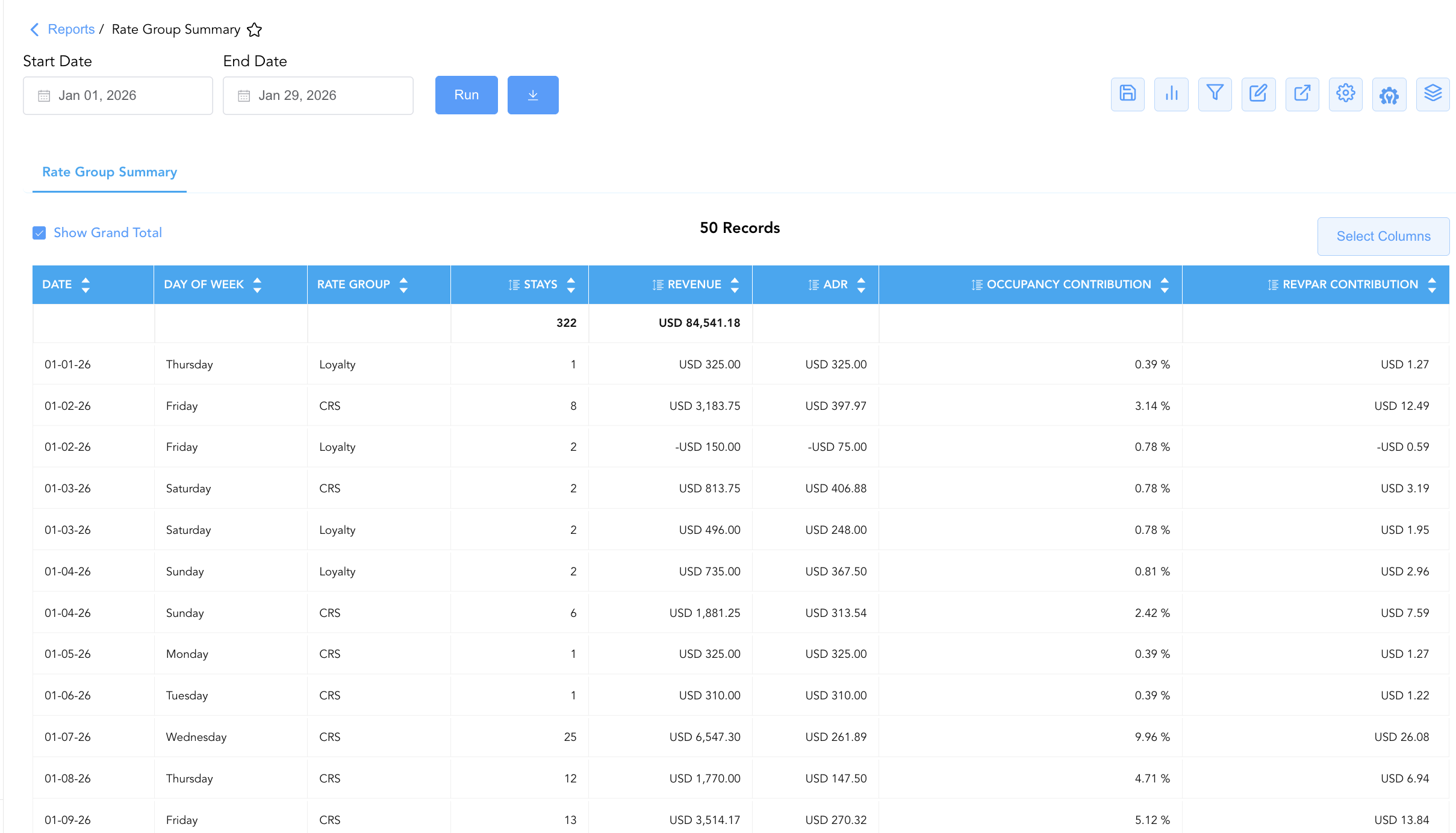
Data Dictionary (Dynamic View Columns)
Customize your default view using the Configure (⚙️) icon on the report page. Below is the full data dictionary representing every column available in this report:
💡 Monetary & Rate Calculation Note: Revenue and ADR represent Base Room Revenue (Excludes Taxes & Non-Room Charges). ADR is calculated as ADR = Revenue ÷ Stays.
|
Column Name |
Description |
Data Source / System Mapping |
Includes Taxes & Fees? |
|---|---|---|---|
|
Date |
Calendar date of the reported stay production (e.g., 2026-01-01). |
HotelKey PMS > Stay Date |
N/A |
|
Day Of Week |
Corresponding day of the week for the stay date (e.g., Thursday, Friday). |
System Calendar > Day Of Week |
N/A |
|
Rate Group |
Centralized rate group bucket combining multiple rate plans in HotelKey (e.g., CRS, Loyalty, NONE). |
HotelKey Rate Management > Rate Group Name |
N/A |
|
Revenue |
Gross base room revenue generated by stays assigned to the rate group on the date. |
SUM(Rate Group Base Room Revenue) |
❌ No |
|
Stays |
Total physical room nights / stays produced by the rate group on the date. |
SUM(Occupied Stays by Rate Group) |
N/A |
|
ADR |
Average Daily Rate earned per room stay for the rate group (Revenue÷Stays). |
Revenue / Stays |
❌ No |
|
Occupancy Contribution |
Proportion of total available room capacity contributed by the rate group on the date. |
Stays / Total Available Rooms |
N/A |
|
RevPAR Contribution |
Revenue Per Available Room contributed by the rate group on the date. |
Revenue / Total Available Rooms |
❌ No |
Customization & Platform Features
User & Property Preferences
-
Personal Preference: Tailor your individual view by hiding or dragging columns. Your preferences save automatically for future sessions.
-
Property Defaults: System Admins can configure standard default layouts across all property users to streamline operational reporting. To maximize audit efficiency, group the columns into the below logical blocks.
-
Time & Segmentation (Cols 1–3):
Date|Day Of Week|Rate Group -
Volume & Production Metrics (Cols 4–5):
Stays|Revenue -
Yield & Performance Metrics (Cols 6–8):
ADR|Occupancy Contribution|RevPAR Contribution
-
Report Toolbar & Quick Actions
Use the top-right toolbar icons on the report page to manage and export your data view:
|
Icon |
Action / Feature |
Description |

|
Knowledge Article |
Opens the knowledge base article to learn how to interpret this report. |

|
Saved Views |
Saves your column filtering, sorting, and highlight preferences so you can easily reload your custom view later without reconfiguring the report. |

|
Bar Chart |
Displays report data in a visual bar chart format. |

|
Filter |
Opens filter controls to isolate specific data within a column based on your selected criteria. |

|
Highlight |
Highlights column values in a designated color based on selected conditions. |

|
Export |
Exports and downloads the report in various formats (Excel, PDF, CSV) for offline analysis or printing. |

|
Configure |
Opens column selection controls to toggle visibility, reorder columns, or hide rows with all zeros. |

|
Additional Configuration |
Provides advanced report configuration and display formatting options to customize data presentation. |

|
Group By |
Summarize and group report data dynamically in real time. |
Interactive Visualizations & Grouping Controls
-
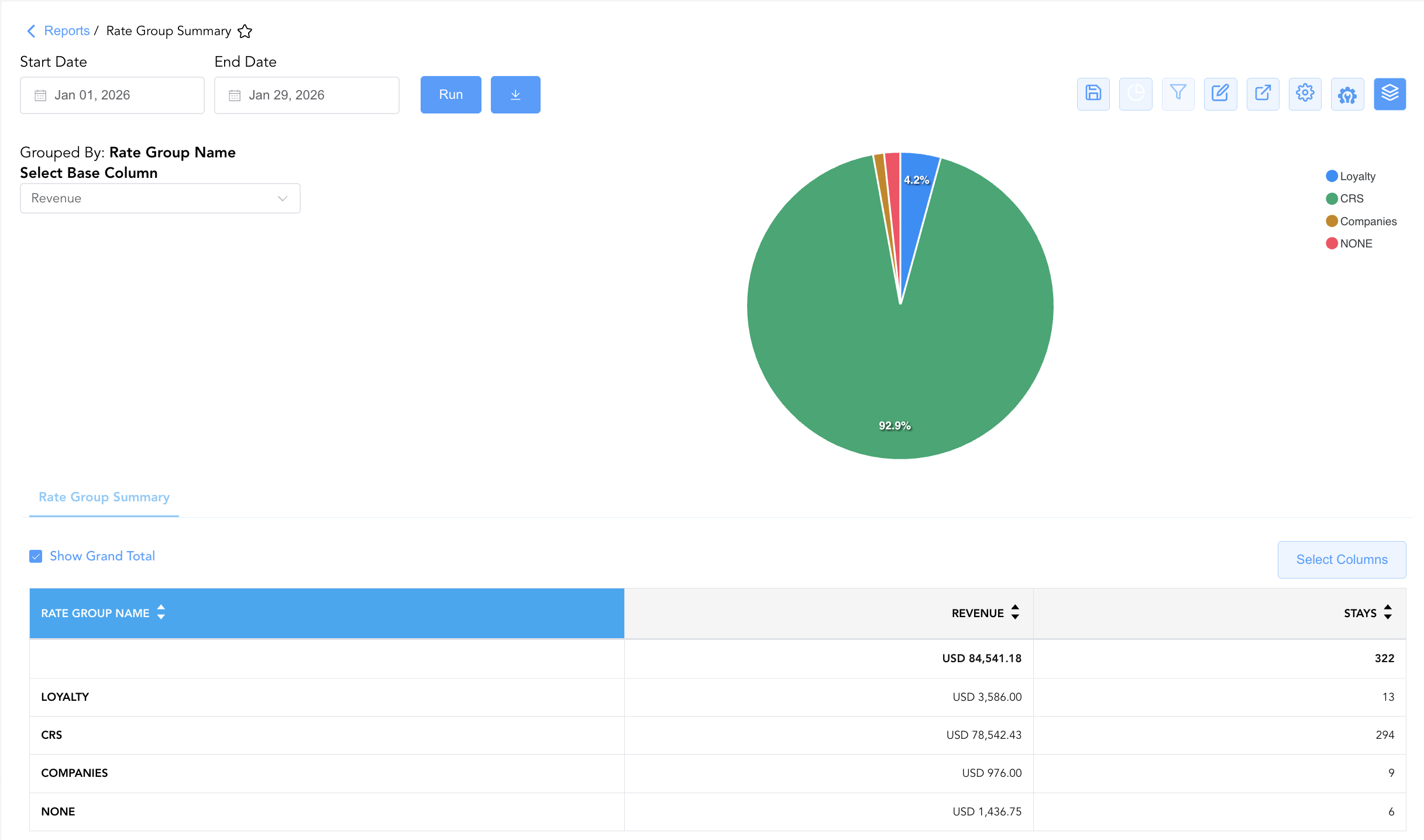
Group By & Pie Chart Visualization: The Rate Group Summary report features an interactive pie chart to help analyze rate bucket performance and revenue share distributions. Users can group rate performance entries on the fly by Rate Group Name or Day Of Week to evaluate bucket performance over weekly or monthly periods. By selecting either Revenue or Stays from the Select Base Column dropdown menu, the chart dynamically renders percentage share breakdowns accompanied by an interactive color-coded legend.
-
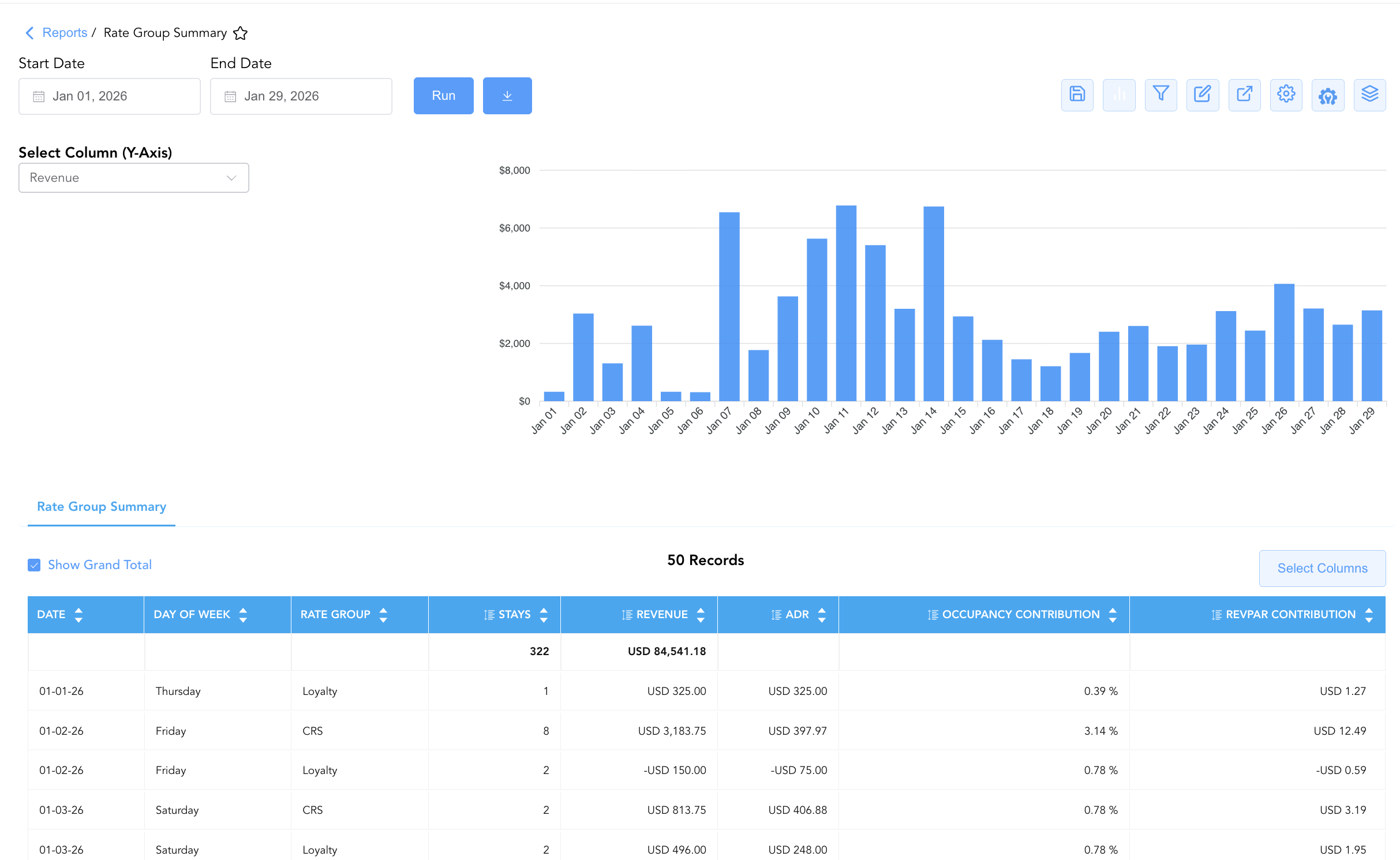
Bar Chart Visualizer: he Rate Group Summary report includes an interactive bar chart to help analyze rate bucket production and revenue performance over time. By adjusting the Select Column (Y-Axis) dropdown menu, users can dynamically toggle the chart view to plot financial yields (Revenue) or room night volumes (Stays) chronologically alongside the detailed summary data grid.
Advanced Controls
-
Exporting & Rate Strategy Analysis: Download in Excel or PDF format to support weekly revenue strategy meetings, rate shopping setup evaluations, and HotelKey inventory control reviews.
-
Filtering: Filter data by specific
Rate Group(e.g., isolate CRS or Loyalty) or filter out zero-stay dates. -
Highlighting (Conditional Formatting): Apply custom rules to automatically highlight high-revenue rate groups, negative revenue adjustments, or low-ADR performance days.
🔗 Related Reports & Next Steps
Within 📈 Revenue & Analytics & 🏷️ Rate Management:
-
Rate Code Configuration – Master system setup report detailing rate code parameters, lifecycle dates, and market mappings in HotelKey.
-
Discrepant Rates– Audit log tracking variances between system-quoted rates and actual charged rates on guest folios.
-
Rate Plan Summary – High-level overview of active rate code production, room nights, revenue, and average daily rate (ADR) yield.
Cross-Pillar Deep Dives:
-
🥧 Market & Segmentation: Reconcile rate group production against Market Segment Overview and Local Market Segment.
-
⚖️ Ledgers & Trial Balance: Reconcile daily room revenue postings by rate group against General Ledger control accounts in Trial Balance.