
Travel Agent Revenue Details Report Overview
Parent Hub: 📈 Revenue & Analytics
Category: 📊 Performance Summaries
Target Roles: Directors of Revenue Management, General Managers, Directors of Finance & Controllers, Travel Agency Commission Coordinators, Accounting Managers
Key Value: Audit travel agency booking production, track IATA agency commission eligibility status, unbundle room versus package revenues generated through intermediary channels, and reconcile agency commission liabilities across three analytical sections.
Executive Summary
The Travel Agent Revenue Details Report is a primary intermediary channel audit and commission governance document within the 📊 Performance Summaries category of the 📈 Revenue & Analytics hub. Designed to provide complete financial and operational visibility into third-party booking channels, online travel agencies (OTAs), and traditional travel management companies, it logs all reservations sourced through travel agencies across a selected reporting window.
By organizing agency production data across three structured operational sections (Details, Summary, and Summary By Status), this report pairs travel agency profiles (IATA Number, Travel Agent Company Name, Address) with stay parameters (Guest Name, Confirmation No, Arrival Date, Nights, Departure Date, Rate Plan, Reservation Status) and financial yield metrics (Average Room Rate, Total Room And Package Revenue, Room Revenue, Package Revenue, Tax). Crucially, it tracks commission eligibility via the Status field—differentiating non-commissionable rates (NC) and no-commission bookings (NO) from active commissionable reservations—enabling accounting teams and revenue managers to calculate accurate commission payouts, verify IATA production, and audit intermediary channel profitability.
Key Capabilities
-
Three-Section Intermediary Governance: Integrates line-item reservation details (Details), agency-level production roll-ups (Summary), and commission status financial totals (Summary By Status).
-
Commission Eligibility Tracking (Status): Categorizes reservations by commission eligibility rules, including Non-Commissionable (NC - Not Eligible) and No Commission (NO) statuses.
-
IATA & Agency Production Identification: Links revenue directly to agency master profiles via unique IATA registration numbers (IATA Number) and company titles (Travel Agent Company Name).
-
Unbundled Package & Room Yield: Separates gross accommodation income (Room Revenue) from non-room package elements (Package Revenue) to ensure commission calculations apply strictly to eligible revenue bases.
Report Views & Functional Breakdown (All 3 Sections)
The Travel Agent Revenue Details Report presents third-party agency performance across three structured operational sections:
┌────────────────────────────────────────────────────────────────────────┐
│               TRAVEL AGENT REVENUE DETAILS REPORT                      │
├────────────────────────────────────────────────────────────────────────┤
│ 1. Details Section                                                     │
│    (Itemized Reservation-Level Ledger by Travel Agency & Guest)        │
├────────────────────────────────────────────────────────────────────────┤
│ 2. Summary Section                                                     │
│    (Agency-Level Consolidated Revenue & Night Roll-Up)                 │
├────────────────────────────────────────────────────────────────────────┤
│ 3. Summary By Status Section                                           │
│    (Financial Roll-Up Grouped by Commission Eligibility Status)       │
└────────────────────────────────────────────────────────────────────────┘
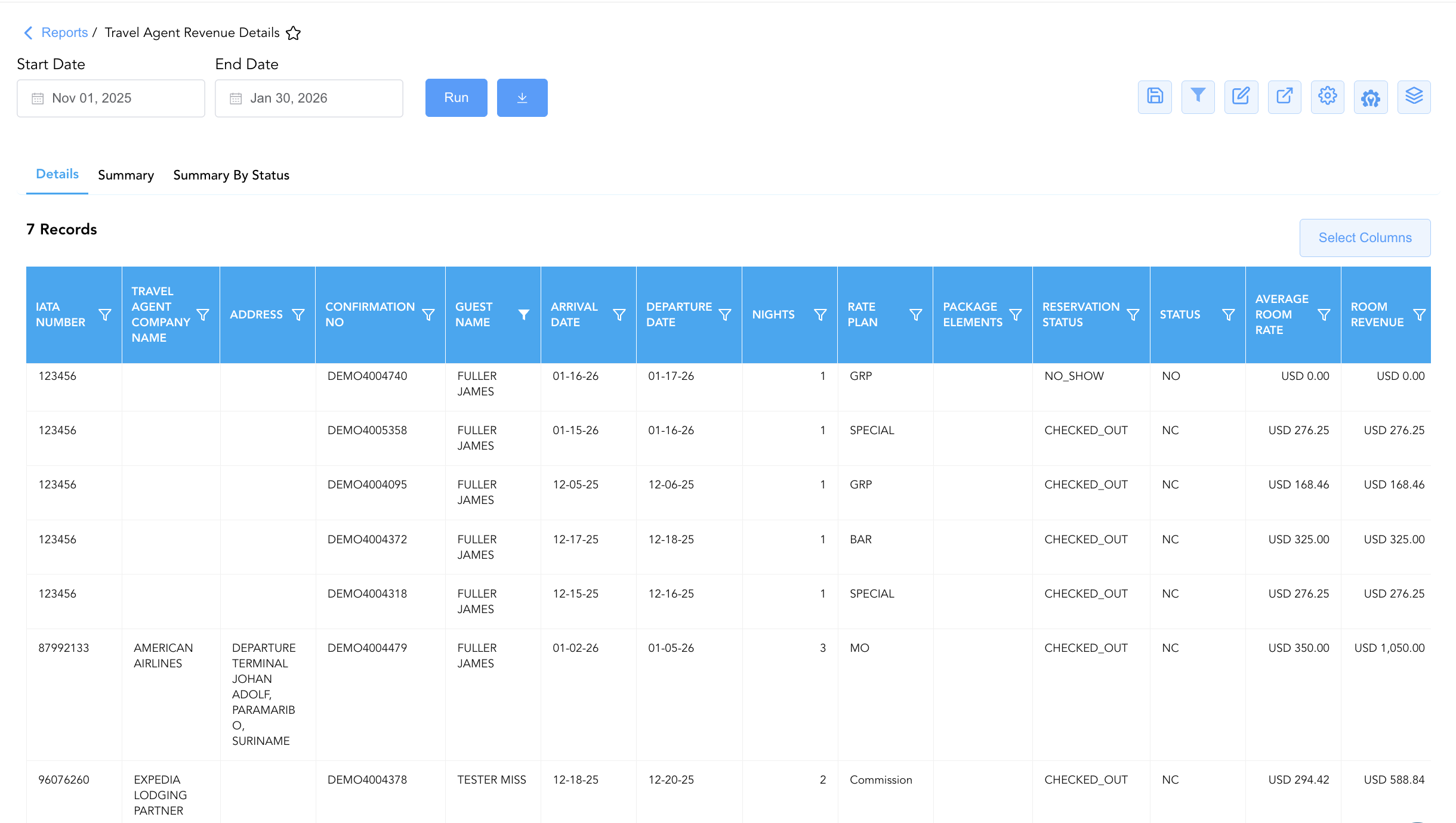
1. Details
Provides a line-item transaction ledger logging every individual guest reservation booked through a travel agency or OTA.
-
Primary Use: Auditing individual guest stays, checking rate plan eligibility (Commission, MO), verifying room vs. package revenue allocations, and investigating guest commission inquiries.
-
Key Metrics: IATA Number, Travel Agent Company Name, Address, Guest Name, Confirmation No, Arrival Date, Nights, Departure Date, Rate Plan, Package Elements, Average Room Rate, Total Room And Package Revenue, Room Revenue, Package Revenue, Tax, Status, Reservation Status.
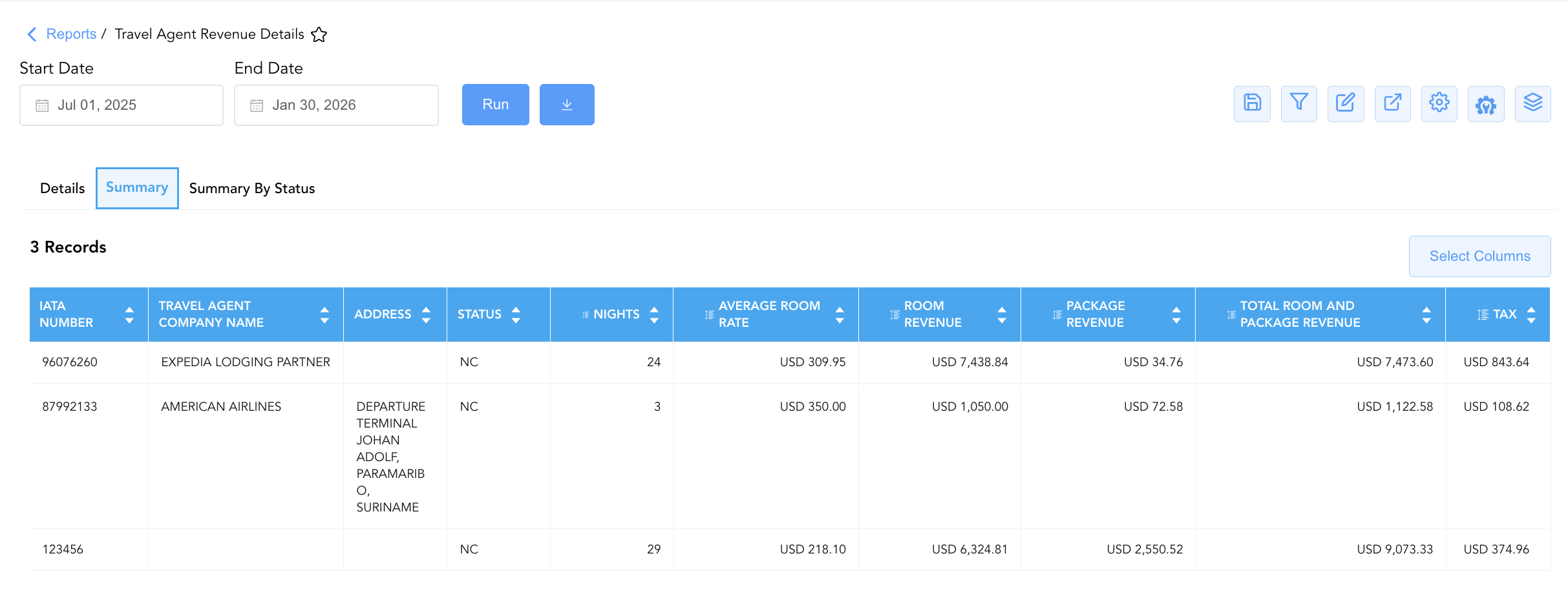
2. Summary
Aggregates total sold nights and financial revenue yields per travel agency master profile.
-
Primary Use: Ranking top-producing travel agencies by room nights (
Nights) and total revenue (Total Room And Package Revenue), evaluating OTA channel performance, and preparing agency-level commission statements. -
Key Metrics: IATA Number, Travel Agent Company Name, Address, Total Room And Package Revenue, Room Revenue, Package Revenue, Average Room Rate, Nights, Tax, Status.
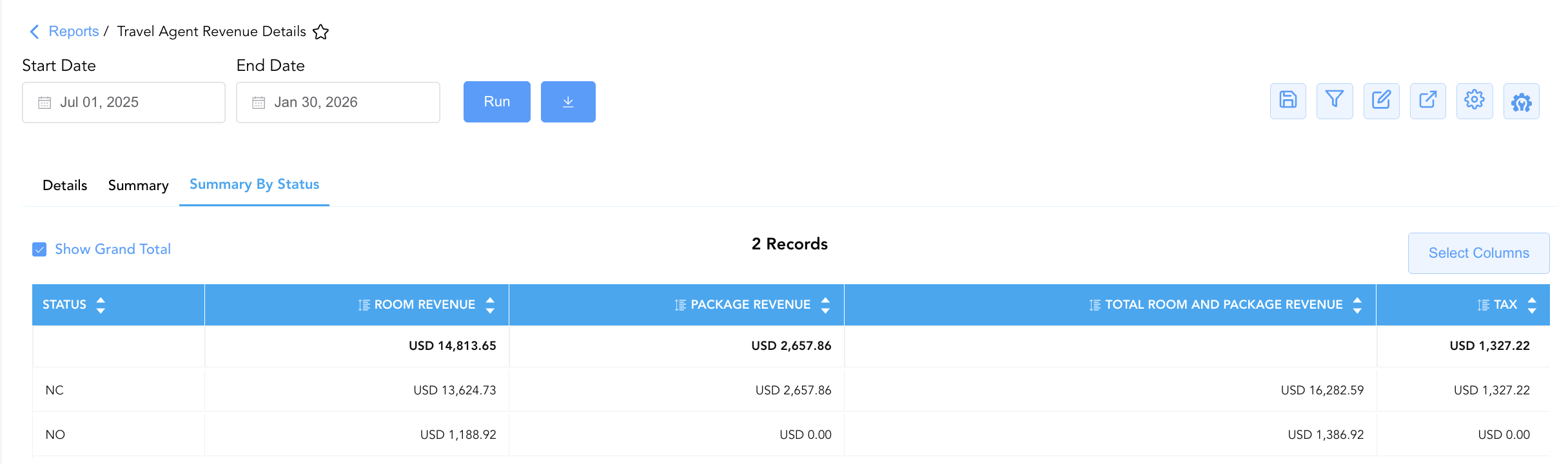
3. Summary By Status
Rolls up total financial revenue and tax liabilities grouped by commission eligibility classifications.
-
Primary Use: Providing macro-level totals for month-end commission expense accruals, auditing non-commissionable revenue write-offs, and reconciling commission ledger balances.
-
Key Metrics: Status (NC, NO, Commissionable), Total Room And Package Revenue, Room Revenue, Package Revenue, Tax.
Data Dictionary (Dynamic View Columns Across All 3 Sections)
Customize your default view using the Configure (⚙️) icon on the report page. Below is the full data dictionary representing every column available across all three sections of this report:
💡 Commission Status Reference Note:
Status = NC: Non Commissionable (Not Eligible) – Indicates rate plans or contracted agreements where agency commissions do not apply.
Status = NO: No Commission – Indicates bookings where no commission was selected or negotiated.
Revenue Treatment: Total Room And Package Revenue represents Room Revenue + Package Revenue (excluding tax).
|
Column Name |
Section(s) Where Column Appears |
Description |
Data Source / System Mapping |
Includes Taxes & Fees? |
|
IATA Number |
Details, Summary |
Unique international registration number identifying the travel agency (e.g., |
Agency Profile Master |
N/A |
|
Travel Agent Company Name |
Details, Summary |
Official company name of the booking travel agency or OTA (e.g., AMERICAN AIRLINES, EXPEDIA LODGING PARTNER). |
Agency Profile Master |
N/A |
|
Address |
Details, Summary |
Registered physical mailing or terminal address of the travel agency. |
Agency Profile Master |
N/A |
|
Guest Name |
Details |
Registered primary guest full name on the reservation. |
|
N/A |
|
Confirmation No |
Details |
Unique system reference code assigned to the guest booking (e.g., |
System Reservation ID |
N/A |
|
Arrival Date / Departure Date |
Details |
Registered check-in and check-out dates for the agency stay. |
|
N/A |
|
Nights |
Details, Summary |
Total stay duration in nights for the reservation or aggregated agency room nights. |
|
N/A |
|
Rate Plan |
Details |
Rate code or plan description assigned to the booking (e.g., Commission, MO). |
Rate Code Configuration |
N/A |
|
Package Elements |
Details |
Non-room bundled package components included in the rate plan. |
Package Setup Engine |
N/A |
|
Average Room Rate |
Details, Summary |
Realized Average Daily Rate (ADR) earned per occupied night ( |
|
❌ No |
|
Total Room And Package Revenue |
All 3 Sections |
Gross combined revenue generated from room charges and package inclusions ( |
|
❌ No |
|
Room Revenue |
All 3 Sections |
Net accommodation revenue earned from the room charge portion. |
|
❌ No |
|
Package Revenue |
All 3 Sections |
Net revenue generated from bundled non-room package inclusions. |
|
❌ No |
|
Tax |
All 3 Sections |
Statutory tax liabilities accrued on the room and package charges. |
Tax Calculation Engine |
🟢 Yes |
|
Status |
All 3 Sections |
Commission eligibility classification flag (NC = Non Commissionable / Not Eligible; NO = No Commission). |
Commission Engine Rules |
N/A |
|
Reservation Status |
Details |
Final operational state of the reservation (e.g., |
System Reservation Engine |
N/A |
Customization & Platform Features
User & Property Preferences
-
Personal Preference: Tailor your individual view by hiding or dragging columns. Your preferences save automatically for future sessions.
-
Property Defaults: System Admins can configure standard default layouts across all property users to streamline operational reporting. To maximize audit efficiency, group the columns into 6 logical blocks:
-
Section 1: Details
-
Agency Identification & IATA Anchors (Cols 1–3):
IATA Number|Travel Agent Company Name|Address -
Guest & Confirmation Identifiers (Cols 4–5):
Confirmation No|Guest Name -
Stay Window Parameters (Cols 6–8):
Arrival Date|Departure Date|Nights -
Rate Plan & Status Controls (Cols 9–12):
Rate Plan|Package Elements|Reservation Status|Status (Commission Status) -
Financial Revenue & Tax Allocations (Cols 13–17):
Average Room Rate|Room Revenue|Package Revenue|Total Room And Package Revenue|Tax
-
-
Section 2: Summary
-
Agency Identification (Cols 1–3):
IATA Number|Travel Agent Company Name|Address -
Commission Status (Col 4):
Status -
Volume & Yield Metrics (Cols 5–6):
Nights|Average Room Rate -
Financial Revenue & Tax Totals (Cols 7–10):
Room Revenue|Package Revenue|Total Room And Package Revenue|Tax
-
-
Section 3: Summary by Status
-
Commission Status Anchor (Col 1):
StatusFinancial Revenue & Tax Totals (Cols 2–5):
Room Revenue|Package Revenue|Total Room And Package Revenue|Tax
-
-
Report Toolbar & Quick Actions
Use the top-right toolbar icons on the report page to manage and export your data view:
|
Icon |
Action / Feature |
Description |

|
Knowledge Article |
Opens the knowledge base article to learn how to interpret this report. |

|
Saved Views |
Saves your column filtering, sorting, and highlight preferences so you can easily reload your custom view later without reconfiguring the report. |

|
Filter |
Opens filter controls to isolate specific data within a column based on your selected criteria. |

|
Highlight |
Highlights column values in a designated color based on selected conditions. |

|
Export |
Exports and downloads the report in various formats (Excel, PDF, CSV) for offline analysis or printing. |

|
Configure |
Opens column selection controls to toggle visibility, reorder columns, or hide rows with all zeros. |

|
Additional Configuration |
Provides advanced report configuration and display formatting options to customize data presentation. |

|
Group By |
Summarize and group report data dynamically in real time. |
Interactive Visualizations & Grouping Controls
-
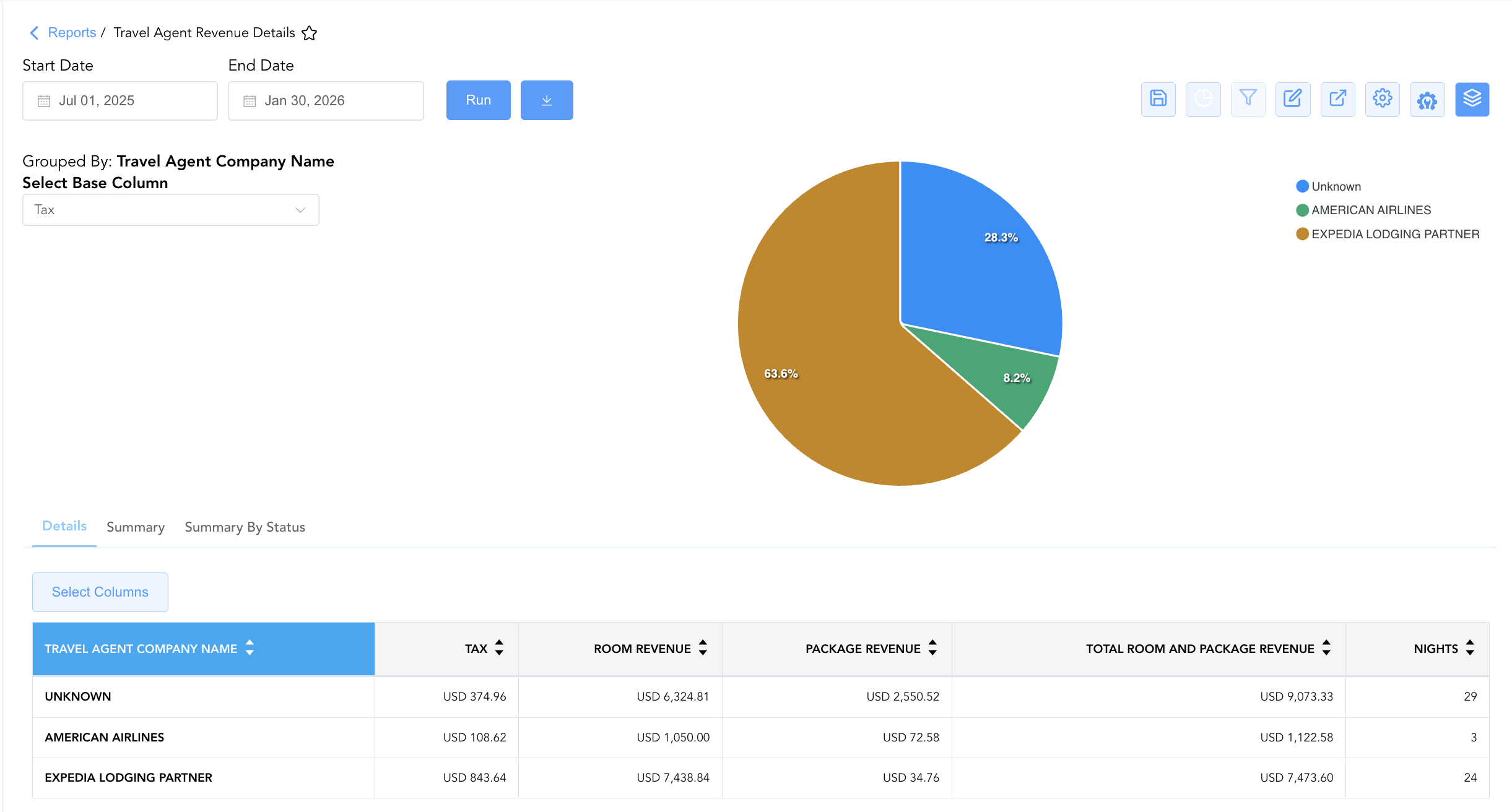
Group By & Pie Chart Visualization Group: The Travel Agent Revenue Details report includes an interactive pie chart to analyze production and revenue share across booking intermediaries. Users can group detail entries on the fly by Travel Agent Company Name, Arrival Date, or Rate Plan to evaluate intermediary booking patterns. By selecting a metric from the Select Base Column dropdown—such as Room Revenue, Package Revenue, Total Room And Package Revenue, Tax, or Nights—the chart dynamically renders percentage contribution share alongside a color-coded partner legend.
Advanced Controls
-
Exporting & Commission Reconciliation: Download in Excel or PDF format to support third-party commission payment processing (e.g., Onyx, TACS), agency production audits, and month-end accounting tie-outs.
-
Filtering: Filter data by specific IATA Number, Travel Agent Company Name, or commission Status (
NC,NO, or Commissionable). -
Highlighting (Conditional Formatting): Apply custom rules to automatically highlight high-producing travel agencies or reservations with non-commissionable status flags.
🔗 Related Reports & Next Steps
Within 📈 Revenue & Analytics & 📊 Performance Summaries:
-
General Manager – Review property-wide macro statistics, room revenues, ADR, and RevPAR performance.
-
Market Segment Summary – Analyze how travel agency bookings compare against corporate, leisure, and OTA market segments.
-
Revenue Activity – Deep dive into daily line-item room, tax, fee, and outlet revenue breakdowns.
Cross-Pillar Deep Dives:
-
⚖️ Ledgers & Trial Balance: Reconcile travel agency commission expenses against General Ledger control accounts in Trial Balance or Day End Summary.
-
💳 Payments & Transactions: To inspect specific guest payments and direct-bill settlements associated with agency stays, review All Transactions.