
Day End Summary Report Overview
Parent Hub: 💰 Finance & Accounting Reports
Category: ⚖️ Ledgers & Trial Balance
Target Roles: Directors of Finance & Controllers, Night Auditors, Accounting Managers & Clerks
Key Value: Provide a consolidated financial blueprint of all monetary transactions processed during the operational day across gross revenues, tax accruals, payment tenders, and advance deposits to streamline end-of-day general ledger reconciliation.
Executive Summary
The Day End Summary Report is a core financial reconciliation blueprint within the ⚖️ Ledgers & Trial Balance module. Designed for end-of-day auditability and general ledger governance, it synthesizes all monetary activity executed across the property during the operational business day into four distinct financial pillars.
By mapping revenue postings (Revenue & Charges), municipal and state tax liabilities (Tax Information), settlement tenders (Payment Information), and advance prepayments (Deposit Information) directly to the processing staff member (Username), this report enables night auditors and controllers to verify gross operational earnings, audit daily tax accruals, balance cashier payment collections, and establish baseline figures for General Ledger (GL) posting.
Key Capabilities
-
Four Financial Audit Pillars: Divided into gross charges (Revenue & Charges), tax liabilities (Tax Information), settlement tenders (Payment Information), and advance prepayments (Deposit Information).
-
Staff Accountability Tracking: Maps every posted charge, tax adjustment, payment tender, and cash deposit directly to individual staff accounts (Username).
-
Net Revenue & Adjustment Visibility: Captures both positive gross charges (
ROOM RENT,WIFI,PET FEE) and negative line-item adjustments (Parking,FOOD) for exact audit trail reconciliation.
Report Views & Functional Breakdown
The Day End Summary Report presents daily financial operations across four structured operational sections:
┌────────────────────────────────────────────────────────────────────────┐
│                        DAY END SUMMARY REPORT                          │
├──────────────────────────┬──────────────────────────┬──────────────────┤
│ 1. Revenue & Charges     │ 2. Tax Information       │ 3. Payment       │
│    (Gross Operations)    │    (Accrued Liabilities) │    Information   │
├──────────────────────────┴──────────────────────────┴──────────────────┤
│ 4. Deposit Information (Prepayments & Advance Tender)                  │
└────────────────────────────────────────────────────────────────────────┘
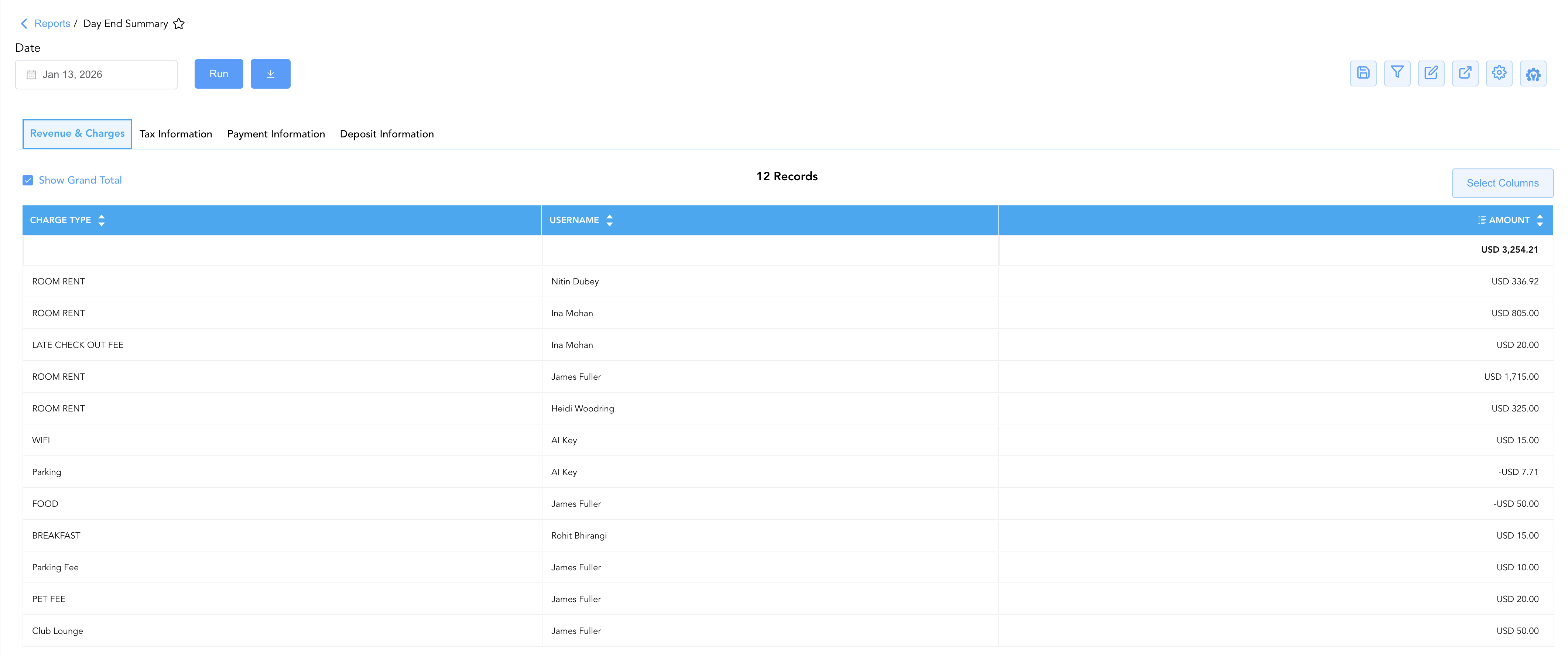
1. Revenue & Charges
Audits gross revenues, ancillary fees, and operational charge adjustments posted across property folios during the business day.
-
Primary Use: Establishing gross operational revenue baselines per charge code and auditing staff posting attributions.
-
Key Metrics: Charge Type (
ROOM RENT,WIFI,Parking Fee,FOOD), Username, Amount.
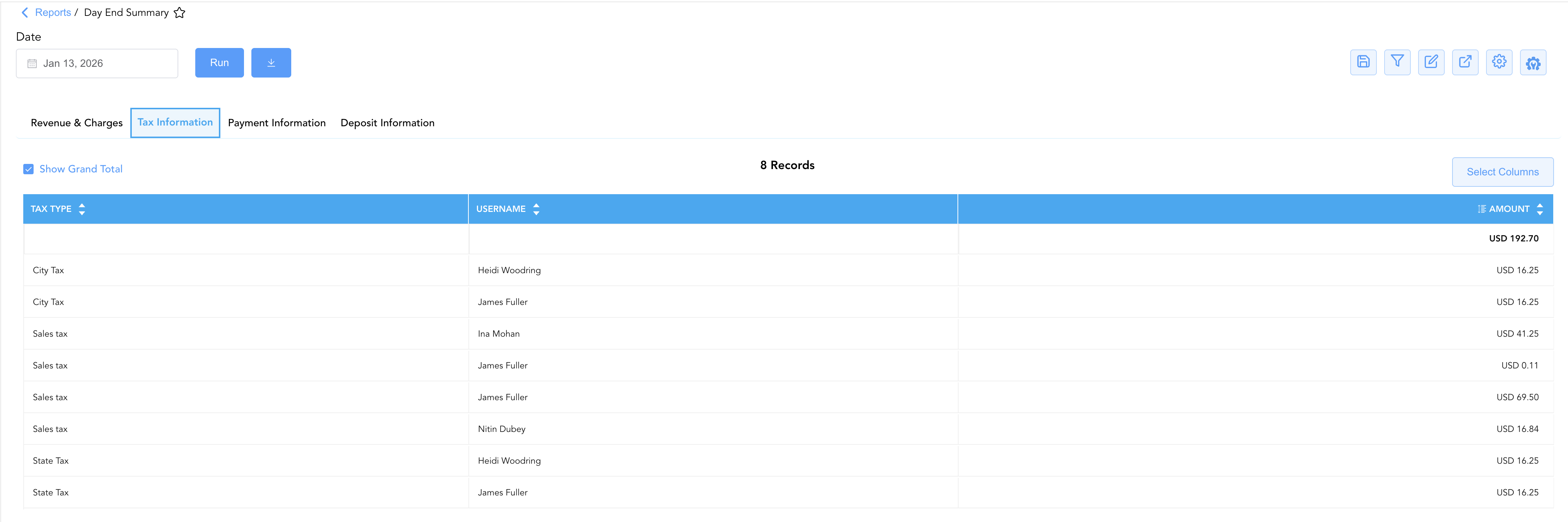
2. Tax Information
Itemizes municipal, state, and sales tax accruals generated across all taxable daily sales.
-
Primary Use: Verifying daily tax ledger accruals, monitoring tax adjustments, and ensuring compliance with tax remittance rules.
-
Key Metrics: Tax Type (
City Tax,Sales tax,State Tax), Username, Amount.
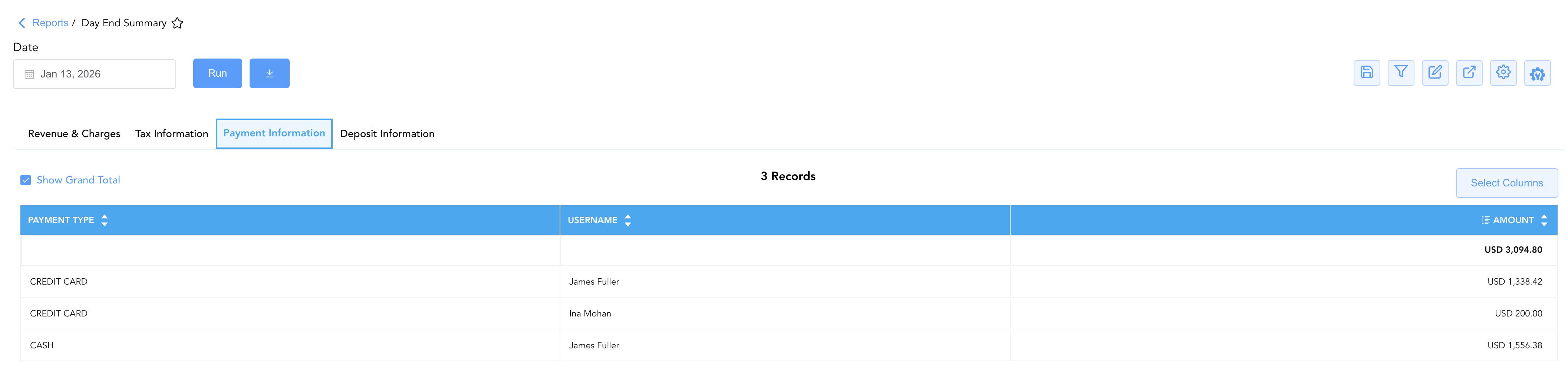
3. Payment Information
Tracks all settlement tender processed for active guest stays, house accounts, and settled folios during the operational day.
-
Primary Use: Balancing daily merchant gateway credit card batches, verifying physical cash drops, and auditing cashier shift settlements.
-
Key Metrics: Payment Type (
CREDIT CARD,CASH,CHECK), Username, Amount.
4. Deposit Information
Isolates advance prepayments, pre-arrival deposit collections, and cash deposits logged for future stay commitments.
-
Primary Use: Balancing unearned revenue ledgers, auditing advance deposit postings, and tracking cash flow commitments.
-
Key Metrics: Payment Type (
Cash Posted,Credit Card Deposit), Username, Amount.

Data Dictionary (Dynamic View Columns)
Customize your default view using the Configure (⚙️) icon on the report page. Below is the full data dictionary available across all sections of this report:
💡 Tax Treatment Note: Revenue charges (ROOM RENT, FOOD, WIFI, etc.) in the Revenue & Charges section represent net amounts exclusive of taxes. The Amount fields in Payment Information and Deposit Information represent Gross Amounts (Includes Taxes & Fees).
|
Column Name |
Description |
Data Source / System Mapping |
Includes Taxes & Fees? |
|
Charge Type |
System revenue or fee posting classification (e.g., |
Transaction Code Configuration |
❌ No |
|
Tax Type |
Specific statutory tax classification (e.g., |
Tax Engine Configuration |
N/A |
|
Payment Type |
Settlement method or deposit category (e.g., |
Tender Configuration |
N/A |
|
Username |
User email or staff identifier of the user who posted the charge or payment. |
System Audit Log |
N/A |
|
Amount |
Total financial value for the charge, tax accrual, or payment tender entry. |
Ledger Posting Engine |
Depends on Section |
Customization & Platform Features
User & Property Preferences
-
Personal Preference: Tailor your individual view by hiding or dragging columns. Your preference saves automatically for future sessions.
-
Property Defaults: System Admins can configure standard default layouts across all property users to streamline operational reporting. To maximize audit efficiency, group the columns into the below logical blocks:
-
Section 1: Revenue & Charges
-
Charge Category & User (Cols 1–2):
Charge Type|Username -
Financial Total (Col 3):
Amount
-
-
Section 2: Tax Information
-
Tax Category & User (Cols 1–2):
Tax Type|Username -
Financial Total (Col 3):
Amount
-
-
Section 3: Payment Information
-
Payment Tender & User (Cols 1–2):
Payment Type|Username -
Financial Total (Col 3):
Amount
-
-
Section 4: Deposit Information
-
Deposit Tender & User (Cols 1–2):
Payment Type|Username -
Financial Total (Col 3):
Amount
-
-
Report Toolbar & Quick Actions
Use the top-right toolbar icons on the report page to manage and export your data view:
|
Icon |
Action / Feature |
Description |

|
Knowledge Article |
Opens the knowledge base article to learn how to interpret this report. |

|
Saved Views |
Saves your column filtering, sorting, and highlight preferences so you can easily reload your custom view later without reconfiguring the report. |

|
Filter |
Opens filter controls to isolate specific data within a column based on your selected criteria. |

|
Highlight |
Highlights column values in a designated color based on selected conditions. |

|
Export |
Exports and downloads the report in various formats (Excel, PDF, CSV) for offline analysis or printing. |

|
Configure |
Opens column selection controls to toggle visibility, reorder columns, or hide rows with all zeros. |

|
Additional Configuration |
Provides advanced report configuration and display formatting options to customize data presentation. |
Advanced Controls
-
Exporting & Audit Delivery: Download in Excel or PDF format to attach supporting documentation to daily night audit packs or General Ledger posting journals.
-
Filtering: Filter data by specific Username, Charge Type, or Payment Type.
-
Highlighting (Conditional Formatting): Apply custom rules to automatically highlight negative charge adjustments (
Amount < $0.00) or high-value cash deposits.
🔗 Related Reports & Next Steps
Within ⚖️ Ledgers & Trial Balance:
-
Trial Balance – Translate daily property activity into strict General Ledger asset, liability, income, and expense accounts.
-
Balance Details – Comprehensive ledger roll-forward detailing starting balances, credits, debits, and ending balances per category.
-
Closed Folio Balances – Track daily financial shifts and balances on post-settlement closed accounts.
-
Control Report – Audit cashier shift cash drawers, paid-outs, and credit card processing gateway batches.
Cross-Pillar Deep Dives:
-
💳 Payments & Transactions: To inspect itemized token details or cashier shift logs, cross-reference All Payments.
-
🏛️ Taxes & Expenses: To audit tax percentage rules and verify taxable vs. tax-exempt revenue codes, review Active Taxes and Charge Types or Tax Summary.
-
📈 Forward Revenue & Analytics: Looking for forward-facing revenue projections or macro performance metrics (like RevPAR or ADR)? Please visit the 📈 Revenue & Analytics reporting hub.