
Electronic Factura File Report Overview
Parent Hub: 💰 Finance & Accounting Reports
Category: 📬 Billing & Receivables (AR)
Target Roles: Directors of Finance & Controllers, Hotel Accountants, IT & System Administrators
Key Value: Maintain Mexican fiscal compliance governance (Factura Electrónica) by auditing digital tax invoice transmissions processed through the PAC integration (Data Express), identifying validation errors, and resolving queue bottlenecks.
Executive Summary
The Electronic Factura File Report is an essential fiscal compliance and digital auditing report within the 📬 Billing & Receivables (AR) module. Designed for properties operating under Mexican tax regulations (CFDI / Factura Electrónica), it provides an itemized operational ledger of all digital tax invoices generated and transmitted to the Authorized Certification Provider (PAC / Data Express).
By segmenting invoice transactions based on PAC certification response states—Successful, Failed With Error, and Failed Communication—this report allows controllers and finance leads to verify stamped tax folios, audit tax breakdowns (IVA, Tourism Tax ISH, Service Tax), troubleshoot tax validation errors (such as invalid RFCs or mismatched fiscal names), and resend queued transactions upon restoring network connectivity.
Key Capabilities
-
PAC Integration Audit: Real-time visibility into digital invoice transmission statuses processed via Data Express.
-
Fiscal Entity Reconciliation: Pairs guest and corporate stays directly with taxpayer credentials (Fiscal Name, RFC Number) and official certified Data Express IDs.
-
Complete Tax Itemization: Itemizes base revenues alongside statutory tax allocations including IVA, Tourism Tax ISH, Service Tax, and VAT 0PCT.
Report Views & Functional Breakdown
The Electronic Factura File Report organizes digital invoice transmission data across three structured operational sections:
┌────────────────────────────────────────────────────────────────────────┐
│                   ELECTRONIC FACTURA FILE REPORT                       │
├──────────────────────────┬──────────────────────────┬──────────────────┤
│ 1. Successful            │ 2. Failed With Error     │ 3. Failed        │
│    (Certified CFDI Logs) │    (Data Validation Logs)│    Communication │
└──────────────────────────┴──────────────────────────┴──────────────────┘
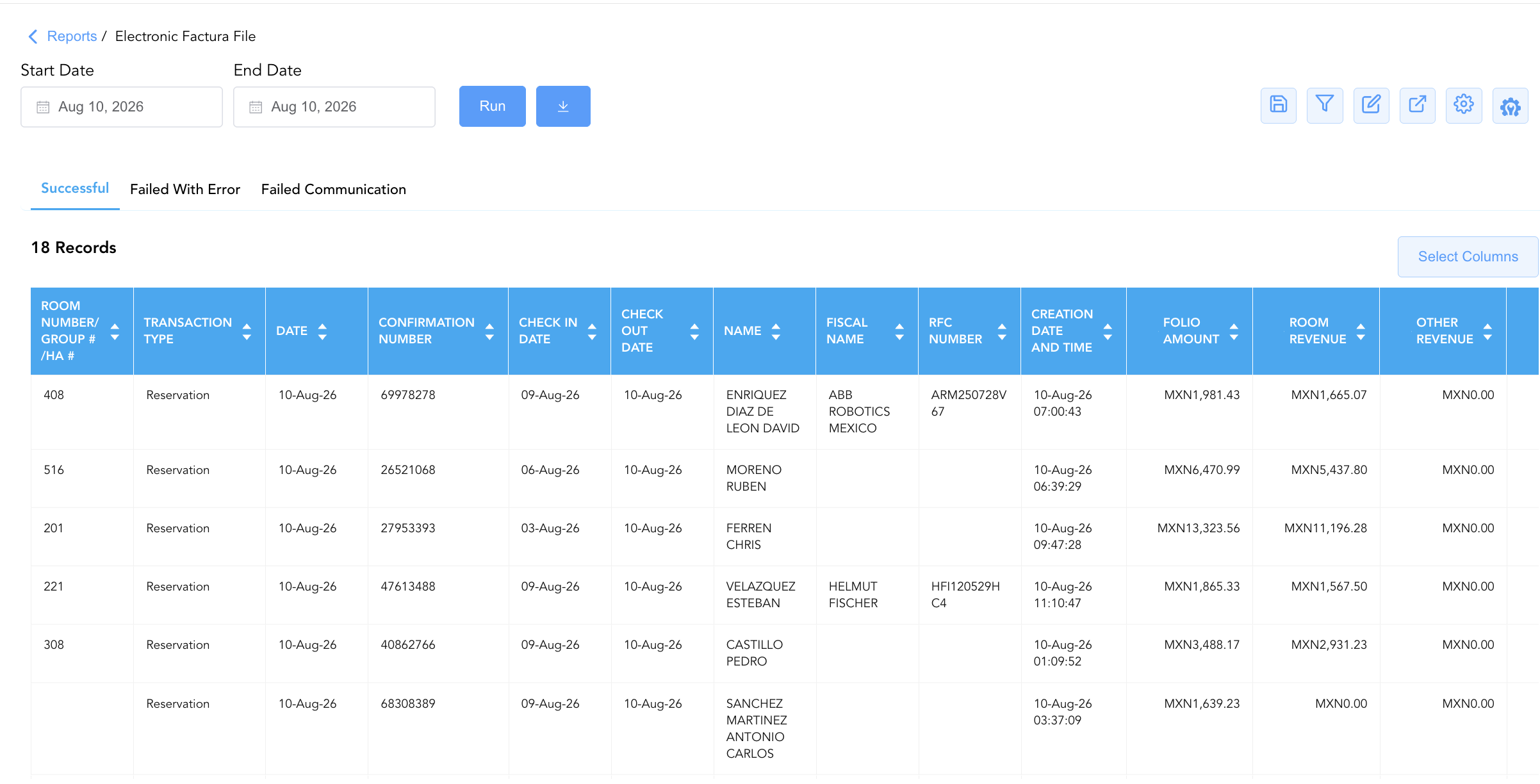
1. Successful
Audits all fully certified, stamped, and approved electronic invoices returned by the PAC.
-
Primary Use: Verifying certified digital tax folios, validating tax collection registers, and matching stamped fiscal IDs to guest/corporate accounts.
-
Key Metrics: Room Number / Group # / HA #, Confirmation Number, Name, Fiscal Name, RFC Number, Folio Amount, Tourism Tax ISH, IVA, Service Tax, Folio Number, Data Express Id.
2. Failed With Error
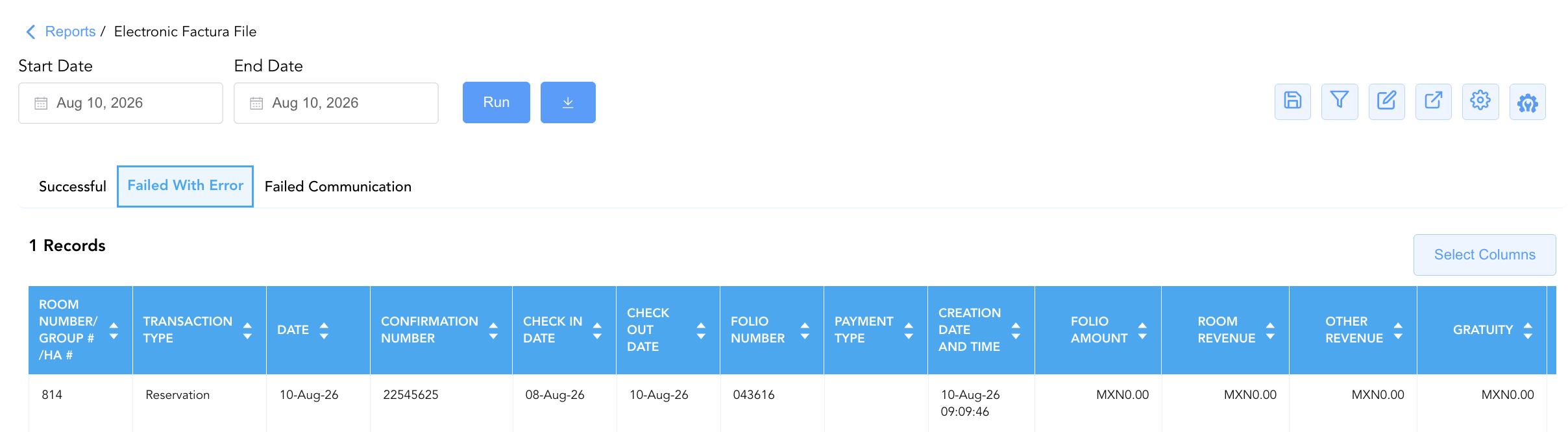
Tracks generated invoices that were actively rejected by Data Express due to data structure or tax validation errors.
-
Primary Use: Identifying invalid RFC codes, missing fiscal names, or tax calculation mismatches so finance teams can update client profiles and re-stamp invoices.
-
Key Metrics: Folio Number, Name, Fiscal Name, RFC Number, Folio Amount, Error Message, Data Express Id.
3. Failed Communication
Captures unbilled or pending digital folios that failed to transmit to Data Express due to network timeouts, API disconnects, or system communication outages.
-
Primary Use: Holding untransmitted folios in queue during connection drops and monitoring last retry attempts to ensure all pending invoices transition smoothly once connectivity is restored.
-
Key Metrics: Room # / HA # / GM Code, Confirmation No, Name, RFC, C/I Date, C/O Date, Folio Number, Creation Date/Time, Folio Total Amount, Last Retry Date/Time.
Data Dictionary (Dynamic View Columns)
Customize your default view using the Configure (⚙️) icon on the report page. Below is the full data dictionary available across all sections of this report:
💡 Tax Treatment Note: The Folio Amount field represents the Gross Amount (Includes Taxes & Fees), whereas Room Revenue and Other Revenue represent net revenue base amounts prior to tax application.
|
Column Name |
Description |
Data Source / System Mapping |
Includes Taxes & Fees? |
|
Room Number / Group # / HA # |
Room number, House Account number, or Group Master code. |
|
N/A |
|
Transaction Type |
Classification of the account ( |
System Account Type |
N/A |
|
Date |
Posting date of the electronic invoice entry. |
Transaction Timestamp |
N/A |
|
Confirmation Number |
Confirmation code (blank for House Accounts & Group Masters). |
|
N/A |
|
Check In Date (C/I Date) |
Scheduled or actual arrival date ( |
|
N/A |
|
Check Out Date (C/O Date) |
Scheduled or actual departure date ( |
|
N/A |
|
Folio Number |
Unique PMS folio reference number associated with the bill. |
|
N/A |
|
Payment Type |
Settlement method used to close the folio (e.g., |
|
N/A |
|
Creation Date And Time |
Date and time the JSON invoice file was created ( |
PAC Engine Creation Timestamp |
N/A |
|
Folio Amount (Folio Total Amount) |
Gross total monetary value of the electronic folio. |
|
🟢 Yes |
|
Room Revenue |
Net revenue generated from room rent charges. |
|
❌ No |
|
Other Revenue |
Net revenue generated from ancillary and non-room charges. |
|
❌ No |
|
Gratuity |
Tip or service gratuity amount included on the folio. |
|
❌ No |
|
Name |
Guest name ( |
Guest / Account Profile Record |
N/A |
|
First Name / Last Name |
Individual guest first name and last name. |
|
N/A |
|
Fiscal Name |
Official corporate or individual taxpayer name registered with SAT. |
|
N/A |
|
RFC Number (RFC) |
Taxpayer identification number (RFC) linked to the invoice when required. |
|
N/A |
|
Data Express Id |
Official certified digital tracking ID returned by Data Express (PAC). |
PAC Integration Response |
N/A |
|
Error Message |
Diagnostic error message returned by the PAC explaining rejection cause. |
PAC Integration Error Log |
N/A |
|
Service Tax |
Applicable municipal or regional service tax amount. |
Tax Engine Calculation |
❌ No |
|
Tourism Tax ISH |
State lodging tax (Impuesto Sobre Hospedaje - ISH) levied on room charges. |
Tax Engine Calculation |
❌ No |
|
IVA |
Value-added tax (Impuesto al Valor Agregado - IVA) levied on taxable items. |
Tax Engine Calculation |
❌ No |
|
VAT 0PCT |
Zero-rated VAT revenue or exemptions applied under tax regulations. |
Tax Engine Calculation |
❌ No |
|
Last Retry Date/Time |
Timestamp of the most recent re-transmission attempt to Data Express. |
PAC Retry Engine Log |
N/A |
Customization & Platform Features
User & Property Preferences
-
Personal Preference: Tailor your individual view by hiding or dragging columns. Your preference saves automatically for future sessions.
-
Property Defaults: System Admins can configure standard default layouts across all property users to streamline fiscal audit procedures.
Report Toolbar & Quick Actions
Use the top-right toolbar icons on the report page to manage and export your data view:
|
Icon |
Action / Feature |
Description |

|
Knowledge Article |
Opens the knowledge base article to learn how to interpret this report. |

|
Saved Views |
Saves your column filtering, sorting, and highlight preferences so you can easily reload your custom view later without reconfiguring the report. |

|
Filter |
Opens filter controls to isolate specific data within a column based on your selected criteria. |

|
Highlight |
Highlights column values in a designated color based on selected conditions. |

|
Export |
Exports and downloads the report in various formats (Excel, PDF, CSV) for offline analysis or printing. |

|
Configure |
Opens column selection controls to toggle visibility, reorder columns, or hide rows with all zeros. |

|
Additional Configuration |
Provides advanced report configuration and display formatting options to customize data presentation. |
Advanced Controls
-
Exporting & Fiscal Filing: Download in Excel or PDF format for offline tax filing, PAC reconciliation, or audit defense packets.
-
Filtering: Filter data by specific transmission status (Successful, Failed With Error, Failed Communication), RFC Number, or Data Express Id.
-
Highlighting (Conditional Formatting): Apply custom rules to automatically highlight rejected invoices (
Failed With Error) or high-value un-stamped folios.
🔗 Related Reports & Next Steps
Within 📬 Billing & Receivables (AR):
-
Accounts Receivable Activity – Track every detailed transaction hitting the AR ledger.
-
AR Invoice Aging – Categorize open invoice balances across 30-day time bands.
-
Closed Invoice Transactions – Audit settled guest folios and itemized tax allocations.
-
Uninvoiced Transactions Overview – Review posted unbilled transactions awaiting tax invoice generation.
-
Invoice Details – Detailed lifecycle tracking of generated invoices.
Cross-Pillar Deep Dives:
-
🏛️ Taxes & Expenses: To audit tax percentage rules and verify taxable vs. tax-exempt revenue codes, cross-reference Active Taxes and Charge Types or the Tax Report.
-
⚖️ Ledgers & Trial Balance: To reconcile tax accruals against daily property ledgers, review the Day End Summary.
-
📈 Forward Revenue & Analytics: Looking for forward-facing revenue projections or macro performance metrics (like RevPAR or ADR)? Please visit the 📈 Revenue & Analytics reporting hub.