
Declined Payments Report Overview
Parent Hub: 💰 Finance & Accounting Reports
Category: 💳 Payments & Transactions
Target Roles: Directors of Finance & Controllers, Night Auditors, Front Office Managers, Cashiers & Reservations Staff
Key Value: Maintain credit risk control and merchant gateway security by tracking declined payment card transactions, failed pre-authorizations, card network rejection amounts, and live account positions across transient guest reservations and group master accounts.
Executive Summary
The Declined Payments Report is a primary credit risk management and payment gateway exception audit tool within the 💳 Payments & Transactions category of the 💰 Finance & Accounting Reports suite. Designed for merchant gateway oversight and front desk payment exception handling, it logs every instance where a credit card payment charge or pre-authorization attempt was rejected by the payment gateway processor.
By organizing transaction exception records across two explicit operational sections (Reservations and Group), this report captures comprehensive audit metadata—including reservation and group identifiers (Confirmation Number, External Confirmation Number, Group Number, Group Name), guest demographics (Guest Name, First Name, Last Name, Room Number), card security details (Payment Type, Masked Card Number), corporate linkages (Company Name), processing states (Reservation Status), staff attributions (Username, Date, Time), and financial exposure metrics (Declined Amount, Reservation Balance / Group Balance). This enables controllers, night auditors, and front office managers to detect payment processing failures immediately, investigate card declines, request updated payment instruments, and eliminate uncollected revenue exposure.
Key Capabilities
-
Dual-Section Exception Audit: Explicitly separates payment declines on transient guest stays (Reservations) from card rejection exceptions on group master accounts (Group).
-
Payment Gateway & Card Security Traceability: Logs masked payment card numbers (Masked Card Number) and card network brands (MASTER, VISA, AMEX, OTHER) while maintaining PCI compliance.
-
Real-Time Financial Exposure Monitoring: Displays both the rejected transaction value (Declined Amount) and total outstanding account liability (Reservation Balance / Group Balance).
-
Staff & Timeline Attribution: Captures exact processing timestamps (Date, Time) and attributes each declined transaction directly to the responsible user ID (Username).
Report Views & Functional Breakdown (All 2 Sections)
The Declined Payments Report presents card exception data across two structured operational sections:
┌────────────────────────────────────────────────────────────────────────┐
│                      DECLINED PAYMENTS REPORT                          │
├────────────────────────────────────────────────────────────────────────┤
│                       Unified Exception Ledger                         │
├──────────────────────────────────┬─────────────────────────────────────┤
│ 1. Reservations                  │ 2. Group                            │
│    (Transient Guest Declines)    │    (Group Master & Event Declines)   │
└──────────────────────────────────┴─────────────────────────────────────┘
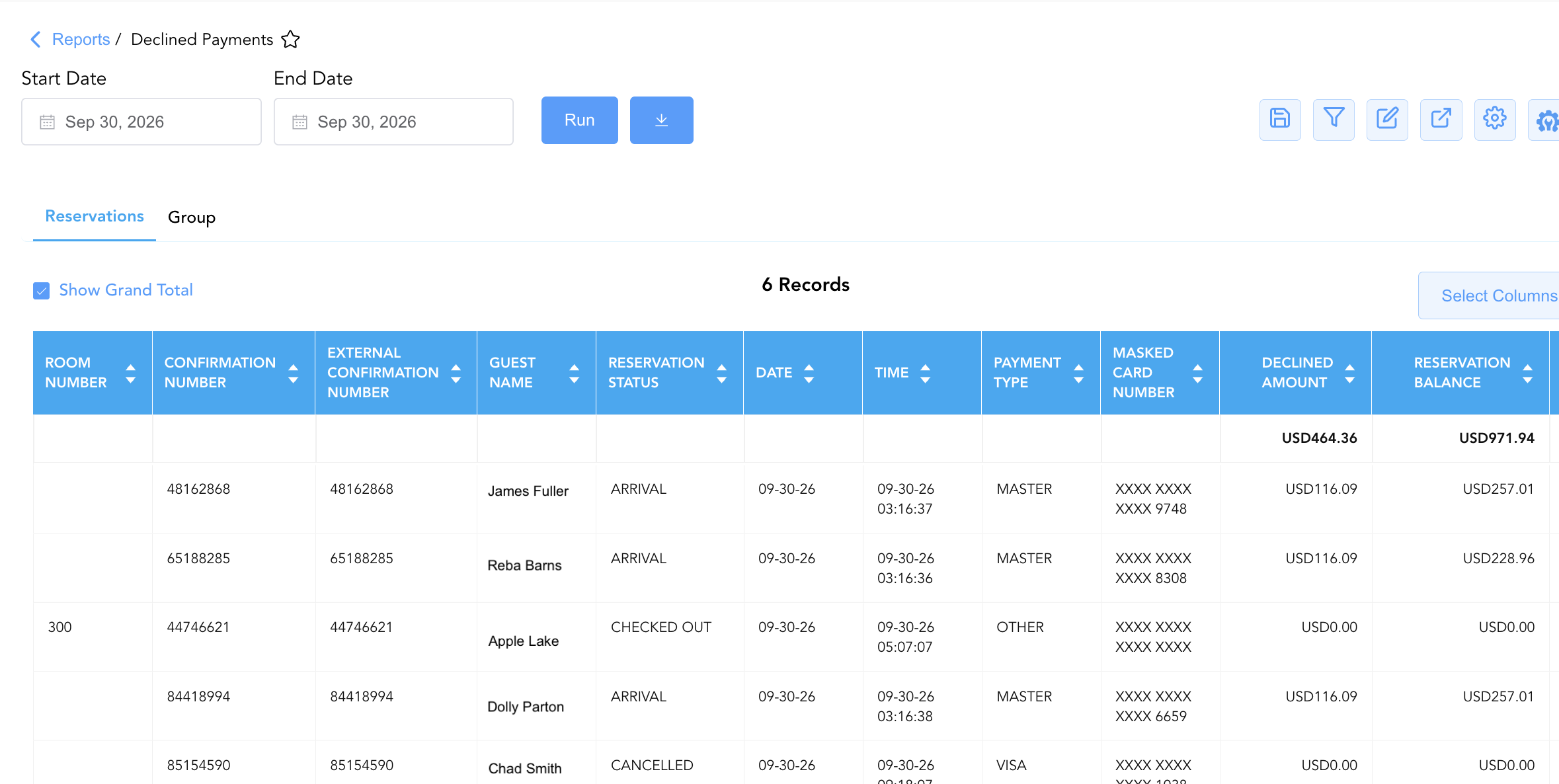
1. Reservations
Itemizes all declined credit card charges, failed pre-authorizations, and payment rejection events posted against transient guest reservations.
-
Primary Use: Identifying failed guest card payments, triggering guest payment link requests, following up on uncollected balances prior to arrival or departure, and auditing front desk card processing attempts.
-
Key Metrics: Date, Time, Confirmation Number, External Confirmation Number, Guest Name, First Name, Last Name, Payment Type, Masked Card Number, Company Name, Room Number, Reservation Status, Username, Declined Amount, Reservation Balance.
2. Group
Isolates declined payment card transactions, rejected event deposits, and failed pre-authorizations applied to group master accounts and convention blocks.
-
Primary Use: Auditing group master payment failures, tracking uncollected convention prepayments, and verifying corporate credit card processing attempts prior to group checkout.
-
Key Metrics: Date, Time, Group Number, Group Name, Masked Card Number, Company Name, Username, Declined Amount, Reservation Status, Group Balance.
Data Dictionary (Dynamic View Columns Across Both Sections)
Customize your default view using the Configure (⚙️) icon on the report page. Below is the full data dictionary representing every column available across both sections of this report:
💡 Tax & Monetary Treatment Note: Declined Amount and Reservation Balance / Group Balance represent Gross Monetary Values (Includes Taxes & Fees). Declined Amount reflects the specific transaction value rejected by the payment gateway processor.
|
Column Name |
Section(s) Where Column Appears |
Description |
Data Source / System Mapping |
Includes Taxes & Fees? |
|
Date |
Reservations, Group |
Official business date when the payment card charge or pre-authorization attempt was declined. |
Transaction Timestamp |
N/A |
|
Time |
Reservations, Group |
Exact system timestamp when the decline occurred. |
Transaction Timestamp |
N/A |
|
Confirmation Number |
Reservations |
Unique system reference code assigned to the individual transient reservation. |
System Reservation ID |
N/A |
|
External Confirmation Number |
Reservations |
Third-party or central reservation system (CRS) confirmation number linked to the booking. |
Distribution Channel Engine |
N/A |
|
Group Number |
Group |
Unique master folio or contract reference ID assigned to the group block. |
System Group Block ID |
N/A |
|
Group Name |
Group |
Official title or event name of the convention group block. |
|
N/A |
|
Guest Name |
Reservations |
Combined full primary guest name ( |
|
N/A |
|
First Name / Last Name |
Reservations |
Individual guest first name and last name. |
|
N/A |
|
Payment Type |
Reservations |
Credit card network brand or payment tender type used for the transaction (MASTER, VISA, AMEX, OTHER). |
Payment Gateway Engine |
N/A |
|
Masked Card Number |
Reservations, Group |
Masked payment card account number displaying only leading/trailing digits for PCI security (e.g., |
Payment Gateway Token |
N/A |
|
Company Name |
Reservations, Group |
Contracting corporate profile or company associated with the reservation or group block. |
|
N/A |
|
Room Number |
Reservations |
Physical room number assigned to the reservation ( |
|
N/A |
|
Reservation Status |
Reservations, Group |
Current operational state of the reservation ( |
System Reservation Engine |
N/A |
|
Username |
Reservations, Group |
System user ID or username of the staff member or automated service account that initiated the declined transaction. |
System Audit Log |
N/A |
|
Declined Amount |
Reservations, Group |
Gross monetary value of the transaction or pre-authorization attempt rejected by the payment gateway processor. |
Payment Gateway Response |
🟢 Yes |
|
Reservation Balance / Group Balance |
Reservations, Group |
Net unpaid financial balance remaining on the guest folio or group master account. |
|
🟢 Yes |
Customization & Platform Features
User & Property Preferences
-
Personal Preference: Tailor your individual view by hiding or dragging columns. Your preferences save automatically for future sessions.
-
Property Defaults: System Admins can configure standard default layouts across all property users to streamline operational reporting. To maximize audit efficiency, group the columns into the below logical blocks:
-
Section 1: Reservations
-
Room & Reservation Anchors (Cols 1–3):
Room Number|Confirmation Number|External Confirmation Number -
Guest & Corporate Context (Cols 4–7):
Guest Name|First Name|Last Name|Company Name -
Stay & Lifecycle Status (Col 8):
Reservation Status -
Audit Timestamps & Payment Method (Cols 9–12):
Date|Time|Payment Type|Masked Card Number -
Financial Decline & Folio Balances (Cols 13–14):
Declined Amount|Reservation Balance -
Staff Attribution (Col 15):
Username
-
-
Section 2: Group
-
Group & Account Anchors (Cols 1–3):
Group Number|Group Name|Company Name -
Group & Booking Status (Col 4):
Reservation Status -
Audit Timestamps & Payment Method (Cols 5–7):
Date|Time|Masked Card Number -
Financial Decline & Group Balance (Cols 8–9):
Declined Amount|Group Balance -
Staff Attribution (Col 10):
Username
-
-
Report Toolbar & Quick Actions
Use the top-right toolbar icons on the report page to manage and export your data view:
|
Icon |
Action / Feature |
Description |

|
Knowledge Article |
Opens the knowledge base article to learn how to interpret this report. |

|
Saved Views |
Saves your column filtering, sorting, and highlight preferences so you can easily reload your custom view later without reconfiguring the report. |

|
Filter |
Opens filter controls to isolate specific data within a column based on your selected criteria. |

|
Highlight |
Highlights column values in a designated color based on selected conditions. |

|
Export |
Exports and downloads the report in various formats (Excel, PDF, CSV) for offline analysis or printing. |

|
Configure |
Opens column selection controls to toggle visibility, reorder columns, or hide rows with all zeros. |

|
Additional Configuration |
Provides advanced report configuration and display formatting options to customize data presentation. |
Advanced Controls
-
Exporting & Gateway Exception Follow-Up: Download in Excel or PDF format to support front desk payment collection call sheets, reservation policy audits, and merchant gateway troubleshooting.
-
Filtering: Filter data by specific Payment Type, Reservation Status, Username, or date ranges.
-
Highlighting (Conditional Formatting): Apply custom rules to automatically highlight high-value declined transactions (
Declined Amount > $100.00) or imminent same-day arrivals (Reservation Status = ARRIVAL).
🔗 Related Reports & Next Steps
Within 💳 Payments & Transactions & ⚖️ Ledgers & Trial Balance:
-
Payment Link Details – Dispatch digital remote payment links to guests with declined cards for secure online settlement.
-
Authorized Payments – Audit successful credit card pre-authorization holds, capture approvals, and card refund processing.
-
All Payments – Complete transaction ledger logging all successful cash, check, credit card, and direct-bill payment receipts.
-
Payment Activity – Technical transaction log focusing specifically on card pre-authorizations and settlement tokens.
-
Day End Summary – Review consolidated daily revenue, tax, payment, and deposit blueprints at business date close.
Cross-Pillar Deep Dives:
-
🛎️ Front Desk & Guest Services: To cross-reference upcoming arrivals impacted by payment declines, review Arrivals List.