
Closed Invoice Transactions Summary Report Overview
Parent Hub: 💰 Finance & Accounting Reports
Category: 📬 Billing & Receivables (AR)
Target Roles: Directors of Finance & Controllers, Accounting Managers & Clerks, Night Auditors
Key Value: Evaluate high-level settled invoice metrics, monitor fiscal invoice numbers, and track net vs. gross revenue and tax totals across property accounts without line-item noise.
Executive Summary
The Closed Invoice Transactions Summary Report is an executive-level auditing tool within the 📬 Billing & Receivables (AR) module. Designed for high-level financial oversight, it aggregates settled transaction activity into a streamlined, one-line summary per closed invoice.
By consolidating individual folio postings into master invoice totals—linking base NET AMOUNT figures, itemized tax liabilities (Sales tax, City Tax, State Tax), and Gross Amount totals directly to certified Fiscal Invoice Numbers and client profiles—this report allows accounting leads and controllers to swiftly verify daily invoice totals, reconcile tax register totals, and audit voided or cancelled invoices.
Key Capabilities
-
Invoice-Level Rollup: Consolidates multi-line folio transactions into single-row summary totals per invoice number.
-
Fiscal Tax Synchronization: Pairs each closed invoice directly with its certified Fiscal Invoice Number for tax authority compliance.
-
Cancellation & Void Audit: Captures compliance tracking for voided or cancelled invoices via dedicated Cancelled By and Cancelled At audit stamps.
Report Views & Functional Breakdown
The Closed Invoice Transactions Summary Report presents data across three core analytical perspectives:
┌────────────────────────────────────────────────────────────────────────┐
│               CLOSED INVOICE TRANSACTIONS SUMMARY REPORT               │
├──────────────────────────┬──────────────────────────┬──────────────────┤
│ 1. Invoice Summary       │ 2. Fiscal Tax            │ 3. Cancellation  │
│    Ledger                │    Reconciliation        │    & Audit Log   │
└──────────────────────────┴──────────────────────────┴──────────────────┘
1. Invoice Summary Ledger
Consolidates total settled revenue at the master invoice level, mapping guest/account profiles to originating transaction and folio records.
-
Primary Use: Daily executive financial balancing and verifying master invoice gross totals against bank deposits.
-
Key Metrics: Invoice Number, Invoice Date, Transaction Number, Name, Folio Name, NET AMOUNT, Gross Amount.
2. Fiscal Tax Reconciliation
Aggregates net revenue alongside municipal, state, and sales tax liabilities tied to official fiscal invoice numbers.
-
Primary Use: Reconciling tax liabilities for monthly tax returns and auditing fiscal stamping integrations.
-
Key Metrics: Fiscal Invoice Number, NET AMOUNT, City Tax, Sales tax, State Tax, Gross Amount.
3. Cancellation & Audit Log
Tracks voided or invalidated invoice records to maintain full financial audit compliance and prevent unrecorded revenue leakage.
-
Primary Use: Investigating invoice voids, enforcing internal accounting controls, and auditing supervisory overrides.
-
Key Metrics: Invoice Number, Status, Cancelled By, Cancelled At.
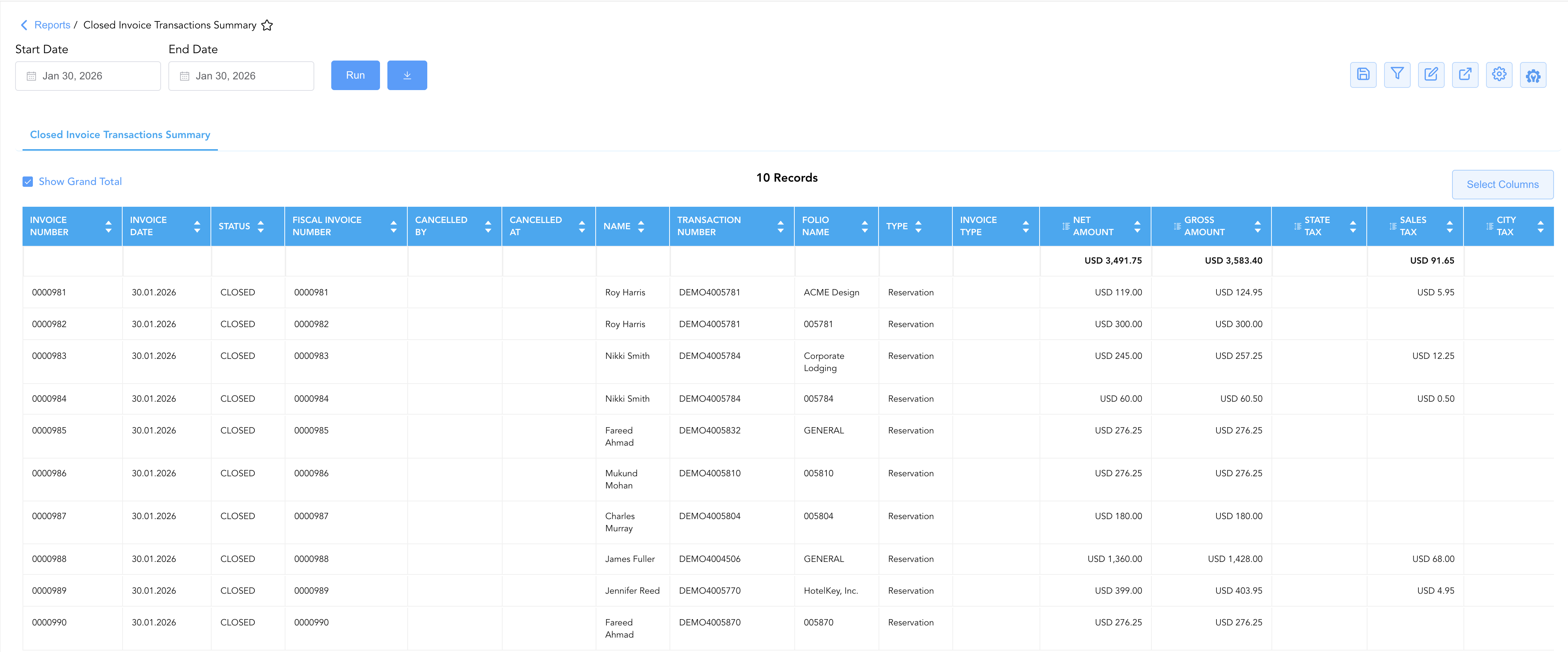
Data Dictionary (Dynamic View Columns)
Customize your default view using the Configure (⚙️) icon on the report page. Below is the full data dictionary available for this report:
💡 Tax Treatment Note: The NET AMOUNT column represents base invoice charges exclusive of taxes. The Gross Amount column represents total invoice charges including all applicable taxes (Sales tax, City Tax, State Tax).
|
Column Name |
Description |
Data Source / Calculation Formula |
Includes Taxes & Fees? |
|
Type |
Originating account classification (e.g., |
System Account Classification |
N/A |
|
Invoice Type |
Category of the generated invoice (e.g., Standard, Fiscal, Proforma). |
System Invoice Rule |
N/A |
|
Invoice Number |
Unique system identifier code assigned to the closed invoice. |
System Invoice Engine |
N/A |
|
Status |
Current lifecycle state of the invoice (e.g., |
System Invoice State |
N/A |
|
Fiscal Invoice Number |
Certified government or PAC fiscal stamp identifier. |
Fiscal Integration Engine |
N/A |
|
Invoice Date |
Official date when the invoice was generated and closed. |
Invoice Generation Timestamp |
N/A |
|
Transaction Number |
Underlying reservation confirmation number or master account code. |
System Reference ID |
N/A |
|
Name |
Primary guest or corporate account contact name. |
|
N/A |
|
Folio Name |
Assigned name or identifier of the specific folio (e.g., |
|
N/A |
|
NET AMOUNT |
Cumulative base invoice charges exclusive of taxes and fees. |
|
❌ No |
|
City Tax |
Cumulative municipal city tax or tourism tax levied on the invoice. |
|
❌ No |
|
Sales tax |
Cumulative sales or value-added tax levied on the invoice. |
|
❌ No |
|
State Tax |
Cumulative state or regional tax levied on the invoice. |
|
❌ No |
|
Gross Amount |
Total cumulative invoice value including net charges and all taxes. |
|
🟢 Yes |
|
Cancelled By |
Username of the staff member who voided or cancelled the invoice. |
System Audit Log |
N/A |
|
Cancelled At |
System timestamp when the invoice cancellation was executed. |
System Audit Log Timestamp |
N/A |
Customization & Platform Features
User & Property Preferences
-
Personal Preference: Tailor your individual view by hiding or dragging columns. Your preference saves automatically for future sessions.
-
Property Defaults: System Admins can configure standard default layouts across all property users to streamline operational reporting. To maximize audit efficiency, group the columns into 3 logical blocks:
-
Invoice & Status (Cols 1–6):
Invoice Number|Invoice Date|Status|Fiscal Invoice Number|Cancelled By|Cancelled AtAccount Context (Cols 7–11):
Name|Transaction Number|Folio Name|Type|Invoice TypeFinancials (Cols 12–16):
Net Amount|City Tax|Sales Tax|State Tax|Gross Amount
-
Report Toolbar & Quick Actions
Use the top-right toolbar icons on the report page to manage and export your data view:
|
Icon |
Action / Feature |
Description |

|
Knowledge Article |
Opens the knowledge base article to learn how to interpret this report. |

|
Saved Views |
Saves your column filtering, sorting, and highlight preferences so you can easily reload your custom view later without reconfiguring the report. |

|
Filter |
Opens filter controls to isolate specific data within a column based on your selected criteria. |

|
Highlight |
Highlights column values in a designated color based on selected conditions. |

|
Export |
Exports and downloads the report in various formats (Excel, PDF, CSV) for offline analysis or printing. |

|
Configure |
Opens column selection controls to toggle visibility, reorder columns, or hide rows with all zeros. |

|
Additional Configuration |
Provides advanced report configuration and display formatting options to customize data presentation. |
Advanced Controls
-
Exporting: Download in Excel or PDF format for offline distribution, executive financial packages, or tax authority audits.
-
Filtering: Filter data by specific Status (
CLOSED,CANCELLED), Type, or Invoice Date. -
Highlighting (Conditional Formatting): Apply custom rules to automatically highlight high-value invoices or flagged zero-value/cancelled invoices.
🔗 Related Reports & Next Steps
Within 📬 Billing & Receivables (AR):
-
Closed Invoice Transactions – Line-item deep dive breaking down every individual charge and tax posting within closed invoices.
-
Invoice Details – Detailed lifecycle tracking of open, settled, and voided invoices.
-
Statement of Invoice – Audit corporate billing lifecycle broken down into Open and Closed invoice sections.
-
Electronic Factura File – Audit PAC integration logs for successful, failed, or un-stamped electronic tax invoices.
Cross-Pillar Deep Dives:
-
⚖️ Ledgers & Trial Balance: To reconcile total daily closed invoice totals against night audit balancing reports, review Closed Folio Balances or Day End Summary.
-
💳 Payments & Transactions: To inspect settlement tenders processed to close these invoices, cross-reference Payment Activity or Payment Summary.
-
📈 Forward Revenue & Analytics: Looking for forward-facing revenue projections or macro performance metrics (like RevPAR or ADR)? Please visit the 📈 Revenue & Analytics reporting hub.