
Paid Out Activity Report Overview
Parent Hub: 💰 Finance & Accounting Reports
Category: 💳 Payments & Transactions
Target Roles: Directors of Finance & Controllers, Night Auditors, Front Office Managers, General Cashiers & Accounting Staff
Key Value: Maintain strict cash drawer governance and petty cash auditability by tracking all cash disbursements, guest cash advances, departmental paid-outs, and staff cashier attributions.
Executive Summary
The Paid Out Activity Report is a primary cash drawer control and disbursement audit tool within the 💳 Payments & Transactions category of the 💰 Finance & Accounting Reports suite. Designed for cash drawer reconciliation, petty cash governance, and front desk cashier auditing, it provides a comprehensive transaction log of all cash paid-out disbursements executed across the property.
By pairing reservation and folio metadata (Transaction Number, Transaction Name, First Name, Last Name) with cash movement details (Date, Time, Expense Type, Amount, Expense Status, User, Remarks), this report enables controllers, night auditors, and general cashiers to verify cash drawer drops, audit guest cash advance requests, monitor operational petty cash outlays, and eliminate unexplained cash drawer shortages.
Key Capabilities
-
Cash Disbursement Auditability: Logs every cash paid-out entry disbursed directly from cashier drawers or central petty cash vaults.
-
Granular Audit Traceability: Captures exact transaction timestamps (Date, Time), unique reference IDs (Transaction Number), expense categories (Expense Type), and manager authorization remarks (Remarks).
-
Staff & Cashier Attribution: Identifies the exact employee (User) who processed the cash disbursement for complete shift accountability.
Report Views & Functional Breakdown
The Paid Out Activity Report presents cash disbursement data in a unified single-table ledger that supports three distinct analytical perspectives:
┌────────────────────────────────────────────────────────────────────────┐
│                      PAID OUT ACTIVITY REPORT                          │
├────────────────────────────────────────────────────────────────────────┤
│                       Unified Transaction Ledger                       │
├──────────────────────────┬──────────────────────────┬──────────────────┤
│ 1. Guest Cash Advance &  │ 2. Petty Cash &          │ 3. Cashier & Shift│
│    Paid-Out Audit        │    Operational Outlays   │    Accountability│
└──────────────────────────┴──────────────────────────┴──────────────────┘
1. Guest Cash Advance & Paid-Out Audit
Itemizes cash advance disbursements provided directly to registered guests and charged to their folios.
-
Primary Use: Auditing front desk cash advances (e.g., guest cash for taxi fares or tips), verifying folio debit postings, and preventing unpaid cash advance walkouts.
-
Key Metrics: Date, Time, Expense Type (
Guest Paid Out), Transaction Number, Transaction Name, Amount, User, Remarks.
2. Petty Cash & Operational Outlays
Tracks cash disbursements issued from cash drawers for property-level operating expenses and emergency purchases.
-
Primary Use: Reconciling petty cash receipt vouchers, auditing departmental cash outlays, and ensuring proper general ledger expense categorization.
-
Key Metrics: Date, Time, Expense Type, Transaction Number, Amount, Expense Status, User, Remarks.
3. Cashier & Shift Accountability
Attributes all cash disbursement entries directly to specific staff members and operational shifts.
-
Primary Use: Balancing cashier shift drop envelopes, investigating cash drawer over/short variances during night audit, and enforcing cashier authorization limits.
-
Key Metrics: Date, Time, Expense Type, Amount, User, Expense Status.
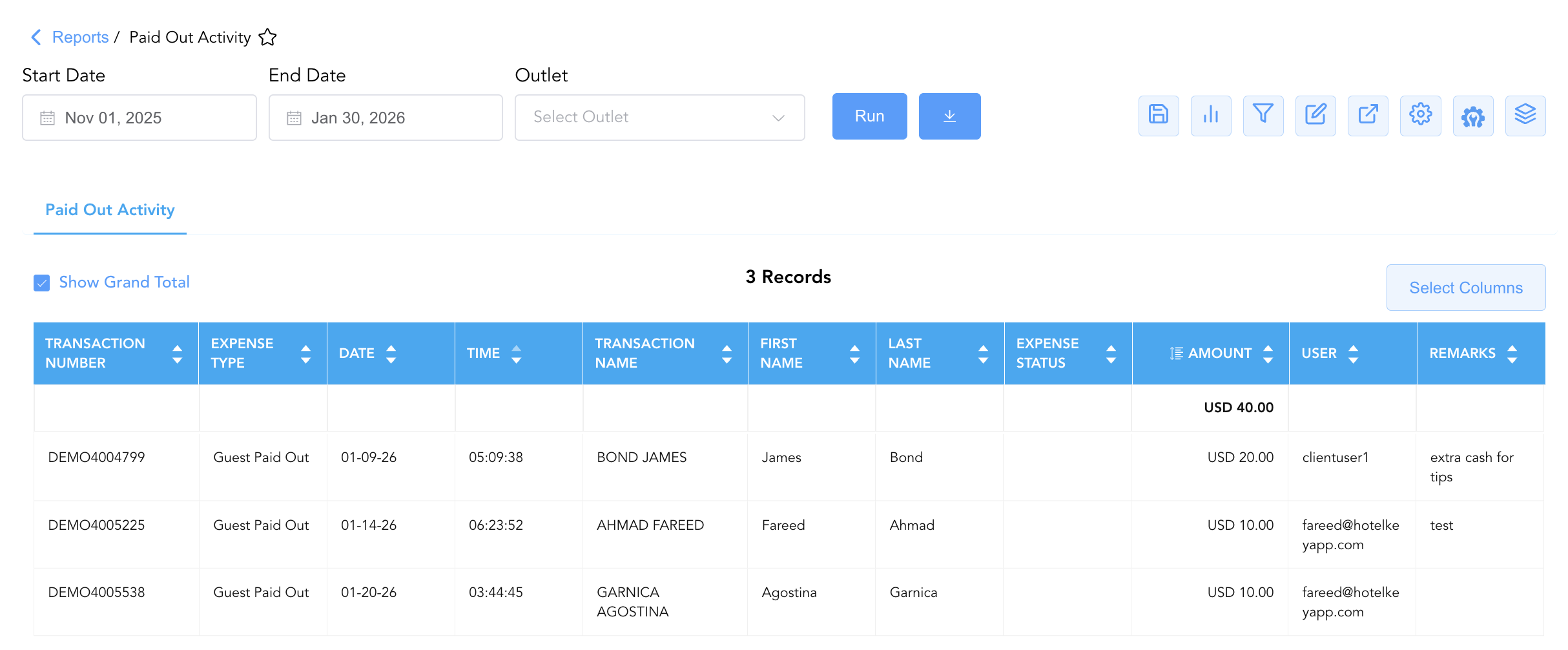
Data Dictionary (Dynamic View Columns)
Customize your default view using the Configure (⚙️) icon on the report page. Below is the full data dictionary representing every column available in this report:
💡 Monetary Treatment Note: The Amount field represents Gross Cash Values (Includes Taxes & Fees) disbursed directly from the cash drawer or petty cash fund.
|
Column Name |
Description |
Data Source / System Mapping |
Includes Taxes & Fees? |
|
Date |
Official business date when the cash paid-out transaction occurred. |
Transaction Timestamp |
N/A |
|
Time |
Exact system timestamp when the cash disbursement was posted. |
Transaction Timestamp |
N/A |
|
Expense Type |
Categorization of the cash disbursement (e.g., Guest Paid Out, Petty Cash, Vendor Outlay). |
Expense Code Setup |
N/A |
|
Transaction Number |
Unique system reference identifier assigned to the reservation or paid-out entry. |
System Master ID |
N/A |
|
Transaction Name |
Full primary guest or account name receiving or authorizing the paid-out. |
|
N/A |
|
First Name |
Primary guest or recipient first name. |
|
N/A |
|
Last Name |
Primary guest or recipient last name. |
|
N/A |
|
Amount |
Gross cash monetary value disbursed from the drawer or petty cash fund. |
Cash Ledger Engine |
🟢 Yes |
|
Expense Status |
Operational processing state of the paid-out request (e.g., Approved, Pending, Completed). |
System Audit Engine |
N/A |
|
User |
System user ID, staff email, or username of the employee who processed the paid-out. |
System Audit Log |
N/A |
|
Remarks |
Explanatory notes, voucher justifications, or cashier comments entered during processing. |
Transaction Notes Field |
N/A |
Customization & Platform Features
User & Property Preferences
-
Personal Preference: Tailor your individual view by hiding or dragging columns. Your preferences save automatically for future sessions.
-
Property Defaults: System Admins can configure standard default layouts across all property users to streamline operational reporting. To maximize audit efficiency, group the columns into the below logical blocks:
-
Transaction Identifiers & Classification (Cols 1–4):
Transaction Number|Expense Type|Date|Time -
Guest & Payee Context (Cols 5–8):
Transaction Name|First Name|Last Name|Expense Status -
Financial Disbursement (Col 9):
Amount -
Staff Attribution & Audit Notes (Cols 10–11):
User|Remarks
-
Report Toolbar & Quick Actions
Use the top-right toolbar icons on the report page to manage and export your data view:
|
Icon |
Action / Feature |
Description |

|
Knowledge Article |
Opens the knowledge base article to learn how to interpret this report. |

|
Saved Views |
Saves your column filtering, sorting, and highlight preferences so you can easily reload your custom view later without reconfiguring the report. |

|
Bar Chart |
Displays report data in a visual bar chart format. |

|
Filter |
Opens filter controls to isolate specific data within a column based on your selected criteria. |

|
Highlight |
Highlights column values in a designated color based on selected conditions. |

|
Export |
Exports and downloads the report in various formats (Excel, PDF, CSV) for offline analysis or printing. |

|
Configure |
Opens column selection controls to toggle visibility, reorder columns, or hide rows with all zeros. |

|
Additional Configuration |
Provides advanced report configuration and display formatting options to customize data presentation. |

|
Group By |
Summarize and group report data dynamically in real time. |
Interactive Visualizations & Grouping Controls
-
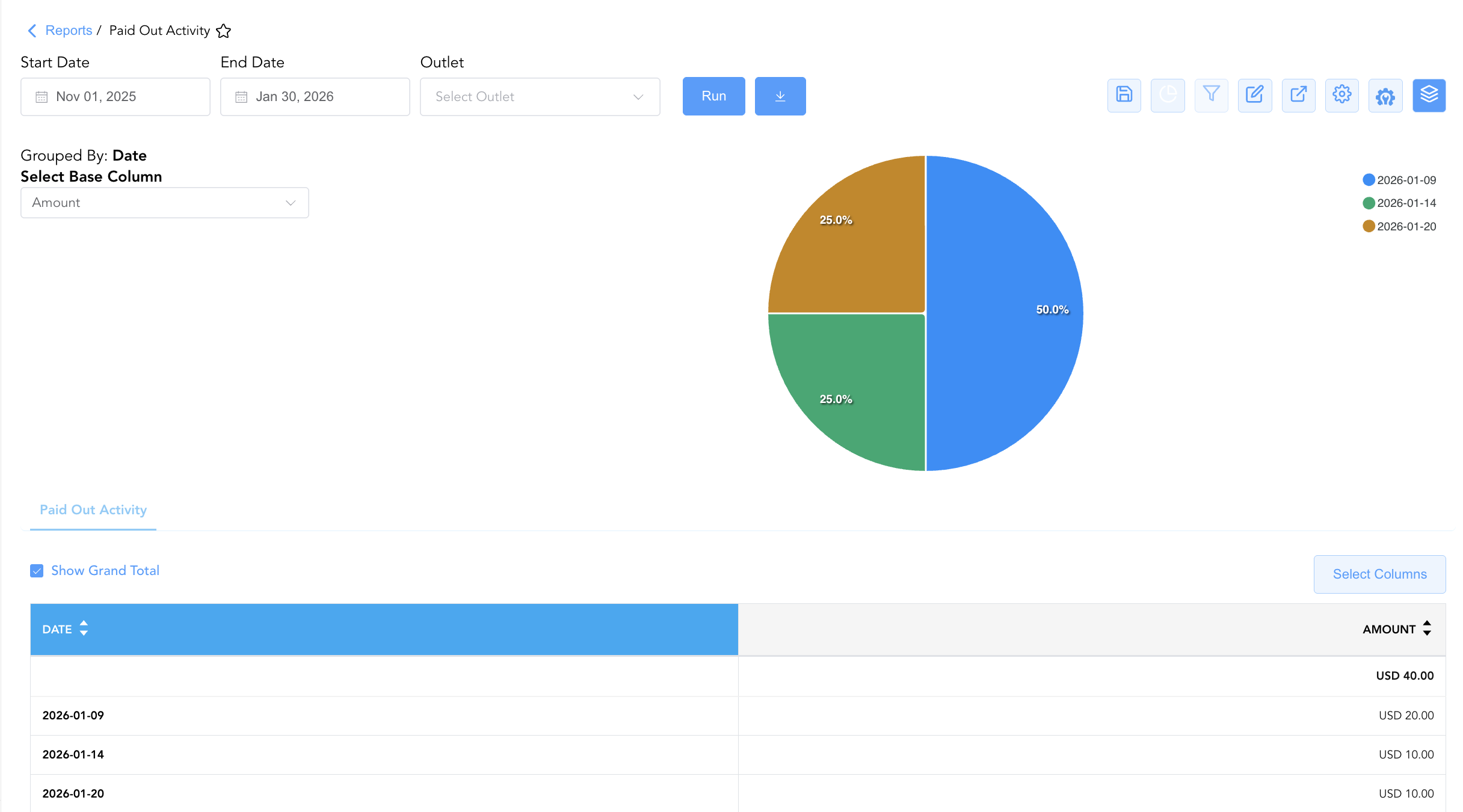
Group By & Pie Chart Visualization: The Paid Out Activity report features an interactive pie chart to help analyze cash disbursement patterns and petty cash allocations. Users can group transaction entries on the fly by Expense Type, User, Date, or Expense Status to analyze cash disbursement distribution across staff shifts. By selecting Amount from the Select Base Column dropdown menu, the chart dynamically renders percentage share breakdowns accompanied by an interactive color-coded legend.
-
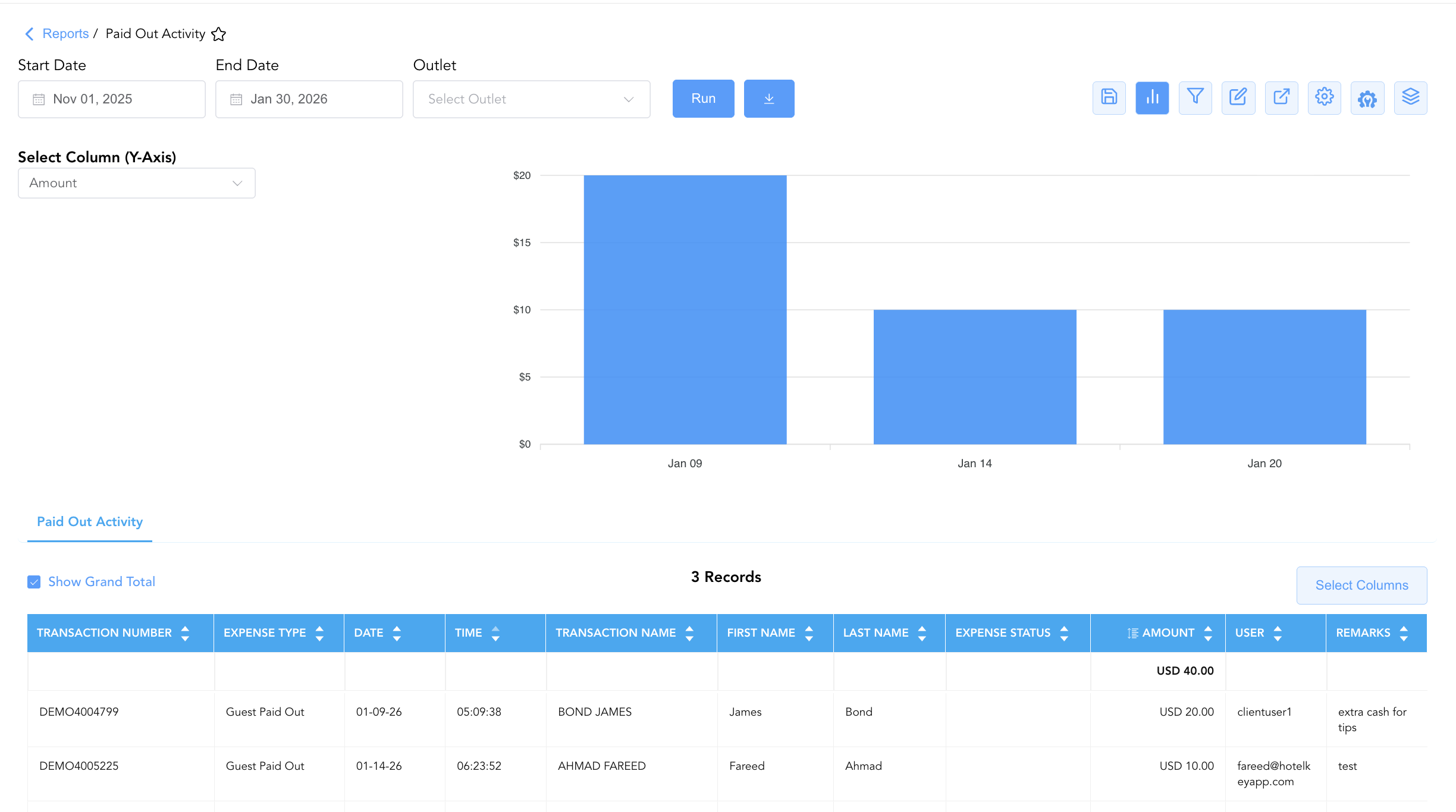
Bar Chart Visualizer: The Paid Out Activity report includes an interactive bar chart to help visualize cash disbursement volumes and petty cash trends over time. By selecting Amount from the Select Column (Y-Axis) dropdown menu, users can visually track daily payout totals chronologically alongside the detailed transaction grid.
Advanced Controls
-
Exporting & Cashier Tie-Outs: Download in Excel or PDF format to support daily cashier drop envelope auditing, petty cash voucher balancing, and general ledger postings.
-
Filtering: Filter data by specific Expense Type, User, or date ranges.
-
Highlighting (Conditional Formatting): Apply custom rules to automatically highlight high-value paid-out transactions (
Amount > $50.00) or entries missing remarks.
🔗 Related Reports & Next Steps
Within 💳 Payments & Transactions & ⚖️ Ledgers & Trial Balance:
-
Control Report – Audit cashier shift drops, cash drawers, paid-outs, and credit card processing gateway batches.
-
All Payments – Complete transaction ledger logging all cash, check, credit card, and direct-bill payment receipts.
-
Payment Activity – Technical transaction log focusing specifically on card pre-authorizations and settlement tokens.
-
Adjustments & Refunds Activity – Track rate write-offs, charge adjustments, and cash/card refund transactions.
-
Day End Summary – Review consolidated daily revenue, tax, payment, and deposit blueprints at business date close.
Cross-Pillar Deep Dives:
-
🏛️ Taxes & Expenses: To audit statutory tax structures associated with operational expense codes, review Active Taxes & Charge Types.
-
🛎️ Front Desk & Guest Services: For contingency emergency offline cash tracking, review Cash Guest List.