
Company Collection Notes Report Overview
Parent Hub: 💰 Finance & Accounting Reports
Category: 📬 Billing & Receivables (AR) Reports
Target Roles: Accounts Receivable Managers, Credit Managers, Hotel Controllers, Collections Specialists, Staff Accountants, Directors of Finance
Key Value: Systematic accounts receivable dunning governance, tracking communication interactions with corporate accounts payable contacts, logging collector agency assignments, recording itemized invoice collection activity logs, and auditing outstanding overdue invoice balances to accelerate cash collections.
Date Parameter: Date Range Selector (Start / End Date) | Past Only | Maximum Range: 366 Days
Executive Summary
The Company Collection Notes report is the central dunning log, debtor interaction audit, and accounts receivable collections tracking document within the 📬 Billing & Receivables (AR) Reports category of the 💰 Finance & Accounting Reports hub. Designed to empower credit controllers, collections specialists, and finance leadership with complete chronological visibility into collection efforts on delinquent direct bill statements, it provides an auditable history of all recorded collection activities, client outreach, and collector notes across corporate accounts.
-
Centered on collections workflow transparency through the unified Company Collection Notes log, this report links specific finalized accounts receivable statements (
Invoice#,Invoice Date) with timestamped entry milestones (Date,Time), operator accountability credentials (User Id), corporate debtor contact information (Contact Name,Contact Email,Contact Phone), assigned internal or third-party recovery agencies (Collector Name), itemized dunning remarks and balance status (Collection Note), and account lifecycle states (Status = ACTIVE). This detailed operational record enables properties to maintain thorough collection documentation, track third-party collection agency assignments, substantiate disputed charges during client meetings, eliminate duplicate dunning calls, and expedite cash recovery on aged debt.
Key Capabilities
-
Chronological Dunning Audit Trail: Records exact timestamped entries (
Date,Time) for every collection note entered on an accounts receivable invoice, providing an unalterable history of debtor outreach. -
Invoice-Specific Traceability: Binds collection communications directly to master city ledger invoice identifiers (
Invoice#) and original billing dates (Invoice Date), allowing staff to track collection notes per statement. -
Debtor Contact Governance: Captures primary corporate accounts payable liaison details, including representative names (
Contact Name), email addresses (Contact Email), and telephone numbers (Contact Phone) for seamless follow-up communications. -
Collector & Agency Attribution: Identifies the internal recovery team member or contracted third-party collection agency (
Collector Name) handling the debt recovery process. -
Granular Collection Activity Narrative: Preserves complete free-text collection updates, payment promises, dispute explanations, and aging days calculations (
Collection Note). -
Operator Accountability: Logs the login credentials (
User Id) of the employee entering or updating the note, ensuring personal accountability across the accounting staff.
Report Views & Functional Breakdown
The Company Collection Notes report structures collection logs into a unified matrix view supporting three primary operational perspectives:
┌────────────────────────────────────────────────────────────────────────┐
│                    COMPANY COLLECTION NOTES REPORT                     │
├────────────────────────────────────────────────────────────────────────┤
│                         Unified Matrix View                            │
├──────────────────────────┬──────────────────────────┬──────────────────┤
│ 1. Invoice & Entry       │ 2. Debtor AP Contact     │ 3. Collection    │
│    Identification        │    & Agency Assignment   │    Notes & Status│
└──────────────────────────┴──────────────────────────┴──────────────────┘
1. Invoice & Entry Identification
Tracks the target city ledger invoice number, invoice issuance date, and the timestamped event when the collection note was logged.
-
Primary Use: Cross-referencing collection notes against accounts receivable billing registers and verifying when debtor follow-ups occurred.
-
Key Metrics: Date, Time, Invoice#, Invoice Date, User Id.
2. Debtor AP Contact & Agency Assignment
Maintains corporate customer communication coordinates and logs the assigned recovery agent or third-party collection entity.
-
Primary Use: Facilitating immediate phone or email debtor outreach, reviewing corporate client contacts, and managing collection agency assignments.
-
Key Metrics: Contact Name, Contact Email, contact phone, collector name.
3. Collection Notes & Status Auditing
Details the exact qualitative collection narrative, outstanding amounts due, overdue days, and profile operational status.
-
Primary Use: Reviewing payment promises, tracking balance resolution progress, and confirming active collection workflows.
-
Key Metrics: collection note, Status.
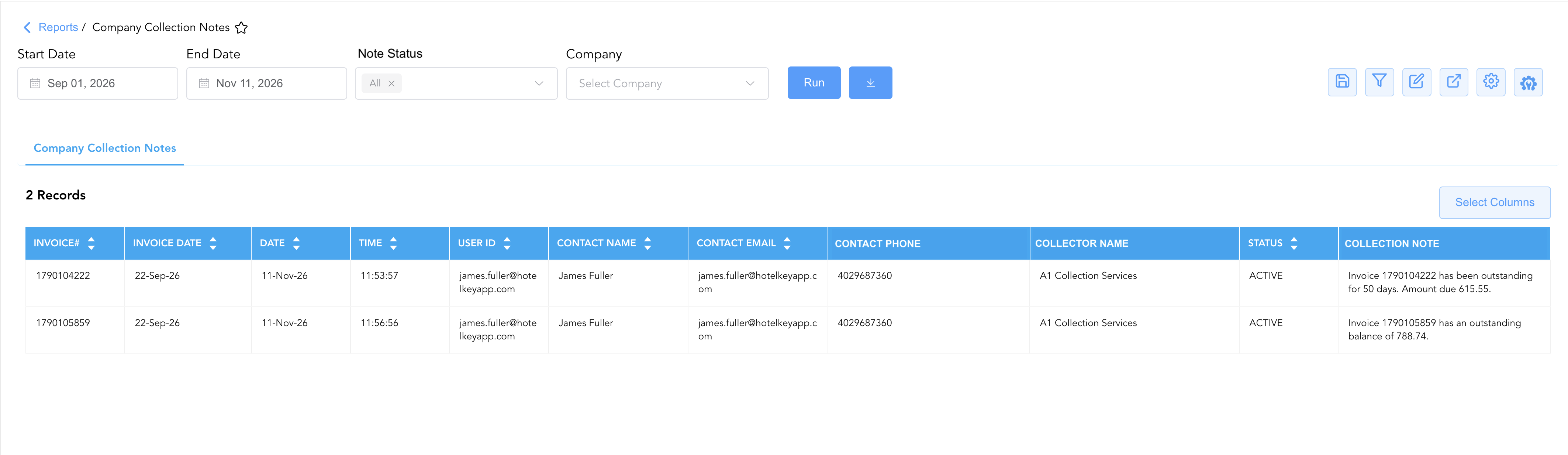
Data Dictionary (Dynamic View Columns)
Customize your default view using the Configure (⚙️) icon on the report page. Below is the full data dictionary representing all 11 exact dynamic columns available in this report, sorted in alphabetical order by column name:
💡 System Schema & Column Mapping Notes:
Technical database label prefixes such as
contact phone,collector name, andcollection noteare maintained directly from the property management system schema to preserve operational reporting parity.Dunning Status Logic: The
Statusindicates the operational state of the collection entry or associated corporate profile (e.g.,ACTIVErepresenting open collection follow-up).
|
Column Name |
Description |
Data Source / System Mapping |
Includes Taxes & Fees? |
|
Collection Note |
Full free-text narrative recording collection remarks, payment promises, aging days, and balance amounts. |
AR Collection Module > Detailed Note Text |
N/A |
|
Collector Name |
Designated internal recovery specialist or external collection agency assigned to the invoice. |
AR Collection Module > Assigned Agency/Collector |
N/A |
|
Contact Email |
Email address of the primary corporate client representative or accounts payable liaison. |
Company Master > Primary Billing Email |
N/A |
|
Contact Name |
Full name of the designated corporate accounts payable contact or travel coordinator. |
Company Master > Contact Person |
N/A |
|
Contact Phone |
Direct telephone or corporate contact number for the accounts payable debtor representative. |
Company Master > Primary Phone Number |
N/A |
|
Date |
Calendar date on which the collection note or communication log entry was recorded. |
AR Collection Module > Entry Date |
N/A |
|
Invoice Date |
Calendar date on which the targeted accounts receivable invoice was finalized and issued. |
AR Invoicing Engine > Invoice Generation Date |
N/A |
|
Invoice# |
Unique master system accounts receivable invoice number associated with the collection note. |
AR Billing Engine > Master Invoice ID |
N/A |
|
Status |
Operational lifecycle status of the collection follow-up or corporate account profile (e.g., |
AR Collection Module > Operational Status |
N/A |
|
Time |
Exact time of day (HH:MM:SS) when the collection note was saved in the property management system. |
Audit Trail > Creation Timestamp |
N/A |
|
User Id |
Digital identity or login email address of the employee who documented the collection interaction. |
Security / User Directory > User ID |
N/A |
Customization & Platform Features
User & Property Preferences
-
Personal Preference: Tailor your individual view by hiding or dragging columns. Your preferences save automatically for future sessions.
-
Property Defaults: System Admins can configure standard default layouts across all property users to streamline operational reporting. To maximize audit efficiency, group the columns into the below logical blocks:
-
nvoice Key & Billing Date (Cols 1–2):
Invoice#|Invoice Date -
Audit Timestamp & User Accountability (Cols 3–5):
Date|Time|User Id -
Debtor Contact Profile (Cols 6–8):
Contact Name|Contact Email|Contact Phone -
Collection Agency & Status Flag (Cols 9–10):
Collector Name|Status -
Collection Note & Narrative (Col 11):
Collection Note
-
Report Toolbar & Quick Actions
Use the top-right toolbar icons on the report page to manage and export your data view:
|
Icon |
Action / Feature |
Description |

|
Knowledge Article |
Opens the knowledge base article to learn how to interpret this report. |

|
Saved Views |
Saves your column filtering, sorting, and highlight preferences so you can easily reload your custom view later without reconfiguring the report. |

|
Filter |
Opens filter controls to isolate specific data within a column based on your selected criteria. |

|
Highlight |
Highlights column values in a designated color based on selected conditions. |

|
Export |
Exports and downloads the report in various formats (Excel, PDF, CSV) for offline analysis or printing. |

|
Configure |
Opens column selection controls to toggle visibility, reorder columns, or hide rows with all zeros. |

|
Additional Configuration |
Provides advanced report configuration and display formatting options to customize data presentation. |
Advanced Controls
-
Collection Agency Productivity Auditing: Filter by
collector nameto review third-party agency engagement velocity, verifying whether assigned external agencies are actively contacting delinquent corporate accounts. -
Stale Debt Escalation: Cross-reference notes in
collection notestating aging over 90 or 120 days to escalate persistent non-payment accounts to senior controllership for formal direct bill revocation or bad-debt write-off. -
Dispute Tracking & Resolution: Search
collection notefor billing discrepancies, missing vouchers, or rate disputes, allowing billing specialists to issue credit adjustments or updated folios promptly. -
Highlighting (Conditional Formatting): Apply custom rules to automatically highlight records where
collector namecontains third-party agency assignments, entries associated with invoices older than 60 days, or notes entered by specific supervisory staff.
🔗 Related Reports & Next Steps
Within 💰 Finance & Accounting Reports & 📬 Billing & Receivables (AR) Reports:
-
AR Invoice Aging Report – Three-tier master aging report tracking outstanding direct bill balances across discrete and cumulative aging buckets.
-
Invoice Details Report – Itemized transaction-level audit detailing invoice room revenue splits, taxes, guest names, and settlement milestones.
-
Customer Statement Report – Three-section client-facing statement detailing open invoices, payments on account, aging brackets, and bank remittance instructions.
-
Direct Bill Aging Report – Five-section aging analysis categorizing unbilled transfers, finalized invoices, and customer settlements across 8 aging brackets.
Cross-Pillar Deep Dives:
-
🏢 Corporate Accounts Reports: Cross-reference delinquent collection accounts with the Company Details Report to place non-compliant corporate direct bill privileges on administrative credit hold.