
Control Report Overview
Parent Hub: 💰 Finance & Accounting Reports
Category: ⚖️ Ledgers & Trial Balance / 💳 Payments & Transactions
Target Roles: Directors of Finance & Controllers, Night Auditors, Accounting Managers & Clerks, Front Office Supervisors
Key Value: Provide complete shift settlement auditing and cash drawer governance by contrasting system cash expectations against drops and variances, while itemizing credit card processing volume by card brand and individual user.
Executive Summary
The Control Report is an indispensable daily financial control and cashier shift reconciliation tool within the ⚖️ Ledgers & Trial Balance and 💳 Payments & Transactions modules. Designed for strict cash handling governance and credit card processing oversight, it structures all daily monetary settlement activity into three specialized functional audit perspectives.
By contrasting cashier drawer expectations (System Reading) against outlays (Paid Out, Currency Exchange), drops (Deposit Recorded), reimbursements (Due Back), and variance calculations (Over Short), while summarizing electronic payment volume across card brands (Credit Card By Type) and individual staff members (Credit Card By User), this report enables controllers, night auditors, and supervisors to enforce drawer accountability, balance merchant gateway batches, and eliminate shift handoff discrepancies.
Key Capabilities
-
Three Functional Audit Sections: Divided into cashier drawer reconciliation (Cash By User), merchant batch balancing (Credit Card By Type), and staff card processing logs (Credit Card By User).
-
Automated Over/Short Detection: Automatically calculates physical cash drawer variances (
System Reading - Deposit Recorded = Over Short) per user to enforce shift-end staff accountability. -
Granular Cashier & Merchant Reconciliation: Itemizes physical cash drops, currency exchanges, paid-outs, direct-bill routing, and credit card tenders down to individual staff user accounts (Username).
Report Views & Functional Breakdown
The Control Report organizes daily payment and cash handling activity across three structured operational sections:
┌────────────────────────────────────────────────────────────────────────┐
│                            CONTROL REPORT                              │
├──────────────────────────┬──────────────────────────┬──────────────────┤
│ 1. Cash By User          │ 2. Credit Card By Type   │ 3. Credit Card   │
│    (Drawer Governance)   │    (Brand Batching)      │    By User       │
└──────────────────────────┴──────────────────────────┴──────────────────┘
1. Cash By User
Functions as the primary cashier shift-audit ledger, evaluating physical cash drawer balancing and settlement handling per individual user.
-
Primary Use: Verifying cashier drawer counts, auditing paid-outs, validating recorded cash drops, and identifying drawer overage or shortage variances.
-
Key Metrics: Username, System Reading, Paid Out, Currency Exchange, Received, Deposit Recorded, Over Short, Due Back, Direct Bill.
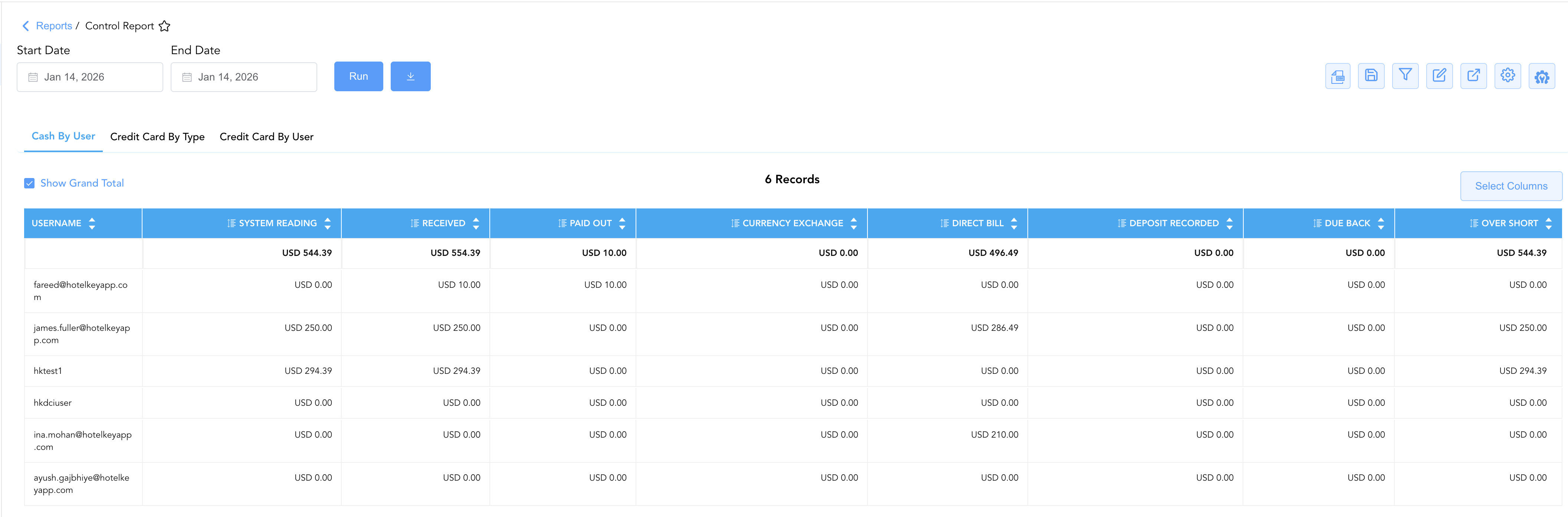
Cash by User Section
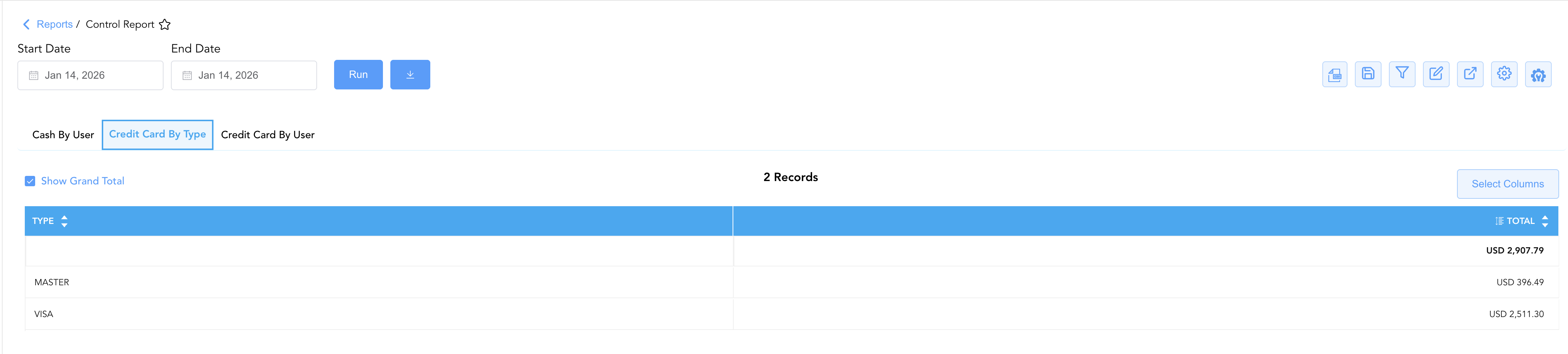
2. Credit Card By Type
Delivers an aggregated macro breakdown of property-wide electronic payment processing grouped strictly by credit card brand.
-
Primary Use: Night audit batch balancing, verifying merchant processor gateway totals, and confirming batch deposits prior to shift close.
-
Key Metrics: Type (
VISA,MASTER,AMEX,DISCOVER, etc.), Total.
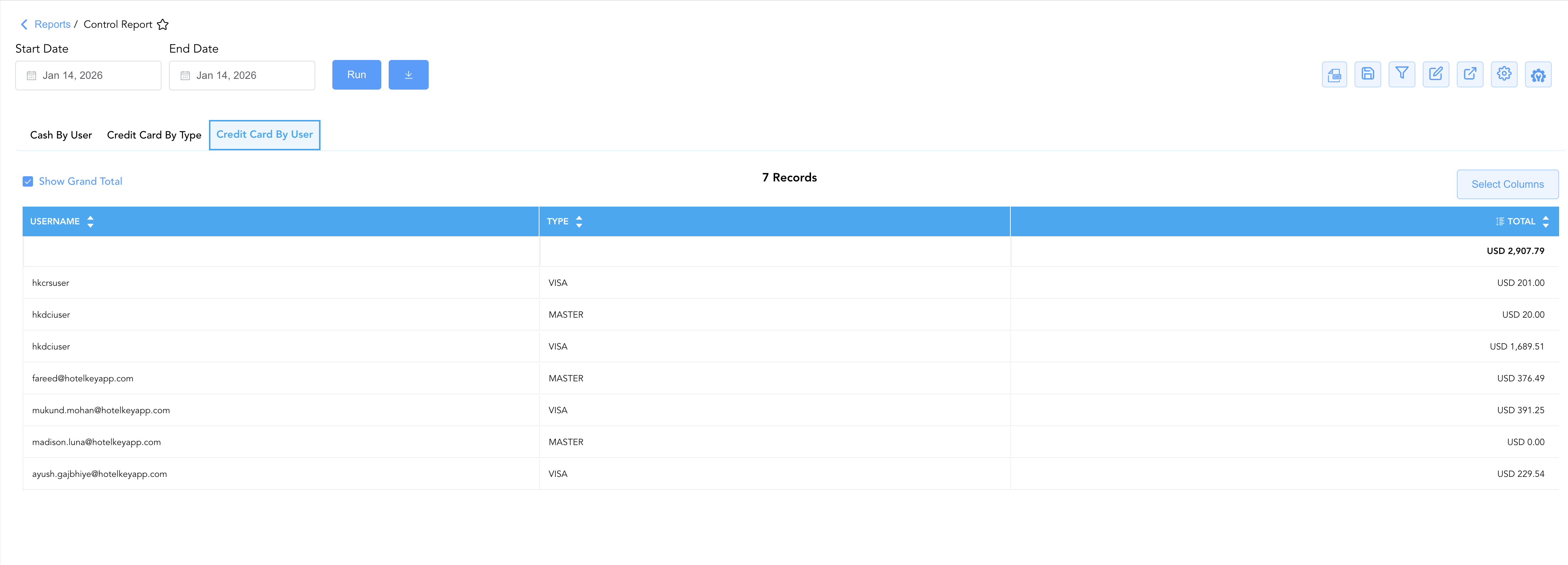
3. Credit Card By User
Itemizes electronic payment processing volume down to specific staff members cross-referenced with card tender types.
-
Primary Use: Auditing individual cashier payment activity, investigating credit card batch imbalances back to the originating user, and verifying manual card entries.
-
Key Metrics: Username, Type (
VISA,MASTER, etc.), Total.
Data Dictionary (Dynamic View Columns)
Customize your default view using the Configure (⚙️) icon on the report page. Below is the full data dictionary available across all sections of this report:
💡 Tax Treatment Note: All monetary figures (System Reading, Paid Out, Deposit Recorded, Direct Bill, and Total) represent Gross Amounts (Includes Taxes & Fees) collected or processed at the front desk.
|
Column Name |
Description |
Data Source / System Mapping |
Includes Taxes & Fees? |
|---|---|---|---|
|
Username |
User email of the staff member responsible for the shift or transaction. |
System Audit Log |
N/A |
|
System Reading |
Calculated gross physical cash expectation expected in the drawer by the PMS. |
|
🟢 Yes |
|
Paid Out |
Physical cash disbursed from the drawer for petty cash or approved payouts. |
|
🟢 Yes |
|
Currency Exchange |
Net cash adjustments resulting from foreign currency exchange trades. |
|
🟢 Yes |
|
Received |
Total gross cash received and processed during the user's shift. |
|
🟢 Yes |
|
Deposit Recorded |
Actual physical cash drop or safe deposit amount logged by the cashier. |
Cashier Shift Drop Entry |
🟢 Yes |
|
Over Short |
Calculated variance between system expectation and recorded deposit. |
|
🟢 Yes |
|
Due Back |
Reimbursement amount owed back to the cashier drawer float. |
System Float Reconciler |
🟢 Yes |
|
Direct Bill |
Direct-bill transfers or city ledger charges authorized during the user's shift. |
|
🟢 Yes |
|
Type |
Credit card tender brand or payment processor category (e.g., |
Payment Gateway Token |
N/A |
|
Total |
Cumulative gross dollar amount processed for the card type or user. |
|
🟢 Yes |
Customization & Platform Features
User & Property Preferences
-
Personal Preference: Tailor your individual view by hiding or dragging columns. Your preference saves automatically for future sessions.
-
Property Defaults: System Admins can configure standard default layouts across all property users to streamline operational reporting. To maximize audit efficiency, group the columns into the below logical blocks:
-
Section 1: Cash by User
-
User Identifier (Col 1):
Username -
Cash Movements & Adjustments (Cols 2–6):
System Reading|Received|Paid Out|Currency Exchange|Direct Bill -
Deposit & Shift Reconciliation (Cols 7–9):
Deposit Recorded|Due Back|Over Short
-
-
Section 2: Credit Card by Type
-
Card Brand (Col 1):
Type -
Batch Production (Col 2):
Total
-
-
Section 3: Credit Card by User
-
User & Card Context (Cols 1–2):
Username|Type -
Shift Processing Total (Col 3):
Total
-
-
Report Toolbar & Quick Actions
Use the top-right toolbar icons on the report page to manage and export your data view:
|
Icon |
Action / Feature |
Description |

|
Knowledge Article |
Opens the knowledge base article to learn how to interpret this report. |

|
Background Export |
Allows users to download up to 365 days of data directly to their computer in CSV format. |

|
Saved Views |
Saves your column filtering, sorting, and highlight preferences so you can easily reload your custom view later without reconfiguring the report. |

|
Filter |
Opens filter controls to isolate specific data within a column based on your selected criteria. |

|
Highlight |
Highlights column values in a designated color based on selected conditions. |

|
Export |
Exports and downloads the report in various formats (Excel, PDF, CSV) for offline analysis or printing. |

|
Configure |
Opens column selection controls to toggle visibility, reorder columns, or hide rows with all zeros. |

|
Additional Configuration |
Provides advanced report configuration and display formatting options to customize data presentation. |
Advanced Controls
-
Exporting & Shift Auditing: Download in Excel or PDF format to attach to cashier drop envelopes, shift audit packets, or night audit documentation.
-
Filtering: Filter data by specific Username, Type (
VISA,MASTER), or non-zero Over Short entries. -
Highlighting (Conditional Formatting): Apply custom rules to automatically highlight cashier drawer variances (
Over Short ≠ $0.00) or high-value paid-outs.
🔗 Related Reports & Next Steps
Within ⚖️ Ledgers & Trial Balance & 💳 Payments & Transactions:
-
Day End Summary – Review consolidated daily revenue, tax, and payment blueprints at business day close.
-
Paid Out Activity – Itemized audit trail of all cash disbursements and petty cash outlays.
-
All Payments – Line-item transaction audit capturing token details and GL routing for every payment.
-
Payment Activity – Technical transaction evidence linking payments to room numbers and processor tokens.
-
Settlement by Payment Type – Compare detailed settlement ledgers against daily roll-up summary totals.
Cross-Pillar Deep Dives:
-
📬 Billing & Receivables (AR): To audit direct-bill transfers authorized during the shift, cross-reference Direct Bill Reconciliation or Accounts Receivable Activity.
-
🏛️ Taxes & Expenses: To inspect cash outlays and petty cash vouchers, review Paid Out Activity.
-
📈 Forward Revenue & Analytics: Looking for forward-facing revenue projections or macro performance metrics (like RevPAR or ADR)? Please visit the 📈 Revenue & Analytics reporting hub.