
Loyalty Enrollment Report Overview
Parent Hub: 🛎️ Front Desk & Guest Services
Category: ⭐ Guest Insights & Relations
Target Roles: Front Office Managers, Front Desk Agents, Guest Relations Managers, Loyalty Program Champions, Hotel Controllers, General Managers
Key Value: Monitor guest loyalty program sign-ups, track staff front desk enrollment performance, verify member profile completion, audit tier assignments and membership numbers, and drive property brand loyalty engagement.
Executive Summary
The Loyalty Enrollment Report is an essential guest engagement, staff performance tracking, and CRM growth document within the ⭐ Guest Insights & Relations category of the 🛎️ Front Desk & Guest Services hub. Designed to deliver complete operational visibility over newly created loyalty program memberships, it itemizes every guest profile enrolled into the brand loyalty program across specified date windows.
-
By mapping enrollment transaction parameters (Enrollment Date, Enrollment Time, Enrollment Source, Username) to guest profile data (Guest Name, First Name, Last Name, Email, Phone, Address, City, State, Country, Postal Code) and loyalty program credentials (Member ID, Loyalty Program Name, Initial Tier Status, Confirmation Number), this report enables front office supervisors, guest experience managers, and hotel controllers to audit front desk enrollment incentives, verify new member profile accuracy, measure agent sign-up conversion rates, and ensure seamless loyalty integration.
Key Capabilities
-
Front Desk Staff Performance Audit: Captures the specific employee username (
Username) responsible for enrolling the guest to evaluate front office incentive programs and agent conversion metrics. -
Loyalty Credential Verification: Logs assigned membership numbers (
Member ID), loyalty program tier levels (Initial Tier Status, e.g., Club, Gold, Platinum), and program titles (Loyalty Program Name). -
Enrollment Channel & Source Tracking: Tracks the specific interaction touchpoint (
Enrollment Source, e.g., Front Desk Check-in, Mobile App, Post-Stay Email, Call Center). -
Member Profile Completeness Audit: Displays complete guest contact information (
Email,Phone,Address,City,State,Country,Postal Code) to ensure new member profiles satisfy brand data quality standards. -
Stay Linkage & Confirmation Tracking: Links new loyalty enrollments directly with active or upcoming reservations (
Confirmation Number).
Report Views & Functional Breakdown
The Loyalty Enrollment Report presents new member sign-up data in a unified single-table ledger that supports three key analytical perspectives:
┌────────────────────────────────────────────────────────────────────────┐
│                   LOYALTY ENROLLMENT REPORT                            │
├────────────────────────────────────────────────────────────────────────┤
│                         Unified Matrix View                            │
├──────────────────────────┬──────────────────────────┬──────────────────┤
│ 1. Member Credentials &  │ 2. Guest Contact &       │ 3. Staff Audit & │
│    Loyalty Program Trace │    Profile Register      │    Source Matrix │
└──────────────────────────┴──────────────────────────┴──────────────────┘
1. Member Credentials & Loyalty Program Trace
Monitors newly issued loyalty account numbers, assigned tier statuses, and linked reservation confirmation numbers.
-
Primary Use: Verifying new loyalty account creation, checking assigned initial tier levels, and confirming reservation linkages for immediate stay credit.
-
Key Metrics: Member ID, Loyalty Program Name, Initial Tier Status, Confirmation Number, Enrollment Date.
2. Guest Contact & Profile Register
Correlates new membership accounts directly with full guest identity and contact details.
-
Primary Use: Auditing member contact details for completeness, verifying email and phone formats, and ensuring data accuracy for welcome communication dispatches.
-
Key Metrics: Guest Name, First Name, Last Name, Email, Phone, City, State, Country, Postal Code.
3. Staff Audit & Source Matrix
Tracks enrollment timestamps, front desk employee credentials, and sign-up channels.
-
Primary Use: Auditing front desk employee sign-up contest results, calculating agent commission or incentive payouts, and analyzing enrollment channel performance.
-
Key Metrics: Username, Enrollment Date, Enrollment Time, Enrollment Source, Member ID.
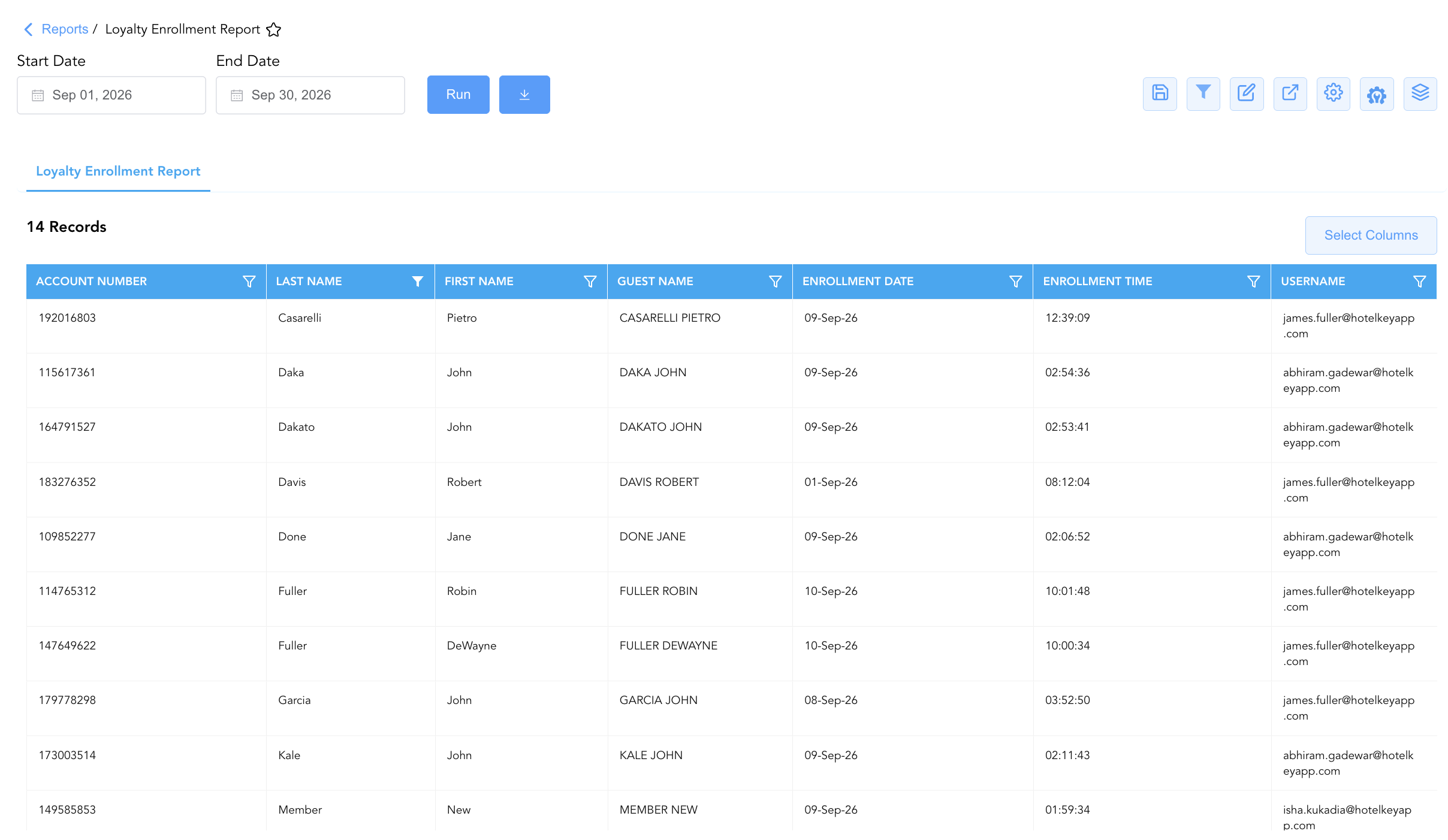
Data Dictionary (Dynamic View Columns)
Customize your default view using the Configure (⚙️) icon on the report page. Below is the full data dictionary representing all dynamic columns available in this report:
💡 Member Audit Note: Member ID reflects the unique alphanumeric account number generated upon successful loyalty program registration. Initial Tier Status indicates the baseline membership tier assigned upon sign-up.
|
Column Name |
Description |
Data Source / System Mapping |
Includes Taxes & Fees? |
|
Enrollment Date |
Calendar date on which the loyalty enrollment was created. |
Loyalty System > Registration Date |
N/A |
|
Enrollment Time |
Timestamp recording when the enrollment was processed. |
Loyalty System > Registration Time |
N/A |
|
Username |
Name or user login ID of the employee who processed the enrollment. |
Security Audit Trail > User ID |
N/A |
|
Enrollment Source |
Touchpoint channel where the enrollment occurred (e.g., Front Desk, Mobile App, Web). |
Loyalty System > Source Channel |
N/A |
|
Member ID |
Unique alphanumeric brand loyalty membership account number. |
Loyalty System > Account ID |
N/A |
|
Loyalty Program Name |
Official brand loyalty program title. |
Loyalty System > Program Name |
N/A |
|
Initial Tier Status |
Membership tier level assigned upon registration (e.g., Club, Silver, Gold, Platinum). |
Loyalty System > Assigned Tier |
N/A |
|
Confirmation Number |
Unique reservation identifier linked to the guest stay at the time of enrollment. |
Reservation System > Confirmation ID |
N/A |
|
Guest Name |
Combined full name of the newly enrolled guest. |
Guest Profile > Full Name |
N/A |
|
First Name |
First name of the newly enrolled guest. |
Guest Profile > First Name |
N/A |
|
Last Name |
Last name of the newly enrolled guest. |
Guest Profile > Last Name |
N/A |
|
|
Primary email address registered to the loyalty account. |
Guest Profile > Primary Email |
N/A |
|
Phone |
Primary contact phone number registered to the loyalty account. |
Guest Profile > Phone Number |
N/A |
|
Address |
Street address registered to the member profile. |
Guest Profile > Street Address |
N/A |
|
City |
City of residence associated with the member profile. |
Guest Profile > City |
N/A |
|
State |
State or province of residence. |
Guest Profile > State |
N/A |
|
Country |
Country code or title of residence. |
Guest Profile > Country |
N/A |
|
Postal Code |
Postal or ZIP code of the member address. |
Guest Profile > Postal Code |
N/A |
Customization & Platform Features
User & Property Preferences
-
Personal Preference: Tailor your individual view by hiding or dragging columns. Your preferences save automatically for future sessions.
-
Property Defaults: System Admins can configure standard default layouts across all property users to streamline operational reporting. To maximize audit efficiency, group the columns into the below logical blocks:
-
Loyalty Account Identification (Col 1):
Account Number -
Guest Profile Identification (Cols 2–4):
Last Name|First Name|Guest Name -
Enrollment Timestamp (Cols 5–6):
Enrollment Date|Enrollment Time -
Staff Agent Accountability (Col 7):
Username
-
Report Toolbar & Quick Actions
Use the top-right toolbar icons on the report page to manage and export your data view:
|
Icon |
Action / Feature |
Description |

|
Knowledge Article |
Opens the knowledge base article to learn how to interpret this report. |

|
Saved Views |
Saves your column filtering, sorting, and highlight preferences so you can easily reload your custom view later without reconfiguring the report. |

|
Filter |
Opens filter controls to isolate specific data within a column based on your selected criteria. |

|
Highlight |
Highlights column values in a designated color based on selected conditions. |

|
Export |
Exports and downloads the report in various formats (Excel, PDF, CSV) for offline analysis or printing. |

|
Configure |
Opens column selection controls to toggle visibility, reorder columns, or hide rows with all zeros. |

|
Additional Configuration |
Provides advanced report configuration and display formatting options to customize data presentation. |

|
Group By |
Summarize and group report data dynamically in real time. |
Interactive Visualizations & Grouping Controls
-
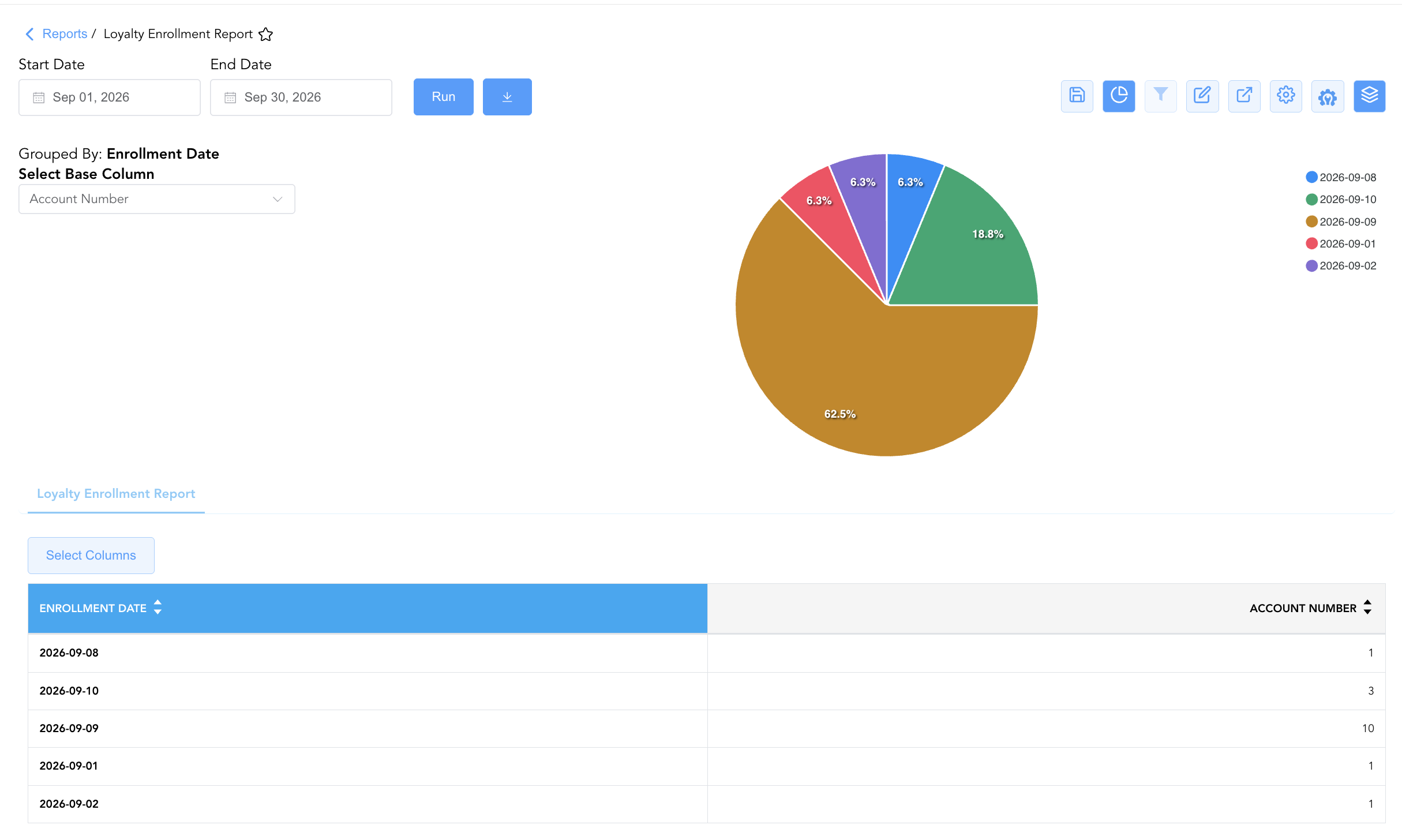
Group By & Pie Chart Visualization: The Loyalty Enrollment Report features an interactive pie chart to help analyze guest loyalty signups and staff acquisition share distributions. Users can group enrollment records on the fly by Username or Enrollment Date to evaluate front desk agent leaderboard rankings and channel productivity. By selecting Account Number from the Select Base Column dropdown menu, the chart dynamically renders percentage share breakdowns accompanied by an interactive color-coded legend.
Advanced Controls
-
Exporting & Incentive Audits: Download in Excel or PDF format to support monthly front desk incentive programs, agent bonus calculations, and brand loyalty audits.
-
Filtering: Filter data by specific
Usernameto audit individual agent performance, or isolate enrollments created at check-in (Enrollment Source = Front Desk). -
Highlighting (Conditional Formatting): Apply custom rules to automatically highlight high-performing agent sign-up milestones or incomplete member email profiles.
🔗 Related Reports & Next Steps
Within 🛎️ Front Desk & Guest Services & ⭐ Guest Insights & Relations:
-
Guest Opt In Preferences – Marketing consent and communication choice audit report.
-
Guest Remarks Report – Profile-level audit log displaying permanent guest notes and extended-stay attributes.
-
In House List – Real-time guest register detailing active room occupants, rate plans, and vehicle registration data.
Cross-Pillar Deep Dives:
-
📈 Revenue & Brand Analytics: Cross-reference new loyalty member volume against Occupancy Forecast and History and Rate Plan Summary to evaluate loyalty stay capture rates.