
Service Recovery Report Overview
Parent Hub: 🛎️ Front Desk & Guest Services
Category: ⭐ Guest Insights & Relations
Target Roles: Front Office Managers, Guest Relations Managers, Hotel Controllers, Night Auditors, General Managers, Guest Services Supervisors
Key Value: Monitor guest service recovery adjustments, track financial allowances versus non-revenue goodwill gestures, audit issue categories and staff resolution reasons, measure employee service recovery authority usage, and quantify total recovery costs.
Executive Summary
The Service Recovery Report is a primary financial audit, guest satisfaction tracking, and operational quality control document within the ⭐ Guest Insights & Relations category of the 🛎️ Front Desk & Guest Services hub. Designed to deliver complete operational transparency over guest issue resolutions, it itemizes every service recovery adjustment, rate reduction, allowance, and non-monetary gesture recorded in the Property Management System (PMS) across specified reporting windows.
-
By mapping operational adjustment timestamps (
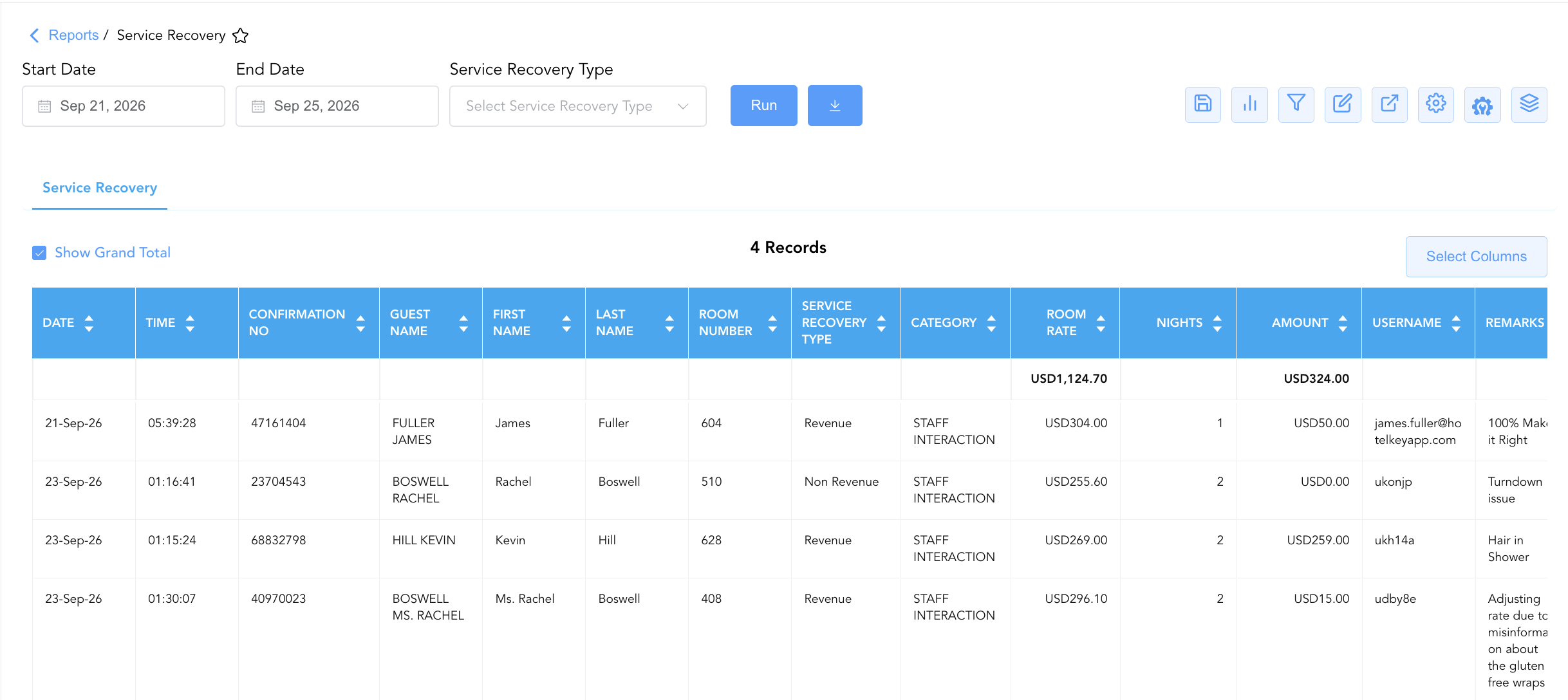
Date,Time) to reservation parameters (Confirmation No,Guest Name,First Name,Last Name,Room Number,Room Rate,Nights), resolution classifications (Service Recovery Type,Category), financial metrics (Amount), staff user credentials (Username), and descriptive justifications (Remarks), this report enables front desk managers, guest experience leads, and controllers to audit staff empowerment limits, quantify the true cost of service breakdowns, identify recurring operational failures, and safeguard hotel revenue.
Key Capabilities
-
Dual Recovery Type Classification: Distinguishes between direct rate adjustments and monetary billing allowances (
Revenue) versus goodwill operational resolutions (Non Revenue). -
Standardized Root-Cause Categorization: Group service recovery incidents by operational department or breakdown origin (
Category, e.g.,STAFF INTERACTION,HOUSEKEEPING,MAINTENANCE) to isolate recurring service bottlenecks. -
Financial Allowance Quantification: Itemizes individual recovery dollar amounts (
Amount) alongside posted room rates (Room Rate) to evaluate recovery costs relative to guest stay value. -
Staff Empowerment & User Audit: Tracks the specific employee username or email (
Username) processing the adjustment to audit staff empowerment thresholds and prevent unauthorized folio discounts. -
Detailed Issue Remarks Logging: Captures free-text resolution explanations (
Remarks, e.g., "100% Make it Right", "Turndown issue", "Hair in Shower", "Adjusting rate due to misinformation") to verify resolution policy compliance.
Report Views & Functional Breakdown
The Service Recovery Report presents issue resolution and adjustment data in a unified single-table ledger that supports three key analytical perspectives:
┌────────────────────────────────────────────────────────────────────────┐
│                      SERVICE RECOVERY REPORT                           │
├────────────────────────────────────────────────────────────────────────┤
│                         Unified Matrix View                            │
├──────────────────────────┬──────────────────────────┬──────────────────┤
│ 1. Guest Incident &      │ 2. Recovery Type &       │ 3. Staff Audit & │
│    Folio Allocation      │    Department Category   │    Adjustment Notes│
└──────────────────────────┴──────────────────────────┴──────────────────┘
1. Guest Incident & Folio Allocation
Monitors guest reservation details, stay timeframes, assigned room numbers, and base room rates.
-
Primary Use: Linking service recovery adjustments directly to active or checked-out guest folios and evaluating recovery costs against total stay revenue.
-
Key Metrics: Confirmation No, Guest Name, Room Number, Room Rate, Nights, Date, Time.
2. Recovery Type & Department Category
Audits whether resolutions involved monetary adjustments (Revenue) or operational gestures (Non Revenue) and categorizes issue origins.
-
Primary Use: Tracking total monetary allowances granted, identifying high-risk failure categories, and evaluating department-level service quality.
-
Key Metrics: Service Recovery Type, Category, Amount, Room Rate, Confirmation No.
3. Staff Audit & Adjustment Notes
Correlates recovery transactions directly with employee credentials and documented incident remarks.
-
Primary Use: Verifying employee authorization for discounts, reviewing "Make it Right" policy enforcement, and analyzing guest complaint trends during management meetings.
-
Key Metrics: Username, Remarks, Amount, Service Recovery Type, Date, Time.
Data Dictionary (Dynamic View Columns)
Customize your default view using the Configure (⚙️) icon on the report page. Below is the full data dictionary representing all 14 available columns in this report:
💡 Financial Calculation Note: Amount reflects the gross dollar value of the service recovery discount or credit credited to the guest folio. Service Recovery Type classifies whether the adjustment impacted net room/incidental revenue (
Revenue) or was an operational goodwill gesture (Non Revenue).
|
Column Name |
Description |
Data Source / System Mapping |
Includes Taxes & Fees? |
|
Date |
Calendar date on which the service recovery adjustment was posted. |
PMS Folio Audit > Adjustment Date |
N/A |
|
Time |
Exact timestamp recording when the adjustment was processed. |
PMS Folio Audit > Adjustment Time |
N/A |
|
Confirmation No |
Unique alphanumeric reservation identifier. |
Reservation System > Confirmation ID |
N/A |
|
Guest Name |
Combined full name of the registered guest. |
Guest Profile > Full Name |
N/A |
|
First Name |
First name of the primary registered guest. |
Guest Profile > First Name |
N/A |
|
Last Name |
Last name of the primary registered guest. |
Guest Profile > Last Name |
N/A |
|
Room Number |
Physical guest room assigned to the reservation. |
PMS > Assigned Room Number |
N/A |
|
Room Rate |
Posted daily base room rate for the guest stay. |
Folio Posting > Base Room Rate |
❌ No |
|
Nights |
Total physical room nights spanned by the stay. |
Reservation System > Total Nights |
N/A |
|
Service Recovery Type |
Operational classification of the adjustment ( |
PMS Adjustment Setup > Recovery Type |
N/A |
|
Category |
Departmental or operational failure category (e.g., |
PMS Adjustment Setup > Reason Category |
N/A |
|
Username |
User login ID or email address of the employee who processed the adjustment. |
Security Audit Trail > User ID |
N/A |
|
Amount |
Dollar amount credited or adjusted on the guest folio as service recovery. |
Folio Posting > Recovery Amount |
❌ No |
|
Remarks |
Detailed free-text operational notes justifying the adjustment or describing the guest issue. |
PMS Adjustment Prompt > Remarks |
N/A |
Customization & Platform Features
User & Property Preferences
-
Personal Preference: Tailor your individual view by hiding or dragging columns. Your preferences save automatically for future sessions.
-
Property Defaults: System Admins can configure standard default layouts across all property users to streamline operational reporting. To maximize audit efficiency, group the columns into the below logical blocks:
-
Transaction Timestamps & Reservation Audit (Cols 1–3):
Date|Time|Confirmation No -
Guest Profile & Location (Cols 4–7):
Guest Name|First Name|Last Name|Room Number -
Recovery Classification & Adjustment Type (Cols 8–9):
Service Recovery Type|Category -
Stay Financial Context & Adjustment Amount (Cols 10–12):
Room Rate|Nights|Amount -
Staff Accountability & Operational Remarks (Cols 13–14):
Username|Remarks
-
Report Toolbar & Quick Actions
Use the top-right toolbar icons on the report page to manage and export your data view:
|
Icon |
Action / Feature |
Description |

|
Knowledge Article |
Opens the knowledge base article to learn how to interpret this report. |

|
Saved Views |
Saves your column filtering, sorting, and highlight preferences so you can easily reload your custom view later without reconfiguring the report. |

|
Bar Chart |
Displays report data in a visual bar chart format. |

|
Filter |
Opens filter controls to isolate specific data within a column based on your selected criteria. |

|
Highlight |
Highlights column values in a designated color based on selected conditions. |

|
Export |
Exports and downloads the report in various formats (Excel, PDF, CSV) for offline analysis or printing. |

|
Configure |
Opens column selection controls to toggle visibility, reorder columns, or hide rows with all zeros. |

|
Additional Configuration |
Provides advanced report configuration and display formatting options to customize data presentation. |

|
Group By |
Summarize and group report data dynamically in real time. |
Interactive Visualizations & Grouping Controls
-
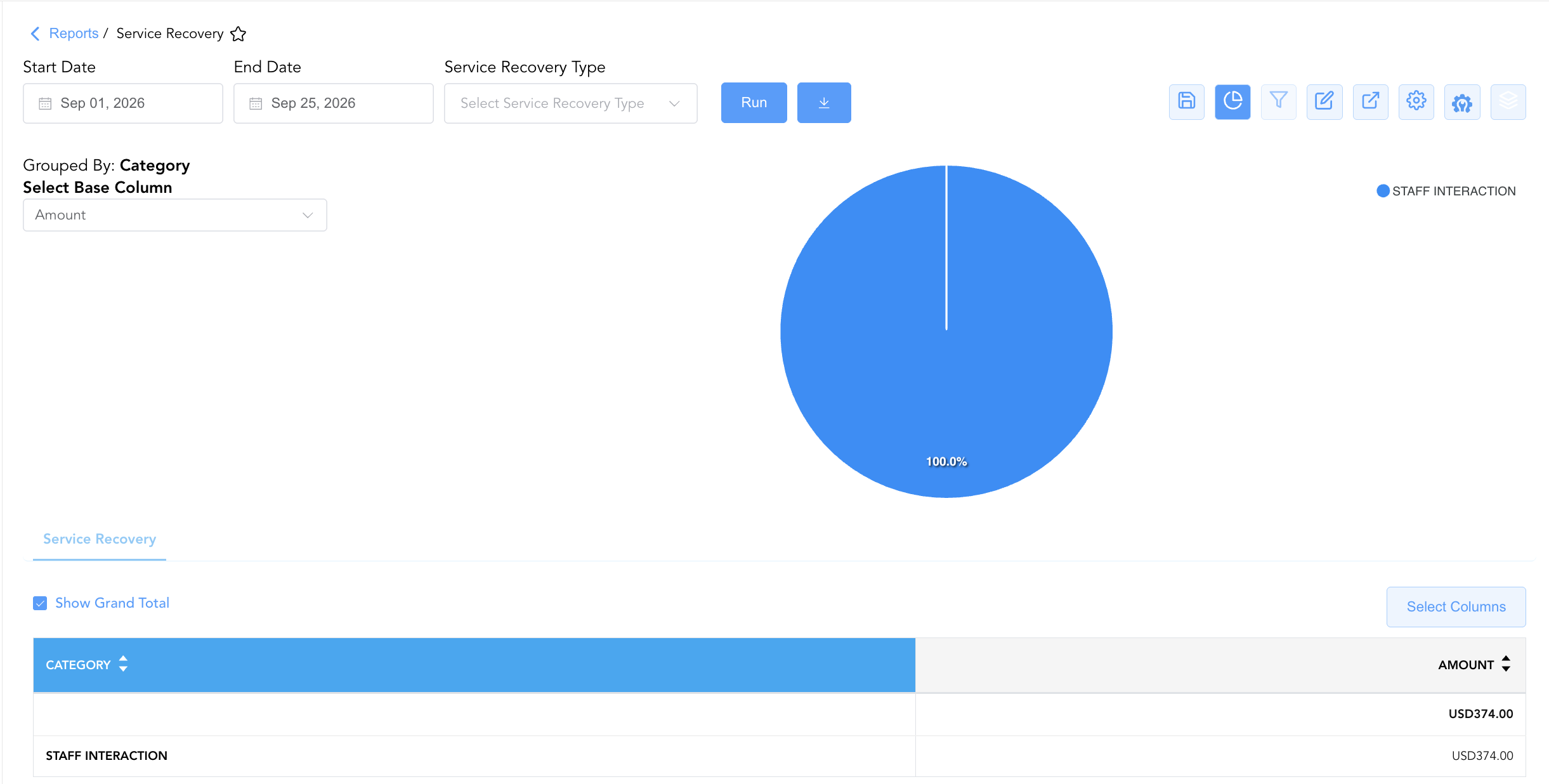
Group By & Pie Chart Visualization: The Service Recovery report features an interactive pie chart to help analyze financial adjustment distributions and service issue drivers. Users can group service recovery records on the fly by Category to evaluate departmental error trends and staff allowance volume. By selecting Amount from the Select Base Column dropdown menu, the chart dynamically renders percentage share breakdowns accompanied by an interactive color-coded legend.
-
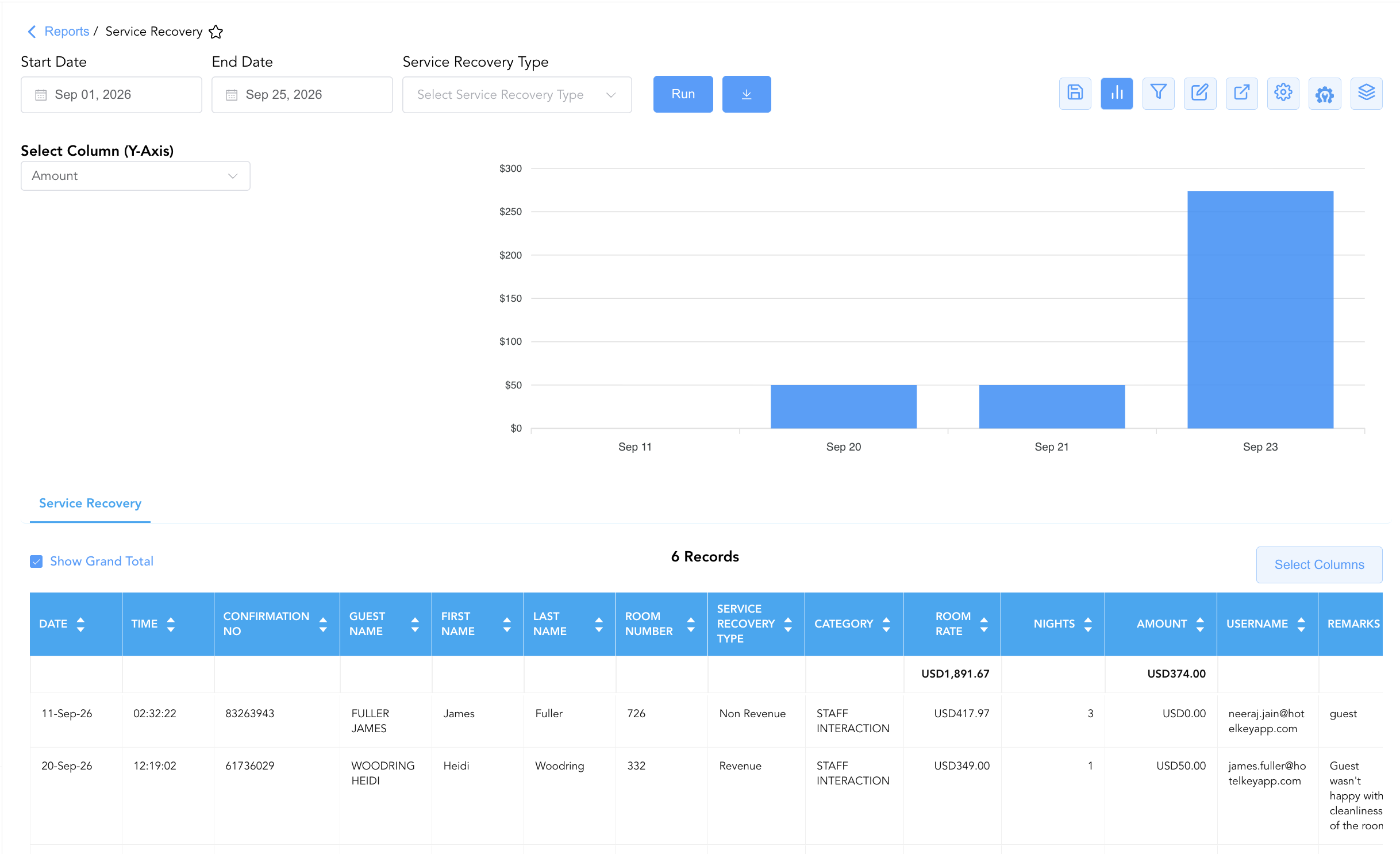
Bar Chart Visualizer: The Service Recovery report includes an interactive bar chart to help analyze guest compensation costs and financial allowance trends over time. By selecting Amount from the Select Column (Y-Axis) dropdown menu, users can dynamically plot daily recovery adjustment totals chronologically alongside the detailed service recovery log
Advanced Controls
-
Exporting & Financial Audits: Download in Excel or PDF format to support weekly controller audits, department head reviews, and general manager risk assessments.
-
Filtering: Filter data by
Service Recovery Type = Revenueto audit cash/credit allowances, or isolate high-dollar adjustments (Amount > $100). -
Highlighting (Conditional Formatting): Apply custom rules to automatically highlight 100% room rate waivers (
Amount = Room Rate), specific staff user entries, or recurring maintenance categories.
🔗 Related Reports & Next Steps
Within 🛎️ Front Desk & Guest Services & ⭐ Guest Insights & Relations:
-
Guest Remarks – Profile-level audit log displaying permanent guest notes and extended-stay attributes.
-
In House List – Real-time guest register detailing active room occupants, rate plans, and vehicle registration data.
-
Reminders Report – Operational task, amenity delivery, and shift incident tracking log.
-
Do Not Rent – Security governance report tracking blacklisted guest profiles and restriction codes.
Cross-Pillar Deep Dives:
-
⚖️ Ledgers & Trial Balance: Reconcile total service recovery allowances (
Amount) against General Ledger revenue reduction accounts in Trial Balance. -
🧹 Housekeeping & Maintenance: Cross-reference cleanliness or maintenance recovery remarks ("Hair in Shower", "Turndown issue") with Housekeeping Sheet and All Rooms report to enforce quality standards.