
Breakfast and Packages Report Overview
Parent Hub: 🛎️ Front Desk & Guest Services
Category: 📱 Self-Service & Packages
Target Roles: Food & Beverage Managers, Restaurant Supervisors, Executive Chefs, Front Office Managers, Revenue Managers, Hotel Controllers, General Managers
Key Value: Audit guest breakfast entitlements and add-on package purchases, forecast daily kitchen meal prep and dining room covers, verify package element revenue posting, track add-on amenity deliveries, and streamline F&B voucher/entitlement fulfillment.
Executive Summary
The Breakfast and Packages Report is a critical operational forecasting, dining entitlement reconciliation, and package revenue audit document within the 📱 Self-Service & Packages category of the 🛎️ Front Desk & Guest Services hub. Designed to deliver complete cross-departmental transparency over rate-included breakfast plans, standalone F&B add-ons, and special amenity packages (such as champagne and roses), it itemizes all guest package commitments across active and upcoming stays.
-
By organizing package data into 4 defined report sections: Breakfast And Packages, Summary By Date, Summary By Package Element, and Add On Packages, this report enables food & beverage teams, culinary leads, front office agents, and controllers to audit detailed reservation-level entitlements (
Breakfast And Packages), forecast daily meal covers (Summary By Date), analyze departmental consumption volumes (Summary By Package Element), and reconcile standalone add-on package revenues (Add On Packages). It maps stay parameters (Date,Confirmation No,Guest Name,Room Number,Rate Plan,Arrival Date,Departure Date,Status,Adults,Children,Total Guests) with package configuration attributes (Package Elements,Package Category,Package Name,Package Revenue,Add On Package Quantity,Total Consumption,Projected Occupancy).
Key Capabilities
-
Four-Section Operational Breakdown: Isolates granular reservation-level entitlements (
Breakfast And Packages) from daily cover summaries (Summary By Date), category element projections (Summary By Package Element), and standalone add-on sales (Add On Packages). -
Kitchen & Outlet Cover Forecasting: Projects total adult and child headcounts (
Adults,Children,Total Guests) entitled to breakfast each day to optimize kitchen staffing, food purchasing, and prep volume. -
Package Revenue & Pricing Audit: Tracks rate-inclusive package revenue allocations alongside standalone package sales (
Package Revenue,Add On Package Quantity). -
Amenity Delivery Coordination: Identifies non-breakfast special inclusions (
Package Category = OTHER,Package Elements = Champagne and Roses) to coordinate timely room deliveries between front desk, concierge, and room service. -
Package Origin Classification: Distinguishes rate-bundled breakfast entitlements (
Rate Plan = BEST FLEX WITH BKFST,Package Element = Bed and Breakfast Included) from guest-purchased add-ons (Breakfast Add On Purchase,Bed and Breakfast Purchased).
Report Views & Functional Breakdown
The Breakfast and Packages Report presents entitlement and package data across 4 defined sections:
┌────────────────────────────────────────────────────────────────────────┐
│                   BREAKFAST AND PACKAGES REPORT                        │
├────────────────────────────────────────────────────────────────────────┤
│                       4 Defined Report Sections                        │
├──────────────────────────┬──────────────────────────┬──────────────────┤
│ 1. Breakfast And Packages│ 2. Summary By Date       │ 3. Summary By    │
│    (Detail Manifest)     │    (Daily Cover Forecast)│    Pkg Element   │
├──────────────────────────┴──────────────────────────┴──────────────────┤
│ 4. Add On Packages Section (Standalone Purchased Amenities)            │
└────────────────────────────────────────────────────────────────────────┘
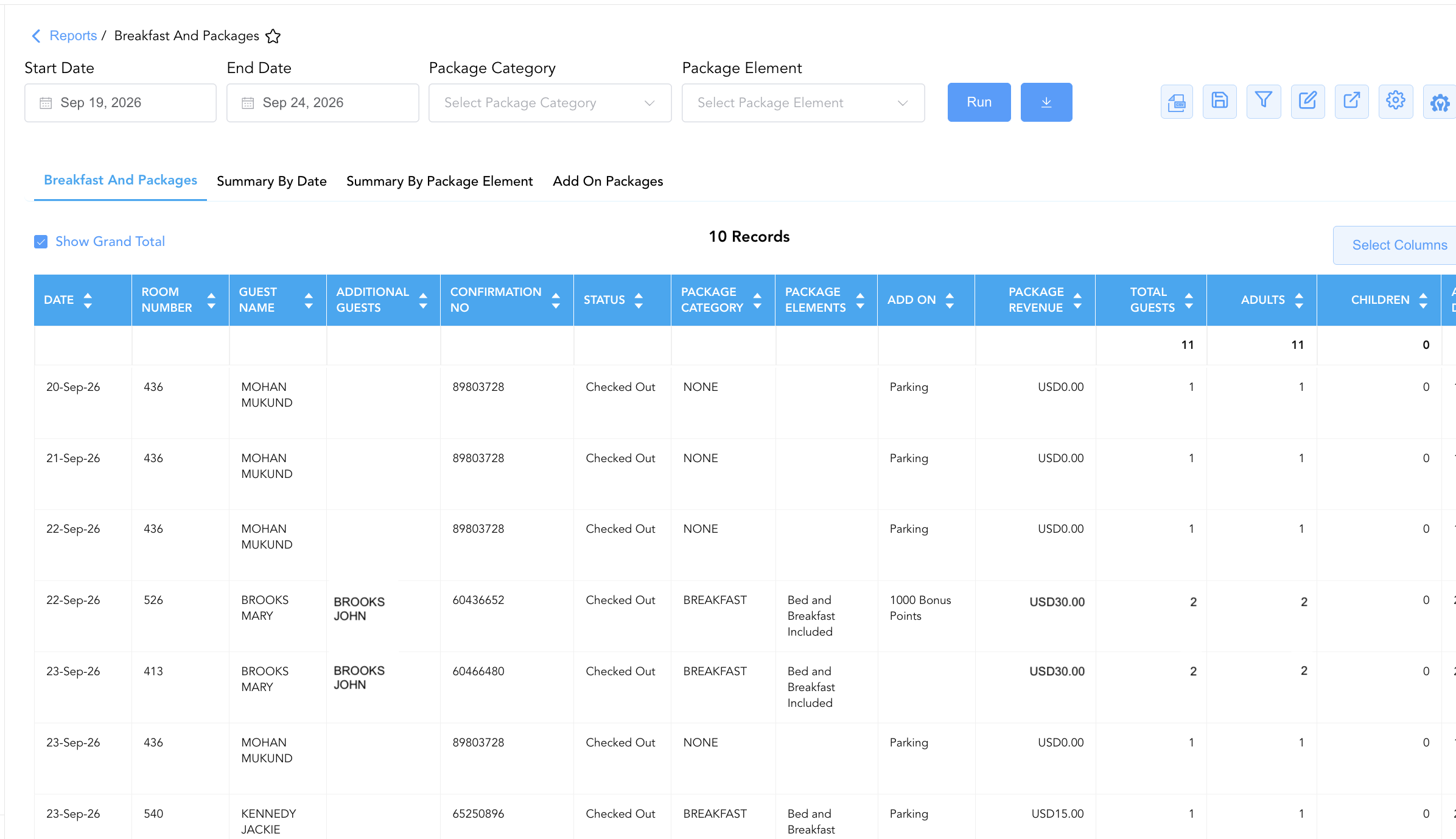
1. Breakfast And Packages Section
Monitors individual guest reservations holding rate-included or rate-attached package entitlements.
-
Primary Use: Verifying daily restaurant guest eligibility, checking room numbers and occupant headcounts at dining outlet podiums, and auditing rate plan package setups.
-
Key Metrics: Date, Confirmation No, Guest Name, Room Number, Rate Plan, Status, Adults, Children, Total Guests, Package Elements, Package Category, Package Revenue.
2. Summary By Date Section
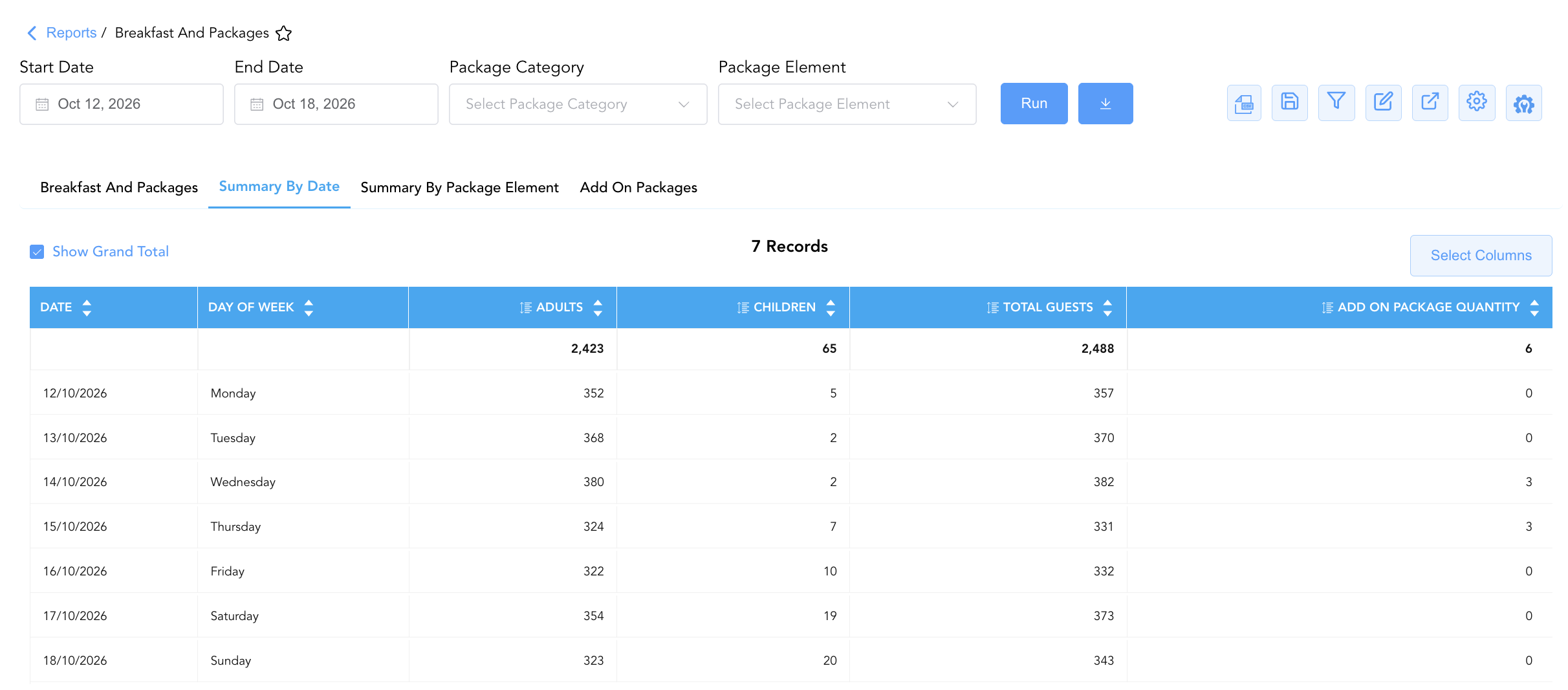
Aggregates total daily guest entitlement headcounts and add-on package quantities by day of the week.
-
Primary Use: Forecasting overall daily breakfast restaurant demand, staffing dining room attendants, and planning kitchen buffet production volumes.
-
Key Metrics: Date, Day Of Week, Adults, Children, Total Guests, Add On Package Quantity.
3. Summary By Package Element Section
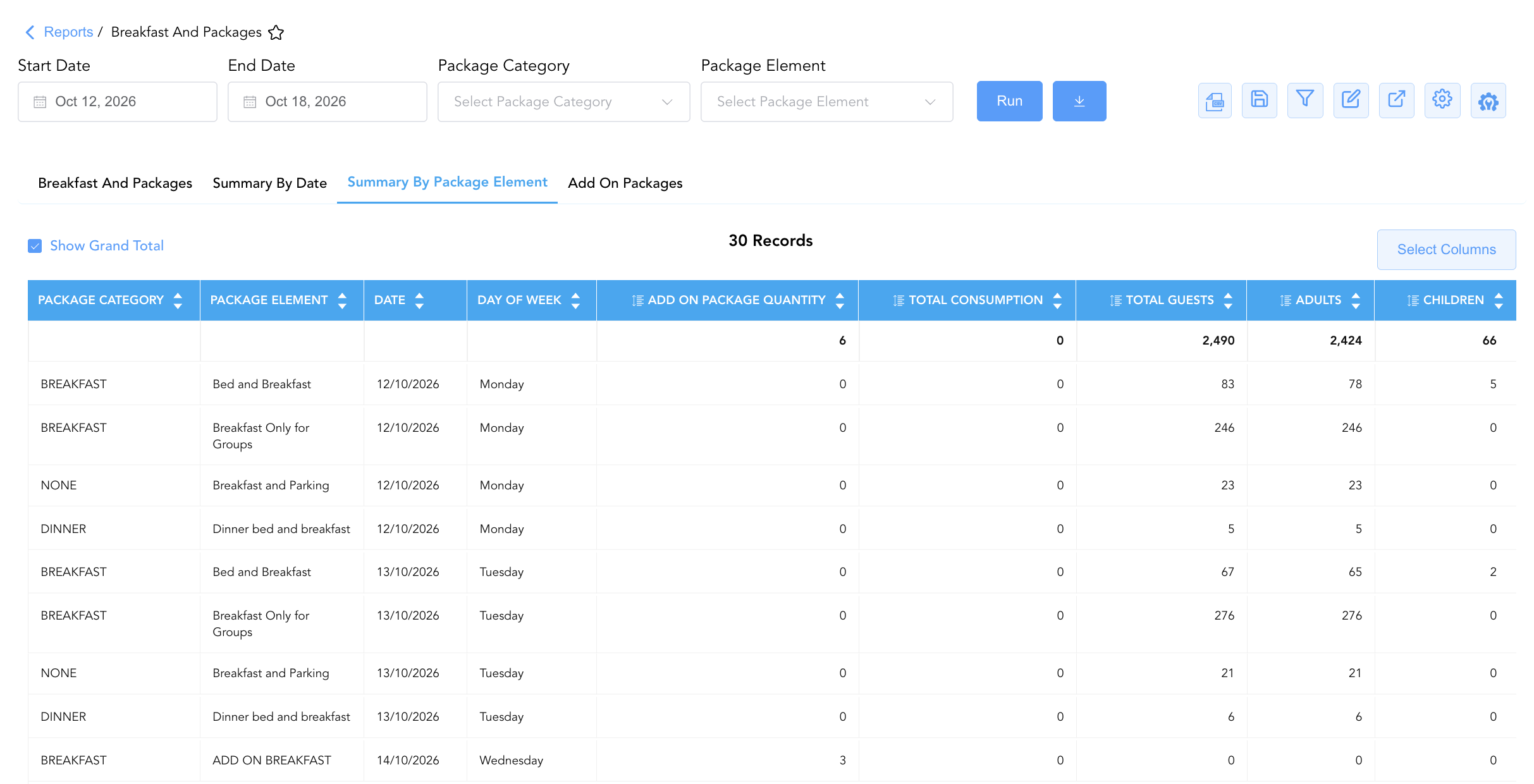
Categorizes daily entitlement counts by specific package element titles and operational categories (e.g., BREAKFAST, OTHER).
-
Primary Use: Differentiating rate-included breakfast covers from purchased breakfast add-ons and tracking special amenity consumption rates.
-
Key Metrics: Date, Day Of Week, Package Category, Package Element, Adults, Children, Total Guests, Add On Package Quantity, Total Consumption.
4. Add On Packages Section
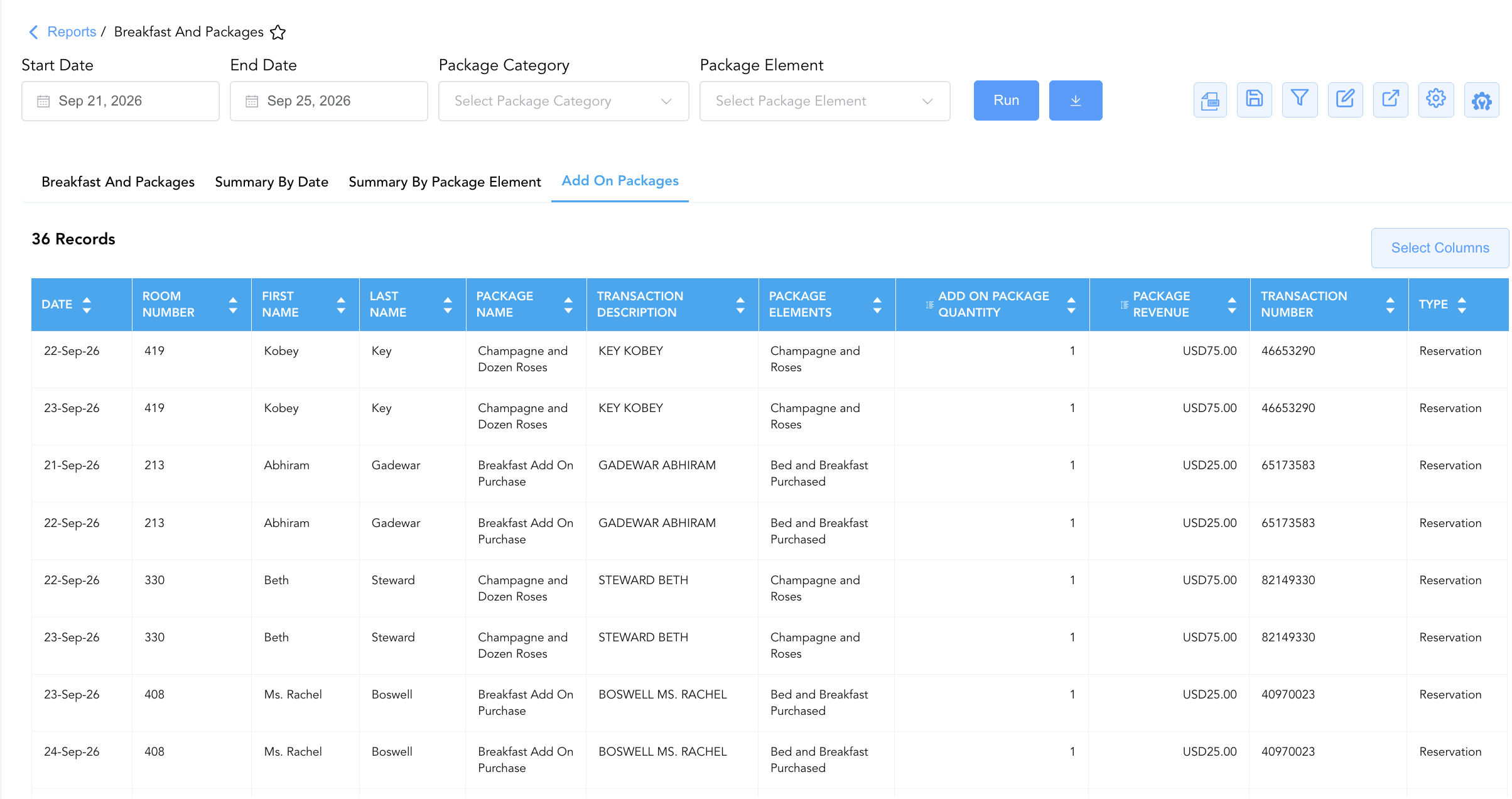
Itemizes standalone amenity and breakfast add-on purchases attached to guest reservations.
-
Primary Use: Reconciling standalone package sales revenue, tracking room delivery schedules for special gifts (e.g., Champagne & Dozen Roses), and auditing transaction descriptions.
-
Key Metrics: Type, Date, Transaction Number, Room Number, Guest Name, Package Name, Package Elements, Package Revenue, Add On Package Quantity.
Data Dictionary (Dynamic View Columns)
Customize your default view using the Configure (⚙️) icon on the report page. Below is the full data dictionary representing all 30 unique columns available across the 4 report sections:
💡 Financial & Entitlement Calculation Note:
Package Revenuerepresents net revenue earned from the package component (Package Revenue = Unit Price x Quantity). It is marked No under "Includes Taxes & Fees?" because taxes and service fees are calculated separately unless explicitly sold as an inclusive inclusive package rate.
|
Column Name |
Section Applicability |
Description |
Data Source / System Mapping |
Includes Taxes & Fees? |
|
Date |
All 4 Sections |
Calendar date on which the meal entitlement or package is valid/consumed. |
PMS Package Schedule > Entitlement Date |
N/A |
|
Confirmation No |
Section 1 |
Unique alphanumeric reservation identifier. |
Reservation System > Confirmation ID |
N/A |
|
Guest Name |
Sections 1 & 4 |
Combined full name of the primary registered guest. |
Guest Profile > Full Name |
N/A |
|
First Name |
Sections 1 & 4 |
First name of the primary registered guest. |
Guest Profile > First Name |
N/A |
|
Last Name |
Sections 1 & 4 |
Last name of the primary registered guest. |
Guest Profile > Last Name |
N/A |
|
Additional Guests |
Section 1 |
Names of secondary or accompanying occupants sharing the room. |
Reservation System > Additional Guests |
N/A |
|
Room Number |
Sections 1 & 4 |
Physical guest room assigned to the stay (Blank if unassigned). |
PMS > Assigned Room Number |
N/A |
|
Rate Plan |
Section 1 |
Active rate plan code attached to the reservation (e.g., |
Reservation System > Active Rate Code |
N/A |
|
Arrival Date |
Section 1 |
Scheduled or actual check-in date. |
Reservation System > Arrival Date |
N/A |
|
Departure Date |
Section 1 |
Scheduled check-out date. |
Reservation System > Departure Date |
N/A |
|
Status |
Section 1 |
Operational stay status (e.g., |
Reservation System > Main Status |
N/A |
|
Adults |
Sections 1, 2, 3 |
Count of adult occupants entitled to the package element. |
Reservation System > Adult Count |
N/A |
|
Children |
Sections 1, 2, 3 |
Count of child occupants entitled to the package element. |
Reservation System > Child Count |
N/A |
|
Total Guests |
Sections 1, 2, 3 |
Combined headcount of entitled occupants (Adults + Children). |
SUM(Adults + Children) |
N/A |
|
Loyalty Tier |
Section 1 |
Guest loyalty program membership level (e.g., Diamond Elite, Club). |
Loyalty Engine > Membership Tier |
N/A |
|
Benefits |
Section 1 |
Loyalty program tier benefits attached to the reservation. |
Loyalty Engine > Tier Benefits |
N/A |
|
Package Elements |
Sections 1 & 4 |
Specific item or service title included in the package (e.g., |
PMS Package Setup > Element Title |
N/A |
|
Package Category |
Sections 1 & 3 |
Broad operational department grouping (e.g., |
PMS Package Setup > Category |
N/A |
|
Room Preferences |
Section 1 |
Stored physical room feature or housekeeping preferences. |
Guest Preferences > Room Preferences |
N/A |
|
Add On |
Section 1 |
Indicator code or title for attached add-on packages. |
PMS Setup > Add-On Name |
N/A |
|
Package Revenue |
Sections 1 & 4 |
Billed dollar revenue generated by the package element. |
Folio Posting > Package Revenue |
❌ No |
|
Day Of Week |
Sections 2 & 3 |
Day of the week corresponding to the entitlement date (e.g., Monday, Tuesday). |
Date Function > Day Name |
N/A |
|
Add On Package Quantity |
Sections 2, 3, 4 |
Cumulative count of standalone add-on units purchased. |
SUM(Add-On Package Units) |
N/A |
|
Projected Occupancy |
Sections 2 & 3 |
Total projected room occupancy count for the property on that date. |
Occupancy Engine > Total Occupied Rooms |
N/A |
|
Package Element |
Section 3 |
Standardized title of the package element being summarized. |
PMS Package Setup > Element Name |
N/A |
|
Total Consumption |
Section 3 |
Measured physical redemption or consumption count recorded at dining outlets. |
Outlet POS / PMS > Redemptions |
N/A |
|
Type |
Section 4 |
Classification of the transaction entity (e.g., |
PMS Billing > Entity Type |
N/A |
|
Transaction Number |
Section 4 |
Unique PMS billing transaction identifier linked to the add-on purchase. |
PMS Billing > Transaction ID |
N/A |
|
Transaction Description |
Section 4 |
Operational description of the purchase (e.g., |
PMS Billing > Line Description |
N/A |
|
Package Name |
Section 4 |
Full commercial marketing name of the package (e.g., |
PMS Package Setup > Commercial Name |
N/A |
Customization & Platform Features
User & Property Preferences
-
Personal Preference: Tailor your individual view by hiding or dragging columns. Your preferences save automatically for future sessions.
-
Property Defaults: System Admins can configure standard default layouts across all property users to streamline operational reporting. To maximize audit efficiency, group the columns into the below logical blocks:
-
Section 1: Breakfast And Packages
-
Primary Locators & Guest Identification (Cols 1–8):
Date|Room Number|Guest Name|First Name|Last Name|Additional Guests|Confirmation No|Status -
Package, Inclusions & Revenue (Cols 9–12):
Package Category|Package Elements|Add On|Package Revenue -
Guest Counts & Stay Context (Cols 13–17):
Total Guests|Adults|Children|Arrival Date|Departure Date -
Rate Details & Preferences (Cols 18–21):
Rate Plan|Loyalty Tier|Benefits|Room Preferences
-
-
Section 2: Summary By Date
-
Date Anchors (Cols 1–2):
Date|Day Of Week -
Guest Volume & Package Headcounts (Cols 3–6):
Total Guests|Adults|Children|Add On Package Quantity
-
-
Section 3: Summary By Package Element
-
-
Package & Date Anchors (Cols 1–4):
Package Category|Package Element|Date|Day Of Week -
Quantities & Consumption Metrics (Cols 5–9):
Add On Package Quantity|Total Consumption|Total Guests|Adults|Children
-
-
-
-
-
Section 4: Add On Packages
-
Locators & Item Identifiers (Cols 1–7):
Date|Room Number|First Name|Last Name|Package Name|Transaction Description|Package Elements
-
-
-
-
-
Volume & Revenue (Cols 8–9):
Add On Package Quantity|Package Revenue -
Audit & Account Metadata (Cols 10–11):
Transaction Number|Type
-
-
Report Toolbar & Quick Actions
Use the top-right toolbar icons on the report page to manage and export your data view:
|
Icon |
Action / Feature |
Description |

|
Knowledge Article |
Opens the knowledge base article to learn how to interpret this report. |

|
Background Export |
Allows users to download up to 365 days of data directly to their computer in CSV format. |

|
Saved Views |
Saves your column filtering, sorting, and highlight preferences so you can easily reload your custom view later without reconfiguring the report. |

|
Filter |
Opens filter controls to isolate specific data within a column based on your selected criteria. |

|
Highlight |
Highlights column values in a designated color based on selected conditions. |

|
Export |
Exports and downloads the report in various formats (Excel, PDF, CSV) for offline analysis or printing. |

|
Configure |
Opens column selection controls to toggle visibility, reorder columns, or hide rows with all zeros. |

|
Additional Configuration |
Provides advanced report configuration and display formatting options to customize data presentation. |
Advanced Controls
-
Exporting & Kitchen Prep Logs: Download Section 2 and Section 3 in Excel or PDF format to generate daily morning prep sheets for culinary and outlet staff.
-
Filtering: Filter Section 1 by
Package Category = BREAKFASTfor restaurant podium staff, or filter Section 4 byPackage Name = Champagne and Dozen Rosesfor room amenity setups. -
Highlighting (Conditional Formatting): Apply custom rules to automatically highlight high-occupancy guest rooms (
Total Guests > 2), special amenity add-ons, or unassigned room numbers.
🔗 Related Reports & Next Steps
Within 🛎️ Front Desk & Guest Services & 📱 Self-Service & Packages:
-
In House List – Real-time guest register detailing active room occupants, rate plans, and room assignments.
-
Stay Request Details – Itemized task dispatch report tracking housekeeping and room feature requests.
-
Departures Details – Manifest tracking scheduled guest departures, folio numbers, and outstanding balances.
Cross-Pillar Deep Dives:
-
🍽️ Food & Beverage / Outlets: Reconcile daily package cover counts (
Total Guests) against POS restaurant revenue and voucher redemption logs. -
📈 Revenue & Sales: Evaluate package conversion rates and add-on revenue performance in Rate Plan Summary and Add on Revenue.