
In House Report Overview
Parent Hub: 🛎️ Front Desk & Guest Services
Category: 🏨 In-House & Occupancy
Target Roles: Front Office Managers, Front Desk Agents, Guest Services Supervisors, Housekeeping Supervisors, Night Auditors, Hotel Controllers, General Managers
Key Value: Monitor all currently registered in-house guests, verify room assignments and occupancy statuses, inspect rate plans, room rates, and folio charge rules, track vehicle registration details, and ensure complete guest safety and operational compliance.
Executive Summary
The In House Report is the central operational roster and guest register document within the 🏨 In-House & Occupancy category of the 🛎️ Front Desk & Guest Services hub. Designed to deliver complete real-time visibility over all guests actively occupying hotel rooms, it aggregates guest identity profiles, loyalty standings, stay timeframes, room assignments, rate plan pricing, vehicle registration data, and special VIP designations.
-
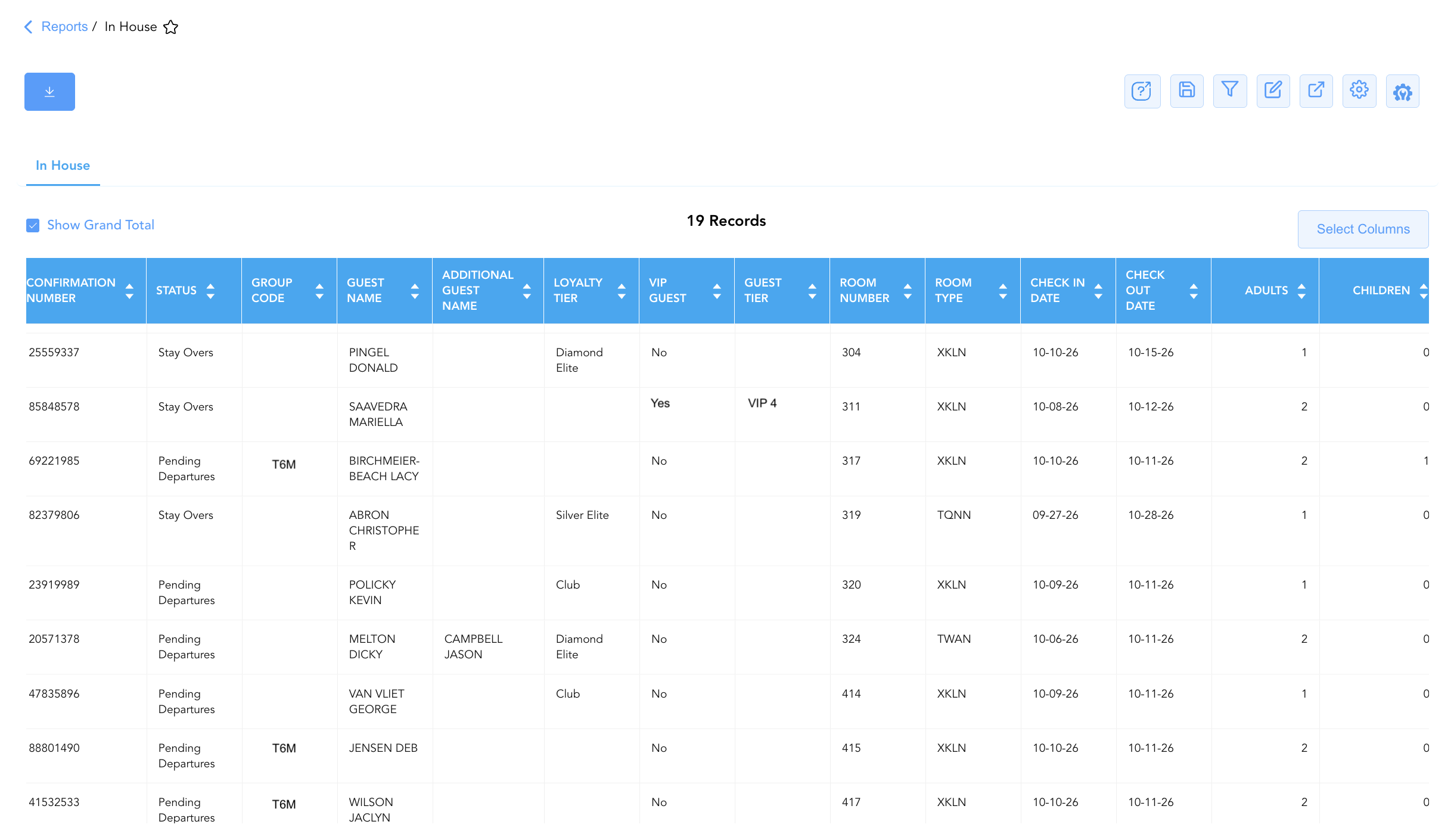
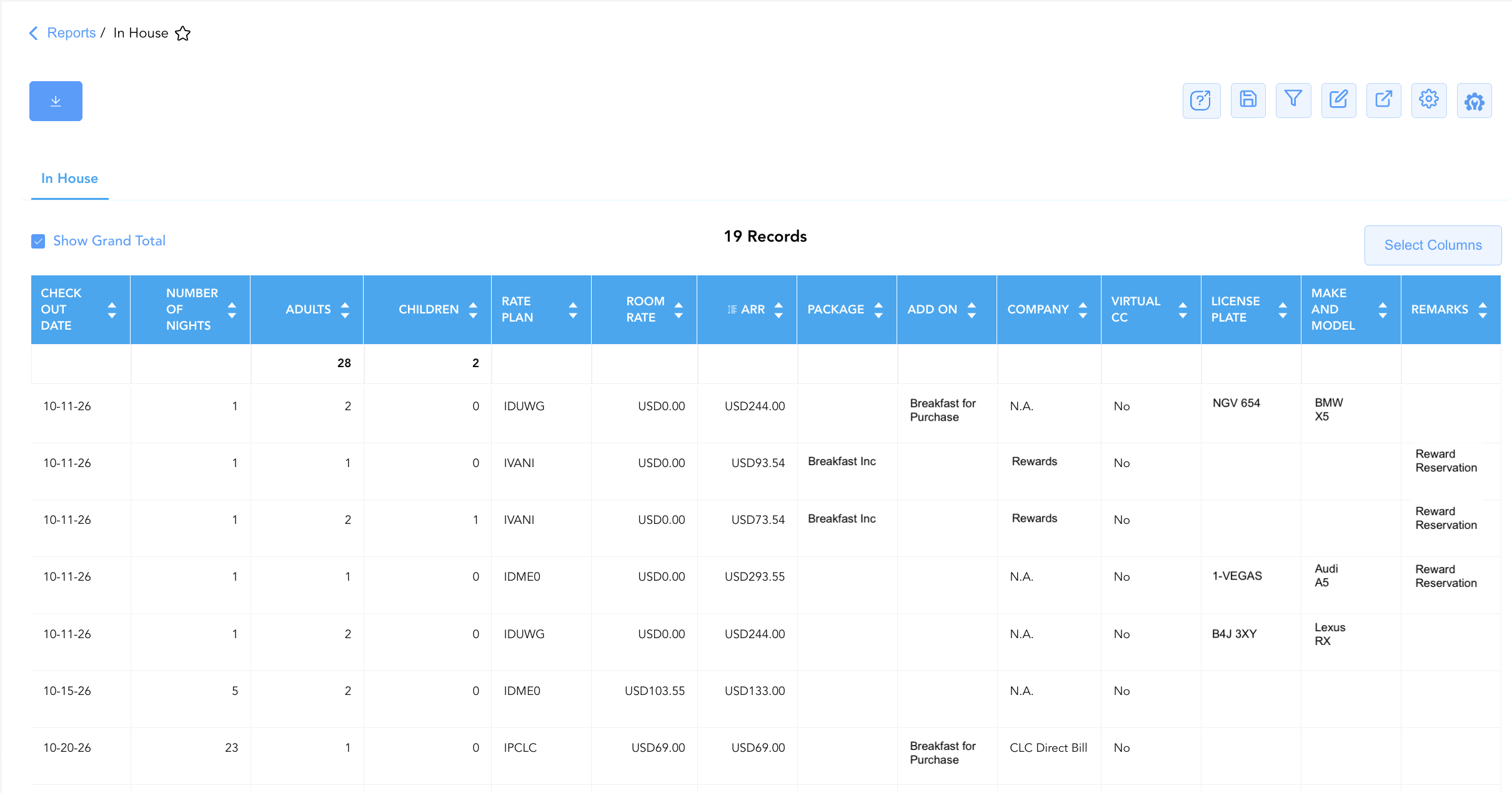
By mapping reservation parameters (Confirmation Number, Group Number, Group Code, PO Number, Status) to guest profiles (Guest Name, Additional Guest Name, First Name, Last Name, Local First Name, Local Last Name, Loyalty Tier, VIP Guest, Guest Tier, Company), stay details (Check In Date, Check Out Date, Number Of Nights, Adults, Children), room and pricing metrics (Room Number, Room Type, Rate Plan, Package, Room Rate, Add On, ARR), and vehicle/security attributes (License Plate, Make and Model, Remarks, Virtual CC), this report enables front desk agents, night auditors, and hotel managers to audit in-house occupancy, coordinate housekeeping workflows, verify billing rules, and manage emergency evacuation manifests.
Key Capabilities
-
Real-Time Guest Roster Audit: Itemizes all active in-house reservations, providing a live count of occupied rooms, adult occupants (
Adults), child headcounts (Children), and registered guest names (Guest Name,Additional Guest Name). -
Room & Rate Structure Verification: Displays assigned physical room numbers (
Room Number), room categories (Room Type), applied rate codes (Rate Plan), package inclusions (Package), daily room rates (Room Rate), and Average Room Rates (ARR). -
Loyalty & VIP Guest Identification: Highlights guest loyalty tiers (
Loyalty Tier), VIP classifications (VIP Guest), and property tier standings (Guest Tier) to ensure proper recognition and service delivery. -
Corporate & Group Attachment Tracking: Captures corporate company profile attachments (
Company), group master contracts (Group Number,Group Code), and purchase orders (PO Number) for direct billing verification. -
Vehicle & Security Information Logging: Tracks guest vehicle license plates (
License Plate), vehicle descriptions (Make and Model), payment security indicators (Virtual CC), and operational handling instructions (Remarks).
Report Views & Functional Breakdown
The In House Report presents active guest register data in a unified single-table ledger that supports three key analytical perspectives:
┌────────────────────────────────────────────────────────────────────────┐
│                        IN HOUSE REPORT                                 │
├────────────────────────────────────────────────────────────────────────┤
│                         Unified Matrix View                            │
├──────────────────────────┬──────────────────────────┬──────────────────┤
│ 1. Guest Roster &        │ 2. Stay, Room & Rate     │ 3. Security,     │
│    Profile Details       │    Structure             │    Vehicle & Notes│
└──────────────────────────┴──────────────────────────┴──────────────────┘
1. Guest Roster & Profile Details
Monitors registered guest names, loyalty program standings, corporate account affiliations, and occupant headcounts.
-
Primary Use: Verifying guest identity, checking loyalty program tier perks, reviewing accompanying secondary guest names, and identifying VIP profiles.
-
Key Metrics: Confirmation Number, Guest Name, First Name, Last Name, Loyalty Tier, VIP Guest, Guest Tier, Company, Adults, Children.
2. Stay, Room & Rate Structure
Provides complete room allocations, stay timeframes, daily base rates, and package attachments across occupied rooms.
-
Primary Use: Auditing occupied room inventory, verifying rate plan pricing compliance, checking length of stay durations, and inspecting package or add-on amenities.
-
Key Metrics: Room Number, Room Type, Rate Plan, Room Rate, ARR, Package, Add On, Check In Date, Check Out Date, Number Of Nights, Status.
3. Security, Vehicle & Notes Matrix
Correlates in-house stays with vehicle registration records, payment security flags, and operational stay remarks.
-
Primary Use: Managing guest parking permits, identifying vehicle ownership for parking management, verifying virtual credit card payment guarantees, and reading operational front desk notes.
-
Key Metrics: License Plate, Make and Model, Virtual CC, Remarks, PO Number, Group Code.
Data Dictionary (Dynamic View Columns)
Customize your default view using the Configure (⚙️) icon on the report page. Below is the full data dictionary representing all 31 columns available in this report:
💡 Rate Calculation Note: Room Rate reflects the daily base room rate charged for the stay (Excludes Taxes & Fees). ARR (Average Room Rate) represents the average rate calculated across the total stay length.
|
Column Name |
Description |
Data Source / System Mapping |
Includes Taxes & Fees? |
|
Confirmation Number |
Primary unique alphanumeric reservation identifier. |
Reservation System > Confirmation ID |
N/A |
|
Loyalty Tier |
Guest loyalty program membership level (e.g., Diamond Elite, Silver Elite, Club). |
Loyalty System > Membership Tier |
N/A |
|
Group Number |
Master group block identification number. |
Group Management > Group ID |
N/A |
|
Group Code |
Alphanumeric code assigned to the group block. |
Group Management > Group Code |
N/A |
|
PO Number |
Purchase order number supplied for corporate billing. |
Billing Setup > PO Number |
N/A |
|
Guest Name |
Combined full name of the primary registered guest. |
Guest Profile > Full Name |
N/A |
|
Additional Guest Name |
Full name of secondary or accompanying registered occupants. |
Guest Profile > Accompanying Guests |
N/A |
|
First Name |
First name of the primary registered guest. |
Guest Profile > First Name |
N/A |
|
Last Name |
Last name of the primary registered guest. |
Guest Profile > Last Name |
N/A |
|
Company |
Corporate company profile or direct bill account linked to the stay. |
Reservation System > Company Account |
N/A |
|
Adults |
Count of registered adult occupants in the room. |
Reservation System > Adult Count |
N/A |
|
Children |
Count of registered child occupants in the room. |
Reservation System > Child Count |
N/A |
|
License Plate |
Vehicle license plate number registered to the guest. |
Guest Vehicle Profile > License Plate |
N/A |
|
Check In Date |
Actual check-in date of the reservation. |
Reservation System > Check-In Date |
N/A |
|
Check Out Date |
Scheduled check-out date of the reservation. |
Reservation System > Check-Out Date |
N/A |
|
Number Of Nights |
Total physical room nights spanned by the stay. |
Reservation System > Total Nights |
N/A |
|
Room Number |
Physical guest room assigned to the in-house stay. |
PMS > Assigned Room Number |
N/A |
|
Room Type |
Code representing the occupied room category. |
PMS > Room Type Code |
N/A |
|
Rate Plan |
Active rate plan code attached to the reservation. |
Reservation System > Active Rate Code |
N/A |
|
Package |
Code of package inclusions attached to the rate plan. |
Rate Engine > Package Setup |
N/A |
|
Room Rate |
Daily base room rate posted for the stay. |
Folio Posting > Daily Room Rate |
❌ No |
|
Add On |
Ancillary add-on products or services attached to the stay. |
PMS Billing > Add-On Services |
N/A |
|
Status |
Operational reservation status (e.g., In House). |
Reservation System > Main Status |
N/A |
|
ARR |
Average Room Rate earned across the total stay length. |
Folio Posting > Average Room Rate |
❌ No |
|
Remarks |
Operational notes, special requests, or delivery instructions. |
Reservation Notes > Remarks |
N/A |
|
Make and Model |
Vehicle make, model, and color description registered to the guest. |
Guest Vehicle Profile > Description |
N/A |
|
VIP Guest |
VIP status indicator or tier classification. |
Guest Profile > VIP Flag |
N/A |
|
Guest Tier |
Property-defined guest classification tier. |
Guest Profile > Guest Tier |
N/A |
|
Virtual CC |
Indicator flag noting payment guaranteed by Virtual Credit Card. |
PMS Billing > VCC Flag |
N/A |
|
Local First Name |
First name rendered in local language character set. |
Guest Profile > Local First Name |
N/A |
|
Local Last Name |
Last name rendered in local language character set. |
Guest Profile > Local Last Name |
N/A |
Customization & Platform Features
User & Property Preferences
-
Personal Preference: Tailor your individual view by hiding or dragging columns. Your preferences save automatically for future sessions.
-
Property Defaults: System Admins can configure standard default layouts across all property users to streamline operational reporting. To maximize audit efficiency, group the columns into the below logical blocks:
-
Reservation Identification & Group Mapping (Cols 1–5):
Confirmation Number|Status|Group Number|Group Code|PO Number -
Guest Profile & Contact Identification (Cols 6–13):
Guest Name|First Name|Last Name|Local First Name|Local Last Name|Additional Guest Name|Loyalty Tier|VIP Guest / Guest Tier -
Room Assignment & Property Operations (Cols 14–15):
Room Number|Room Type -
Stay Itinerary & Timestamps (Cols 16–18):
Check In Date|Check Out Date|Number Of Nights -
Guest Occupancy Demographics (Cols 19–20):
Adults|Children -
Rate Plan, Package & Financial Inclusions (Cols 21–25):
Rate Plan|Room Rate|ARR|Package|Add On -
Company Profile & Payment Indicators (Cols 26–27):
Company|Virtual CC -
Guest Vehicle Identification (Cols 27–29):
License Plate|Make and Model -
Operational Remarks (Col 30):
Remarks
-
Report Toolbar & Quick Actions
Use the top-right toolbar icons on the report page to manage and export your data view:
|
Icon |
Action / Feature |
Description |

|
Knowledge Article |
Opens the knowledge base article to learn how to interpret this report. |

|
Saved Views |
Saves your column filtering, sorting, and highlight preferences so you can easily reload your custom view later without reconfiguring the report. |

|
Filter |
Opens filter controls to isolate specific data within a column based on your selected criteria. |

|
Highlight |
Highlights column values in a designated color based on selected conditions. |

|
Export |
Exports and downloads the report in various formats (Excel, PDF, CSV) for offline analysis or printing. |

|
Configure |
Opens column selection controls to toggle visibility, reorder columns, or hide rows with all zeros. |

|
Additional Configuration |
Provides advanced report configuration and display formatting options to customize data presentation. |
Interactive Visualizations & Grouping Controls
-
Dynamic Section Grouping: Group in-house records on the fly by
Rate Plan,Company,Room Type, orLoyalty Tierto evaluate current house mix and corporate occupancy share. -
Visual Chart Display: Switch view modes to render Bar Charts (ranking top corporate accounts by occupied room count) or Pie Charts (visualizing loyalty tier distribution) for front office shift briefings.
Advanced Controls
-
Exporting & Emergency Manifests: Download in Excel or PDF format to maintain an updated paper manifest for emergency procedures, night audit handovers, and manager on duty checks.
-
Filtering: Filter data by specific
Loyalty Tier = Diamond Elite, isolate vehicle registrations (License Plate != Blank), or filter byCompany. -
Highlighting (Conditional Formatting): Apply custom rules to automatically highlight high-tier VIP guests, zero-rate room stays (
Room Rate = $0), or missing vehicle license plate details.
🔗 Related Reports & Next Steps
Within 🛎️ Front Desk & Guest Services & 🏨 In-House & Occupancy:
-
Arrivals List – Detailed daily manifest of expected arriving guests, check-in statuses, and room assignments.
-
Departures Details – Comprehensive manifest tracking daily scheduled guest departures, folio numbers, and outstanding balances.
Cross-Pillar Deep Dives:
-
📈 Revenue & Analytics: Reconcile active room revenue postings against Occupancy Forecast and History and Rate Plan Summary.
-
⚖️ Ledgers & Trial Balance: Verify active guest folio balances against Guest Ledger control accounts in Trial Balance.