
Room Count Summary Report Overview
Parent Hub: 🛎️ Front Desk & Guest Services
Category: 🏨 In-House & Occupancy
Target Roles: Housekeeping Managers, Executive Housekeepers, Front Office Managers, Facilities Managers, Revenue Managers, General Managers
Key Value: Audit property physical room stock and capacity, verify physical-to-virtual room mapping, track room count distribution across room categories, and maintain accurate inventory configuration standards in the Property Management System (PMS).
Executive Summary
The Room Count Summary Report is a primary physical inventory audit and room capacity document within the 🏨 In-House & Occupancy category of the 🛎️ Front Desk & Guest Services hub. Designed to deliver complete visibility over hotel physical room configurations and room category totals, it itemizes every physical room number alongside its assigned room type and provides an aggregated summary count by category.
-
By organizing room stock data into 2 defined report sections: Room Count Summary and Room Type Count, this report enables housekeeping supervisors, front office managers, facilities teams, and revenue directors to verify physical room setups (
Room Count Summary) alongside category totals (Room Type Count). It maps physical room numbers (Room Number) to PMS room category codes (Room Type) and calculates total room stock availability (Count).
Key Capabilities
-
Two-Section Inventory Audit: Separates granular room-by-room listings (
Room Count Summary) from macro category totals (Room Type Count) for thorough property auditing. -
Physical Room Stock Mapping: Itemizes every physical guest room (
Room Number) and its mapped room type category code (Room Type, e.g., TQNN, XKLN, TWAN, TWYN). -
Category Inventory Summarization: Aggregates total physical room counts (
Count) by room type code to verify house capacity and room mix ratios. -
PMS Configuration Verification: Serves as a baseline audit reference to verify that physical property additions, room type reclassifications, or room mapping edits are accurately reflected in the system.
-
Housekeeping & Facilities Planning: Provides housekeeping and maintenance supervisors with an official reference list for room assignment grids, floor plans, and physical asset management.
Report Views & Functional Breakdown
The Room Count Summary Report presents physical inventory data in a structured matrix across 2 defined sections:
┌────────────────────────────────────────────────────────────────────────┐
│                   ROOM COUNT SUMMARY REPORT                            │
├────────────────────────────────────────────────────────────────────────┤
│                       2 Defined Report Sections                        │
├──────────────────────────┬──────────────────────────┬──────────────────┤
│ 1. Room Count Summary    │ 2. Room Type Count       │                  │
│    Section (Granular)    │    Section (Aggregated)  │                  │
└──────────────────────────┴──────────────────────────┴──────────────────┘
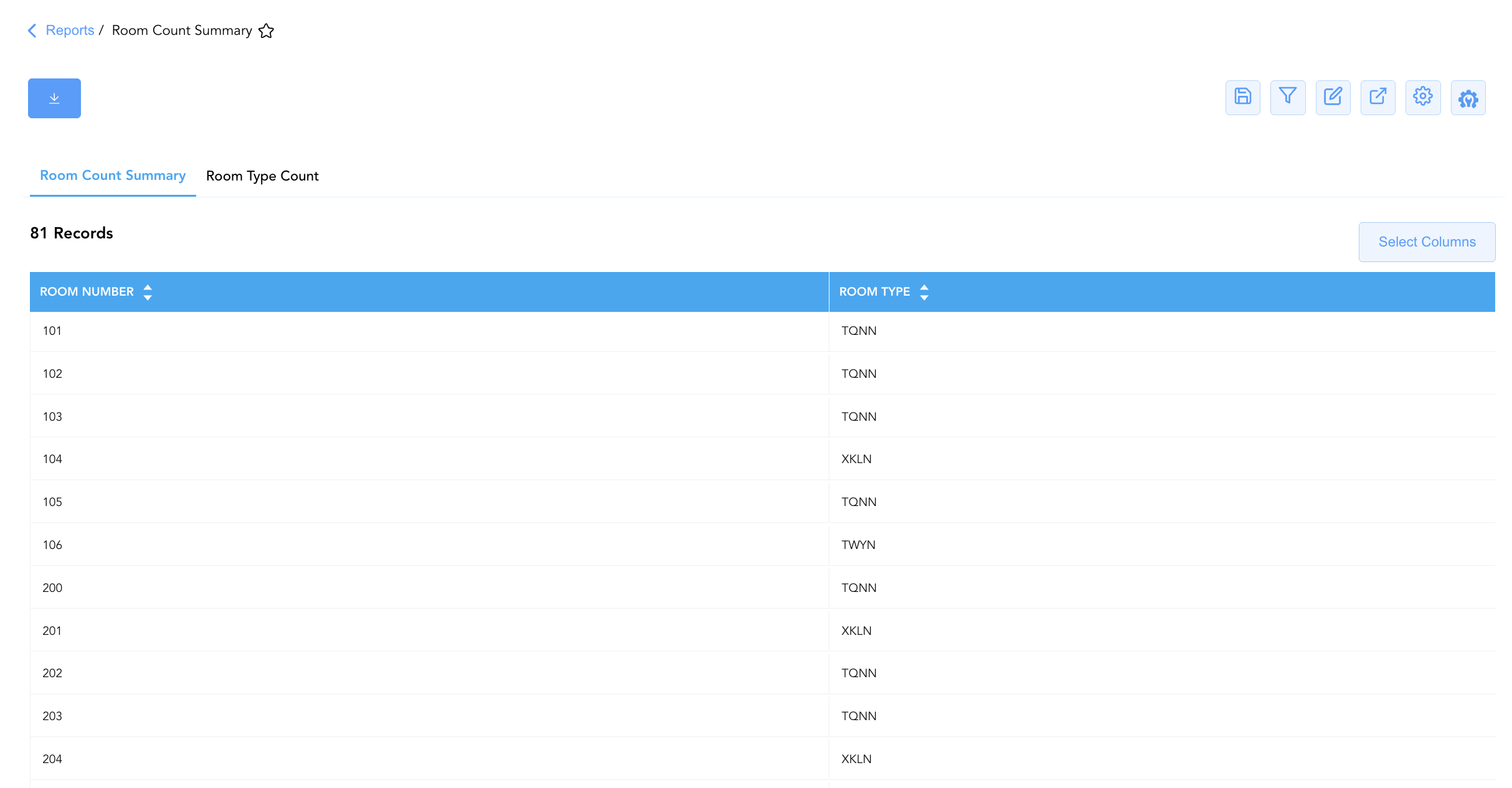
1. Room Count Summary Section
Monitors every individual physical guest room on the property and its designated room type category.
-
Primary Use: Verifying individual room category assignments, inspecting floor plan room mappings, and auditing room-by-room system setup.
-
Key Metrics: Room Number, Room Type.
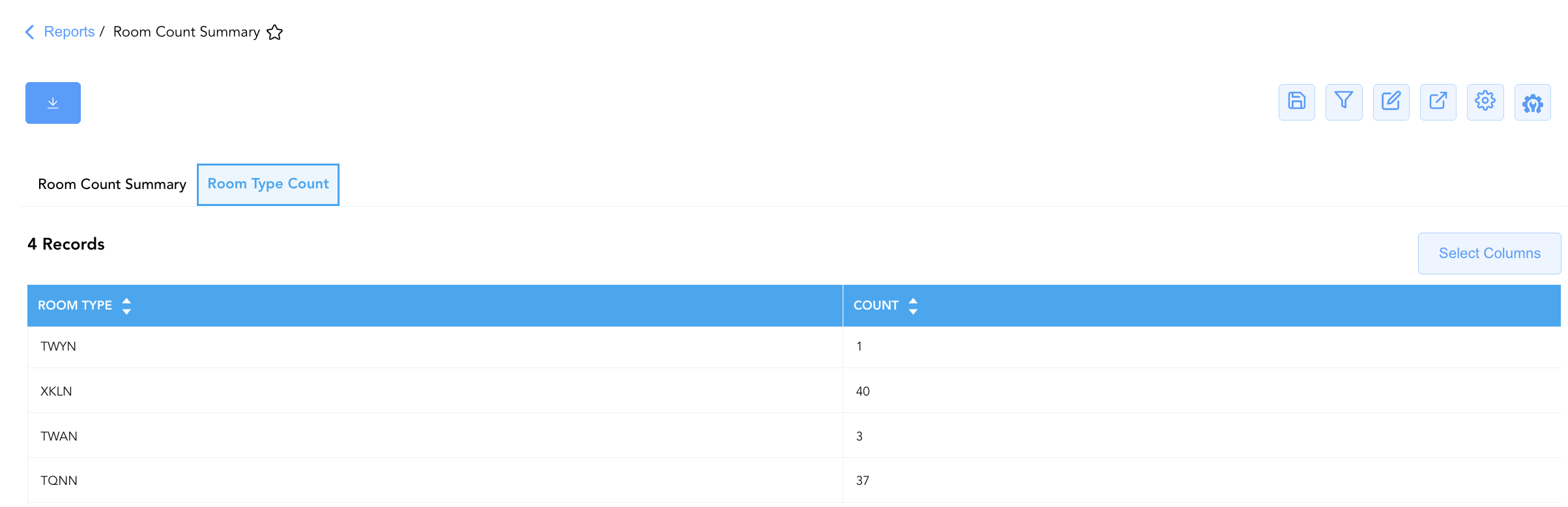
2. Room Type Count Section
Aggregates the property's physical room stock into total room counts by room category code.
-
Primary Use: Reviewing total house capacity, verifying category distribution mix, and validating room stock figures for yield management and inventory fencing.
-
Key Metrics: Room Type, Count.
Data Dictionary (Dynamic View Columns)
Customize your default view using the Configure (⚙️) icon on the report page. Below is the full data dictionary representing all 3 unique columns available across the 2 sections in this report:
💡 Inventory Calculation Note: Count in Section 2 represents the sum of physical guest rooms mapped to each specific (Room Type code Count = Physical Rooms by Category).
|
Column Name |
Section Applicability |
Description |
Data Source / System Mapping |
Includes Taxes & Fees? |
|
Room Number |
Section 1 ( |
Physical guest room number assigned on the property (e.g., 101, 102, 200, 300, 400). |
PMS Physical Room Setup > Room ID |
N/A |
|
Room Type |
Both Sections |
Alphanumeric code representing the room category (e.g., TQNN, XKLN, TWAN, TWYN). |
PMS Room Setup > Room Type Code |
N/A |
|
Count |
Section 2 ( |
Total number of physical guest rooms configured under the specified room type category. |
SUM(Physical Rooms by Room Type) |
N/A |
Customization & Platform Features
User & Property Preferences
-
Personal Preference: Tailor your individual view by hiding or dragging columns. Your preferences save automatically for future sessions.
-
Property Defaults: System Admins can configure standard default layouts across all property users to streamline operational reporting. To maximize audit efficiency, group the columns into the below logical blocks:
-
Section 1: Room Count Summary
-
Physical Room Inventory (Cols 1–2):
Room Number|Room Type
-
-
Section 2: Room Type Count
-
Capacity Aggregation (Cols 1–2):
Room Type|Count
-
-
Report Toolbar & Quick Actions
Use the top-right toolbar icons on the report page to manage and export your data view:
|
Icon |
Action / Feature |
Description |

|
Knowledge Article |
Opens the knowledge base article to learn how to interpret this report. |

|
Saved Views |
Saves your column filtering, sorting, and highlight preferences so you can easily reload your custom view later without reconfiguring the report. |

|
Filter |
Opens filter controls to isolate specific data within a column based on your selected criteria. |

|
Highlight |
Highlights column values in a designated color based on selected conditions. |

|
Export |
Exports and downloads the report in various formats (Excel, PDF, CSV) for offline analysis or printing. |

|
Configure |
Opens column selection controls to toggle visibility, reorder columns, or hide rows with all zeros. |

|
Additional Configuration |
Provides advanced report configuration and display formatting options to customize data presentation. |
Advanced Controls
-
Exporting & Facilities Audits: Download in Excel or PDF format to support annual room inventory audits, facilities maintenance planning, and housekeeping floor grids.
-
Filtering: Filter data by specific
Room Type(e.g., isolateXKLNorTQNN) or filter by floor level (e.g., Room Numbers starting with2or3). -
Highlighting (Conditional Formatting): Apply custom rules to automatically highlight low-count room categories or specific room blocks.
🔗 Related Reports & Next Steps
Within 🛎️ Front Desk & Guest Services & 🏨 In-House & Occupancy:
-
In House Guest List – Standard guest roster tracking active room occupants, contact info, and stay dates.
-
Departures Details – Comprehensive manifest tracking daily scheduled guest departures, folio numbers, and outstanding balances.
Cross-Pillar Deep Dives:
-
📈 Revenue & Analytics: Reconcile total room capacity against Occupancy Forecast and History and Booking Pace to verify total house room counts (Total\ Rooms).
-
🧹 Housekeeping & Facilities: Cross-reference physical room numbers with All Rooms to track available vs. unserviceable room stock.