
Arrivals Report Overview
Parent Hub: 🛎️ Front Desk & Guest Services
Category: 🚨 Downtime & Contingency
Target Roles: Front Office Managers, Front Desk Agents, Night Auditors, Executive Housekeepers, Guest Experience Leads, General Managers
Key Value: Serves as the primary operational downtime contingency manifest for expected check-ins, allowing front desk teams to process check-ins, verify pre-blocked room numbers, confirm rate plans, and review guest preferences during PMS system outages or network offline periods.
Executive Summary
The Arrivals Report is a critical operational contingency, pre-arrival planning, and system outage management document within the 🚨 Downtime & Contingency category of the 🛎️ Front Desk & Guest Services hub. Designed to ensure seamless property operations during unexpected software outages, planned PMS maintenance, or network disconnections, it provides a comprehensive printed or exported manifest of all reservations scheduled to arrive on the current business date.
-
By mapping core guest identity parameters (
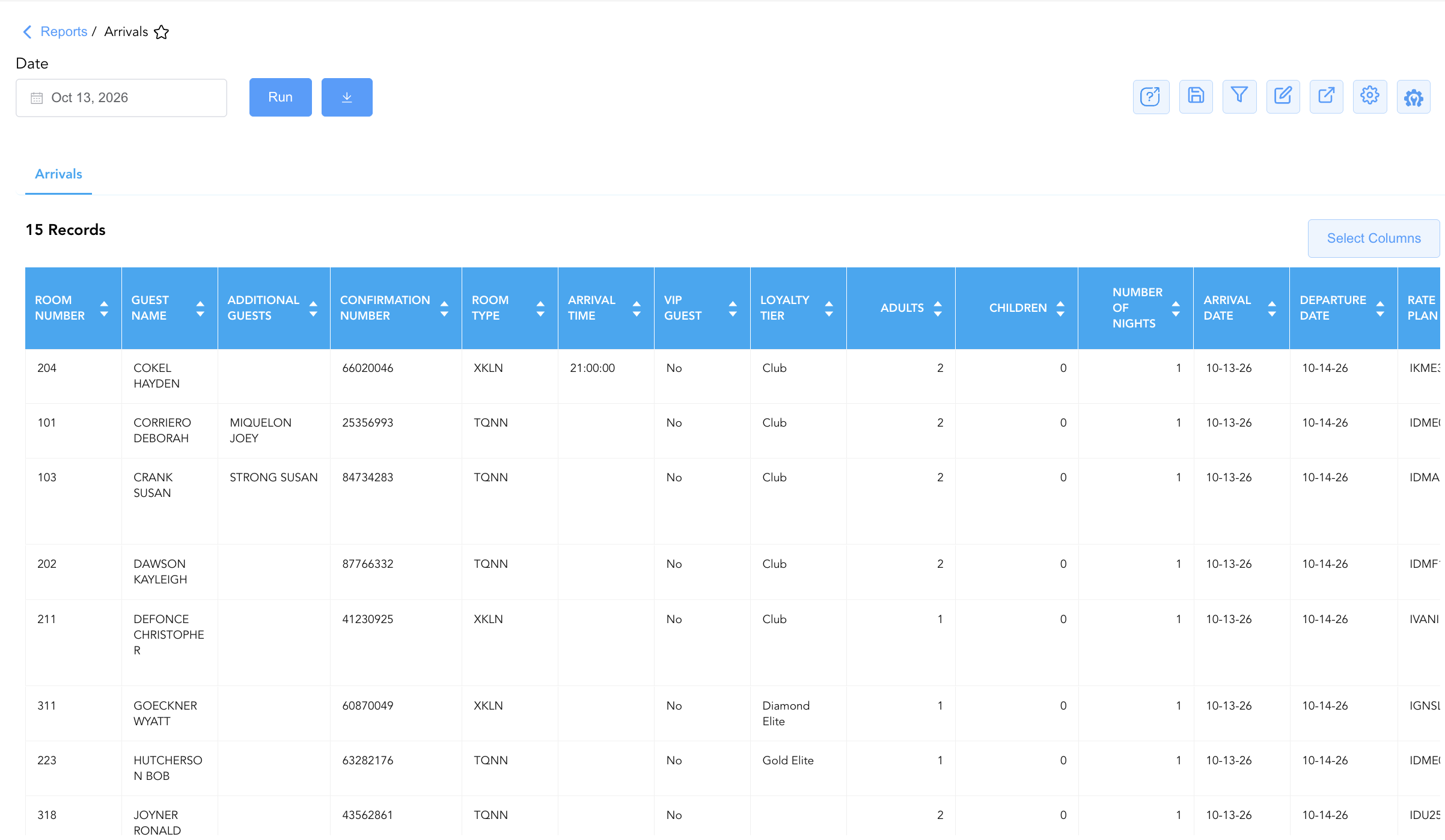
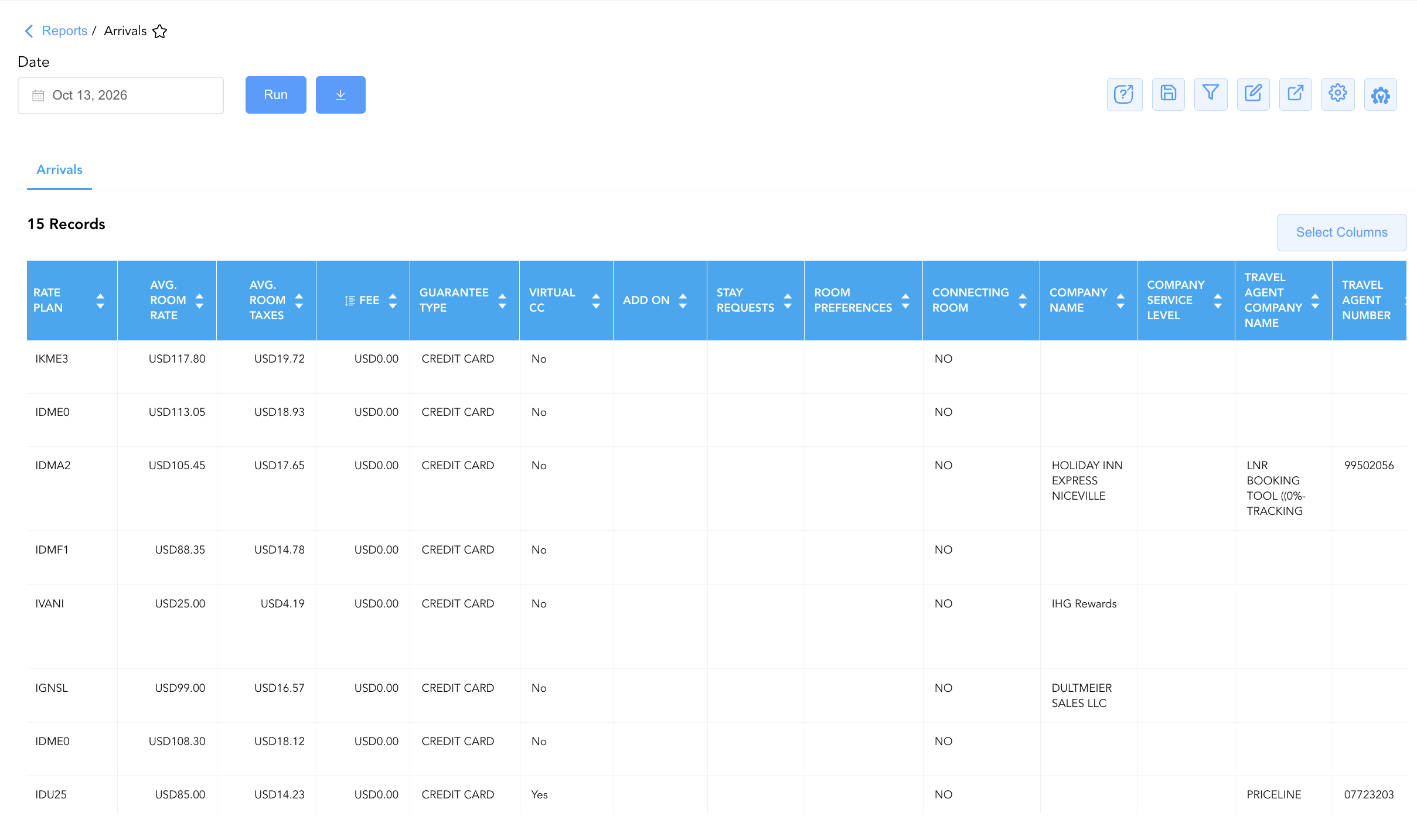
Guest Name,First Name,Last Name,Additional Guests,Local First Name,Local Last Name) to reservation parameters (Confirmation Number,Arrival Date,Departure Date,Number Of Nights,Arrival Time), physical room allocations (Room Number,Room Type,Connecting Room), financial arrangements (Rate Plan,Avg. Room Rate,Avg. Room Taxes,Fee,Guarantee Type,Virtual CC), and operational preferences (Stay Requests,Room Preferences,VIP Guest,Housekeeping Remarks,Booking Remarks,Stay Remarks), this report guarantees front office continuity, accurate rate collection, and personalized guest service even when primary cloud systems are offline.
Key Capabilities
-
Downtime Contingency Check-In Manifest: Provides an essential physical or PDF fallback register to check in arriving guests, verify identity credentials, and record room key issuances during system outages.
-
Pre-Arrival Room Blocking & Inventory Audit: Displays assigned physical room numbers (
Room Number) and room categories (Room Type) to ensure expected check-ins match inspected housekeeping status. -
Financial & Payment Guarantee Control: Itemizes base rate charges (
Avg. Room Rate), estimated taxes (Avg. Room Taxes), ancillary fees (Fee), guarantee methods (Guarantee Type), and Virtual Credit Card flags (Virtual CC) for precise manual folio management. -
Digital Engagement Tracking: Displays mobile check-in completion states (
Digital Check In) and keyless entry issuing statuses (Digital Key) to streamline arrival desk flows. -
Consolidated Remarks & VIP Inspection: Consolidates multi-departmental notes (
Housekeeping Remarks,Booking Remarks,Stay Remarks,Group Remarks) and VIP tier standing (VIP Guest,Guest Tier,Loyalty Tier) to maintain high-touch guest recognition.
Report Views & Functional Breakdown
The Arrivals Report presents expected arrival data in a unified, single-table master manifest supporting three primary operational perspectives:
┌────────────────────────────────────────────────────────────────────────┐
│                        ARRIVALS REPORT                                 │
├────────────────────────────────────────────────────────────────────────┤
│                         Unified Matrix View                            │
├──────────────────────────┬──────────────────────────┬──────────────────┤
│ 1. Guest Identity &      │ 2. Room Assignment &     │ 3. Financial,    │
│    Stay Timeframe Trace  │    Digital Key Status    │    Guarantee &   │
│                          │                          │    Remarks Trace │
└──────────────────────────┴──────────────────────────┴──────────────────┘
1. Guest Identity & Stay Timeframe Trace
Monitors expected guest names, accompanying occupants, stay durations, and expected arrival times.
-
Primary Use: Verifying guest identity at check-in during offline shifts, planning arrival desk staffing, and checking expected stay durations.
-
Key Metrics: Confirmation Number, Guest Name, First Name, Last Name, Additional Guests, Arrival Date, Departure Date, Number Of Nights, Arrival Time.
2. Room Assignment & Digital Key Status
Tracks physical room allocations, room categories, connecting room requirements, and mobile key provisioning.
-
Primary Use: Verifying room pre-blocking prior to guest check-in, coordinating room releases with housekeeping, and monitoring digital check-in adoption.
-
Key Metrics: Room Number, Room Type, Connecting Room, Digital Check In, Digital Key, Housekeeping Remarks.
3. Financial, Guarantee & Remarks Trace
Audits rate plan structures, daily rate charges, payment guarantee security, corporate/agent affiliations, and multi-departmental stay remarks.
-
Primary Use: Verifying manual credit card authorizations or Virtual CC vouchers during outages, ensuring accurate rate billing, and executing VIP/stay requests.
-
Key Metrics: Rate Plan, Avg. Room Rate, Avg. Room Taxes, Fee, Guarantee Type, Virtual CC, VIP Guest, Stay Requests, Booking Remarks, Stay Remarks.
Data Dictionary (Dynamic View Columns)
Customize your default view using the Configure (⚙️) icon on the report page. Below is the full data dictionary representing all 40 columns available in this report:
💡 Rate & Financial Note:
Avg. Room Raterepresents the net base room rate per night, whileAvg. Room TaxesandFeereflect daily tax and service fee liabilities.
|
Column Name |
Description |
Data Source / System Mapping |
Includes Taxes & Fees? |
|
Guest Name |
Combined full name of the primary registered arriving guest. |
Guest Profile > Full Name |
N/A |
|
First Name |
First name of the primary registered guest. |
Guest Profile > First Name |
N/A |
|
Last Name |
Last name of the primary registered guest. |
Guest Profile > Last Name |
N/A |
|
Additional Guests |
Names of secondary or accompanying occupants sharing the room. |
Reservation System > Additional Guests |
N/A |
|
Local First Name |
Local language or native character set first name. |
Guest Profile > Local First Name |
N/A |
|
Local Last Name |
Local language or native character set last name. |
Guest Profile > Local Last Name |
N/A |
|
Arrival Date |
Scheduled check-in date of the reservation. |
Reservation System > Arrival Date |
N/A |
|
Departure Date |
Scheduled check-out date of the reservation. |
Reservation System > Departure Date |
N/A |
|
Number Of Nights |
Total physical room nights spanned by the stay. |
Reservation System > Total Nights |
N/A |
|
Confirmation Number |
Primary unique alphanumeric reservation identifier. |
Reservation System > Confirmation ID |
N/A |
|
Rate Plan |
Active rate plan code attached to the arrival reservation. |
Reservation System > Active Rate Code |
N/A |
|
Adults |
Count of registered adult occupants. |
Reservation System > Adult Count |
N/A |
|
Children |
Count of registered child occupants. |
Reservation System > Child Count |
N/A |
|
Company Name |
Corporate company profile attached to the reservation. |
Reservation System > Company Account |
N/A |
|
Company Service Level |
Corporate contract tier or service classification level. |
Company Profile > Service Level |
N/A |
|
Avg. Room Rate |
Net base Average Daily Rate earned per night. |
Folio Posting > Net Base Rate |
❌ No |
|
Avg. Room Taxes |
Estimated daily room tax liability. |
Folio Posting > Estimated Taxes |
🟢 Yes |
|
Fee |
Estimated daily surcharge or resort fee liability. |
Folio Posting > Estimated Fees |
🟢 Yes |
|
Loyalty Tier |
Brand loyalty program tier standing (e.g., Diamond Elite, Club). |
Loyalty Engine > Membership Tier |
N/A |
|
Add On |
Attached package add-ons or ancillary service codes. |
PMS Setup > Add-On Name |
N/A |
|
Requests |
Special guest preferences or feature requests. |
Guest Preferences > Requests |
N/A |
|
Stay Requests |
Specific room feature choices (e.g., High Floor, Quiet Zone). |
Guest Preferences > Stay Requests |
N/A |
|
Room Preferences |
Stored physical room feature or bed type choices. |
Guest Preferences > Room Preferences |
N/A |
|
Arrival Time |
Estimated or scheduled time of guest arrival. |
Reservation System > Expected ETA |
N/A |
|
Digital Check In |
Status indicator for completed mobile self-check-in. |
Mobile Engine > Check-In Status |
N/A |
|
Digital Key |
Provisioning status of keyless mobile room entry. |
Mobile Key Engine > Key Status |
N/A |
|
Room Type |
Assigned physical room category code or title. |
PMS > Room Type Name |
N/A |
|
Room Number |
Physical guest room assigned to the reservation (Blank if unassigned). |
PMS > Assigned Room ID |
N/A |
|
Connecting Room |
Indicator flag for requested or assigned connecting room sets. |
PMS > Connecting Room Flag |
N/A |
|
Guarantee Type |
Payment guarantee method on file (e.g., Credit Card, Direct Bill). |
PMS Billing > Guarantee Method |
N/A |
|
VIP Guest |
Indicator flag or VIP level code. |
Guest Profile > VIP Status |
N/A |
|
Guest Tier |
Property-defined VIP or loyalty tier standing. |
Guest Profile > Property Tier |
N/A |
|
Housekeeping Remarks |
Specific room preparation notes from housekeeping leads. |
Housekeeping Engine > Remarks |
N/A |
|
Booking Remarks |
Operational notes entered during reservation booking. |
Reservation Notes > Booking Remarks |
N/A |
|
Stay Remarks |
General operational notes for front office handling. |
Reservation Notes > Stay Remarks |
N/A |
|
Group Remarks |
Operational handling notes attached to group master blocks. |
Group Master > Group Remarks |
N/A |
|
Virtual CC |
Indicator flag denoting payment via Virtual Credit Card voucher. |
PMS Billing > VCC Flag |
N/A |
|
Linked Reservations |
Identifiers of linked multi-room or family reservations. |
Reservation System > Linked IDs |
N/A |
|
Travel Agent Number |
IATA or travel agency identifier code. |
Reservation System > IATA Code |
N/A |
|
Travel Agent Company Name |
Corporate name of the booking travel agency. |
Reservation System > Agency Title |
N/A |
Customization & Platform Features
User & Property Preferences
-
Personal Preference: Tailor your individual view by hiding or dragging columns. Your preferences save automatically for future sessions.
-
Property Defaults: System Admins can configure standard default layouts across all property users to streamline operational reporting. To maximize audit efficiency, group the columns into the below logical blocks:
-
Physical Locators & Consolidated Guest Identity (Cols 1–8):
Room Number|Guest Name|Additional Guests|First Name|Last Name|Local First Name|Local Last Name|Confirmation Number -
Arrival Logistics & Status Flags (Cols 9–14):
Room Type|Arrival Time|Digital Check In|Digital Key|VIP Guest|Guest Tier -
Loyalty & Guest Counts (Cols 15–18):
Loyalty Tier|Adults|Children|Number Of Nights -
Stay Dates (Cols 19–20):
Arrival Date|Departure Date -
Financial Rates & Billing Guarantee (Cols 21–27):
Rate Plan|Avg. Room Rate|Avg. Room Taxes|Fee|Guarantee Type|Virtual CC|Add On -
Guest Preferences & Special Requests (Cols 28–31):
Requests|Stay Requests|Room Preferences|Connecting Room -
Corporate & Agency Metadata (Cols 32–35):
Company Name|Company Service Level|Travel Agent Company Name|Travel Agent Number -
Operational Remarks & Audit Notes (Cols 36–40):
Booking Remarks|Stay Remarks|Housekeeping Remarks|Group Remarks|Linked Reservations
-
Report Toolbar & Quick Actions
Use the top-right toolbar icons on the report page to manage and export your data view:
|
Icon |
Action / Feature |
Description |

|
Knowledge Article |
Opens the knowledge base article to learn how to interpret this report. |

|
Saved Views |
Saves your column filtering, sorting, and highlight preferences so you can easily reload your custom view later without reconfiguring the report. |

|
Filter |
Opens filter controls to isolate specific data within a column based on your selected criteria. |

|
Highlight |
Highlights column values in a designated color based on selected conditions. |

|
Export |
Exports and downloads the report in various formats (Excel, PDF, CSV) for offline analysis or printing. |

|
Configure |
Opens column selection controls to toggle visibility, reorder columns, or hide rows with all zeros. |

|
Additional Configuration |
Provides advanced report configuration and display formatting options to customize data presentation. |
Advanced Controls
-
Downtime Contingency Printing & Exporting: Automatically schedule a daily PDF/Excel export prior to shift changes (e.g., 06:00, 14:00, 22:00) to maintain an updated offline emergency check-in binder at the front desk.
-
Filtering: Filter data by
Room Number = Blankto generate unassigned arrival lists requiring pre-blocking, or isolate Virtual Credit Card bookings (Virtual CC = Yes). -
Highlighting (Conditional Formatting): Apply custom rules to automatically highlight high-tier VIP arrivals (
VIP Guest = Yes), unassigned rooms, or specific stay remarks.
🔗 Related Reports & Next Steps
Within 🛎️ Front Desk & Guest Services & 🚨 Downtime & Contingency:
-
In House List – Core downtime contingency manifest detailing active room occupants, rate plans, and guest balances.
-
Departures Details Report – Downtime contingency manifest tracking daily expected check-outs and folio settlement states.
-
Room Count Summary– Physical room inventory summary tracking total room availability by category.
-
Stay Request Details – Itemized task dispatch report tracking housekeeping and room amenity preferences.
Cross-Pillar Deep Dives:
-
🧹 Housekeeping & Facilities: Cross-reference expected arrival room numbers (
Room Number) with Housekeeping Sheet to prioritize room cleaning and inspection orders. -
💳 Payments & Transactions: Verify Virtual Credit Card vouchers and credit card pre-authorizations in Settlement By Payment Type and Authorized Payments.