
Do Not Rent Report Overview
Parent Hub: 🛎️ Front Desk & Guest Services
Category: ⭐ Guest Insights & Relations
Target Roles: Front Office Managers, Hotel Controllers, Security & Loss Prevention Officers, General Managers, Guest Relations Managers
Key Value: Audit property blacklist entries and banned guest records, track security and financial violation reasons, verify DNR scope classifications, inspect administrative remarks and user credentials, and mitigate operational risk and property loss.
Executive Summary
The Do Not Rent Report is a critical security governance, risk mitigation, and guest relation audit document within the ⭐ Guest Insights & Relations category of the 🛎️ Front Desk & Guest Services hub. Designed to deliver complete visibility over blacklisted guest profiles and restricted booking records, it itemizes every individual flagged in the Property Management System (PMS) under "Do Not Rent" (DNR) status.
-
By mapping operational restriction parameters (Date, Username) to guest identity attributes (First Name, Last Name) and violation metrics (Reason, Dnr Code, Dnr Type, Remarks), this report enables front office supervisors, controllers, and loss prevention managers to audit restriction entries, verify policy enforcement justifications (e.g., room damage, unpaid balances, behavioral violations), inspect DNR scope levels, and prevent unauthorized bookings across property terminals.
Key Capabilities
-
Blacklist & Security Audit: Itemizes all guest profiles placed on "Do Not Rent" status to enforce property access restrictions and guest safety.
-
Standardized Violation Classification: Categorizes restrictions by standardized operational reason descriptions (
Reason, e.g.,OTHER,VIOLATION) and system reason codes (Dnr Code, e.g.,OTHR,VIOLATION). -
Restriction Scope Level Tracking: Distinguishes between local property-level restrictions and regional/chain-wide restrictions (
Dnr Type, e.g.,Local). -
Employee Accountability & Auditability: Captures the full name or user login ID of the staff member who entered or updated the restriction (
Username) alongside the entry timestamp (Date). -
Detailed Incident Remark Inspection: Preserves free-text administrative notes (
Remarks, e.g., "Guest damaged room", "Guest has unpaid fees from last stay") to justify restriction enforcement during booking attempts or guest inquiries.
Report Views & Functional Breakdown
The Do Not Rent Report presents restricted guest data in a unified single-table ledger that supports three key analytical perspectives:
┌────────────────────────────────────────────────────────────────────────┐
│                        DO NOT RENT REPORT                              │
├──────────────────────────┬──────────────────────────┬──────────────────┤
│                         Unified Matrix View                            │
├──────────────────────────┼──────────────────────────┼──────────────────┤
│ 1. Restricted Guest &    │ 2. Violation Code &      │ 3. Staff Audit & │
│    Identity Register     │    Scope Classification  │    Incident Notes│
└──────────────────────────┴──────────────────────────┴──────────────────┘
1. Restricted Guest & Identity Register
Monitors restricted guest names and administrative entry dates.
-
Primary Use: Cross-referencing incoming reservation inquiries or walk-ins against the active property blacklist to prevent unauthorized check-ins.
-
Key Metrics: First Name, Last Name, Date, Dnr Type.
2. Violation Code & Scope Classification
Audits restriction reasons, system codes, and scope classifications.
-
Primary Use: Categorizing DNR entries by financial vs. physical property risk (e.g., unpaid folios vs. room damage) and reviewing restriction scope.
-
Key Metrics: Reason, Dnr Code, Dnr Type, First Name, Last Name.
3. Staff Audit & Incident Notes
Correlates restriction entries directly with staff user credentials and detailed contextual remarks.
-
Primary Use: Ensuring managerial accountability for blacklist additions, reviewing documentation before approving restriction removals, and handling legal or billing disputes.
-
Key Metrics: Username, Date, Remarks, First Name, Last Name.
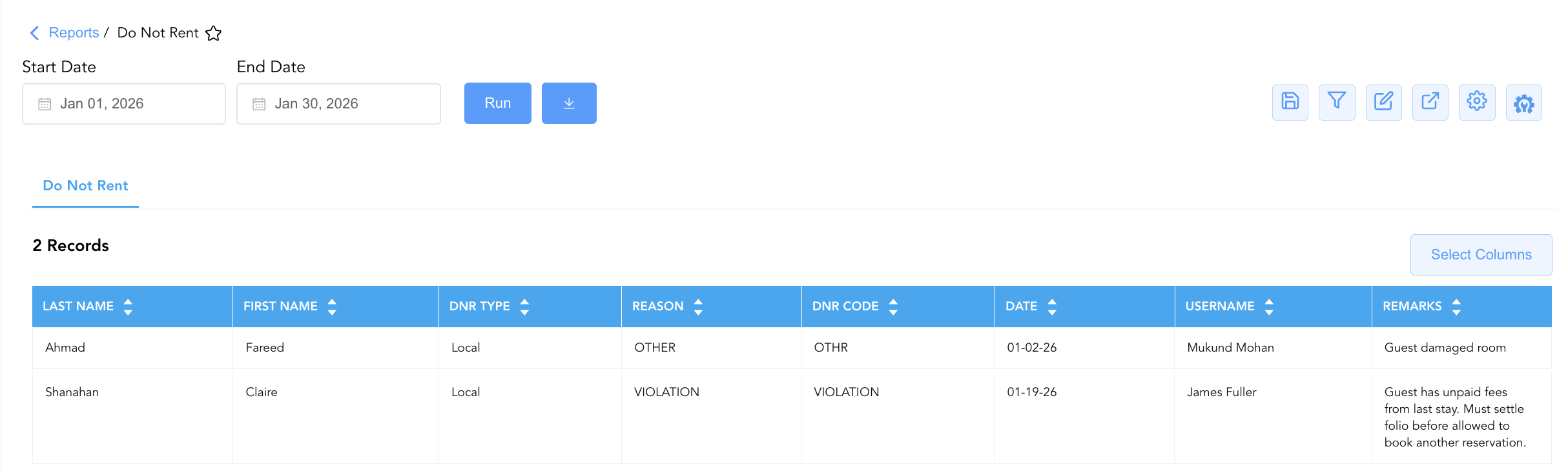
Data Dictionary (Dynamic View Columns)
Customize your default view using the Configure (⚙️) icon on the report page. Below is the full data dictionary representing all 8 columns available in this report:
💡 Restriction Scope Note: Dnr Type specifies whether the restriction applies solely to the current local property (
Local) or extends across multiple properties within the brand/chain network.
|
Column Name |
Description |
Data Source / System Mapping |
Includes Taxes & Fees? |
|
Date |
Calendar date on which the DNR entry was recorded or updated in the system. |
PMS Security Audit > Creation Date |
N/A |
|
Username |
Name or user login ID of the staff member who recorded the restriction. |
Security Audit Trail > User Name |
N/A |
|
First Name |
First name of the restricted individual. |
Guest Profile > First Name |
N/A |
|
Last Name |
Last name of the restricted individual. |
Guest Profile > Last Name |
N/A |
|
Reason |
Standardized operational justification for the restriction (e.g., |
PMS DNR Setup > Reason Description |
N/A |
|
Dnr Code |
System alphanumeric code representing the violation reason (e.g., |
PMS DNR Setup > Reason Code |
N/A |
|
Dnr Type |
Scope level of the restriction (e.g., |
PMS DNR Setup > Scope Type |
N/A |
|
Remarks |
Free-text operational notes detailing the background, unpaid balance, or property damage incident. |
PMS DNR Prompt > Administrative Remarks |
N/A |
Customization & Platform Features
User & Property Preferences
-
Personal Preference: Tailor your individual view by hiding or dragging columns. Your preferences save automatically for future sessions.
-
Property Defaults: System Admins can configure standard default layouts across all property users to streamline operational reporting. To maximize audit efficiency, group the columns into the below logical blocks:
-
Blacklisted Guest Identification (Cols 1–2):
Last Name|First Name -
Restriction & Policy Classification (Cols 3–5):
Dnr Type|Reason|Dnr Code -
Enforcement Audit & Timestamp (Cols 6–7):
Date|Username -
Incidence Details & Remarks (Col 8):
Remarks
-
Report Toolbar & Quick Actions
Use the top-right toolbar icons on the report page to manage and export your data view:
|
Icon |
Action / Feature |
Description |

|
Knowledge Article |
Opens the knowledge base article to learn how to interpret this report. |

|
Saved Views |
Saves your column filtering, sorting, and highlight preferences so you can easily reload your custom view later without reconfiguring the report. |

|
Filter |
Opens filter controls to isolate specific data within a column based on your selected criteria. |

|
Highlight |
Highlights column values in a designated color based on selected conditions. |

|
Export |
Exports and downloads the report in various formats (Excel, PDF, CSV) for offline analysis or printing. |

|
Configure |
Opens column selection controls to toggle visibility, reorder columns, or hide rows with all zeros. |

|
Additional Configuration |
Provides advanced report configuration and display formatting options to customize data presentation. |
Advanced Controls
-
Exporting & Security Reviews: Download in Excel or PDF format to support monthly loss prevention audits, controller ledger reviews, and general manager risk assessments.
-
Filtering: Filter data by
Reason = VIOLATIONto inspect unpaid fee restrictions, or isolate entries logged by specific staff (Username = James Fuller). -
Highlighting (Conditional Formatting): Apply custom rules to automatically highlight severe property damage entries or recent blacklist updates.
🔗 Related Reports & Next Steps
Within 🛎️ Front Desk & Guest Services & ⭐ Guest Insights & Relations:
-
In House List – Real-time guest register detailing active room occupants, contact info, and stay dates.
-
Recently Viewed Reservations – Audit log tracking recently accessed reservation records and user activity.
-
Reminders Report – Operational task and shift incident tracking log.
Cross-Pillar Deep Dives:
-
⚖️ Ledgers & Trial Balance: Reconcile unpaid guest folio balances associated with DNR entries against Closed Folio Balance.
-
💳 Payments & Transactions: Cross-reference financial restriction reasons with Settlement By Payment Type or Credit Card Status to trace declined credit card transactions.