
Booked Reservations Report Overview
Parent Hub: 🛎️ Front Desk & Guest Services
Category: 🧳 Arrivals & Departures
Target Roles: Front Office Managers, Front Desk Agents, Reservations Agents, Revenue Managers, General Managers, Guest Services Supervisors
Key Value: Monitor daily booking activity and new reservation creation, track booking channels and agent production, verify rate plans, market segments, and guarantee methods, inspect cancellation policies and linked reservations, and ensure seamless pre-arrival guest management.
Executive Summary
The Booked Reservations Report is a primary front desk, reservations, and front office audit document within the 🧳 Arrivals & Departures category of the 🛎️ Front Desk & Guest Services hub. Designed to deliver complete operational and financial visibility over newly created and modified reservation bookings, it itemizes every reservation entered into the Property Management System (PMS) across specified booking creation dates.
-
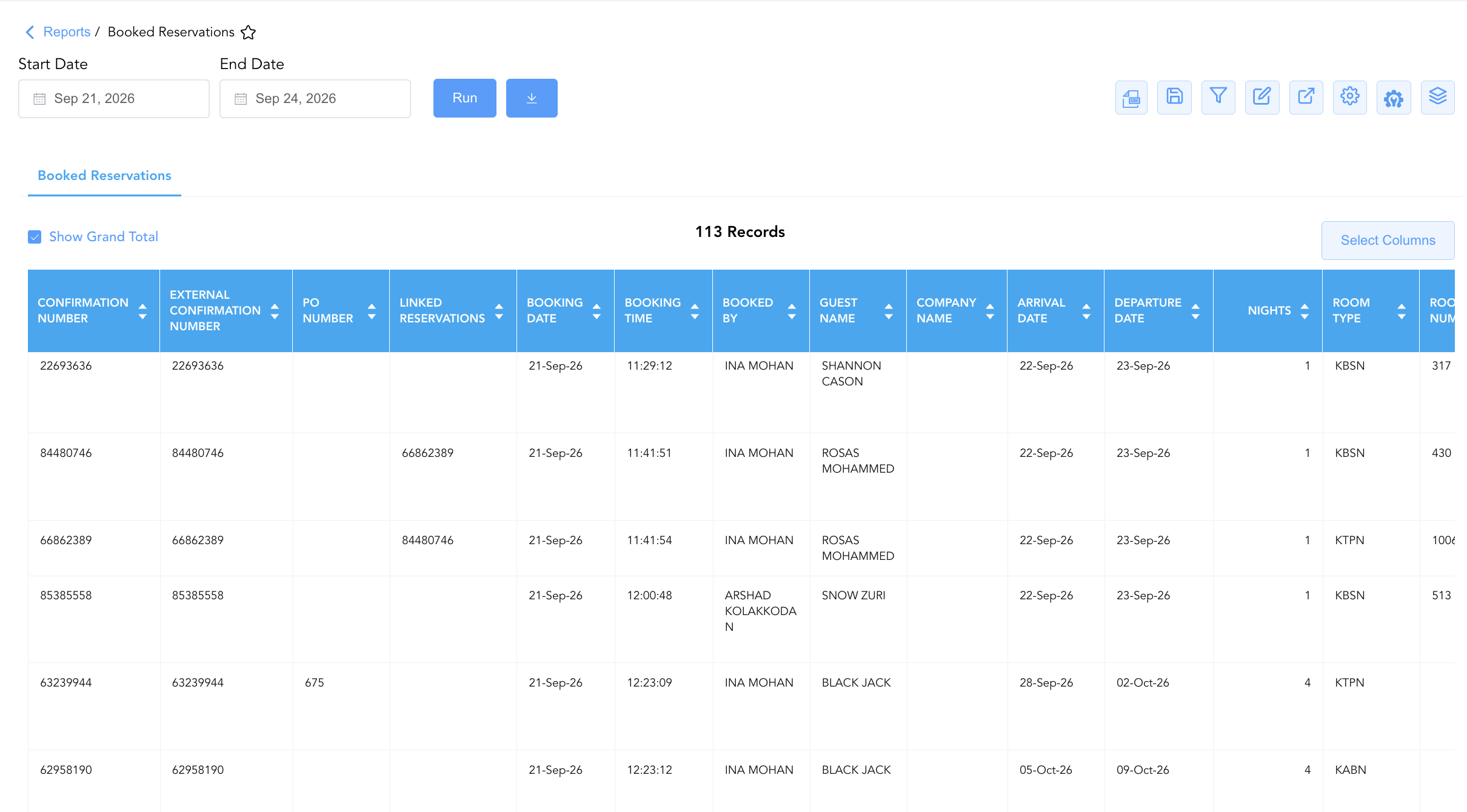
By mapping booking creation metadata (Booking Date, Booking Time, Confirmation Number, External Confirmation Number, Booked By) to guest and stay details (Guest Name, Company Name, Arrival Date, Departure Date, Nights, Adults, Children, Room Type, Room Number), rate structures (Rate Plan, Market Segment, Local Market Segment, Source, Total Room Rate, Total Revenue, ADR), and operational parameters (Current Booking Status, Cancellation Date/Time, Guarantee Method, Linked Reservations, Cancellation Policy), this report enables front desk teams, reservations staff, and revenue managers to audit daily booking flow, confirm rate and market segment accuracy, enforce deposit and guarantee rules, and prepare for incoming arrivals.
Key Capabilities
-
Daily Booking Activity Audit: Itemizes newly created reservations by exact creation timestamp (
Booking DateandBooking Time) and confirmation identifiers (Confirmation Number,External Confirmation Number). -
User & Agent Traceability: Captures the exact staff user or agent ID (
Booked By) responsible for creating or processing each booking entry. -
Stay & Room Assignment Tracking: Tracks scheduled arrival dates (
Arrival Date), departure dates (Departure Date), total length of stay (Nights), room categories (Room Type), and pre-assigned room numbers (Room Number). -
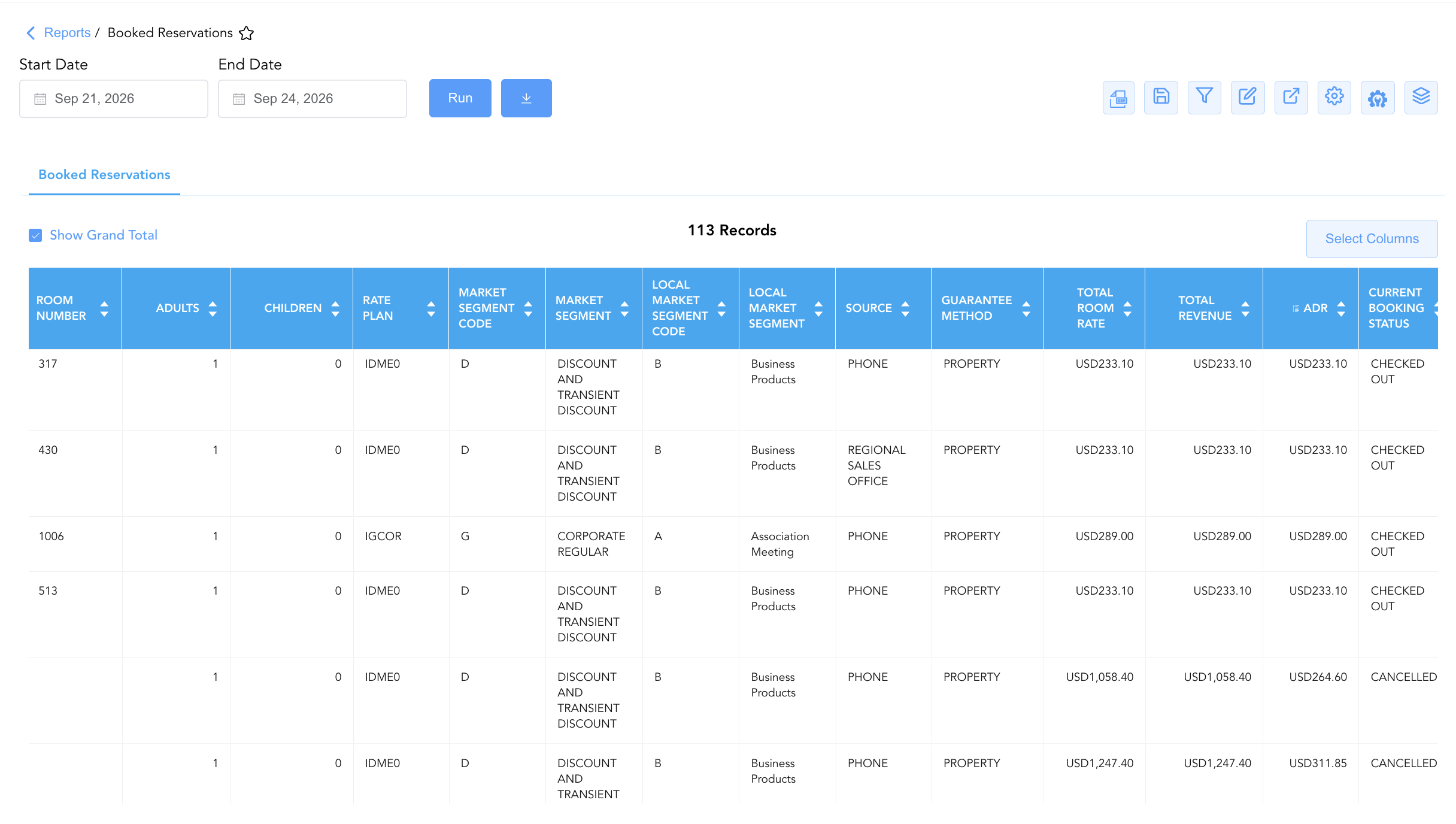
Revenue & Rate Structure Verification: Displays base room pricing (
Total Room Rate), total booking value (Total Revenue), and Average Daily Rate (ADR) alongside assigned rate plans (Rate Plan), market classifications (Market Segment,Local Market Segment), and booking channels (Source). -
Booking Status & Guarantee Governance: Tracks live reservation operational statuses (
Current Booking Status, e.g.,CHECKED OUT,ARRIVAL,NO SHOW,CANCELLED), cancellation timestamps (Cancellation Date,Cancellation Time), guarantee methods (Guarantee Method), linked multi-room bookings (Linked Reservations), and specific policy terms (Cancellation Policy).
Report Views & Functional Breakdown
The Booked Reservations Report presents reservation creation data in a unified single-table ledger that supports three key analytical perspectives:
┌────────────────────────────────────────────────────────────────────────┐
│                   BOOKED RESERVATIONS REPORT                           │
├────────────────────────────────────────────────────────────────────────┤
│                         Unified Matrix View                            │
├──────────────────────────┬──────────────────────────┬──────────────────┤
│ 1. Booking Creation &    │ 2. Stay, Room & Rate     │ 3. Status, Policy &│
│    Agent Ledger          │    Structure             │    Guarantee Trace│
└──────────────────────────┴──────────────────────────┴──────────────────┘
1. Booking Creation & Agent Ledger
Monitors reservation entry timestamps, confirmation numbers, booker credentials, and primary guest details.
-
Primary Use: Verifying daily booking creation logs, auditing call center and front desk agent booking production, and checking corporate company profile attachments.
-
Key Metrics: Booking Date, Booking Time, Confirmation Number, Guest Name, Company Name, Booked By, Source.
2. Stay, Room & Rate Structure
Provides complete stay timeframes, room category allocations, guest headcounts, pricing, and rate plan mappings.
-
Primary Use: Auditing advance reservation rates, checking room type distribution, verifying length of stay durations, and confirming market segment attributions.
-
Key Metrics: Arrival Date, Departure Date, Nights, Room Type, Room Number, Rate Plan, Market Segment, Total Revenue, ADR.
3. Status, Policy & Guarantee Trace
Correlates reservation entries with live operational statuses, guarantee types, linked reservations, and cancellation rules.
-
Primary Use: Identifying non-guaranteed bookings requiring pre-arrival follow-up, reviewing cancellation policy terms, checking linked multi-room party bookings, and inspecting guest stay remarks.
-
Key Metrics: Current Booking Status, Guarantee Method, Cancellation Date, Linked Reservations, Cancellation Policy, Booking Remarks, Stay Remarks.
Data Dictionary (Dynamic View Columns)
Customize your default view using the Configure (⚙️) icon on the report page. Below is the full data dictionary representing every column available in this report:
💡 Rate Calculation Note: Total Room Rate and Total Revenue represent base room charges prior to taxes and fees. ADR is calculated as ADR = Total Revenue ÷ Nights.
|
Column Name |
Description |
Data Source / System Mapping |
Includes Taxes & Fees? |
|---|---|---|---|
|
Booking Date |
Calendar date on which the reservation was created in the system. |
PMS Audit Trail > Booking Creation Date |
N/A |
|
Booking Time |
Timestamp recording the exact time the reservation was created. |
PMS Audit Trail > Booking Creation Time |
N/A |
|
Confirmation Number |
Primary unique alphanumeric reservation identifier. |
Reservation System > Confirmation Number |
N/A |
|
Promotion Name |
Name of promotional campaign or discount offer attached to the booking. |
Reservation System > Promotion Title |
N/A |
|
External Confirmation Number |
Secondary confirmation number from external distribution channels or CRS. |
CRS / Channel Manager > External ID |
N/A |
|
PO Number |
Purchase order number supplied for corporate billing. |
Reservation Billing > PO Number |
N/A |
|
Guest Name |
Combined full name of the primary registered guest. |
Guest Profile > Full Name |
N/A |
|
First Name |
First name of the primary registered guest. |
Guest Profile > First Name |
N/A |
|
Last Name |
Last name of the primary registered guest. |
Guest Profile > Last Name |
N/A |
|
Contact Role |
Primary contact role or relationship designation on the reservation. |
Guest Profile > Role Title |
N/A |
|
Company Name |
Name of corporate account or business profile linked to the stay. |
Reservation System > Company Profile |
N/A |
|
Arrival Date |
Scheduled check-in date of the reservation. |
Reservation System > Check-In Date |
N/A |
|
Departure Date |
Scheduled check-out date of the reservation. |
Reservation System > Check-Out Date |
N/A |
|
Nights |
Total physical room nights spanned by the stay. |
Reservation System > Total Nights |
N/A |
|
Adults |
Count of registered adult occupants. |
Reservation System > Adult Count |
N/A |
|
Children |
Count of registered child occupants. |
Reservation System > Child Count |
N/A |
|
Room Type |
Code representing the room category allocated (e.g., KBSN, KQQN, KTPN, KABN). |
PMS > Room Type Code |
N/A |
|
Room Number |
Physical guest room assigned to the reservation (Blank if unassigned). |
PMS > Assigned Room Number |
N/A |
|
Rate Plan |
Code of the rate plan assigned to the booking (e.g., IGBBB, IGCOR, IDME0, IDAPF). |
Reservation System > Active Rate Code |
N/A |
|
Market Segment |
Master corporate market segment name mapped to the booking. |
PMS > Market Segment Title |
N/A |
|
Market Segment Code |
Master corporate market segment code (e.g., G, D). |
PMS > Market Segment Code |
N/A |
|
Local Market Segment |
Property-specific local market segment title (e.g., Association Meeting, Business Products). |
PMS > Local Market Segment Title |
N/A |
|
Local Market Segment Code |
Property-specific local market segment code (e.g., A, B). |
PMS > Local Market Segment Code |
N/A |
|
Source |
Booking channel or entry module (e.g., PHONE, HOTEL SALES, REGIONAL SALES OFFICE). |
CRS / PMS > Reservation Source |
N/A |
|
Total Room Rate |
Gross base room charges for the total stay duration. |
SUM(Base Daily Room Rates) |
❌ No |
|
Total Revenue |
Total net room revenue generated by the booking. |
SUM(Base Room Revenue) |
❌ No |
|
ADR |
Average Daily Rate earned per room night (Total Revenue÷Nights). |
Total Revenue / Nights |
❌ No |
|
Current Booking Status |
Operational status of the stay (e.g., |
Reservation System > Operational Status |
N/A |
|
Cancellation Date |
Calendar date on which the reservation was cancelled (if applicable). |
PMS Audit Trail > Cancellation Date |
N/A |
|
Cancellation Time |
Timestamp recording when the reservation was cancelled. |
PMS Audit Trail > Cancellation Time |
N/A |
|
Booked By |
Name or user login ID of the employee or system agent creating the reservation. |
Security Audit Trail > User Name |
N/A |
|
Local First Name |
First name rendered in local character set or language script. |
Guest Profile > Local First Name |
N/A |
|
Local Last Name |
Last name rendered in local character set or language script. |
Guest Profile > Local Last Name |
N/A |
|
Booking Remarks |
Operational notes entered at the time of booking creation. |
Reservation Notes > Booking Remarks |
N/A |
|
Stay Remarks |
Operational notes specific to guest stay handling or room requests. |
Reservation Notes > Stay Remarks |
N/A |
|
Housekeeping Remarks |
Specific room preparation or cleaning instructions for housekeeping. |
PMS Housekeeping > Room Remarks |
N/A |
|
Housekeeping Requests |
Special guest amenity or bed setup requests for housekeeping. |
PMS Housekeeping > Guest Requests |
N/A |
|
Guarantee Method |
Payment guarantee classification (e.g., |
Reservation Billing > Guarantee Type |
N/A |
|
Linked Reservations |
Confirmation numbers of associated multi-room party or family bookings. |
Reservation System > Linked IDs |
N/A |
|
Sub Source Code |
Secondary channel distribution code. |
CRS > Sub-Source Code |
N/A |
|
Sub Source Name |
Secondary channel distribution name. |
CRS > Sub-Source Title |
N/A |
|
Cancellation Policy |
Full legal cancellation policy terms and deadline rules governing the reservation. |
Rate Engine > Cancellation Policy Text |
N/A |
Customization & Platform Features
User & Property Preferences
-
Personal Preference: Tailor your individual view by hiding or dragging columns. Your preferences save automatically for future sessions.
-
Property Defaults: System Admins can configure standard default layouts across all property users to streamline operational reporting. To maximize audit efficiency, group the columns into the below logical blocks.
-
Reservation Identification & Creation Audit (Cols 1–7):
Confirmation Number|External Confirmation Number|PO Number|Linked Reservations|Booking Date|Booking Time|Booked By -
Guest Profile & Contact Identification (Cols 8–14):
Guest Name|First Name|Last Name|Local First Name|Local Last Name|Contact Role|Company Name -
Stay Itinerary & Room Assignment (Cols 15–19):
Arrival Date|Departure Date|Nights|Room Type|Room Number -
Guest Occupancy Demographics (Cols 20–21):
Adults|Children -
Rate Plan, Promotion & Market Mapping (Cols 22–27):
Promotion Name|Rate Plan|Market Segment Code|Market Segment|Local Market Segment Code|Local Market Segment -
Booking Channel & Source Origin (Cols 28–31):
Source|Sub Source Code|Sub Source Name|Guarantee Method -
Financial Revenue & Pricing Metrics (Cols 32–34):
Total Room Rate|Total Revenue|ADR -
Booking Status & Cancellation Audit (Cols 35–38):
Current Booking Status|Cancellation Date|Cancellation Time|Cancellation Policy -
Operational Remarks & Requests (Cols 39–42):
Booking Remarks|Stay Remarks|Housekeeping Remarks|Housekeeping Requests
-
Report Toolbar & Quick Actions
Use the top-right toolbar icons on the report page to manage and export your data view:
|
Icon |
Action / Feature |
Description |

|
Knowledge Article |
Opens the knowledge base article to learn how to interpret this report. |

|
Background Export |
Allows users to download up to 365 days of data directly to their computer in CSV format. |

|
Saved Views |
Saves your column filtering, sorting, and highlight preferences so you can easily reload your custom view later without reconfiguring the report. |

|
Filter |
Opens filter controls to isolate specific data within a column based on your selected criteria. |

|
Highlight |
Highlights column values in a designated color based on selected conditions. |

|
Export |
Exports and downloads the report in various formats (Excel, PDF, CSV) for offline analysis or printing. |

|
Configure |
Opens column selection controls to toggle visibility, reorder columns, or hide rows with all zeros. |

|
Additional Configuration |
Provides advanced report configuration and display formatting options to customize data presentation. |

|
Group By |
Summarize and group report data dynamically in real time. |
Interactive Visualizations & Grouping Controls
-
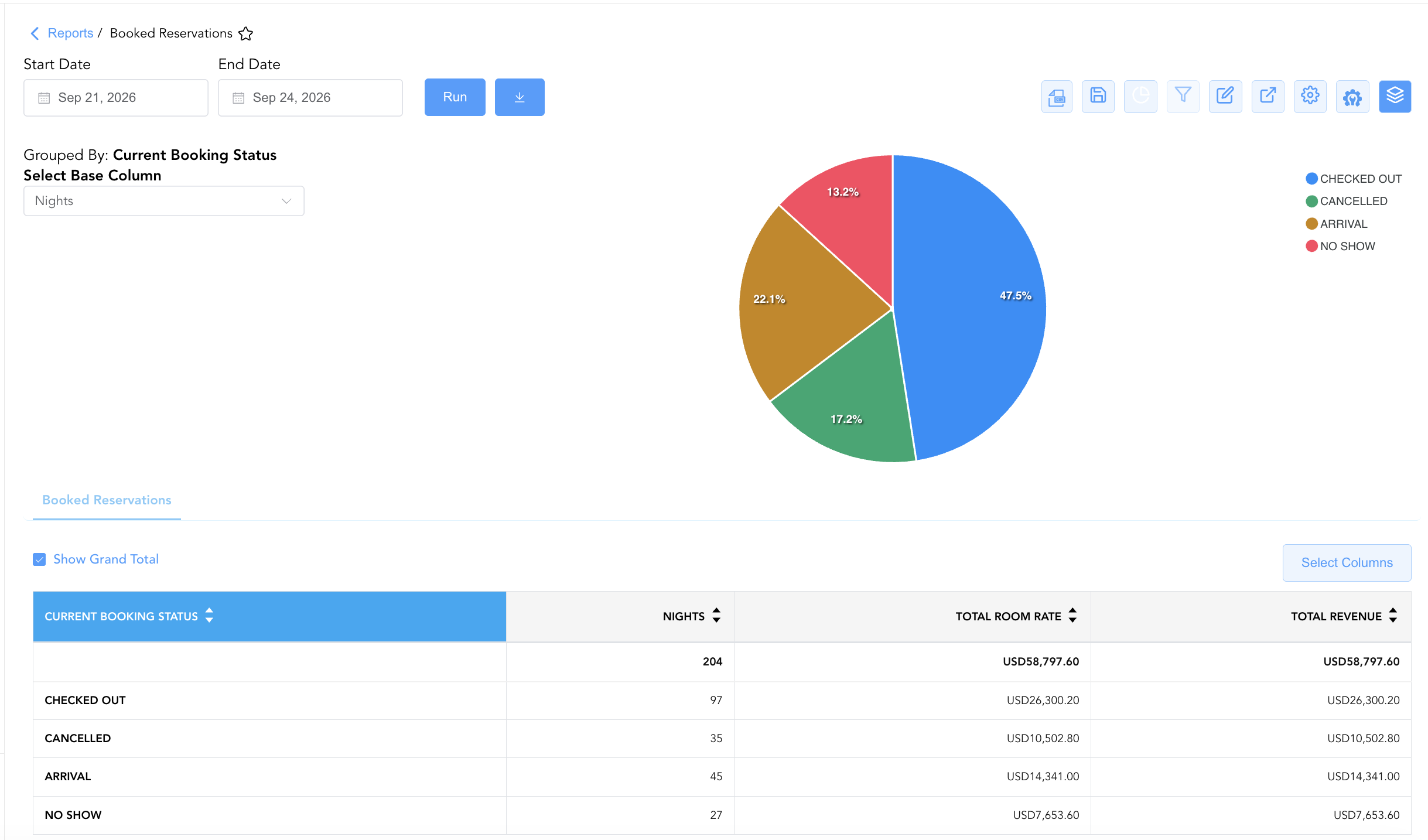
Group By & Pie Chart Visualization: The Booked Reservations report features an interactive pie chart to help analyze reservation activity and booking status share distributions. Users can group booked reservations on the fly by Booked By, Source, Room Type, Rate Plan, or Current Booking Status to evaluate agent booking volume and channel mix. By selecting a metric from the Select Base Column dropdown menu—such as Nights, Total Room Rate, or Total Revenue—the chart dynamically renders percentage share breakdowns accompanied by an interactive color-coded legend.
Advanced Controls
-
Exporting & Pre-Arrival Analysis: Download in Excel or PDF format to support daily front desk morning briefings, reservations audit reviews, and pre-arrival guest preference preparation.
-
Filtering: Filter data by specific
Arrival Date = Today, isolate unassigned rooms (Room Number = Blank), or filter byGuarantee Method. -
Highlighting (Conditional Formatting): Apply custom rules to automatically highlight high-value bookings, unassigned VIP stays, or non-guaranteed reservations.
🔗 Related Reports & Next Steps
Within 🛎️ Front Desk & Guest Services & 🧳 Arrivals & Departures:
-
Arrivals – Detailed daily manifest of expected arriving guests, check-in statuses, and room assignments.
-
Departures List – Daily manifest tracking scheduled guest departures, check-out statuses, and folio balances.
-
In House Guest List – Real-time roster of registered guests currently occupying physical hotel rooms.
Cross-Pillar Deep Dives:
-
📈 Revenue & Analytics: Reconcile new booking volume against Booking Pace and Occupancy Forecast and History.
-
🏷️ Rate Management: Verify assigned rate structures against Rate Plan Summary and Rate Code Configuration.