
Top Guest Report Overview
Parent Hub: 🛎️ Front Desk & Guest Services
Category: ⭐ Guest Insights & Relations
Target Roles: General Managers, Front Office Managers, Guest Experience Directors, Loyalty Program Managers, Revenue Managers, Sales Directors
Key Value: Evaluate VIP guest value, monitor guest frequency and stay density, identify high-revenue producing individuals, audit cancellation and no-show patterns, and optimize guest retention and personalized recognition strategies.
Date Parameter: Date Range Selector (Start & End) | Past & Future | Maximum Window: None
Executive Summary
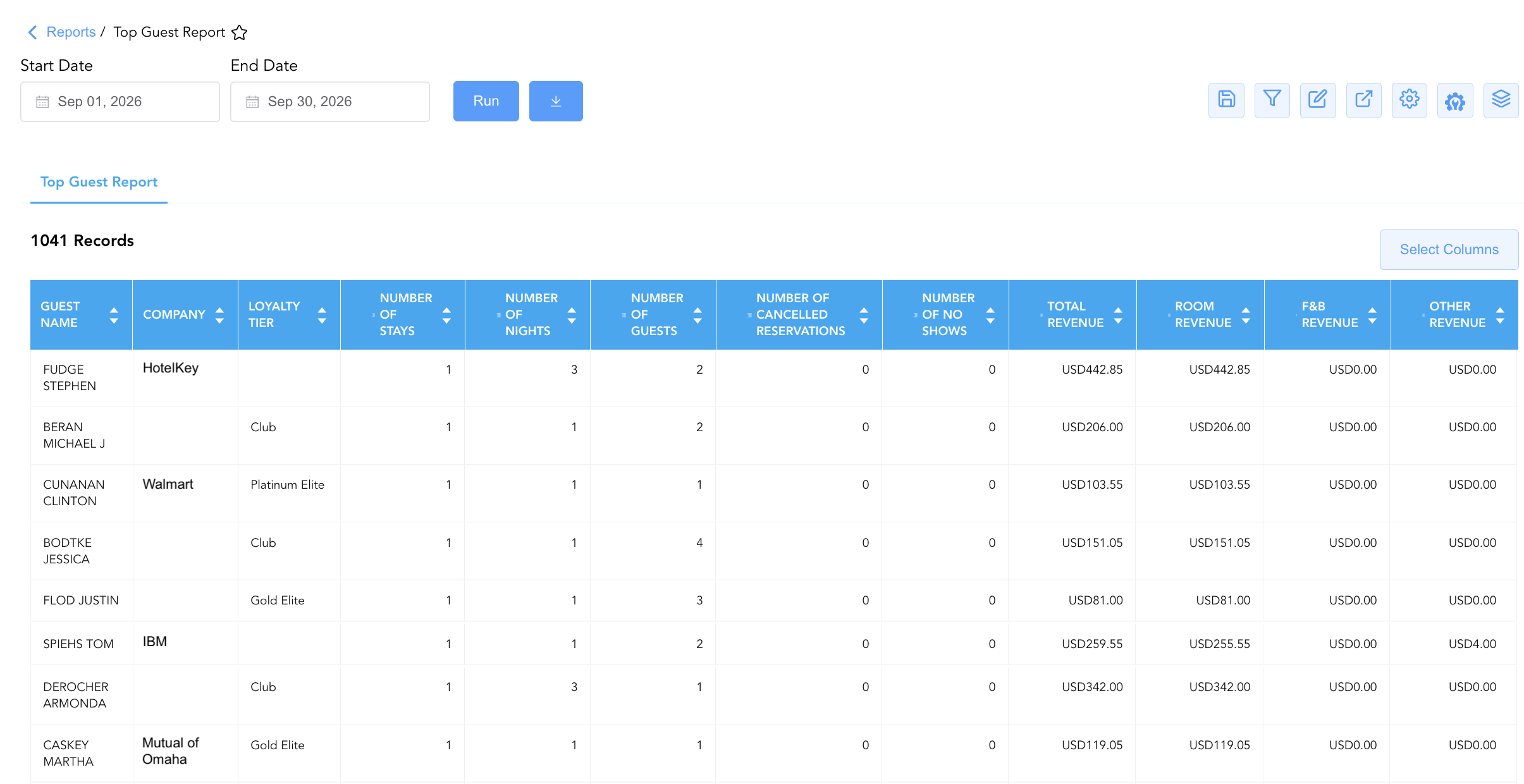
The Top Guest Report is a core guest intelligence, VIP recognition, and loyalty audit document within the ⭐ Guest Insights & Relations category of the 🛎️ Front Desk & Guest Services hub. Designed to deliver 360-degree visibility over individual guest production and historical stay activity, it ranks guest profiles recorded in the Property Management System (PMS) based on volume, room night generation, and total revenue contribution.
-
By aggregating guest profile parameters (
Guest Name,First Name,Last Name,Company,Loyalty Tier,Guest Tier) alongside stay volume metrics (Number of Stays,Number Of Nights,Number of Cancelled Reservations,Number of No Shows,Number of Guests) and financial contribution indicators (Room Revenue,F&B Revenue,Other Revenue,Total Revenue), this report enables hotel leadership, front desk teams, and guest relations leads to reward repeat guests, audit high-value VIP profiles, identify corporate travel bookers, and mitigate guest attrition.
Key Capabilities
-
Individual Production & Value Ranking: Ranks property guests by cumulative stay frequency (
Number of Stays), total nights spent (Number Of Nights), and total financial expenditure (Total Revenue). -
Loyalty & VIP Tier Identification: Integrates brand loyalty program tiers (
Loyalty Tier, e.g., Diamond Elite, Platinum Elite, Gold Elite, Silver Elite, Club) and property-specific VIP classifications (Guest Tier) for targeted recognition. -
Corporate Account Attribution: Links individual guest stay production directly to corporate company profiles (
Company, e.g., BCD TRAVEL, FEDROOMS, CLC Direct Bill, HILTI) to track corporate traveler volume. -
Stay Reliability & Attrition Auditing: Monitors individual cancellation frequency (
Number of Cancelled Reservations) and unfulfilled arrivals (Number of No Shows) to assess guest booking reliability. -
Multidimensional Revenue Segmentation: Disaggregates guest spending into base room charges (
Room Revenue), dining/beverage charges (F&B Revenue), and incidental ancillary charges (Other Revenue).
Report Views & Functional Breakdown
The Top Guest Report presents individual guest production data in a unified matrix supporting three key analytical perspectives:
┌────────────────────────────────────────────────────────────────────────┐
│                        TOP GUEST REPORT                                │
├────────────────────────────────────────────────────────────────────────┤
│                         Unified Matrix View                            │
├──────────────────────────┬──────────────────────────┬──────────────────┤
│ 1. Guest Profile &       │ 2. Stay Volume &         │ 3. Financial &   │
│    Loyalty Matrix        │    Reliability Trace     │    Revenue Audit │
└──────────────────────────┴──────────────────────────┴──────────────────┘
1. Guest Profile & Loyalty Matrix
Monitors individual guest identities, corporate company affiliations, and loyalty/VIP tier standings.
-
Primary Use: Identifying VIP guests prior to arrival, verifying loyalty program tier perks, and recognizing high-value repeat travelers during front desk interactions.
-
Key Metrics: Guest Name, First Name, Last Name, Company, Loyalty Tier, Guest Tier.
2. Stay Volume & Reliability Trace
Tracks historical stay frequency, room night production, occupant counts, and cancellation/no-show records.
-
Primary Use: Measuring guest loyalty and stay density, identifying long-stay guests, and evaluating individual booking reliability.
-
Key Metrics: Number of Stays, Number Of Nights, Number of Cancelled Reservations, Number of No Shows, Number of Guests.
3. Financial & Revenue Audit
Audits cumulative guest expenditure across room rates, food and beverage, and ancillary resort services.
-
Primary Use: Calculating guest lifetime value (LTV) on property, ranking top spenders for executive amenities, and analyzing ancillary revenue contribution.
-
Key Metrics: Room Revenue, F&B Revenue, Other Revenue, Total Revenue, Guest Name.
Data Dictionary (Dynamic View Columns)
Customize your default view using the Configure (⚙️) icon on the report page. Below is the full data dictionary representing all 15 columns available in this report:
💡 Revenue Calculation Note: Total Revenue represents net revenue generated across base room charges, food and beverage postings, and incidental ancillary charges (Total Revenue = Room Revenue + F&B Revenue + Other Revenue).
|
Column Name |
Description |
Data Source / System Mapping |
Includes Taxes & Fees? |
|
Company |
Corporate company profile linked to the guest's stays (if applicable). |
Reservation System > Company Account |
N/A |
|
F&B Revenue |
Net food and beverage revenue billed to the guest's room folios. |
SUM(F&B Folio Charges) |
❌ No |
|
First Name |
First name of the primary registered guest. |
Guest Profile > First Name |
N/A |
|
Guest Name |
Combined full name of the registered guest profile. |
Guest Profile > Full Name |
N/A |
|
Guest Tier |
Property-defined VIP classification tier. |
Guest Profile > Guest VIP Tier |
N/A |
|
Last Name |
Last name of the primary registered guest. |
Guest Profile > Last Name |
N/A |
|
Loyalty Tier |
Guest loyalty program membership level (e.g., Diamond Elite, Platinum Elite, Gold Elite, Silver Elite, Club). |
Loyalty Engine > Membership Tier |
N/A |
|
Number of Cancelled Reservations |
Total count of reservations cancelled by or for the guest prior to arrival. |
SUM(Cancelled Stays) |
N/A |
|
Number of Guests |
Cumulative headcount of adults and children accompanying the guest across stays. |
SUM(Total Occupants) |
N/A |
|
Number Of Nights |
Total physical room nights spent on property across all stays. |
SUM(Occupied Room Nights) |
N/A |
|
Number of No Shows |
Total count of reservations where the guest failed to arrive without cancelling. |
SUM(No-Show Stays) |
N/A |
|
Number of Stays |
Cumulative count of completed and active stay reservations for the guest. |
SUM(Completed + In-House Stays) |
N/A |
|
Other Revenue |
Net ancillary revenue generated (e.g., parking, laundry, resort fees). |
SUM(Incidental Folio Charges) |
❌ No |
|
Room Revenue |
Net base room revenue generated by the guest profile. |
SUM(Base Room Charges) |
❌ No |
|
Total Revenue |
Combined net revenue generated by the guest across all categories. |
SUM(Room + F&B + Other Revenue) |
❌ No |
Customization & Platform Features
User & Property Preferences
-
Personal Preference: Tailor your individual view by hiding or dragging columns. Your preferences save automatically for future sessions.
-
Property Defaults: System Admins can configure standard default layouts across all property users to streamline operational reporting. To maximize audit efficiency, group the columns into the below logical blocks:
-
Guest Profile & Tiering Identification (Cols 1–6):
Last Name|First Name|Guest Name|Company|Loyalty Tier|Guest Tier -
Stay Volume & Historical Metrics (Cols 7–11):
Number of Stays|Number Of Nights|Number of Guests|Number of Cancelled Reservations|Number of No Shows -
Financial Revenue Metrics (Cols 12–15):
Total Revenue|Room Revenue|F&B Revenue|Other Revenue
-
Report Toolbar & Quick Actions
Use the top-right toolbar icons on the report page to manage and export your data view:
|
Icon |
Action / Feature |
Description |

|
Knowledge Article |
Opens the knowledge base article to learn how to interpret this report. |

|
Saved Views |
Saves your column filtering, sorting, and highlight preferences so you can easily reload your custom view later without reconfiguring the report. |

|
Filter |
Opens filter controls to isolate specific data within a column based on your selected criteria. |

|
Highlight |
Highlights column values in a designated color based on selected conditions. |

|
Export |
Exports and downloads the report in various formats (Excel, PDF, CSV) for offline analysis or printing. |

|
Configure |
Opens column selection controls to toggle visibility, reorder columns, or hide rows with all zeros. |

|
Additional Configuration |
Provides advanced report configuration and display formatting options to customize data presentation. |

|
Group By |
Summarize and group report data dynamically in real time. |
Interactive Visualizations & Grouping Controls
-
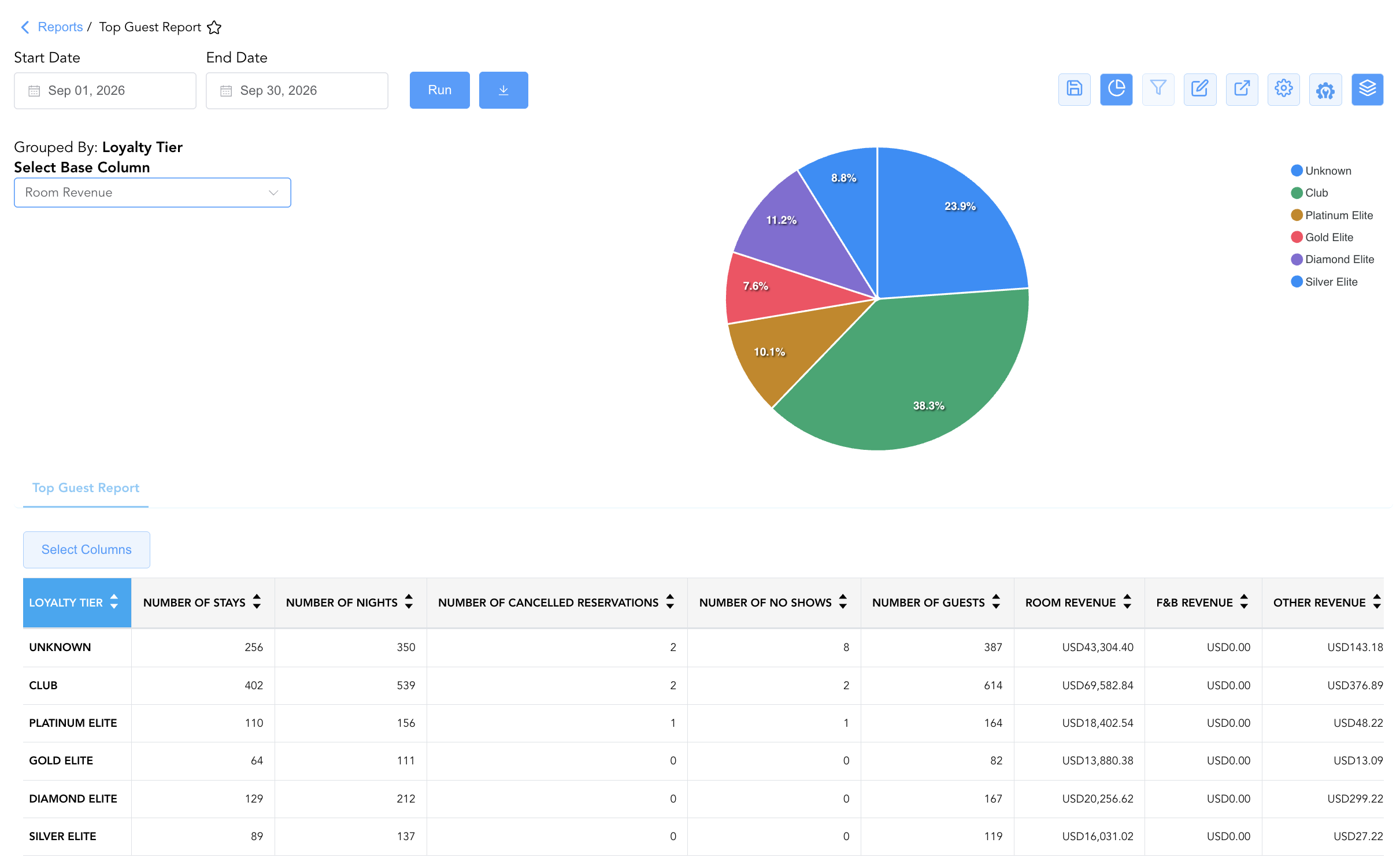
Group By & Pie Chart Visualization: The Top Guest Report features an interactive pie chart to help analyze guest segment contributions and revenue distribution patterns. Users can group guest records on the fly by Loyalty Tier, Company, or Guest Tier to evaluate top guest tiers, corporate traveler mix, and repeat stay concentration. By selecting a metric from the Select Base Column dropdown menu—such as Number of Stays, Number Of Nights, Number of Guests, Room Revenue, F&B Revenue, or Other Revenue—the chart dynamically renders percentage share breakdowns accompanied by an interactive color-coded legend.
Advanced Controls
-
Exporting & VIP Arrival Planning: Download in Excel or PDF format to generate daily VIP arrival lists, front desk morning briefing sheets, and general manager welcome card logs.
-
Filtering: Filter data by
Loyalty Tier = Diamond Eliteto focus on top brand members, or isolate long-stay guests (Number Of Nights > 5). -
Highlighting (Conditional Formatting): Apply custom rules to automatically highlight high-revenue spenders (
Total Revenue > $500), top repeat guests (Number of Stays > 3), or high cancellation risk profiles.
🔗 Related Reports & Next Steps
Within 🛎️ Front Desk & Guest Services & ⭐ Guest Insights & Relations:
-
In House List Report – Real-time guest register detailing active room occupants, rate plans, and vehicle registration data.
-
Guest Remarks Report – Profile-level audit log displaying permanent guest notes, extended-stay attributes, and VIP instructions.
-
Top Accounts Report – Corporate company production report ranking top corporate accounts by room nights and revenue.
-
Loyalty Enrollment Report – Audit report tracking new brand loyalty program sign-ups and front desk agent performance.
Cross-Pillar Deep Dives:
-
📈 Revenue & Marketing: Reconcile top guest spending against Occupancy Forecast and History Report and Rate Plan Summary Report to design targeted guest loyalty promotions.
-
💳 Payments & Transactions: Cross-reference top guest folios with Settlement By Payment Type Report to review guest billing methods and credit limits.