
Pet Occupancy Details Report Overview
Parent Hub: 🛎️ Front Desk & Guest Services
Category: 🏨 In-House & Occupancy
Target Roles: Executive Housekeepers, Housekeeping Supervisors, Room Attendants, Front Office Managers, Facilities Managers, General Managers
Key Value: Audit pet-friendly room usage history, monitor deep-cleaning and allergen sanitation thresholds, track elapsed days since last pet stay, prevent pet-stay room assignment conflicts for allergic guests, and enforce hotel pet policy compliance.
Executive Summary
The Pet Occupancy Details Report is an essential housekeeping, room assignment audit, and allergen control document within the 🏨 In-House & Occupancy category of the 🛎️ Front Desk & Guest Services hub. Designed to deliver clear operational visibility over physical guest rooms recently occupied by pets or service animals, it itemizes every room with recorded pet stay history alongside room categories, last pet departure dates, and cumulative elapsed days.
-
By mapping room allocation parameters (Room Number, Room Type) to pet stay timestamps (Last Occupied With Pet, Number Of Days), this report enables housekeeping teams, front desk agents, and facilities supervisors to schedule deep-cleaning cycles, manage pet-friendly room rotation, avoid assigning recent pet rooms to guests with severe animal allergies, and audit pet cleaning fee compliance.
Key Capabilities
-
Pet-Stay Room History Audit: Itemizes all guest rooms that have hosted pets or service animals, capturing physical room numbers (
Room Number) and room categories (Room Type). -
Chronological Pet Departure Tracking: Logs the exact calendar date on which a pet last occupied the room (
Last Occupied With Pet). -
Elapsed Days Calculation: Automatically calculates the total number of days elapsed (
Number Of Days) between the last pet departure date and the current business day. -
Deep-Cleaning & Allergen Management: Guides housekeeping in scheduling specialized deep-cleaning procedures (e.g., dander removal, carpet shampooing, air purification) prior to reassigning rooms to non-pet guests.
-
Room Assignment Protection: Provides front desk agents with real-time room history data to prevent accidentally assigning recently pet-occupied rooms to allergic guests.
Report Views & Functional Breakdown
The Pet Occupancy Details Report presents pet-stay history in a unified single-table ledger that supports three key operational perspectives:
┌────────────────────────────────────────────────────────────────────────┐
│                   PET OCCUPANCY DETAILS REPORT                         │
├────────────────────────────────────────────────────────────────────────┤
│                         Unified Matrix View                            │
├──────────────────────────┬──────────────────────────┬──────────────────┤
│ 1. Physical Room &       │ 2. Pet Departure &       │ 3. Deep-Cleaning &│
│    Category Identification│    Timeline Audit        │    Allergen Safety│
└──────────────────────────┴──────────────────────────┴──────────────────┘
1. Physical Room & Category Identification
Monitors physical room assignments and room types that have hosted pet stays.
-
Primary Use: Identifying specific pet-friendly room inventory, evaluating room type distribution for pet stays, and reviewing room features.
-
Key Metrics: Room Number, Room Type.
2. Pet Departure & Timeline Audit
Tracks exact departure dates and measures elapsed days since pet occupancy.
-
Primary Use: Determining how recently a pet occupied a given room, evaluating air turnover windows, and monitoring room rotation intervals.
-
Key Metrics: Last Occupied With Pet, Number Of Days.
3. Deep-Cleaning & Allergen Safety
Guides housekeeping room turnover and allergen mitigation workflows.
-
Primary Use: Prioritizing rooms requiring carpet steaming, dander treatment, or ozone sanitation before non-pet guest check-in.
-
Key Metrics: Room Number, Last Occupied With Pet, Number Of Days.
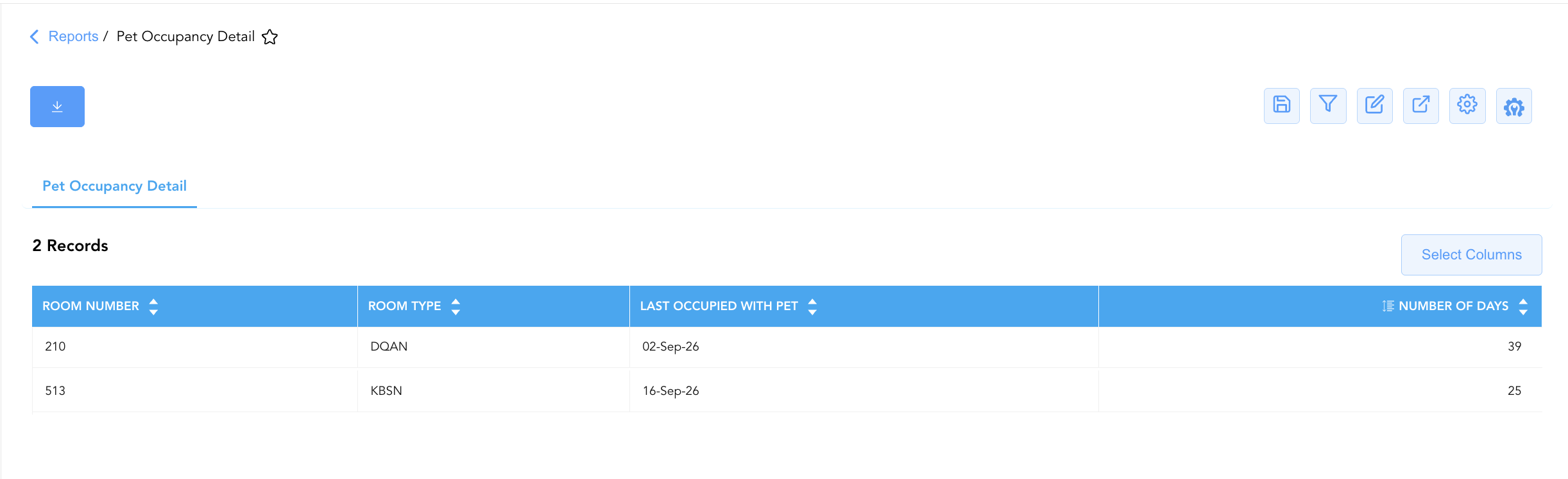
Data Dictionary (Dynamic View Columns)
Customize your default view using the Configure (⚙️) icon on the report page. Below is the full data dictionary representing all 4 columns available in this report:
💡 Elapsed Days Note: Number Of Days is calculated automatically as the difference in calendar days between the current business day and the Last Occupied With Pet date (Number Of Days = Current Business Day - Last Occupied With Pet).
|
Column Name |
Description |
Data Source / System Mapping |
Includes Taxes & Fees? |
|
Room Number |
Physical guest room number that hosted a pet or service animal stay. |
PMS > Assigned Room Number |
N/A |
|
Room Type |
Code representing the room category (e.g., DQAN, KBSN). |
PMS > Room Type Code |
N/A |
|
Last Occupied With Pet |
Calendar date on which a pet or service animal last occupied the room. |
PMS Housekeeping / Stay Audit > Pet Departure Date |
N/A |
|
Number Of Days |
Total elapsed days between the last pet stay departure date and the current business day. |
Current Business Day - Last Occupied With Pet |
N/A |
Customization & Platform Features
User & Property Preferences
-
Personal Preference: Tailor your individual view by hiding or dragging columns. Your preferences save automatically for future sessions.
-
Property Defaults: System Admins can configure standard default layouts across all property users to streamline operational reporting. To maximize audit efficiency, group the columns into the below logical blocks:
-
Room Location & Assignment (Cols 1–2):
Room Number|Room Type -
Pet Stay History & Elapsed Time (Cols 3–4):
Last Occupied With Pet|Number Of Days
-
Report Toolbar & Quick Actions
Use the top-right toolbar icons on the report page to manage and export your data view:
|
Icon |
Action / Feature |
Description |

|
Knowledge Article |
Opens the knowledge base article to learn how to interpret this report. |

|
Saved Views |
Saves your column filtering, sorting, and highlight preferences so you can easily reload your custom view later without reconfiguring the report. |

|
Filter |
Opens filter controls to isolate specific data within a column based on your selected criteria. |

|
Highlight |
Highlights column values in a designated color based on selected conditions. |

|
Export |
Exports and downloads the report in various formats (Excel, PDF, CSV) for offline analysis or printing. |

|
Configure |
Opens column selection controls to toggle visibility, reorder columns, or hide rows with all zeros. |

|
Additional Configuration |
Provides advanced report configuration and display formatting options to customize data presentation. |
Advanced Controls
-
Exporting & Housekeeping Logs: Download in Excel or PDF format to generate daily deep-cleaning checklists for room attendants and inspector logs.
-
Filtering: Filter data by
Number Of Days < 7to isolate rooms occupied by pets within the past week requiring allergen verification. -
Highlighting (Conditional Formatting): Apply custom rules to automatically highlight recently vacated pet rooms (e.g.,
Number Of Days <= 3) in amber or red for immediate housekeeping attention.
🔗 Related Reports & Next Steps
Within 🛎️ Front Desk & Guest Services & 🏨 In-House & Occupancy:
-
In House Guest List – Standard guest roster tracking active room occupants, contact info, and stay dates.
-
Departures Details – Comprehensive manifest tracking daily scheduled guest departures, folio numbers, and outstanding balances.
Cross-Pillar Deep Dives:
-
🧹 Housekeeping & Room Status: Cross-reference pet room departure dates with Housekeeping Sheet to verify deep-cleaning completion before room release.
-
💳 Billing & Transactions: Cross-reference pet rooms with All Transactionsto audit pet deposit or cleaning fee postings.