
Cancelled Reservation Report Overview
Parent Hub: 🛎️ Front Desk & Guest Services
Category: 🧳 Arrivals & Departures
Target Roles: Front Office Managers, Reservations Managers, Revenue Managers, Hotel Controllers, General Managers, Guest Services Supervisors
Key Value: Monitor cancelled individual and group bookings, audit cancellation penalties and waived fee charges, track cancellation reasons and lead times, review user cancellation activity, and manage inventory release back to bookable availability.
Executive Summary
The Cancelled Reservation Report is a primary front office audit, inventory management, and revenue control document within the 🧳 Arrivals & Departures category of the 🛎️ Front Desk & Guest Services hub. Designed to provide complete operational and financial visibility over lost booking volume, it itemizes every individual reservation and group block cancelled in the Property Management System (PMS) across specified cancellation date windows.
-
By organizing lost demand into 2 defined report sections: Cancelled Reservations and Cancelled Groups, this report enables front office managers, revenue directors, and hotel controllers to audit individual guest cancellations (
Cancelled Reservations) alongside group block cancellations (Cancelled Groups). It tracks cancellation timestamps (Cancellation Date, Cancellation Time), cancellation reference numbers (Confirmation Number, Cancellation Number), lost stay revenue (Cancelled Charges, Cancelled Charges Taxes, Cancelled Charges Fees), assessed late cancellation fees (Cancellation Penalty, Cancellation Penalty Taxes, Cancellation Penalty Fees), cancellation reasons (Cancellation Reason, Cancellation Remarks), and cancellation user credentials (Cancelled By).
Key Capabilities
-
Two-Section Cancellation Audit: Separates lost individual guest stays (
Cancelled Reservations) from lost group blocks (Cancelled Groups) for targeted inventory and revenue loss analysis. -
Penalty & Fee Assessment Tracking: Displays lost room revenue (
Cancelled Charges) alongside assessed late cancellation penalties (Cancellation Penalty) and associated tax/fee postings (Cancellation Penalty Taxes,Cancellation Penalty Fees). -
Cancellation Reason & Remark Classification: Logs documented cancellation justifications (
Cancellation Reason,Cancellation Remarks) to evaluate guest attrition trends, policy enforcement, and market shifts. -
User & Agent Traceability: Captures the exact staff username or system agent (
Cancelled By) who processed the cancellation entry. -
Inventory Release & Stay Timeframe Audit: Itemizes original arrival dates (
Arrival Date), stay lengths (Number Of Nights), assigned room categories (Room Type), rate plans (Rate Plan), and booking sources (Source) to track released room inventory.
Report Views & Functional Breakdown
The Cancelled Reservation Report presents lost demand data in a structured matrix across 2 defined sections:
┌────────────────────────────────────────────────────────────────────────┐
│                   CANCELLED RESERVATION REPORT                         │
├────────────────────────────────────────────────────────────────────────┤
│                       2 Defined Report Sections                        │
├──────────────────────────┬──────────────────────────┬──────────────────┤
│ 1. Cancelled Reservations│ 2. Cancelled Groups      │                  │
│    Section (Individual)  │    Section (Group Blocks) │                  │
└──────────────────────────┴──────────────────────────┴──────────────────┘
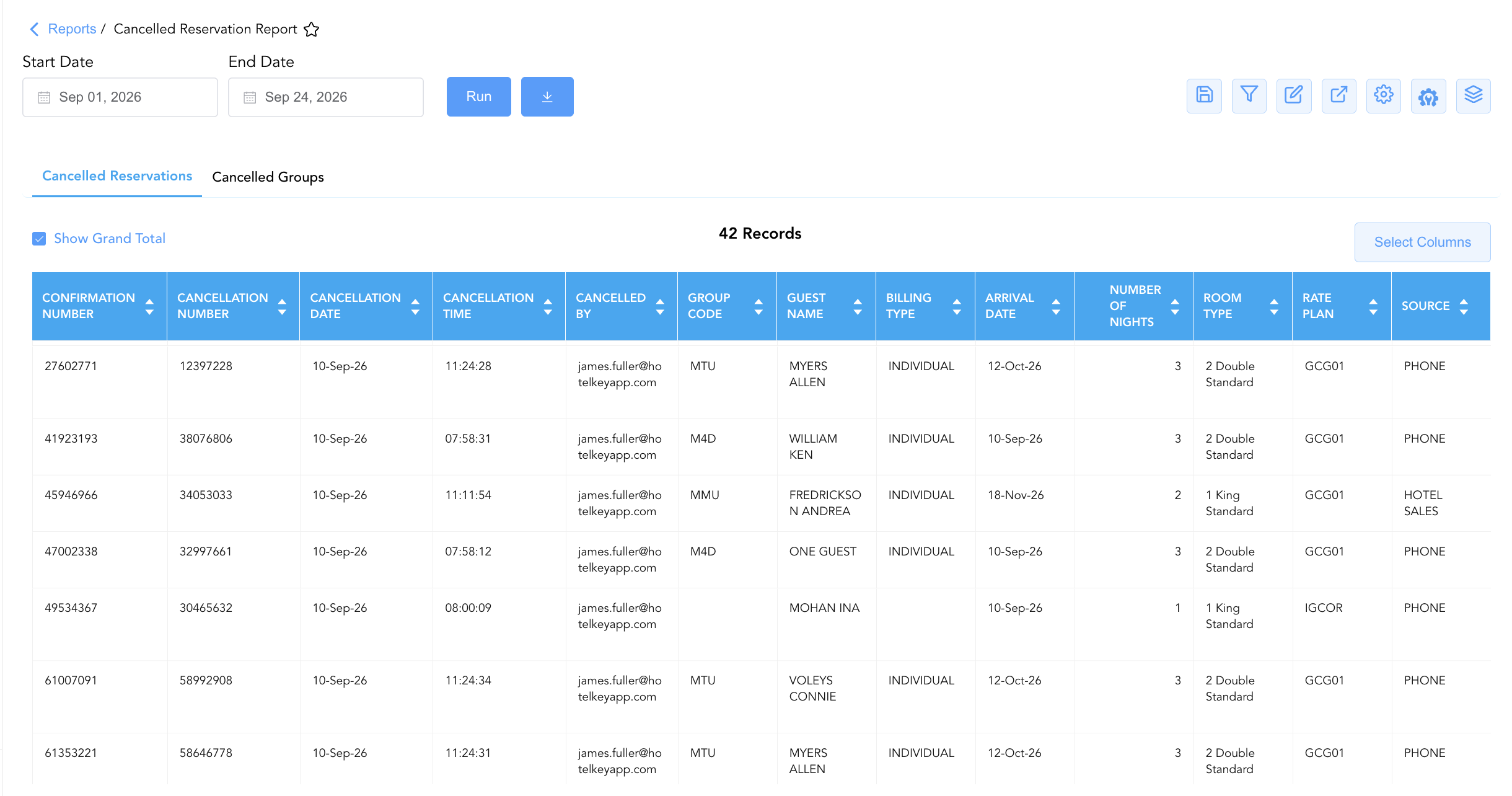
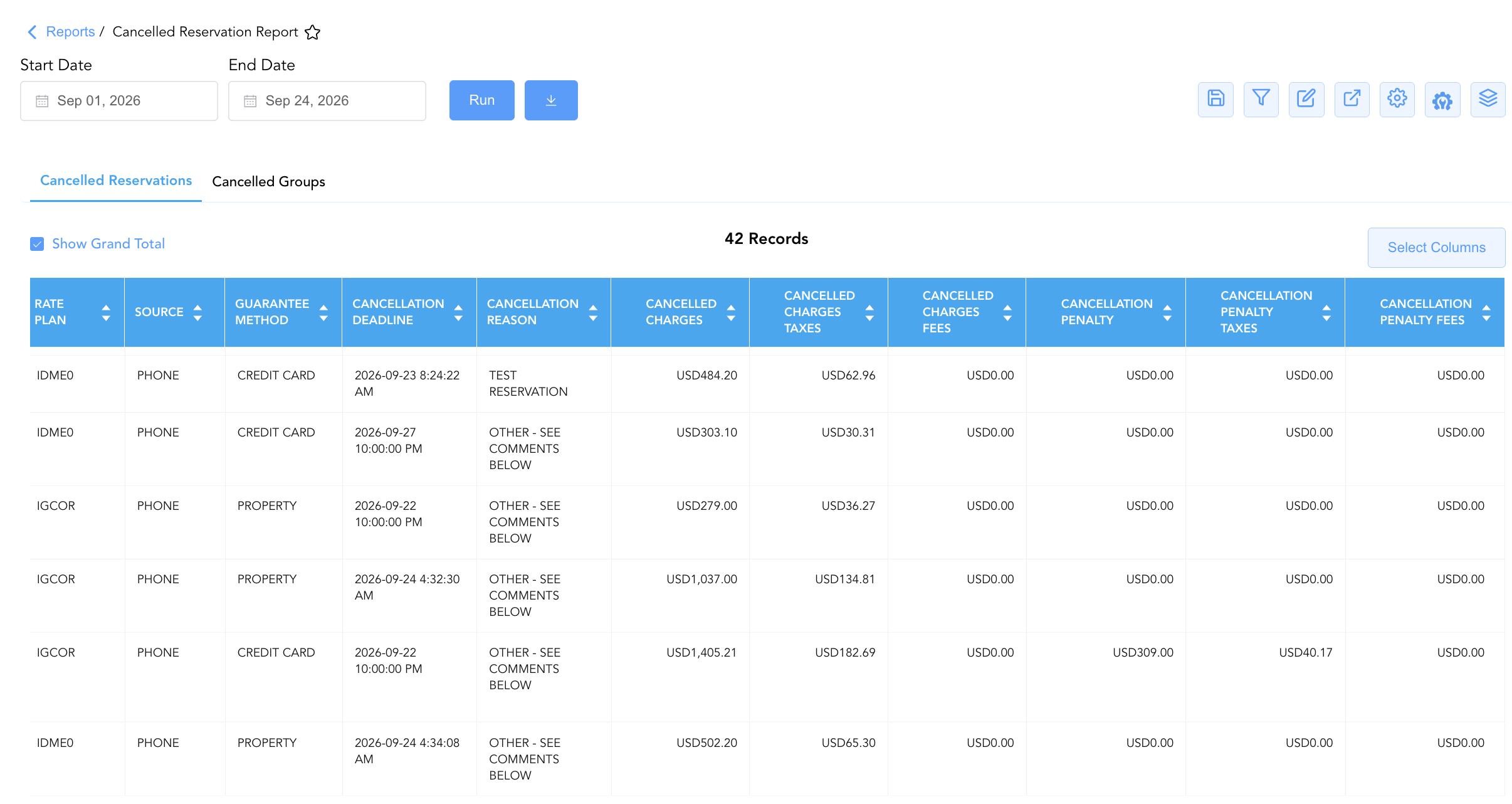
1. Cancelled Reservations Section
Monitors all individual transient, corporate, and promotional guest room cancellations processed during the selected report date range.
-
Primary Use: Tracking individual reservation cancellations, auditing cancellation fee assessments versus waivers, verifying cancellation reference numbers, and reviewing agent processing timestamps.
-
Key Metrics: Cancellation Date, Cancellation Time, Confirmation Number, Cancellation Number, Guest Name, Rate Plan, Arrival Date, Number Of Nights, Cancelled Charges, Cancellation Penalty, Cancelled By.
2. Cancelled Groups Section
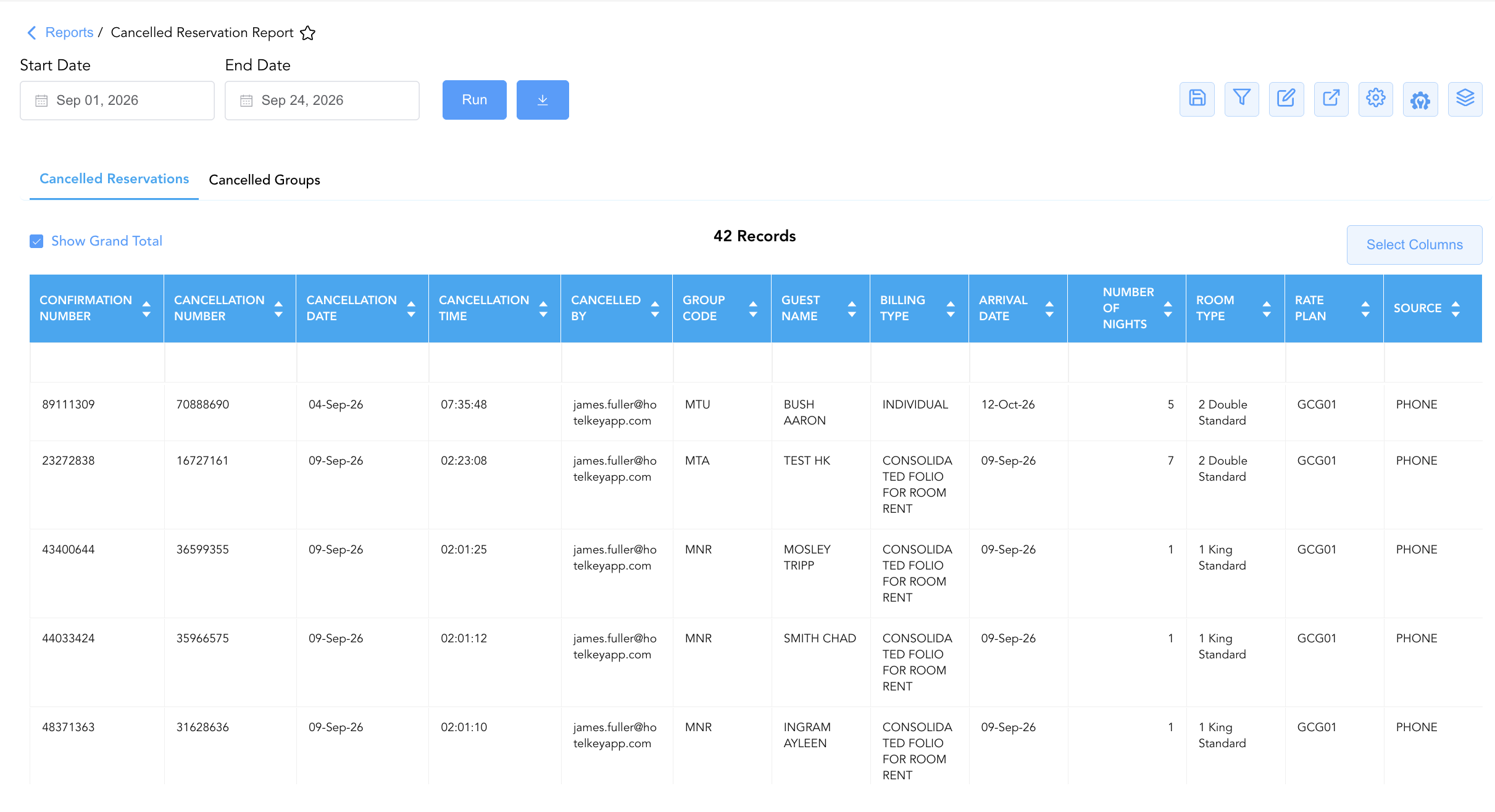
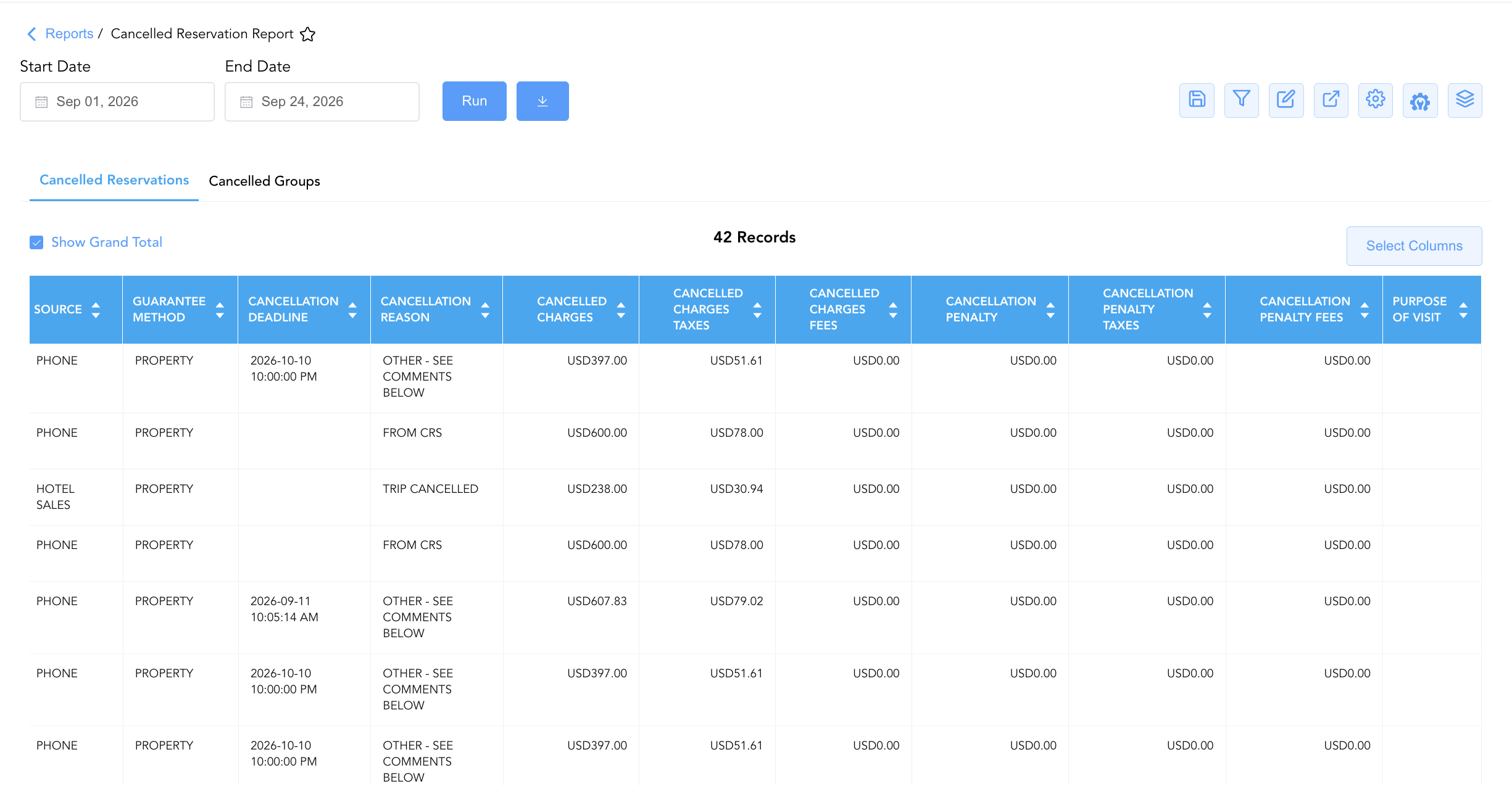
Isolates cancelled group master blocks, group allocations, and event room blocks.
-
Primary Use: Auditing group contract cancellations, tracking group room night attrition, evaluating group penalty fee postings, and reviewing group sales release activity.
-
Key Metrics: Cancellation Date, Group Code, Group Name, Billing Type, Confirmation Number, Rate Plan, Arrival Date, Number Of Nights, Cancelled Charges, Cancellation Penalty.
Data Dictionary (Dynamic View Columns)
Customize your default view using the Configure (⚙️) icon on the report page. Below is the full data dictionary representing every column available in this report:
💡 Financial Calculation Note: Cancelled Charges represents the gross lost room revenue from the cancelled reservation. Cancellation Penalty reflects assessed late cancellation or no-show penalty fees billed to the guest or company folio.
|
Column Name |
Section Applicability |
Description |
Data Source / System Mapping |
Includes Taxes & Fees? |
|---|---|---|---|---|
|
Cancellation Date |
Both Sections |
Calendar date on which the cancellation was processed in the PMS. |
PMS Audit Trail > Cancellation Date |
N/A |
|
Cancellation Time |
Section 1 |
Exact timestamp recording when the individual cancellation was processed. |
PMS Audit Trail > Cancellation Time |
N/A |
|
Confirmation Number |
Both Sections |
Primary unique alphanumeric reservation identifier. |
Reservation System > Confirmation Number |
N/A |
|
Cancellation Number |
Both Sections |
Unique reference number generated upon successful cancellation processing. |
PMS Audit Trail > Cancellation ID |
N/A |
|
Group Code |
Both Sections |
Alphanumeric group code associated with the reservation or group block. |
Reservation / Group System > Group Code |
N/A |
|
Group Name |
Section 2 |
Full descriptive title of the cancelled group block (e.g., HotelKey Quarterly Meeting, TESLA). |
Group Master Setup > Group Name |
N/A |
|
Billing Type |
Both Sections |
Folio routing arrangement assigned to the booking (e.g., |
Billing Setup > Routing Type |
N/A |
|
Guest Name |
Both Sections |
Combined full name of the primary registered guest. |
Guest Profile > Full Name |
N/A |
|
First Name |
Both Sections |
First name of the primary registered guest. |
Guest Profile > First Name |
N/A |
|
Last Name |
Both Sections |
Last name of the primary registered guest. |
Guest Profile > Last Name |
N/A |
|
Contact Role |
Both Sections |
Designation or contact role on the reservation profile. |
Guest Profile > Role Title |
N/A |
|
Loyalty Number |
Section 1 |
Guest loyalty membership identification number. |
Guest Profile > Loyalty ID |
N/A |
|
Source |
Both Sections |
Booking channel or origin interface (e.g., |
CRS / PMS > Reservation Source |
N/A |
|
Rate Plan |
Both Sections |
Code of the rate plan assigned prior to cancellation (e.g., IGCOR, IDME0, IDAPF, GCG01). |
Reservation System > Rate Code |
N/A |
|
Room Type |
Section 1 |
Code representing the room category allocated prior to cancellation. |
PMS > Room Type Code |
N/A |
|
Arrival Date |
Both Sections |
Scheduled check-in date of the cancelled reservation. |
Reservation System > Arrival Date |
N/A |
|
Number Of Nights |
Both Sections |
Total physical room nights spanned by the cancelled stay. |
Reservation System > Total Nights |
N/A |
|
Guarantee Method |
Both Sections |
Payment guarantee type attached to the reservation (e.g., |
Reservation Billing > Guarantee Type |
N/A |
|
Cancellation Policy |
Both Sections |
Full policy terms and deadline rules governing the cancellation. |
Rate Engine > Policy Text |
N/A |
|
Cancellation Deadline |
Section 1 |
Deadline date/time prior to which cancellation was permitted without penalty. |
Rate Engine > Deadline Timestamp |
N/A |
|
Cancellation Reason |
Both Sections |
Selected justification or category explaining why the booking was cancelled. |
PMS Cancellation Prompt > Reason |
N/A |
|
Cancellation Remarks |
Both Sections |
Free-text operational notes entered during cancellation processing. |
PMS Cancellation Prompt > Remarks |
N/A |
|
Cancelled Charges |
Both Sections |
Gross base room revenue lost due to the cancellation. |
SUM(Lost Base Room Revenue) |
❌ No |
|
Cancelled Charges Taxes |
Both Sections |
Total room taxes associated with the lost room charges. |
SUM(Lost Room Taxes) |
N/A |
|
Cancelled Charges Fees |
Both Sections |
Total non-tax fees associated with the lost room charges. |
SUM(Lost Room Fees) |
N/A |
|
Cancellation Penalty |
Both Sections |
Base late cancellation or forfeiture penalty fee assessed to the folio. |
Folio Posting > Base Penalty |
❌ No |
|
Cancellation Penalty Taxes |
Both Sections |
Taxes assessed on the cancellation penalty fee. |
Folio Posting > Penalty Taxes |
🟢 Yes |
|
Cancellation Penalty Fees |
Both Sections |
Non-tax surcharges assessed on the cancellation penalty fee. |
Folio Posting > Penalty Fees |
🟢 Yes |
|
Sub Source Code |
Both Sections |
Secondary channel distribution code. |
CRS > Sub-Source Code |
N/A |
|
Sub Source Name |
Both Sections |
Secondary channel distribution name. |
CRS > Sub-Source Title |
N/A |
|
Cancelled By |
Section 1 |
Staff name or user ID of the employee processing the cancellation. |
Security Audit Trail > User Name |
N/A |
|
Purpose Of Visit |
Both Sections |
Documented reason or travel purpose category. |
Reservation Profile > Visit Purpose |
N/A |
Customization & Platform Features
User & Property Preferences
-
Personal Preference: Tailor your individual view by hiding or dragging columns. Your preferences save automatically for future sessions.
-
Property Defaults: System Admins can configure standard default layouts across all property users to streamline operational reporting. To maximize audit efficiency, group the columns into the below logical blocks:
-
Section 1: Cancelled Reservations
-
Cancellation Audit & Tracking (Cols 1–6):
Confirmation Number|Cancellation Number|Cancellation Date|Cancellation Time|Cancelled By|Group Code -
Guest Profile & Contact Identification (Cols 7–12):
Guest Name|First Name|Last Name|Contact Role|Loyalty Number|Company / Billing Type -
Stay Itinerary & Room Details (Cols 13–15):
Arrival Date|Number Of Nights|Room Type -
Rate Plan & Channel Mapping (Cols 16–19):
Rate Plan|Source|Sub Source Code|Sub Source Name -
Policy, Compliance & Reason Tracking (Cols 20–24):
Guarantee Method|Cancellation Deadline|Cancellation Policy|Cancellation Reason|Cancellation Remarks -
Financial Impact & Penalty Assessment (Cols 25–30):
Cancelled Charges|Cancelled Charges Taxes|Cancelled Charges Fees|Cancellation Penalty|Cancellation Penalty Taxes|Cancellation Penalty Fees -
Audit Notes (Col 31):
Purpose Of Visit
-
-
Section 2: Cancelled Groups
-
Group Identification & Audit (Cols 1–4):
Group Code|Group Name|Cancellation Date|Cancellation Number -
Group Contact & Billing (Cols 5–10):
Guest Name|First Name|Last Name|Contact Role|Billing Type|Confirmation Number -
Group Itinerary & Rate Mapping (Cols 11–16):
Arrival Date|Number Of Nights|Rate Plan|Source|Sub Source Code|Sub Source Name -
Policy & Reason Compliance (Cols 17–20):
Guarantee Method|Cancellation Policy|Cancellation Reason|Cancellation Remarks -
Financial Impact & Penalty Assessment (Cols 21–26):
Cancelled Charges|Cancelled Charges Taxes|Cancelled Charges Fees|Cancellation Penalty|Cancellation Penalty Taxes|Cancellation Penalty Fees -
Audit Notes (Col 27):
Purpose Of Visit
-
-
Report Toolbar & Quick Actions
Use the top-right toolbar icons on the report page to manage and export your data view:
|
Icon |
Action / Feature |
Description |

|
Knowledge Article |
Opens the knowledge base article to learn how to interpret this report. |

|
Saved Views |
Saves your column filtering, sorting, and highlight preferences so you can easily reload your custom view later without reconfiguring the report. |

|
Filter |
Opens filter controls to isolate specific data within a column based on your selected criteria. |

|
Highlight |
Highlights column values in a designated color based on selected conditions. |

|
Export |
Exports and downloads the report in various formats (Excel, PDF, CSV) for offline analysis or printing. |

|
Configure |
Opens column selection controls to toggle visibility, reorder columns, or hide rows with all zeros. |

|
Additional Configuration |
Provides advanced report configuration and display formatting options to customize data presentation. |

|
Group By |
Summarize and group report data dynamically in real time. |
Interactive Visualizations & Grouping Controls
-
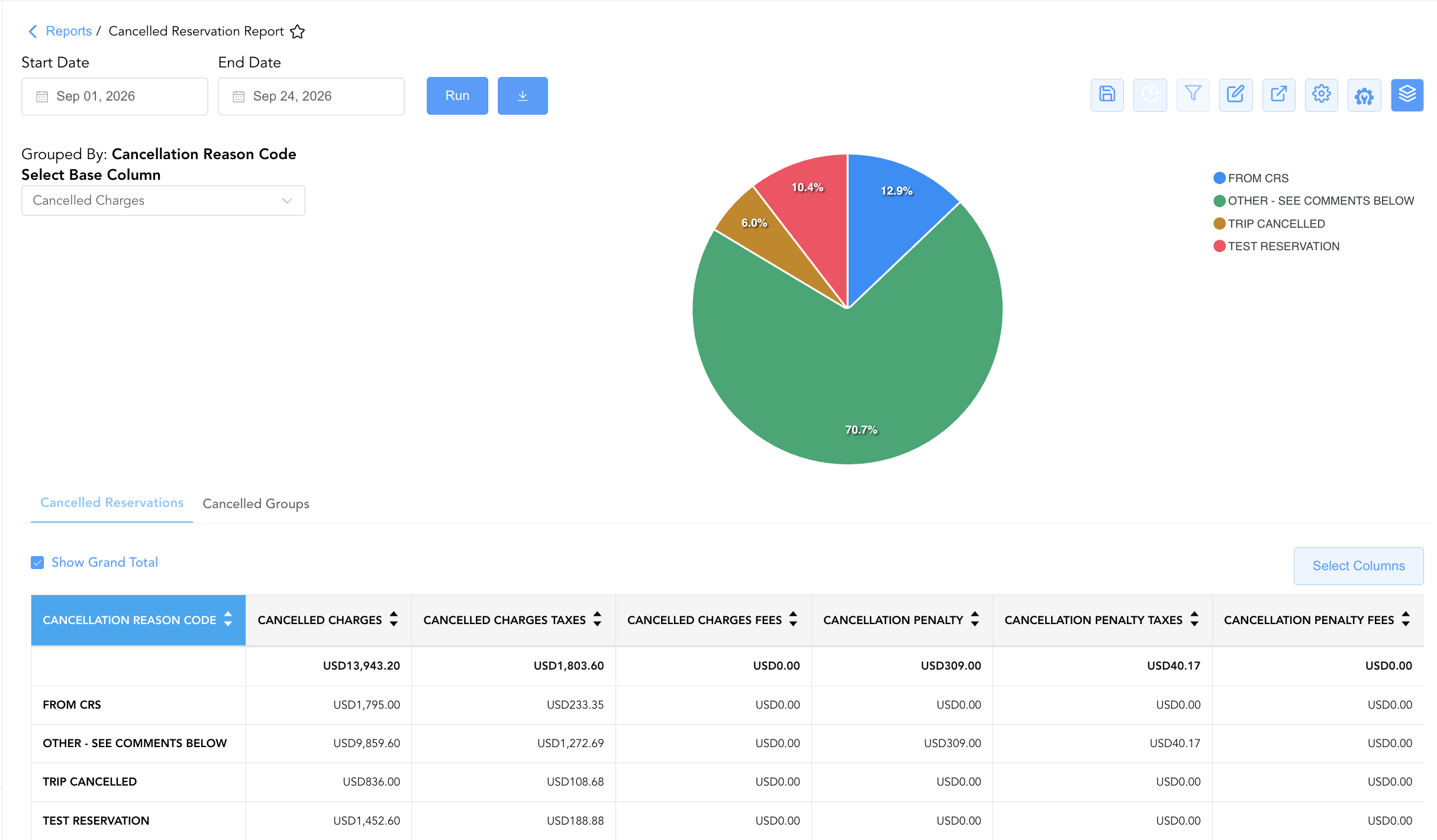
Group By & Pie Chart Visualization: The Cancelled Reservation Report features an interactive pie chart to help analyze financial loss drivers and reason code share distributions. Users can group cancellation records on the fly by Cancellation Reason or Source across the Cancelled Reservations and Cancelled Groups sections to evaluate staff processing volume and loss drivers. By selecting a metric from the Select Base Column dropdown menu—such as Cancelled Charges, Cancelled Charges Taxes, Cancelled Charges Fees, Cancellation Penalty, Cancellation Penalty Taxes, or Cancellation Penalty Fees—the chart dynamically renders percentage share breakdowns accompanied by an interactive color-coded legend.
Advanced Controls
-
Exporting & Attrition Analysis: Download in Excel or PDF format to support daily front office audits, monthly controller reconciliations, and group attrition analysis.
-
Filtering: Filter data by specific
Cancelled Byusername, isolate penalty assessments (Cancellation Penalty > $0), or filter for specific arrival date windows. -
Highlighting (Conditional Formatting): Apply custom rules to automatically highlight high-value lost reservations, late cancellations, or waived penalty fees.
🔗 Related Reports & Next Steps
Within 🛎️ Front Desk & Guest Services & 🧳 Arrivals & Departures:
-
Booked Reservations – Audit log tracking newly created and modified reservation entries.
-
Arrivals – Detailed daily manifest of expected arriving guests, check-in statuses, and room assignments.
-
Departures List – Daily manifest tracking scheduled guest departures, check-out statuses, and folio balances.
Cross-Pillar Deep Dives:
-
📈 Revenue & Analytics: Reconcile lost demand against Booking Pace, Turn Away Reason Code, and Occupancy Forecast and History.
-
🏷️ Rate Management: Review cancellation policy enforcement against Rate Code Configuration and Discrepant Rates.