
Guest Remarks Report Overview
Parent Hub: 🛎️ Front Desk & Guest Services
Category: ⭐ Guest Insights & Relations
Target Roles: Front Office Managers, Front Desk Agents, Guest Relations Managers, VIP Concierge, Guest Services Supervisors, Executive Housekeepers, General Managers
Key Value: Review profile-level guest preferences, long-term stay attributes, and permanent profile instructions for all registered in-house guests, ensuring personalized service delivery and operational continuity across multiple stays.
Executive Summary
The Guest Remarks Report is a specialized guest relations, profile audit, and service personalization document within the ⭐ Guest Insights & Relations category of the 🛎️ Front Desk & Guest Services hub. Designed to aggregate profile-level intelligence for active room occupants, it itemizes all registered in-house guests alongside permanent profile remarks stored directly on the PMS Guest Profile.
-
Unlike temporary reservation notes or single-stay remarks, the notes displayed in this report originate from the master PMS Guest Profile. The report renders a complete roster of all active in-house guests, where the remarks field is dynamically populated whenever a permanent remark is attached to the guest profile. This allows front office agents and guest experience leads to instantly identify VIP status notes, influencer handling guidelines, medical or accessibility preferences, and extended stay flags for currently registered guests.
Key Capabilities
-
In-House Guest Register Integration: Renders a live operational roster of all currently registered in-house guests (
Confirmation Number,Guest Name,First Name,Last Name). -
PMS Guest Profile Remarks Extraction: Pulls permanent, profile-level notes (
Remarks) stored on the master PMS Guest Profile. -
VIP & Influencer Recognition: Highlights high-touch profile instructions (e.g., VIP 4 Influencer handling, executive amenity requests) to ensure personalized guest experiences.
-
Long-Term Stay Identification: Pinpoints extended-stay guest profile attributes (e.g., 30+ night stay history, recurring billing preferences) for tailored front desk and housekeeping care.
-
Stay Window Alignment: Correlates profile notes with live stay timeframes (
Check In Date,Check Out Date) to ensure front office shift awareness during the guest's active stay.
Report Views & Functional Breakdown
The Guest Remarks Report presents profile-level guest insights in a unified single-table ledger supporting three primary operational perspectives:
┌────────────────────────────────────────────────────────────────────────┐
│                        GUEST REMARKS REPORT                            │
├────────────────────────────────────────────────────────────────────────┤
│                         Unified Matrix View                            │
├──────────────────────────┬──────────────────────────┬──────────────────┤
│ 1. Active In-House Guest │ 2. Stay Timeframe &      │ 3. Permanent Profile│
│    Roster                │    Reservation Alignment │    Remarks Trace │
└──────────────────────────┴──────────────────────────┴──────────────────┘
1. Active In-House Guest Roster
Monitors registered in-house guest identities and reservation confirmation numbers.
-
Primary Use: Scanning the current in-house guest list to verify identity details and profile attachments.
-
Key Metrics: Confirmation Number, Guest Name, First Name, Last Name.
2. Stay Timeframe & Reservation Alignment
Tracks check-in and check-out dates for each registered guest.
-
Primary Use: Aligning guest profile remarks with active stay durations and expected departure schedules.
-
Key Metrics: Check In Date, Check Out Date, Confirmation Number.
3. Permanent Profile Remarks Trace
Displays master PMS Guest Profile notes and special guest handling instructions.
-
Primary Use: Reviewing permanent guest preferences, VIP handling notes, and extended-stay flags during daily front desk shift briefings.
-
Key Metrics: Remarks, Guest Name, Confirmation Number.
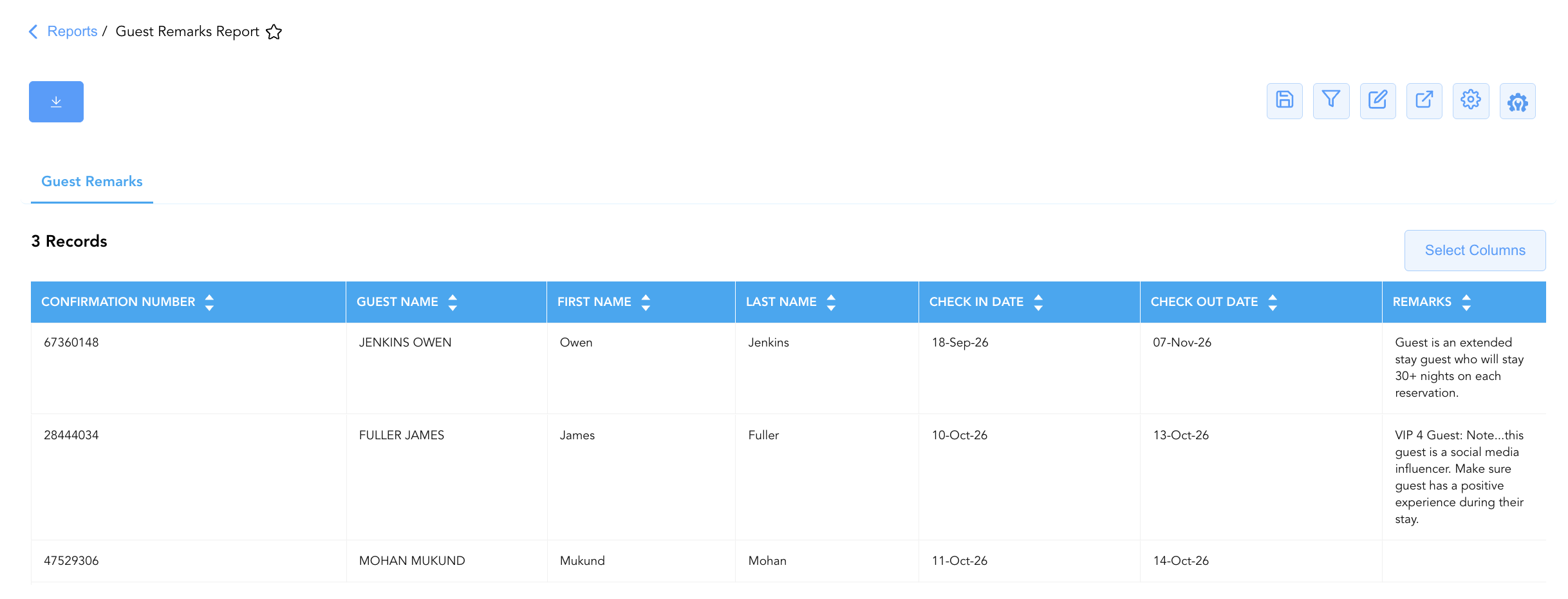
Data Dictionary (Dynamic View Columns)
Customize your default view using the Configure (⚙️) icon on the report page. Below is the full data dictionary representing all 7 columns available in this report:
💡 Special Operational Note: This report displays all in-house guests. The
Remarkscolumn is dynamically populated only when a remark is stored on the master PMS Guest Profile. Stays without profile-level notes will display a blankRemarksfield.
|
Column Name |
Description |
Data Source / System Mapping |
Includes Taxes & Fees? |
|
Confirmation Number |
Primary unique alphanumeric reservation identifier for the active stay. |
Reservation System > Confirmation ID |
N/A |
|
Guest Name |
Combined full name of the primary registered guest. |
Guest Profile > Full Name |
N/A |
|
First Name |
First name of the primary registered guest. |
Guest Profile > First Name |
N/A |
|
Last Name |
Last name of the primary registered guest. |
Guest Profile > Last Name |
N/A |
|
Check In Date |
Actual or scheduled check-in date of the active reservation. |
Reservation System > Check-In Date |
N/A |
|
Check Out Date |
Scheduled check-out date of the active reservation. |
Reservation System > Check-Out Date |
N/A |
|
Remarks |
Permanent profile-level notes, VIP instructions, or special handling remarks stored on the master PMS Guest Profile (Blank if no profile remark exists). |
PMS Guest Profile > Profile Remarks |
N/A |
Customization & Platform Features
User & Property Preferences
-
Personal Preference: Tailor your individual view by hiding or dragging columns. Your preferences save automatically for future sessions.
-
Property Defaults: System Admins can configure standard default layouts across all property users to streamline operational reporting. To maximize audit efficiency, group the columns into the below logical blocks:
-
Reservation Identification (Col 1):
Confirmation Number -
Guest Profile Identification (Cols 2–4):
Guest Name|First Name|Last Name -
Stay Itinerary & Timestamps (Cols 5–6):
Check In Date|Check Out Date -
Operational Instructions & Special Handling (Col 7):
Remarks
-
Report Toolbar & Quick Actions
Use the top-right toolbar icons on the report page to manage and export your data view:
|
Icon |
Action / Feature |
Description |

|
Knowledge Article |
Opens the knowledge base article to learn how to interpret this report. |

|
Saved Views |
Saves your column filtering, sorting, and highlight preferences so you can easily reload your custom view later without reconfiguring the report. |

|
Filter |
Opens filter controls to isolate specific data within a column based on your selected criteria. |

|
Highlight |
Highlights column values in a designated color based on selected conditions. |

|
Export |
Exports and downloads the report in various formats (Excel, PDF, CSV) for offline analysis or printing. |

|
Configure |
Opens column selection controls to toggle visibility, reorder columns, or hide rows with all zeros. |

|
Additional Configuration |
Provides advanced report configuration and display formatting options to customize data presentation. |
Advanced Controls
-
Exporting & Shift Handovers: Download in Excel or PDF format to generate daily morning briefing sheets for front desk agents, guest relations leads, and executive housekeepers.
-
Filtering: Apply a filter for
Remarks IS NOT BLANKto isolate guests requiring special attention, VIP handling, or specific extended-stay protocols. -
Highlighting (Conditional Formatting): Apply custom rules to automatically highlight high-touch profile keywords (e.g.,
VIP,Influencer,Extended Stay,Special Experience) for immediate front desk awareness.
🔗 Related Reports & Next Steps
Within 🛎️ Front Desk & Guest Services & ⭐ Guest Insights & Relations:
-
In House List – Comprehensive guest register detailing active room occupants, rate plans, and vehicle registration data.
-
Stay Requests – Summary reservation view tracking stay preferences, amenity requests, and connecting room requirements.
-
Stay Request Details – Itemized task dispatch report disaggregating guest preferences by department category.
-
Do Not Rent – Security governance report tracking blacklisted guest profiles and restriction codes.
Cross-Pillar Deep Dives:
-
🧹 Housekeeping & Facilities: Cross-reference extended-stay profile remarks with Housekeeping Sheet to schedule deep-cleaning cycles.
-
📈 Revenue & Guest Experience: Cross-reference VIP profile remarks with Rate Plan Summary to evaluate VIP rate plan performance and room upgrade policies.