
Room Detail Report Overview
Parent Hub: 🛎️ Front Desk & Guest Services
Category: 🚨 Downtime & Contingency
Target Roles: Front Office Managers, Front Desk Agents, Executive Housekeepers, Night Auditors, Maintenance/Engineering Supervisors, General Managers
Key Value: Serves as a vital room-by-room physical status audit, housekeeping inventory verification, and emergency downtime master register, enabling front desk and housekeeping teams to track physical room states, guest room assignments, out-of-order maintenance flags, and room turnover readiness during system outages or routine shift handovers.
Executive Summary
The Room Detail Report is a foundational operational audit, housekeeping inventory control, and emergency contingency document within the 🚨 Downtime & Contingency category of the 🛎️ Front Desk & Guest Services hub. Designed to maintain complete operational control over every physical guest room on property during software maintenance, cloud disconnections, or routine shift handovers, it provides a room-by-room breakdown of physical occupancy, housekeeping status, active reservation attachments, and maintenance logs.
-
By mapping physical room numbers (
Room Number) and room categories (Room Type) to active guest occupants (Guest Name,Additional Guests,Loyalty Tier), stay timeframes (Arrival Date,Departure Date), real-time physical states (Occupancy Status,Housekeeping Status), reservation workflows (Rate Plan,Reservation Status,Pending Status), out-of-order logs (Maintenance), and historical occupancy timestamps (Last Occupied), this report guarantees total property status visibility, accelerates housekeeping room releases, and prevents accidental double-assignments or sales of out-of-order rooms during PMS network offline periods.
Key Capabilities
-
Room-by-Room Physical Inventory Audit: Itemizes every physical room on property to verify physical occupancy (
Occupancy Status, e.g.,OCCUPIED,VACANT) and housekeeping cleanliness state (Housekeeping Status, e.g.,DIRTY,READY). -
Downtime Master Room Register: Serves as the primary physical or PDF contingency register during PMS disconnections, allowing front desk agents to verify live room status and assign rooms without system access.
-
Out-of-Order (OOO) & Maintenance Control: Tracks out-of-order codes and reason flags (
Maintenance, e.g.,OOO-DLBO,OOO-GENO) to ensure rooms under repair are isolated from sellable inventory. -
Turnover & Last Occupied Traceability: Records the exact date the physical room was last inhabited (
Last Occupied) to assist housekeeping supervisors in managing long-vacant room inspections or turnover priorities. -
Reservation Workflow & Status Synchronization: Correlates room assignments with reservation states (
Reservation Status,Pending Status, e.g.,In House,Pending Departure,Arrival,Checked Out) and active rate codes (Rate Plan).
Report Views & Functional Breakdown
The Room Detail Report presents property-wide physical room data in a unified single-table master ledger that supports three primary operational perspectives:
┌────────────────────────────────────────────────────────────────────────┐
│                        ROOM DETAIL REPORT                              │
├────────────────────────────────────────────────────────────────────────┤
│                         Unified Matrix View                            │
├──────────────────────────┬──────────────────────────┬──────────────────┤
│ 1. Physical Room State & │ 2. Guest Identity &      │ 3. Maintenance,  │
│    Housekeeping Matrix   │    Stay Workflow Trace   │    OOO & Audit   │
└──────────────────────────┴──────────────────────────┴──────────────────┘
1. Physical Room State & Housekeeping Matrix
Monitors physical room numbers, category codes, real-time occupancy status, and housekeeping cleanliness readiness.
-
Primary Use: Scanning room-by-room cleanliness during morning front desk / housekeeping briefings to prioritize room cleaning releases and verify vacant/ready rooms for check-in.
-
Key Metrics: Room Number, Room Type, Occupancy Status, Housekeeping Status, Last Occupied.
2. Guest Identity & Stay Workflow Trace
Tracks assigned guest names, accompanying occupants, loyalty tier standings, arrival/departure dates, and reservation status.
-
Primary Use: Verifying current occupant identities during check-out or extended stay requests, cross-referencing arriving guests (
Arrival), and identifying departing rooms (Pending Departure). -
Key Metrics: Guest Name, Additional Guests, Loyalty Tier, Arrival Date, Departure Date, Rate Plan, Reservation Status, Pending Status.
3. Maintenance, OOO & Audit
Audits out-of-order maintenance reason codes and historical room turnover dates.
-
Primary Use: Isolating rooms under engineering repair, verifying out-of-order room codes, and monitoring last occupied dates to schedule deep cleaning or maintenance releases.
-
Key Metrics: Maintenance, Last Occupied, Room Number, Room Type, Housekeeping Status.
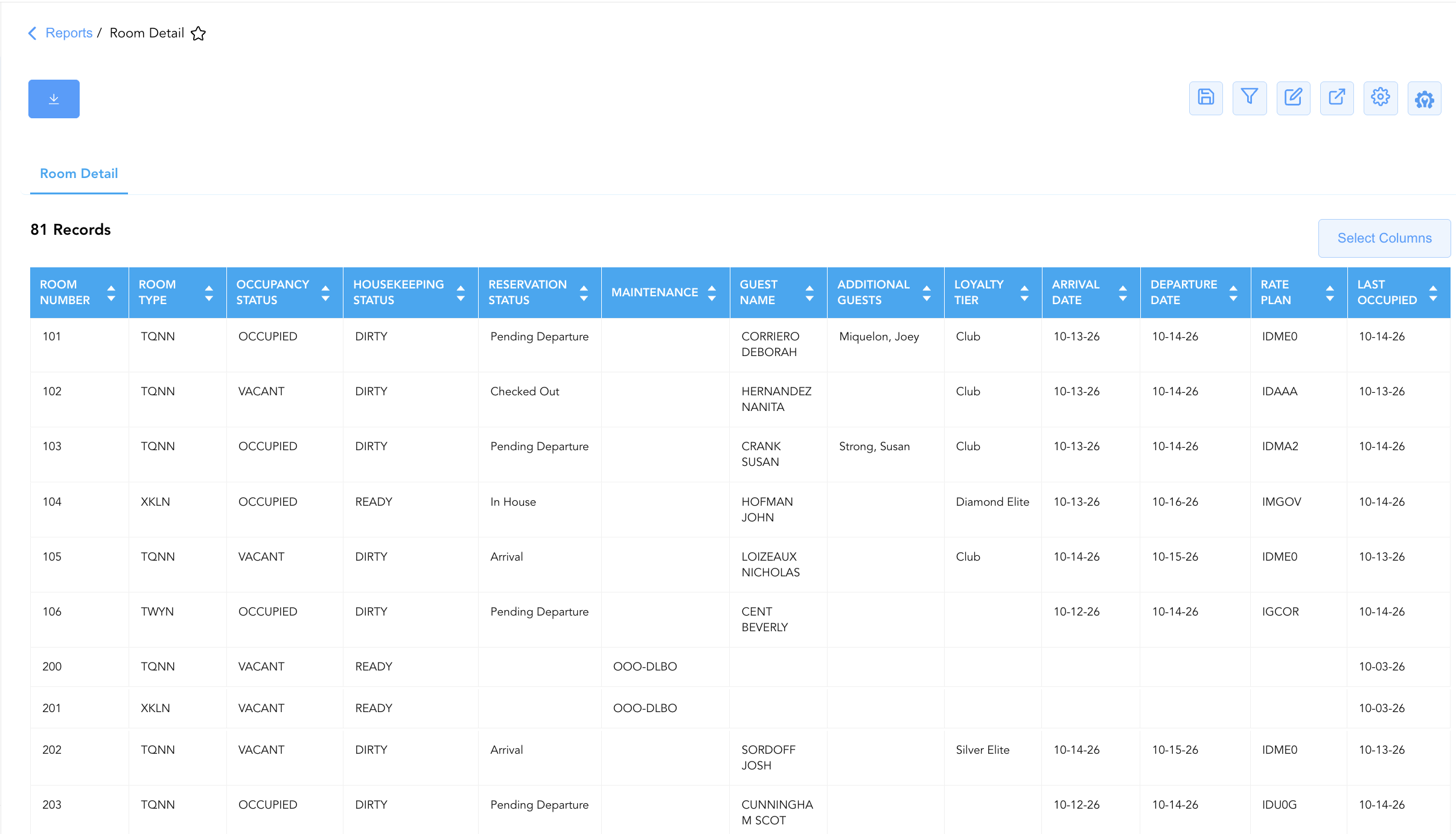
Data Dictionary (Dynamic View Columns)
Customize your default view using the Configure (⚙️) icon on the report page. Below is the full data dictionary representing all 14 dynamic columns available in this report:
|
Column Name |
Description |
Data Source / System Mapping |
Includes Taxes & Fees? |
|
Room Number |
Physical guest room number assigned on property (e.g., |
PMS > Physical Room ID |
N/A |
|
Room Type |
Alphanumeric code representing the room category (e.g., |
PMS > Room Category Code |
N/A |
|
Guest Name |
Combined full name of the registered primary guest occupant (Blank if vacant). |
Guest Profile > Full Name |
N/A |
|
Additional Guests |
Names of secondary occupants or accompanying guests sharing the room. |
Reservation System > Additional Guests |
N/A |
|
Loyalty Tier |
Brand loyalty program membership level of the registered guest (e.g., |
Loyalty Engine > Membership Tier |
N/A |
|
Arrival Date |
Scheduled or actual check-in date for the reservation. |
Reservation System > Arrival Date |
N/A |
|
Departure Date |
Scheduled check-out date for the reservation. |
Reservation System > Departure Date |
N/A |
|
Occupancy Status |
Real-time physical room occupancy state (e.g., |
PMS Inventory Engine > Occupancy Flag |
N/A |
|
Housekeeping Status |
Real-time physical room cleanliness state (e.g., |
Housekeeping Engine > Room Status |
N/A |
|
Rate Plan |
Active rate plan code attached to the reservation (e.g., |
Reservation System > Active Rate Code |
N/A |
|
Reservation Status |
Operational status of the reservation (e.g., |
Reservation System > Main Status |
N/A |
|
Pending Status |
Secondary or transition status indicator (e.g., |
Reservation System > Sub-Status |
N/A |
|
Maintenance |
Out-of-order or out-of-service maintenance reason code (e.g., |
Engineering / Housekeeping > OOO Code |
N/A |
|
Last Occupied |
Calendar date when the physical room was last inhabited by a registered guest. |
PMS Inventory Audit > Last Occupied Date |
N/A |
Customization & Platform Features
User & Property Preferences
-
Personal Preference: Tailor your individual view by hiding or dragging columns. Your preferences save automatically for future sessions.
-
Property Defaults: System Admins can configure standard default layouts across all property users to streamline operational reporting. To maximize audit efficiency, group the columns into the below logical blocks:
-
Physical Locators & Status Anchors (Cols 1–4):
Room Number|Room Type|Occupancy Status|Housekeeping Status -
Reservation Lifecycle & Maintenance (Cols 5–7):
Reservation Status|Pending Status|Maintenance -
Guest Identity & Loyalty Tier (Cols 8–10):
Guest Name|Additional Guests|Loyalty Tier -
Stay Window & Daily Rate Context (Cols 11–13):
Arrival Date|Departure Date|Rate Plan -
Historical Audit Timestamp (Col 14):
Last Occupied
-
Report Toolbar & Quick Actions
Use the top-right toolbar icons on the report page to manage and export your data view:
|
Icon |
Action / Feature |
Description |

|
Knowledge Article |
Opens the knowledge base article to learn how to interpret this report. |

|
Saved Views |
Saves your column filtering, sorting, and highlight preferences so you can easily reload your custom view later without reconfiguring the report. |

|
Filter |
Opens filter controls to isolate specific data within a column based on your selected criteria. |

|
Highlight |
Highlights column values in a designated color based on selected conditions. |

|
Export |
Exports and downloads the report in various formats (Excel, PDF, CSV) for offline analysis or printing. |

|
Configure |
Opens column selection controls to toggle visibility, reorder columns, or hide rows with all zeros. |

|
Additional Configuration |
Provides advanced report configuration and display formatting options to customize data presentation. |
Advanced Controls
-
Downtime Contingency Printing & Exporting: Automatically schedule a daily PDF/Excel export prior to shift changes (e.g., 06:00, 14:00, 22:00) to maintain an updated physical room master binder at the front desk.
-
Filtering: Filter data by
Occupancy Status = VACANTandHousekeeping Status = READYto generate a real-time list of check-in ready rooms, or isolate out-of-order rooms (Maintenance != Blank). -
Highlighting (Conditional Formatting): Apply custom rules to automatically highlight out-of-order rooms (
Maintenance != Blank), dirty occupied rooms (Occupancy Status = OCCUPIED&Housekeeping Status = DIRTY), or VIP guest stays.
🔗 Related Reports & Next Steps
Within 🛎️ Front Desk & Guest Services & 🚨 Downtime & Contingency:
-
In House List – Core downtime contingency manifest detailing active room occupants, rate plans, and guest balances.
-
Arrivals List – Downtime contingency manifest tracking expected check-in arrivals, room pre-blocking, and payment guarantees.
-
Departures List – Downtime contingency manifest tracking daily expected check-outs and folio settlement states.
-
Room Availability– High-level daily room inventory and yield availability matrix.
Cross-Pillar Deep Dives:
-
🧹 Housekeeping & Facilities: Cross-reference room cleanliness states (
Housekeeping Status) with Housekeeping Sheet to prioritize attendant room cleaning assignments. -
🔧 Engineering & Maintenance: Coordinate maintenance reason codes (
Maintenance) with Maintenance Activity to track repair timelines and restore sellable room inventory.