
Departures List Report Overview
Parent Hub: 🛎️ Front Desk & Guest Services Reports
Category: 🚨 Downtime & Contingency
Target Roles: Front Desk Agents, Front Office Supervisors, Housekeeping Managers, Duty Managers, Night Auditors, General Managers
Key Value: Operational departure tracking, housekeeping room turnover management, folio balance zero-out enforcement, contingency and system outage guest ledger tracking, and monitoring checkout status progression across scheduled property departures.
Date Parameter: Single Date Selector | Past Only (Historical, no maximum date range)
Executive Summary
The Departures List report is an indispensable operational tracking, cashiering reconciliation, and business continuity document situated within the 🚨 Downtime & Contingency category of the 🛎️ Front Desk & Guest Services Reports hub. Designed to ensure seamless checkout workflows and uninterrupted guest service during both standard daily operations and critical system offline emergencies, it provides an exhaustive manifest of all reservations scheduled to vacate room inventory on a specific operational date.
-
Centered on room vacation and ledger settlement governance through the unified Departures List view, this report correlates core reservation identifiers (
Confirmation Number,Room Number,Guest Name,Additional Guests,Linked Reservations) with stay duration milestones (Check In Date,Number Of Nights), operational lifecycle progression (Status = Pending Departurevs.Checked Out,Estimated Departure Time,Actual Departed Time), recognition attributes (VIP Guest,Guest Tier), service directives (Housekeeping Remarks,Digital Check Out Eligible), and open financial liabilities (Total Guest Balance). In disaster recovery and PMS downtime scenarios, this document serves as the primary physical audit ledger, empowering front desk agents to verify departing guest identities, collect unsettled balances manually, coordinate room cleaning priorities with housekeeping, and prevent uncollected walkouts.
Key Capabilities
-
Operational Departure Lifecycle Oversight: Tracks room vacation progress in real-time, distinguishing guests who have completed folio settlement (
Status = Checked Out) from those currently occupying rooms (Status = Pending Departure). -
Folio Balance Zero-Out Enforcement: Itemizes unsettled monetary amounts (
Total Guest Balance) on pending departures, enabling front desk agents to settle room, tax, and incidental folios before the guest vacates the property. -
Downtime & Contingency Readiness: Generates a reliable physical paper trail of departing guests, room numbers, and financial balances to maintain uninterrupted operations during network crashes, server maintenance, or hardware failures.
-
Departure Timing & Housekeeping Coordination: Logs timestamped checkout completions (
Actual Departed Time) against expected departure windows (Estimated Departure Time) and housekeeping instructions (Housekeeping Remarks), allowing housekeeping dispatchers to release rooms for immediate turnover. -
Multi-Guest & Multi-Room Traceability: Identifies accompanying room occupants (
Additional Guests) and cross-references multi-room party bookings (Linked Reservations) to ensure coordinated family or group departures. -
VIP & Contactless Service Verification: Highlights distinguished guests (
VIP Guest,Guest Tier) to ensure executive farewell courtesy, while tracking guest eligibility for mobile checkout (Digital Check Out Eligible).
Report Views & Functional Breakdown
The Departures List report structures room vacation parameters into a unified single-table master matrix supporting three primary operational perspectives:
┌────────────────────────────────────────────────────────────────────────┐
│                        DEPARTURES LIST REPORT                          │
├────────────────────────────────────────────────────────────────────────┤
│                         Unified Matrix View                            │
├──────────────────────────┬──────────────────────────┬──────────────────┤
│ 1. Guest Identity &      │ 2. Departure Lifecycle & │ 3. Folio Balance │
│    Room Allocation       │    Turnover Scheduling   │    & Settlement  │
└──────────────────────────┴──────────────────────────┴──────────────────┘
1. Guest Identity & Room Allocation
Monitors the departing guest's legal name, room assignment, companion occupants, linked party bookings, and VIP loyalty status.
-
Primary Use: Verifying guest identity upon key return, identifying multi-room reservations, and extending personalized recognition to elite loyalty members.
-
Key Metrics: Confirmation Number, Room Number, Guest Name, Additional Guests, Linked Reservations, VIP Guest, Guest Tier, Local First Name, Local Last Name.
2. Departure Lifecycle & Turnover Scheduling
Tracks stay length, operational departure status, departure timestamps, digital checkout flags, and housekeeping priorities.
-
Primary Use: Notifying housekeeping of vacated rooms, managing late checkouts, auditing morning turnover velocity, and identifying contactless checkouts.
-
Key Metrics: Check In Date, Number Of Nights, Status, Estimated Departure Time, Actual Departed Time, Digital Check Out Eligible, Housekeeping Remarks.
3. Folio Balance & Settlement Auditing
Displays the live monetary balance owed on the guest folio at the time of report generation.
-
Primary Use: Ensuring all pending departures are settled to cash, credit card, or city ledger prior to physical departure, preventing unsettled walkouts.
-
Key Metrics: Total Guest Balance, Status.
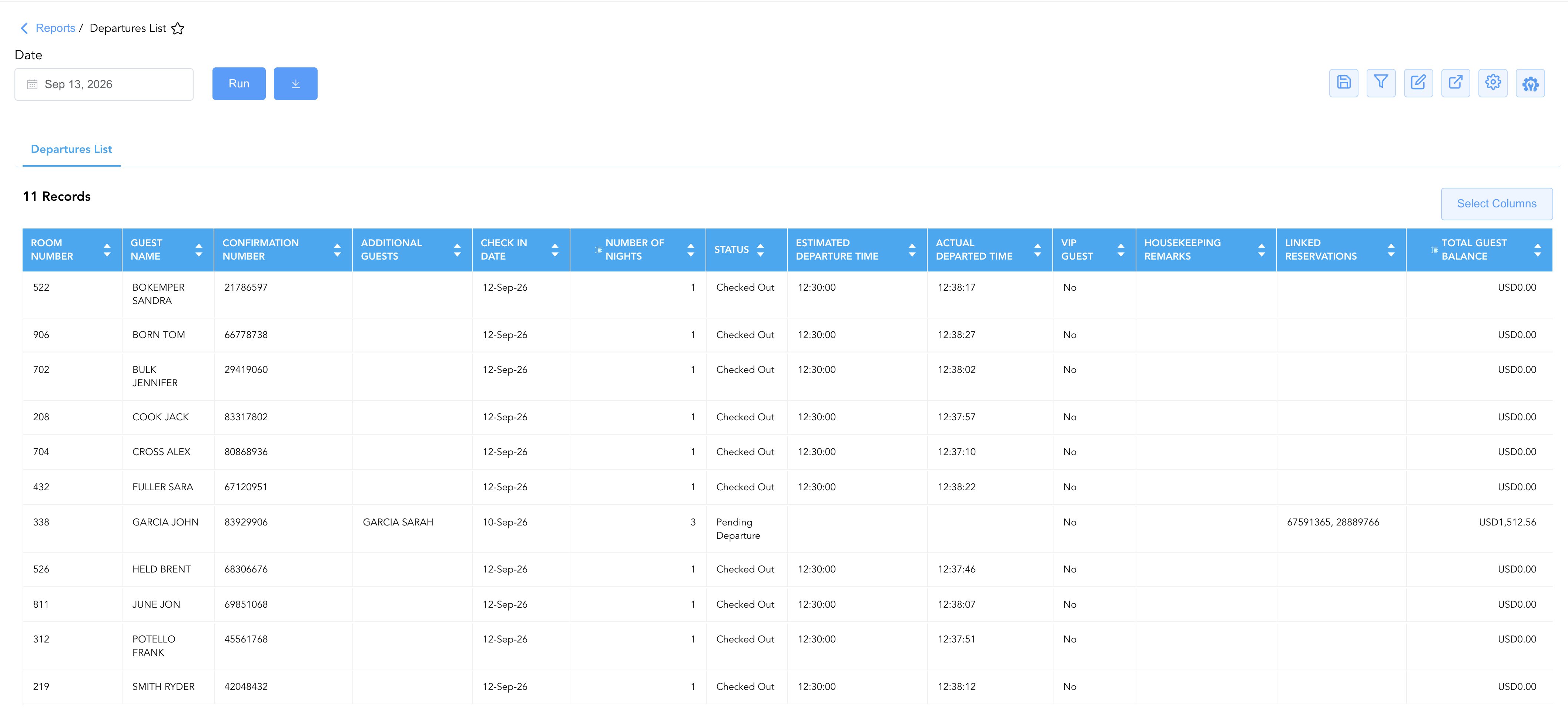
Data Dictionary (Dynamic View Columns)
Customize your default view using the Configure (⚙️) icon on the report page. Below is the full data dictionary representing all 19 exact dynamic columns available in this report, sorted in alphabetical order by column name:
💰 Cashiering & Ledger Settlement Logic:
Total Guest Balance: Represents the gross outstanding balance on the guest folio. For guests with
Status = Checked Out,Total Guest Balancemust equal $0.00$ to confirm that charges have been fully settled via electronic payment, cash, voucher, or direct billing city ledger transfer.Pending Departures: Reservations showing
Status = Pending Departurerepresent in-house rooms where the guest has not yet formally processed checkout at the front desk or via mobile checkout.
|
Column Name |
Description |
Data Source / System Mapping |
Includes Taxes & Fees? |
|
Actual Departed Time |
Exact time of day (HH:MM:SS) when the guest's checkout was formally processed in the system. |
Front Desk Cashiering > Checkout Timestamp |
N/A |
|
Additional Guests |
Names of accompanying guests registered to the room reservation alongside the primary guest. |
Reservation Engine > Accompanying Guests |
N/A |
|
Check In Date |
Calendar date on which the guest originally checked into the property. |
Front Desk Subledger > Arrival Date |
N/A |
|
Confirmation Number |
Primary central reservation system (CRS) or property management system (PMS) booking identifier. |
Reservation Engine > Confirmation Number |
N/A |
|
Digital Check Out Eligible |
Indicates whether the guest reservation is eligible for contactless digital checkout via mobile web or mobile app ( |
Mobile Engine > Digital Checkout Flag |
N/A |
|
Estimated Departure Time |
Anticipated or guest-requested checkout departure time scheduled in the reservation profile. |
Reservation Master > Scheduled Departure Time |
N/A |
|
First Name |
First name of the primary guest on the reservation. |
Guest Profile > First Name |
N/A |
|
Guest Name |
Full legal name of the primary registered guest, formatted as LAST FIRST. |
Guest Profile > Full Name |
N/A |
|
Guest Tier |
Loyalty club membership tier or elite frequency level associated with the guest profile (e.g., Club, Silver, Gold, Platinum, Diamond). |
Loyalty Engine > Membership Level |
N/A |
|
Housekeeping Remarks |
Special instructions, room cleaning notes, or housekeeping priority flags associated with the room departure. |
Housekeeping Module > Room Cleaning Notes |
N/A |
|
Last Name |
Last name of the primary guest on the reservation. |
Guest Profile > Last Name |
N/A |
|
Linked Reservations |
Confirmation number(s) of associated or multi-room bookings linked to the guest reservation. |
Reservation Engine > Associated Booking IDs |
N/A |
|
Local First Name |
First name of the primary guest written in local or native script/language for international properties. |
Guest Profile > Native Script First Name |
N/A |
|
Local Last Name |
Surname of the primary guest written in local or native script/language for international properties. |
Guest Profile > Native Script Last Name |
N/A |
|
Number Of Nights |
Total duration of the guest's stay in room nights. |
Reservation Engine > Length of Stay |
N/A |
|
Room Number |
Physical guest room number assigned to the departing reservation. |
Room Inventory Master > Assigned Room |
N/A |
|
Status |
Operational departure state of the reservation (e.g., |
Front Office Subledger > Departure State |
N/A |
|
Total Guest Balance |
Current outstanding monetary balance owed on the guest folio at the time of report generation. |
Guest Ledger > Gross Folio Balance |
🟢 Yes |
|
VIP Guest |
Designates whether the departing guest holds special VIP status requiring enhanced operational courtesy ( |
Guest Profile > VIP Classification |
N/A |
Customization & Platform Features
User & Property Preferences
-
Personal Preference: Tailor your individual view by hiding, repositioning, or dragging columns. Your preferences save automatically for future sessions.
-
-
Property Defaults: System Admins can configure standard default layouts across all property users to streamline operational reporting. To maximize audit efficiency, group the columns into 4 logical blocks:
-
Room & Guest Identification (Cols 1–8):
Room Number|Guest Name|First Name|Last Name|Confirmation Number|Additional Guests|Local First Name|Local Last NameDeparture & Stay Timing (Cols 9–13):
Check-in Date|Number of Nights|Status|Estimated Departure Time|Actual Departure TimeGuest Profile & Stay Indicators (Cols 14–18):
VIP Guest|Guest Tier|Housekeeping Remarks|Digital Checkout Eligible|Linked ReservationsFinancial Balance & Audit (Col 19):
Total Guest Balance
-
-
Advanced Interactive Controls
-
Exporting: Download and save the departures list into alternate file formats (Excel, PDF, CSV) for offline front desk or housekeeping logs.
-
Filtering: Apply criteria-defined filters to narrow down departures by reservation Status, Room Number, VIP Guest status, or Pending Departure flags.
-
Highlighting (Conditional Formatting): Apply custom rules to automatically highlight critical values, such as non-zero Total Guest Balance figures (
Total Guest Balance > $0.00) or VIP departures.
🔗 Related Reports & Next Steps
Within 🛎️ Front Desk & Guest Services Reports:
-
🚨 Downtime & Contingency:
-
Arrivals Report – Essential emergency backup list for tracking expected arrivals during system outages.
-
In-House Guest Report – Critical offline manifest of all currently occupied rooms and registered guests.
-
Cash Guest List Report – Backup audit log for managing non-credit card and cash guest transactions offline.
-
-
🧳 Arrivals & Departures:
-
Early Checkouts & Extended Stays Report – Track stay extensions and unexpected early departures impacting room availability.
-
-
🧾 Guest Folios & Billing:
-
In-House Guest Balances Report – Audit non-zero balances on departing reservations before manual check-out.
-
Cross-Pillar Deep Dives:
-
🧹 Rooms & Facilities: Cross-reference departures with the [🧹 Rooms & Facilities] reporting page (e.g., Room Status / Housekeeping Board) to assign clean rooms to arriving guests and optimize dirty room turnover queues.
-
💰 Finance & Accounting Reports: To review closed folios and post-settlement accounts after system recovery, review Closed Folio Balances Report.