
Parking Details Report Overview
Parent Hub: 🛎️ Front Desk & Guest Services
Category: 🏨 In-House & Occupancy
Target Roles: Front Office Managers, Front Desk Agents, Guest Services Supervisors, Valet & Parking Attendants, Security Officers, Hotel Controllers, General Managers
Key Value: Monitor guest vehicle registrations, track on-site parking policy compliance, verify license plate and vehicle descriptions, audit parking fee billing dates, and ensure seamless guest parking security and asset protection.
Executive Summary
The Parking Details Report is an essential operational vehicle register, security tracking, and parking revenue audit document within the 🏨 In-House & Occupancy category of the 🛎️ Front Desk & Guest Services hub. Designed to deliver complete visibility over all registered guest vehicles parked on property, it itemizes every reservation with linked vehicle details, parking permit tickets, fee charge dates, and policy acknowledgments across specified date ranges.
-
By mapping reservation parameters (Confirmation Number, Status, Guest Name, First Name, Last Name, Loyalty Tier, Room Number, Rate Plan, Arrival Date, Departure Date, Nights, Digital Key, Digital Check In) to vehicle security and parking billing attributes (Parking Policy, License Plate, State, Make and Model, Color, Parking Ticket, Date Added, Charge Date), this report enables front desk agents, parking attendants, security officers, and controllers to audit on-site parking capacity, verify vehicle ownership, confirm parking fee postings, and maintain security over guest vehicles.
Key Capabilities
-
On-Site Guest Vehicle Register: Itemizes all guest reservations with registered vehicles, displaying room assignments (
Room Number), guest names (Guest Name), and stay timeframes (Arrival DateandDeparture Date). -
Complete Vehicle Identification: Captures vehicle license plate numbers (
License Plate), registration states/provinces (State), vehicle make and model descriptions (Make and Model), and body color (Color) for quick property identification. -
Parking Ticket & Permit Audit: Tracks assigned parking permit or valet ticket identifiers (
Parking Ticket) alongside the date the vehicle profile was registered (Date Added). -
Billing & Charge Date Verification: Logs the specific calendar date on which parking fees were posted or billed to the guest folio (
Charge Date). -
Policy Compliance & Digital Engagement: Displays applicable property parking rules (
Parking Policy) alongside digital key (Digital Key) and digital check-in (Digital Check In) engagement statuses.
Report Views & Functional Breakdown
The Parking Details Report presents vehicle registration and parking billing data in a unified single-table ledger that supports three key analytical perspectives:
┌────────────────────────────────────────────────────────────────────────┐
│                    PARKING DETAILS REPORT                              │
├────────────────────────────────────────────────────────────────────────┤
│                         Unified Matrix View                            │
├──────────────────────────┬──────────────────────────┬──────────────────┤
│ 1. Guest Stay & Room     │ 2. Vehicle Description   │ 3. Parking Policy│
│    Identification        │    & Permit Trace        │    & Fee Audit   │
└──────────────────────────┴──────────────────────────┴──────────────────┘
1. Guest Stay & Room Identification
Monitors guest reservation details, room numbers, loyalty standings, and operational stay statuses.
-
Primary Use: Verifying active guest room assignments for parked vehicles, identifying VIP or loyalty tier guests, and checking arrival/departure schedules.
-
Key Metrics: Confirmation Number, Status, Guest Name, Loyalty Tier, Room Number, Rate Plan, Arrival Date, Departure Date, Nights.
2. Vehicle Description & Permit Trace
Tracks full physical vehicle parameters and assigned parking ticket numbers.
-
Primary Use: Enabling security and valet teams to identify vehicles in property lots, auditing license plate entries, and matching permit tags to guest rooms.
-
Key Metrics: License Plate, State, Make and Model, Color, Parking Ticket, Date Added.
3. Parking Policy & Fee Audit
Audits parking policy disclosures, fee posting dates, and digital check-in flags.
-
Primary Use: Verifying that daily parking fees are billed on the correct dates (
Charge Date), reviewing liability waiver disclosures (Parking Policy), and checking digital check-in records. -
Key Metrics: Parking Policy, Charge Date, Digital Key, Digital Check In, Confirmation Number, Room Number.
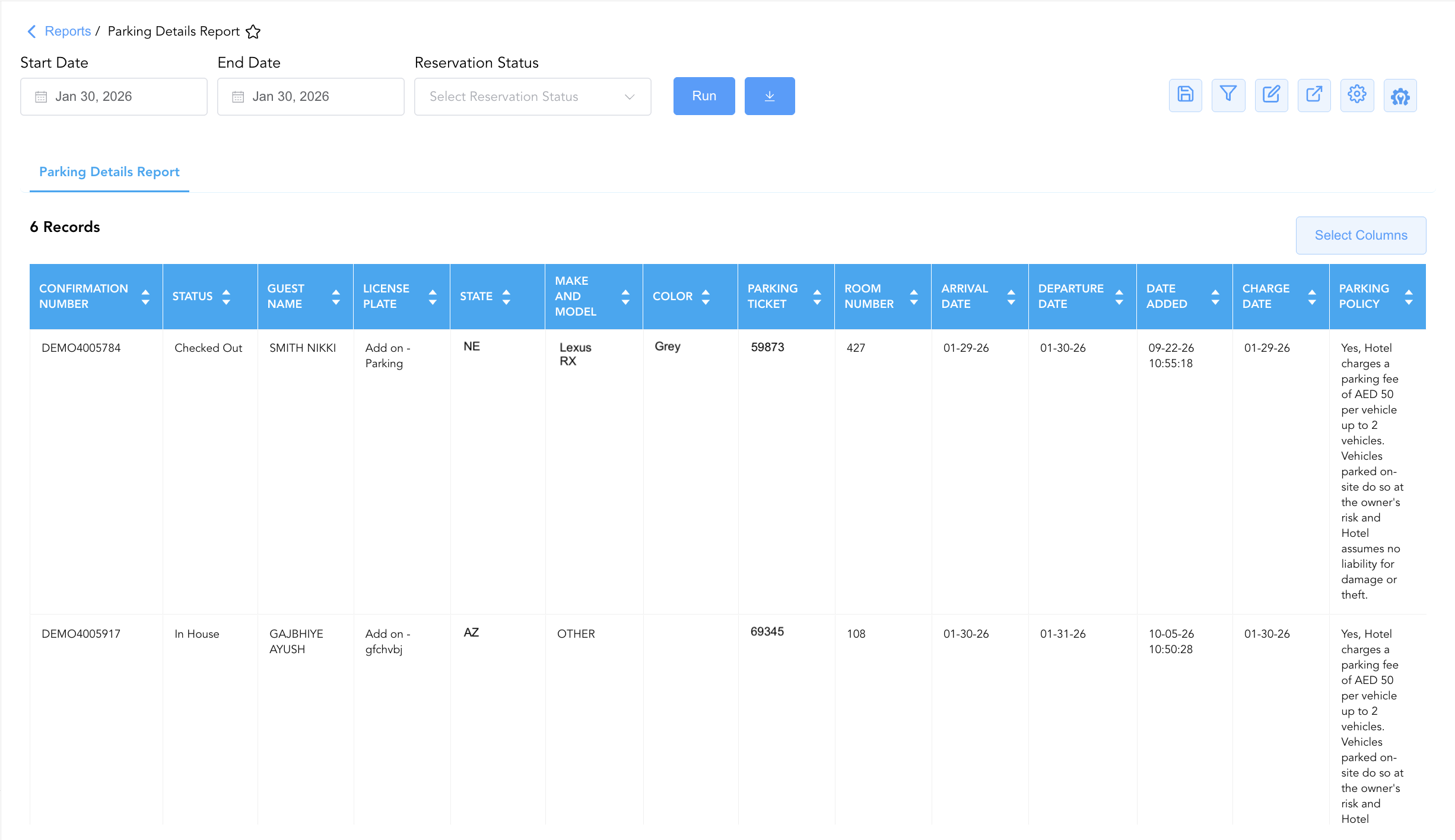
Data Dictionary (Dynamic View Columns)
Customize your default view using the Configure (⚙️) icon on the report page. Below is the full data dictionary representing all 21 columns available in this report:
💡 Parking Fee Note: Charge Date reflects the specific date on which the daily parking surcharge was posted to the guest folio. Parking Policy records the property terms and liability waiver accepted during vehicle registration.
|
Column Name |
Description |
Data Source / System Mapping |
Includes Taxes & Fees? |
|
Confirmation Number |
Unique alphanumeric reservation identifier. |
Reservation System > Confirmation ID |
N/A |
|
Status |
Live operational stay status (e.g., |
Reservation System > Operational Status |
N/A |
|
Guest Name |
Combined full name of the registered guest. |
Guest Profile > Full Name |
N/A |
|
First Name |
First name of the primary registered guest. |
Guest Profile > First Name |
N/A |
|
Last Name |
Last name of the primary registered guest. |
Guest Profile > Last Name |
N/A |
|
Loyalty Tier |
Guest loyalty program membership level (e.g., Blue, Silver, Diamond). |
Loyalty System > Membership Tier |
N/A |
|
Room Number |
Physical guest room assigned to the vehicle owner. |
PMS > Assigned Room Number |
N/A |
|
Rate Plan |
Active rate plan code attached to the reservation. |
Reservation System > Active Rate Code |
N/A |
|
Arrival Date |
Scheduled or actual check-in date. |
Reservation System > Arrival Date |
N/A |
|
Departure Date |
Scheduled or actual check-out date. |
Reservation System > Departure Date |
N/A |
|
Nights |
Total physical room nights spanned by the stay. |
Reservation System > Total Nights |
N/A |
|
Digital Key |
Status flag indicating digital mobile key issuance. |
Door Lock System > Digital Key Status |
N/A |
|
Digital Check In |
Status flag indicating completion of mobile/online check-in. |
Mobile App > Digital Check-In Flag |
N/A |
|
Parking Policy |
Terms, fee disclosures, and liability waiver rules governing property parking. |
PMS Setup > Parking Policy Text |
N/A |
|
License Plate |
Vehicle license plate number registered to the guest. |
Vehicle Profile > License Plate |
N/A |
|
State |
State or province issuing the vehicle license plate. |
Vehicle Profile > Registration State |
N/A |
|
Make and Model |
Manufacturer make and model description of the vehicle. |
Vehicle Profile > Make & Model |
N/A |
|
Color |
Primary exterior paint color of the vehicle. |
Vehicle Profile > Color |
N/A |
|
Parking Ticket |
Valet tag or parking permit ticket identifier assigned to the vehicle. |
Parking System > Ticket/Permit ID |
N/A |
|
Date Added |
Calendar date on which the vehicle was registered in the system. |
PMS Audit Trail > Vehicle Entry Date |
N/A |
|
Charge Date |
Calendar date on which the parking fee was posted to the guest folio. |
PMS Billing > Fee Posting Date |
N/A |
Customization & Platform Features
User & Property Preferences
-
Personal Preference: Tailor your individual view by hiding or dragging columns. Your preferences save automatically for future sessions.
-
Property Defaults: System Admins can configure standard default layouts across all property users to streamline operational reporting. To maximize audit efficiency, group the columns into the below logical blocks:
-
Reservation Identification & Status (Cols 1–3):
Confirmation Number|Status|Loyalty Tier -
Guest Profile Identification (Cols 4–6):
Guest Name|First Name|Last Name -
Vehicle Registration & Identification (Cols 7–11):
License Plate|State|Make and Model|Color|Parking Ticket -
Stay Itinerary & Room Location (Cols 12–15):
Room Number|Arrival Date|Departure Date|Nights -
Rate Plan, Inclusions & Billing Audit (Cols 16–19):
Rate Plan|Date Added|Charge Date|Parking Policy -
Digital Experience & App Indicators (Cols 20–21):
Digital Key|Digital Check In
-
Report Toolbar & Quick Actions
Use the top-right toolbar icons on the report page to manage and export your data view:
|
Icon |
Action / Feature |
Description |

|
Knowledge Article |
Opens the knowledge base article to learn how to interpret this report. |

|
Saved Views |
Saves your column filtering, sorting, and highlight preferences so you can easily reload your custom view later without reconfiguring the report. |

|
Filter |
Opens filter controls to isolate specific data within a column based on your selected criteria. |

|
Highlight |
Highlights column values in a designated color based on selected conditions. |

|
Export |
Exports and downloads the report in various formats (Excel, PDF, CSV) for offline analysis or printing. |

|
Configure |
Opens column selection controls to toggle visibility, reorder columns, or hide rows with all zeros. |

|
Additional Configuration |
Provides advanced report configuration and display formatting options to customize data presentation. |
Advanced Controls
-
Exporting & Lot Security Audits: Download in Excel or PDF format to support night audit lot sweeps, security patrols, and valet fee reconciliations.
-
Filtering: Filter data by
Status = In Houseto view currently parked guest vehicles, or isolate missing vehicle details (License Plate = Blank). -
Highlighting (Conditional Formatting): Apply custom rules to automatically highlight unbilled parking stays, expiring departure dates (
Departure Date = Today), or VIP loyalty tier guests.
🔗 Related Reports & Next Steps
Within 🛎️ Front Desk & Guest Services & 🏨 In-House & Occupancy:
-
In House Guest List – Standard guest roster tracking active room occupants, contact info, and stay dates.
-
Departures Details Report – Comprehensive manifest tracking daily scheduled guest departures, folio numbers, and outstanding balances.
Cross-Pillar Deep Dives:
-
💳 Payments & Transactions: Verify daily parking fee postings and incidental charge collections in All Transactions.