
Recently Viewed Reservations Report Overview
Parent Hub: 🛎️ Front Desk & Guest Services
Category: 🧳 Arrivals & Departures
Target Roles: Front Office Managers, Front Desk Agents, Guest Services Supervisors, Reservations Agents, Hotel Controllers, Call Center Supervisors
Key Value: Monitor recently accessed guest reservation records, track staff navigation history, audit quick-access reservation updates, verify live guest statuses and room assignments, and streamline front desk guest interaction workflows.
Executive Summary
The Recently Viewed Reservations Report is an essential operational activity tracking and user navigation audit document within the 🧳 Arrivals & Departures category of the 🛎️ Front Desk & Guest Services hub. Designed to provide immediate visibility over reservation profiles recently opened, inspected, or modified by front office staff, it logs every accessed reservation record along with guest profile details, live stay statuses, room assignments, and financial ledger balances.
-
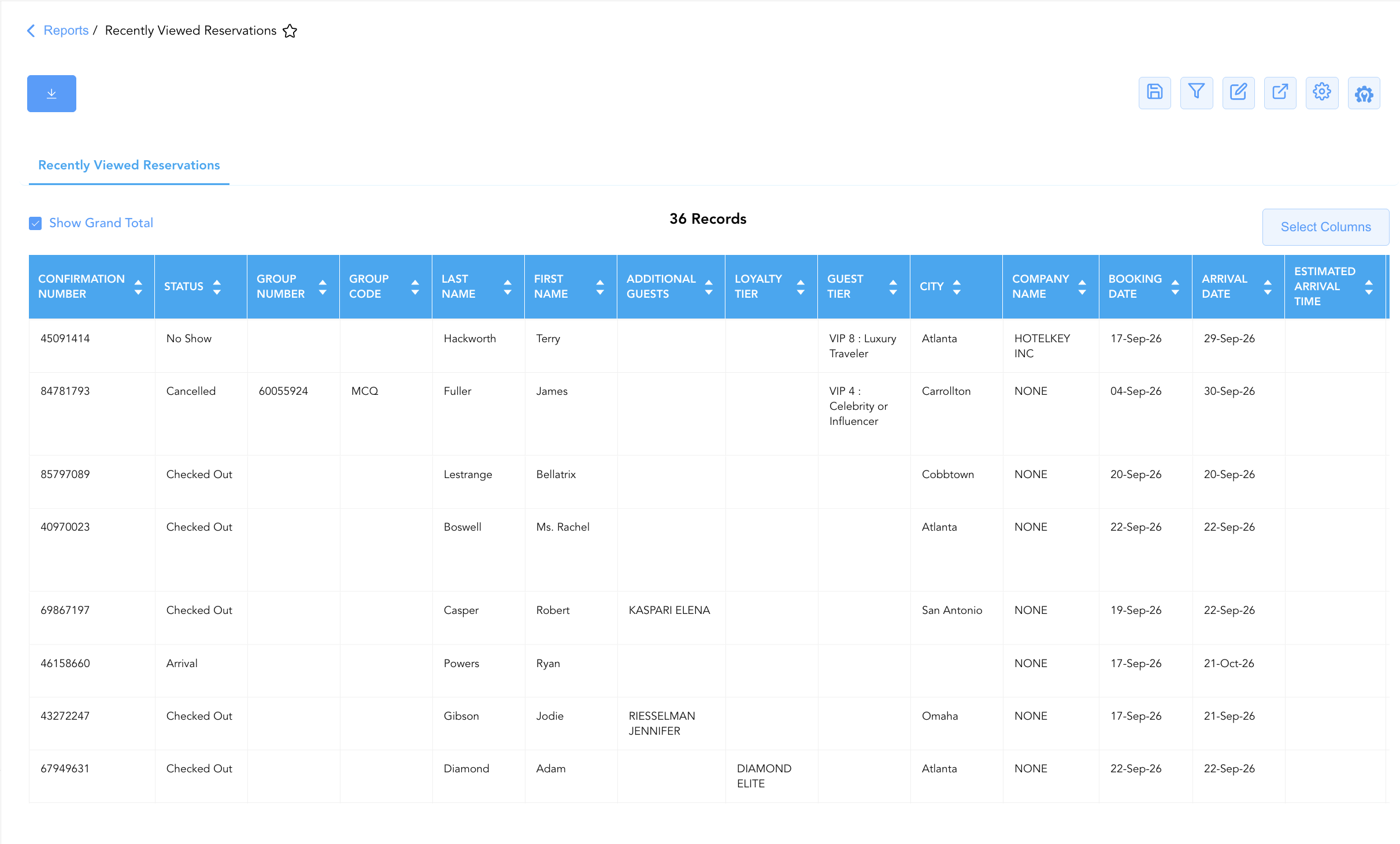
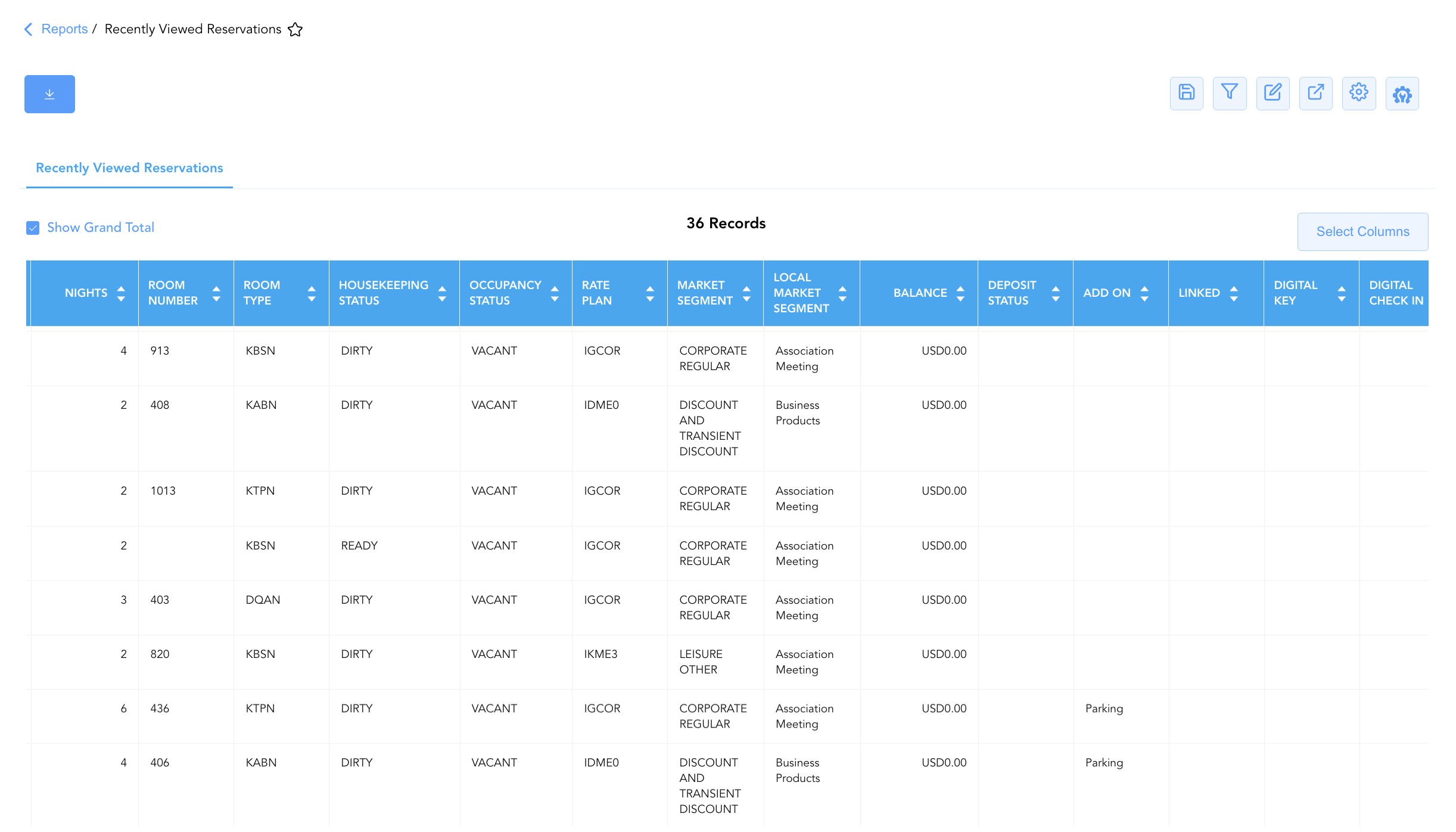
By mapping system navigation and reservation identifiers (Confirmation Number, Group Number, Group Code, Linked) to guest demographics (Last Name, First Name, City, Loyalty Tier, Guest Tier, Additional Guests, Contact Role), stay status parameters (Status, Sub Status, Occupancy Status, Housekeeping Status, Deposit Status, Digital Key, Digital Check In, Digital Check Out), rate and room assignments (Room Type, Room Number, Rate Plan, Market Segment, Local Market Segment, Company Name, Benefits, Add On), and stay timeframes (Booking Date, Arrival Date, Estimated Arrival Time, Departure Date, Estimated Departure Time, Nights, Early Check In, Late Check Out, Balance, Message), this report enables front office supervisors and general managers to trace staff user workflows, review recent reservation changes, assist returning guests, and ensure data entry compliance.
Key Capabilities
-
Recent User Activity Audit: Logs reservation records recently accessed or viewed across front desk terminals, capturing confirmation numbers (
Confirmation Number) and group links (Group Number,Group Code,Linked). -
Comprehensive Guest Profile Visibility: Displays guest name details (
First Name,Last Name,Local First Name,Local Last Name), geographic origin (City), loyalty standing (Loyalty Tier), VIP tier classification (Guest Tier), and secondary guests (Additional Guests). -
Real-Time Operational Status Tracking: Captures live reservation statuses (
Status, e.g.,In House,Arrival,Checked Out,No Show,Cancelled), sub-statuses (Sub Status), room occupancy (Occupancy Status), room cleaning readiness (Housekeeping Status), and deposit collection (Deposit Status). -
Room & Rate Structure Alignment: Tracks assigned physical room numbers (
Room Number), room categories (Room Type), applied rate plans (Rate Plan), market segment classifications (Market Segment,Local Market Segment), corporate affiliations (Company Name), and attached package amenities (Benefits,Add On). -
Digital Service & Request Monitoring: Highlights digital guest engagement flags (
Digital Key,Digital Check In,Digital Check Out), arrival/departure timeframes (Arrival Date,Departure Date,Estimated Arrival Time,Estimated Departure Time), special timing requests (Early Check In,Late Check Out), live folio balances (Balance), and operational notes (Message).
Report Views & Functional Breakdown
The Recently Viewed Reservations Report presents recent staff access history and reservation details in a unified single-table ledger that supports three key analytical perspectives:
┌────────────────────────────────────────────────────────────────────────┐
│               RECENTLY VIEWED RESERVATIONS REPORT                      │
├────────────────────────────────────────────────────────────────────────┤
│                         Unified Matrix View                            │
├──────────────────────────┬──────────────────────────┬──────────────────┤
│ 1. Reservation & Profile │ 2. Stay, Status & Room   │ 3. Financial &   │
│    Audit Ledger          │    Assignment Trace      │    Digital Feature│
└──────────────────────────┴──────────────────────────┴──────────────────┘
1. Reservation & Profile Audit Ledger
Monitors recently opened reservation records, guest identity details, loyalty standings, and group associations.
-
Primary Use: Tracking recent front desk agent record lookups, reviewing returning or VIP guest profiles, and auditing group reservation associations.
-
Key Metrics: Confirmation Number, Group Code, First Name, Last Name, Loyalty Tier, Guest Tier, Additional Guests, Company Name.
2. Stay, Status & Room Assignment Trace
Provides real-time operational stay statuses, room numbers, housekeeping readiness, and rate plan assignments.
-
Primary Use: Checking immediate room readiness for arriving guests, verifying in-house guest room moves, and monitoring rate and market segment attributions.
-
Key Metrics: Status, Occupancy Status, Housekeeping Status, Room Number, Room Type, Rate Plan, Market Segment, Arrival Date, Departure Date.
3. Financial & Digital Feature Matrix
Audits live folio ledger balances, deposit statuses, digital check-in/key activations, and timing requests.
-
Primary Use: Verifying folio balance settlements before check-out, tracking deposit collection, checking digital key issuance, and managing early arrival/late departure requests.
-
Key Metrics: Balance, Deposit Status, Digital Key, Digital Check In, Digital Check Out, Early Check In, Late Check Out, Message.
Data Dictionary (Dynamic View Columns)
Customize your default view using the Configure (⚙️) icon on the report page. Below is the full data dictionary representing every column available in this report:
💡 Ledger & Status Note: Balance reflects the current live outstanding folio balance for the reservation. Status indicates the active operational stay state (e.g.,
In House,Arrival,Checked Out,No Show,Cancelled).
|
Column Name |
Description |
Data Source / System Mapping |
Includes Taxes & Fees? |
|
Confirmation Number |
Unique alphanumeric reservation identifier. |
Reservation System > Confirmation ID |
N/A |
|
Group Number |
Master group contract or block identification number. |
Group Management > Group ID |
N/A |
|
Group Code |
Unique group code assigned to the block (e.g., MTU, MCQ). |
Group Management > Group Code |
N/A |
|
Contact Role |
Primary contact or relationship role on the profile. |
Guest Profile > Contact Role |
N/A |
|
Benefits |
Package inclusions or complimentary amenities attached to the booking. |
Rate Engine > Package Inclusions |
N/A |
|
Add On |
Ancillary add-on products or services attached to the stay (e.g., Parking). |
PMS Billing > Add-On Services |
N/A |
|
Housekeeping Status |
Real-time cleaning status of the assigned room (e.g., |
PMS Housekeeping > Room Status |
N/A |
|
Deposit Status |
Payment status of required advance reservation deposits. |
PMS Billing > Deposit Status |
N/A |
|
Status |
Operational stay status (e.g., |
Reservation System > Main Status |
N/A |
|
Sub Status |
Secondary operational or front office status flag. |
Reservation System > Sub-Status |
N/A |
|
Occupancy Status |
Physical room occupation status (e.g., |
PMS Housekeeping > Occupancy Flag |
N/A |
|
Additional Guests |
Names or counts of secondary registered occupants in the room. |
Guest Profile > Accompanying Guests |
N/A |
|
Last Name |
Last name of the primary registered guest. |
Guest Profile > Last Name |
N/A |
|
First Name |
First name of the primary registered guest. |
Guest Profile > First Name |
N/A |
|
City |
City of residence associated with the guest profile. |
Guest Profile > City |
N/A |
|
Loyalty Tier |
Guest loyalty program tier level (e.g., PLATINUM ELITE). |
Loyalty System > Membership Tier |
N/A |
|
Guest Tier |
VIP or property guest classification tier (e.g., VIP 4 : Celebrity or Influencer, VIP 8 : Luxury Traveler). |
Guest Profile > VIP Tier |
N/A |
|
Room Type |
Code representing the allocated room category (e.g., KBSN, KQQN, DRAN, KTPN). |
PMS > Room Type Code |
N/A |
|
Room Number |
Physical guest room assigned to the reservation. |
PMS > Assigned Room Number |
N/A |
|
Rate Plan |
Code of the rate plan assigned to the booking (e.g., IGCOR, IDME0, GCG01, IKME3). |
Reservation System > Active Rate Code |
N/A |
|
Market Segment |
Master corporate market segment title (e.g., CORPORATE REGULAR, DISCOUNT AND TRANSIENT DISCOUNT). |
PMS > Market Segment Title |
N/A |
|
Local Market Segment |
Property-specific local market segment title (e.g., Association Meeting, Business Products). |
PMS > Local Market Segment Title |
N/A |
|
Company Name |
Name of corporate company profile attached to the reservation. |
Reservation System > Company Account |
N/A |
|
Linked |
Confirmation numbers of associated multi-room or family bookings. |
Reservation System > Linked IDs |
N/A |
|
Booking Date |
Calendar date on which the reservation was created. |
PMS Audit Trail > Creation Date |
N/A |
|
Arrival Date |
Scheduled check-in date of the reservation. |
Reservation System > Arrival Date |
N/A |
|
Estimated Arrival Time |
Expected time of arrival provided by the guest. |
Guest Preferences > Arrival Time |
N/A |
|
Departure Date |
Scheduled check-out date of the reservation. |
Reservation System > Departure Date |
N/A |
|
Estimated Departure Time |
Expected time of departure provided by the guest. |
Guest Preferences > Departure Time |
N/A |
|
Nights |
Total physical room nights spanned by the stay. |
Reservation System > Total Nights |
N/A |
|
Balance |
Live net outstanding dollar balance on the guest folio. |
Guest Folio > Net Balance |
🟢 Yes |
|
Digital Key |
Status flag indicating digital mobile key issuance. |
Door Lock System > Digital Key Status |
N/A |
|
Message |
Operational notes or front desk messages attached to the reservation. |
PMS > Guest Messages |
N/A |
|
Digital Check In |
Flag indicating completion of mobile/online check-in. |
Mobile App > Digital Check-In Flag |
N/A |
|
Digital Check Out |
Flag indicating completion of mobile/online check-out. |
Mobile App > Digital Check-Out Flag |
N/A |
|
Local First Name |
First name rendered in local language script. |
Guest Profile > Local First Name |
N/A |
|
Local Last Name |
Last name rendered in local language script. |
Guest Profile > Local Last Name |
N/A |
|
Early Check In |
Requested or approved early check-in time flag. |
Guest Requests > Early Check-In |
N/A |
|
Late Check Out |
Requested or approved late check-out time flag. |
Guest Requests > Late Check-Out |
N/A |
Customization & Platform Features
User & Property Preferences
-
Personal Preference: Tailor your individual view by hiding or dragging columns. Your preferences save automatically for future sessions.
-
Property Defaults: System Admins can configure standard default layouts across all property users to streamline operational reporting. To maximize audit efficiency, group the columns into the below logical blocks:
-
Reservation Identification & Group Mapping (Cols 1–5):
Confirmation Number|Status|Sub Status|Group Number|Group Code -
Guest Profile & Contact Identification (Cols 6–13):
Last Name|First Name|Local First Name|Local Last Name|Additional Guests|Contact Role|Loyalty Tier|Guest Tier -
Geography & Account Association (Cols 14–15):
City|Company Name -
Stay Itinerary & Timestamps (Cols 16–21):
Booking Date|Arrival Date|Estimated Arrival Time|Departure Date|Estimated Departure Time|Nights -
Room Assignment & Operational Status (Cols 22–25):
Room Number|Room Type|Housekeeping Status|Occupancy Status -
Rate Plan & Market Mapping (Cols 26–28):
Rate Plan|Market Segment|Local Market Segment -
Folio Balance & Financial Indicators (Cols 29–30):
Balance|Deposit Status -
Digital Experience & Guest Amenities (Cols 31–39):
Benefits|Add On|Linked|Digital Key|Digital Check In|Digital Check Out|Early Check In|Late Check Out|Message
-
Report Toolbar & Quick Actions
Use the top-right toolbar icons on the report page to manage and export your data view:
|
Icon |
Action / Feature |
Description |

|
Knowledge Article |
Opens the knowledge base article to learn how to interpret this report. |

|
Saved Views |
Saves your column filtering, sorting, and highlight preferences so you can easily reload your custom view later without reconfiguring the report. |

|
Filter |
Opens filter controls to isolate specific data within a column based on your selected criteria. |

|
Highlight |
Highlights column values in a designated color based on selected conditions. |

|
Export |
Exports and downloads the report in various formats (Excel, PDF, CSV) for offline analysis or printing. |

|
Configure |
Opens column selection controls to toggle visibility, reorder columns, or hide rows with all zeros. |

|
Additional Configuration |
Provides advanced report configuration and display formatting options to customize data presentation. |
Advanced Controls
-
Exporting & Shift Handovers: Download in Excel or PDF format to support shift handovers, supervisor audit reviews, and VIP arrival coordination.
-
Filtering: Filter data by
Status = In HouseorStatus = Arrival, or isolate high VIP tiers (Guest Tier = VIP 4 : Celebrity or Influencer). -
Highlighting (Conditional Formatting): Apply custom rules to automatically highlight unassigned arriving VIPs, dirty room statuses (
Housekeeping Status = DIRTY), or outstanding folio balances (Balance > $0).
🔗 Related Reports & Next Steps
Within 🛎️ Front Desk & Guest Services & 🧳 Arrivals & Departures:
-
Arrivals List – Detailed daily manifest of expected arriving guests, check-in statuses, and room assignments.
-
Departures Details – Comprehensive manifest tracking daily scheduled guest departures, folio numbers, and outstanding balances.
-
In House Guest List – Real-time roster of registered guests currently occupying physical hotel rooms.
-
Booked Reservations – Audit log tracking newly created and modified reservation entries.
Cross-Pillar Deep Dives:
-
📈 Revenue & Analytics: Reconcile recent booking activity against Booking Pace and Occupancy Forecast and History.
-
⚖️ Ledgers & Trial Balance: Verify live guest balances against Guest Ledger control accounts in Trial Balance.