
Lost And Found Report Overview
Parent Hub: 🛎️ Front Desk & Guest Services
Category: 🏨 In-House & Occupancy
Target Roles: Housekeeping Managers, Executive Housekeepers, Front Office Managers, Front Desk Agents, Guest Services Supervisors, Security Officers, General Managers
Key Value: Log lost, found, and claimed guest items, track property locations and room numbers, audit employee reporting and item claiming workflows, maintain security records, and ensure proper chain-of-custody guest asset recovery.
Executive Summary
The Lost And Found Report is an essential operational tracking and security audit document within the 🏨 In-House & Occupancy category of the 🛎️ Front Desk & Guest Services hub. Designed to provide complete visibility over lost, found, and claimed guest property, it logs every recorded incident along with item descriptions, dates, locations, reporting personnel, claiming details, and operational notes.
-
By mapping item tracking parameters (Room Number, Lost Item, Location) to operational dates (Lost Date, Found Date, Claimed Date), status classifications (Status, e.g.,
LOST,FOUND,CLAIMED), employee audit credentials (Reported By, Claimed By), and detailed descriptions (Remarks), this report enables housekeeping supervisors, front office teams, and security personnel to track unclaimed assets, verify guest ownership claims, audit staff chain of custody, and ensure guest satisfaction.
Key Capabilities
-
Comprehensive Item Status Lifecycle Tracking: Itemizes lost and found inventory across distinct status stages (
LOST,FOUND,CLAIMED) to monitor open inquiries and completed item returns. -
Location & Room Identification: Pinpoints specific physical locations (
Location, e.g.,BUSINESS CENTER,LAUNDRY) or guest room numbers (Room Number) where items were reported lost or discovered. -
Timeline & Date Logging: Records exact dates for item loss (
Lost Date), discovery (Found Date), and guest collection (Claimed Date) to maintain an accurate chronological chain of events. -
Employee Accountability & Auditability: Captures the full name or user login ID of the staff member who logged the item (
Reported By) and the employee who processed the item claim/return (Claimed By). -
Detailed Item Description & Remarks: Preserves detailed visual and contextual notes (
Remarks, e.g., color, brand, specific placement details) to accurately verify guest claims prior to item release.
Report Views & Functional Breakdown
The Lost And Found Report presents property incident data in a unified single-table ledger that supports three key analytical perspectives:
┌────────────────────────────────────────────────────────────────────────┐
│                      LOST AND FOUND REPORT                             │
├────────────────────────────────────────────────────────────────────────┤
│                         Unified Matrix View                            │
├──────────────────────────┬──────────────────────────┬──────────────────┤
│ 1. Incident & Item       │ 2. Lifecycle Dates &     │ 3. Staff Audit & │
│    Details               │    Location Tracking     │    Custody Trace │
└──────────────────────────┴──────────────────────────┴──────────────────┘
1. Incident & Item Details
Monitors specific lost or found items, room numbers, and current incident resolution statuses.
-
Primary Use: Searching for reported missing items during guest inquiries, identifying item types, and verifying current disposition.
-
Key Metrics: Room Number, Lost Item, Status, Remarks.
2. Lifecycle Dates & Location Tracking
Tracks the chronological timeline and physical property areas associated with reported items.
-
Primary Use: Auditing holding periods for unclaimed property, tracking discovery locations across public areas versus guest rooms, and verifying collection timelines.
-
Key Metrics: Lost Date, Found Date, Claimed Date, Location, Room Number.
3. Staff Audit & Custody Trace
Correlates lost and found records directly with staff reporting and claiming actions.
-
Primary Use: Ensuring accountability during item intake and return, auditing housekeeping and front desk reporting compliance, and maintaining a secure chain of custody.
-
Key Metrics: Reported By, Claimed By, Status, Claimed Date.
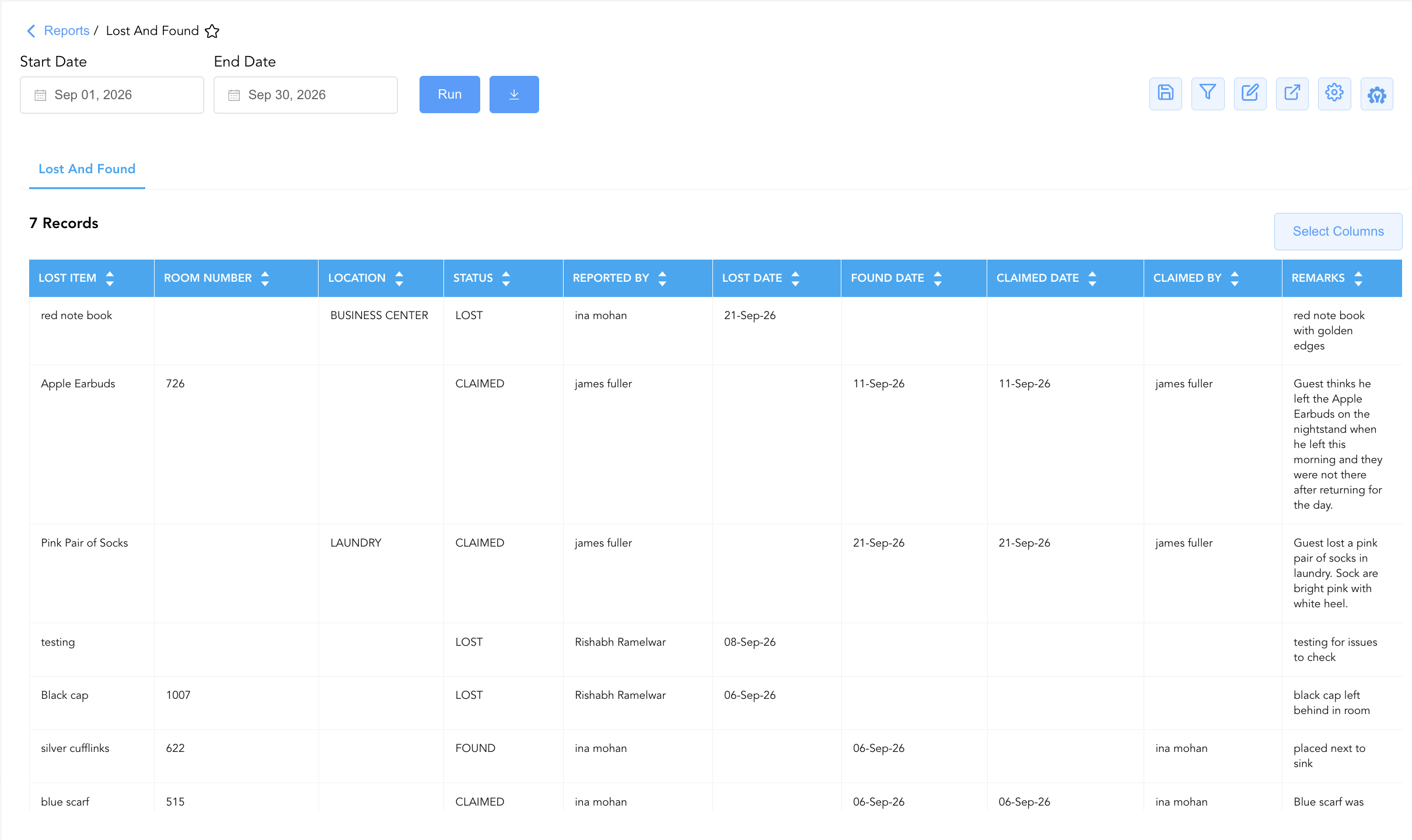
Data Dictionary (Dynamic View Columns)
Customize your default view using the Configure (⚙️) icon on the report page. Below is the full data dictionary representing all 10 available columns in this report:
💡 Status Classification Note: Status indicates the current resolution phase of the item:
LOST(reported missing by guest, not yet found),FOUND(discovered on property, awaiting claim), orCLAIMED(returned to verified owner).
|
Column Name |
Description |
Data Source / System Mapping |
Includes Taxes & Fees? |
|
Room Number |
Guest room number where the item was lost or found (Blank if public area). |
PMS > Assigned Room Number |
N/A |
|
Lost Item |
Short description or title of the missing or discovered item (e.g., Apple Earbuds, red note book, blue scarf). |
Lost & Found System > Item Title |
N/A |
|
Lost Date |
Calendar date on which the item was reported lost by the guest. |
Incident Log > Lost Date |
N/A |
|
Found Date |
Calendar date on which the item was discovered on property. |
Incident Log > Found Date |
N/A |
|
Status |
Operational lifecycle status of the item ( |
Incident Log > Item Status |
N/A |
|
Location |
Specific public area or department where the item was reported or found (e.g., BUSINESS CENTER, LAUNDRY). |
Lost & Found System > Physical Area |
N/A |
|
Reported By |
Name or user login ID of the staff member who recorded the incident. |
Security Audit Trail > Reported User |
N/A |
|
Claimed Date |
Calendar date on which the item was claimed by or returned to the guest. |
Incident Log > Claim Date |
N/A |
|
Claimed By |
Name or user login ID of the staff member who released the item to the guest. |
Security Audit Trail > Released User |
N/A |
|
Remarks |
Detailed descriptive text, distinguishing features, or contextual notes regarding the item and incident. |
Incident Log > Free-Text Remarks |
N/A |
Customization & Platform Features
User & Property Preferences
-
Personal Preference: Tailor your individual view by hiding or dragging columns. Your preferences save automatically for future sessions.
-
Property Defaults: System Admins can configure standard default layouts across all property users to streamline operational reporting. To maximize audit efficiency, group the columns into the below logical blocks:
-
Item & Location Identification (Cols 1–4):
Lost Item|Room Number|Location|Status -
Logging & Reporting Audit (Cols 5–6):
Reported By|Lost Date -
Discovery & Custody Tracking (Cols 7–9):
Found Date|Claimed Date|Claimed By -
Item Description & Remarks (Col 10):
Remarks
-
Report Toolbar & Quick Actions
Use the top-right toolbar icons on the report page to manage and export your data view:
|
Icon |
Action / Feature |
Description |

|
Knowledge Article |
Opens the knowledge base article to learn how to interpret this report. |

|
Saved Views |
Saves your column filtering, sorting, and highlight preferences so you can easily reload your custom view later without reconfiguring the report. |

|
Filter |
Opens filter controls to isolate specific data within a column based on your selected criteria. |

|
Highlight |
Highlights column values in a designated color based on selected conditions. |

|
Export |
Exports and downloads the report in various formats (Excel, PDF, CSV) for offline analysis or printing. |

|
Configure |
Opens column selection controls to toggle visibility, reorder columns, or hide rows with all zeros. |

|
Additional Configuration |
Provides advanced report configuration and display formatting options to customize data presentation. |
Advanced Controls
-
Exporting & Security Audits: Download in Excel or PDF format to support weekly housekeeping logs, property security reviews, and long-term unclaimed item disposition/donation policies.
-
Filtering: Filter data by
Status = LOSTorStatus = FOUNDto focus on active unresolved items, or filter by specificRoom Number. -
Highlighting (Conditional Formatting): Apply custom rules to automatically highlight long-unclaimed found items or recent guest lost item reports.
🔗 Related Reports & Next Steps
Within 🛎️ Front Desk & Guest Services & 🏨 In-House & Occupancy:
-
In House Guest List – Standard guest roster tracking active room occupants, contact info, and stay dates.
-
Departures Details – Comprehensive manifest tracking daily scheduled guest departures, folio numbers, and outstanding balances.
Cross-Pillar Deep Dives:
-
🧳 Arrivals & Departures: Cross-reference lost item dates with Departures List and Reservations Report to locate departed guest contact details.