
Reminders Report Overview
Parent Hub: 🛎️ Front Desk & Guest Services
Category: 🏨 In-House & Occupancy
Target Roles: Front Office Managers, Front Desk Agents, Guest Services Supervisors, Housekeeping Supervisors, Food & Beverage Supervisors, Shift Leads, General Managers
Key Value: Monitor scheduled operational reminders, track department-level guest service tasks, audit shift handovers and incident logs, manage guest amenity delivery requests, and ensure seamless inter-departmental task execution.
Executive Summary
The Reminders Report is an essential operational task tracking, guest request follow-up, and shift communication document within the 🏨 In-House & Occupancy category of the 🛎️ Front Desk & Guest Services hub. Designed to deliver complete visibility over scheduled property reminders and shift logs, it itemizes every operational reminder, departmental task, and shift report entered into the Property Management System (PMS) across specified due date windows.
-
By mapping task scheduling parameters (Reminder Due Date, Time, Department, Title, Description) to guest and reservation profile details (Confirmation Number, Arrival Date, Departure Date, Guest Name, First Name, Last Name, Group Name, Group Code, Room Number), this report enables front desk agents, housekeeping supervisors, F&B managers, and shift leads to execute scheduled guest requests, coordinate inter-departmental task handovers, audit shift incident logs, and deliver personalized guest service.
Key Capabilities
-
Departmental Task & Reminder Tracking: Itemizes scheduled operational tasks categorized by responsible hotel department (
Department, e.g.,Front Office,Housekeeping & Laundry,Food and Beverage,Shift Incident Log). -
Precise Time-Based Execution: Captures exact scheduled execution times (
Reminder Due DateandTime) to ensure timely delivery of guest amenities, VIP letters, or room cleaning schedules. -
Reservation & Room Linkage: Connects operational reminders directly with specific guest reservations (
Confirmation Number,Guest Name,Room Number) or group blocks (Group Name,Group Code). -
Shift Incident & Log Tracking: Incorporates shift logs and incident summaries (
Shift Incident Log) to communicate room moves, noise complaints, late check-outs, and lost & found entries across shift handovers. -
Detailed Action Instructions: Preserves free-text operational instructions (
TitleandDescription) to provide staff with exact execution details (e.g., champagne/flower delivery instructions, welcome letter handouts, room move reasons).
Report Views & Functional Breakdown
The Reminders Report presents operational task and shift log data in a unified single-table ledger that supports three key analytical perspectives:
┌────────────────────────────────────────────────────────────────────────┐
│                      REMINDERS REPORT                                  │
├────────────────────────────────────────────────────────────────────────┤
│                         Unified Matrix View                            │
├──────────────────────────┬──────────────────────────┬──────────────────┤
│ 1. Task Scheduling &     │ 2. Reservation & Guest   │ 3. Shift Log &   │
│    Department Matrix     │    Assignment Trace      │    Action Notes  │
└──────────────────────────┴──────────────────────────┴──────────────────┘
1. Task Scheduling & Department Matrix
Monitors scheduled reminders grouped by department, execution time, and task title.
-
Primary Use: Managing departmental daily task queues, prioritizing time-sensitive guest requests, and auditing task execution schedules.
-
Key Metrics: Reminder Due Date, Time, Department, Title, Description.
2. Reservation & Guest Assignment Trace
Correlates operational reminders directly with individual guest reservations, room numbers, and group blocks.
-
Primary Use: Ensuring guest-specific requests (e.g., extra towels, welcome letters, amenity setup) are delivered to the correct room and guest profile.
-
Key Metrics: Confirmation Number, Room Number, Guest Name, Arrival Date, Departure Date, Group Name, Group Code.
3. Shift Log & Action Notes Matrix
Captures comprehensive shift handover summaries, incident logs, and detailed task execution instructions.
-
Primary Use: Facilitating smooth shift handovers between morning, evening, and night audit teams, tracking guest incident resolutions, and reviewing property management notes.
-
Key Metrics: Department, Title, Description, Reminder Due Date, Time.
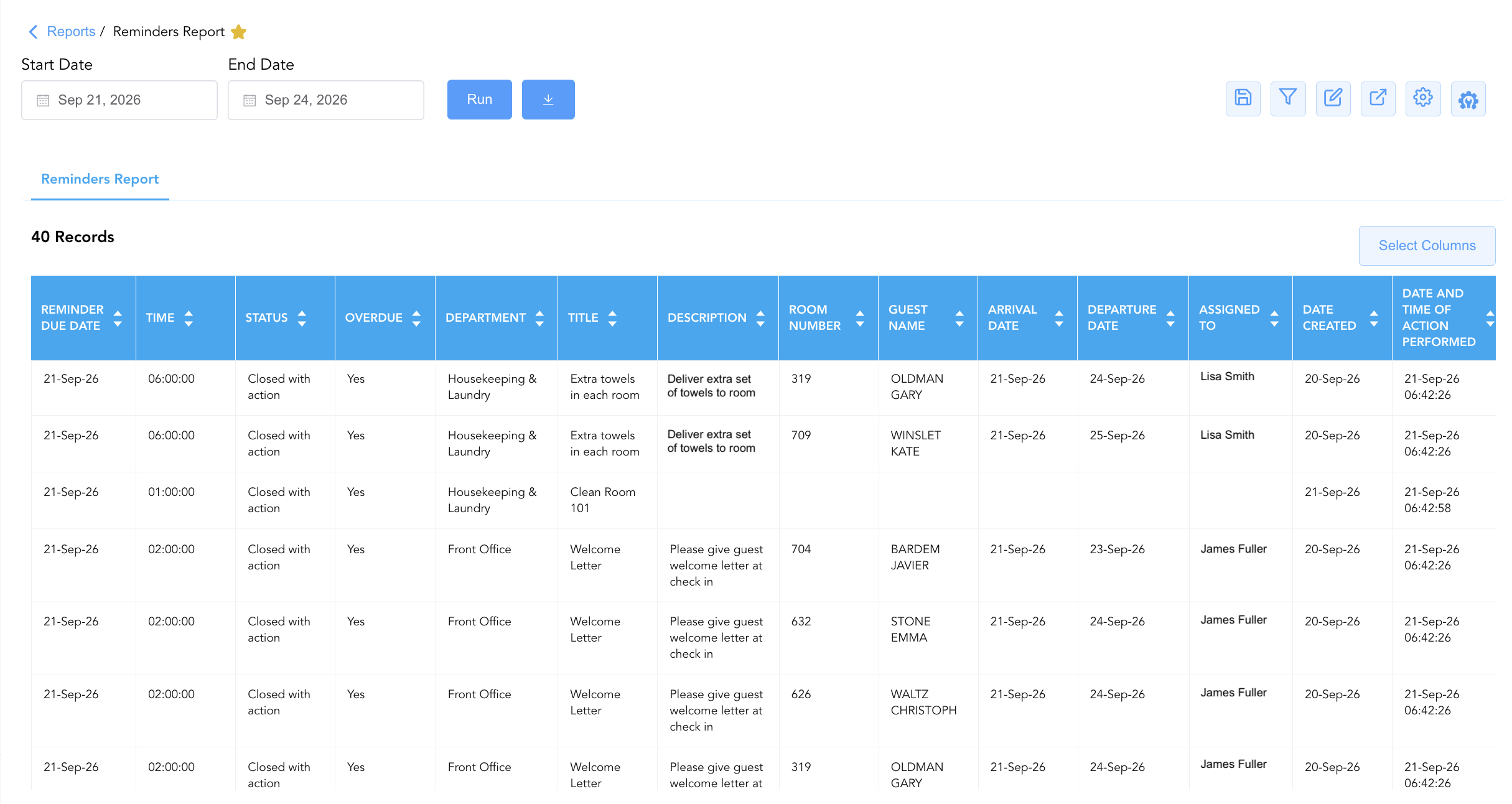
Data Dictionary (Dynamic View Columns)
Customize your default view using the Configure (⚙️) icon on the report page. Below is the full data dictionary representing all 14 available columns in this report:
💡 Task Scheduling Note: Reminder Due Date and Time represent the scheduled execution window for the task. Department indicates the specific operating team responsible for fulfilling the reminder.
|
Column Name |
Description |
Data Source / System Mapping |
Includes Taxes & Fees? |
|
Reminder Due Date |
Calendar date on which the reminder or task is scheduled to be completed. |
PMS Reminders > Scheduled Date |
N/A |
|
Time |
Scheduled execution time for the reminder (e.g., 06:00, 14:00, 17:00). |
PMS Reminders > Scheduled Time |
N/A |
|
Department |
Responsible hotel department (e.g., Front Office, Housekeeping & Laundry, Food and Beverage, Shift Incident Log). |
PMS Reminders > Target Department |
N/A |
|
Title |
Short headline or summary title of the reminder or shift log. |
PMS Reminders > Task Title |
N/A |
|
Description |
Detailed free-text instructions, guest request notes, or shift incident log entries. |
PMS Reminders > Action Description |
N/A |
|
Confirmation Number |
Unique alphanumeric reservation identifier linked to the reminder (if applicable). |
Reservation System > Confirmation ID |
N/A |
|
Arrival Date |
Scheduled or actual check-in date of the linked reservation. |
Reservation System > Check-In Date |
N/A |
|
Departure Date |
Scheduled check-out date of the linked reservation. |
Reservation System > Check-Out Date |
N/A |
|
Guest Name |
Combined full name of the guest associated with the reminder. |
Guest Profile > Full Name |
N/A |
|
First Name |
First name of the registered guest. |
Guest Profile > First Name |
N/A |
|
Last Name |
Last name of the registered guest. |
Guest Profile > Last Name |
N/A |
|
Group Name |
Name of the corporate account or group block linked to the stay (if applicable). |
Group Master > Group Title |
N/A |
|
Group Code |
Unique alphanumeric code identifying the group block. |
Group Master > Group Code |
N/A |
|
Room Number |
Physical guest room assigned to the reservation linked to the reminder. |
PMS > Assigned Room Number |
N/A |
Customization & Platform Features
User & Property Preferences
-
Personal Preference: Tailor your individual view by hiding or dragging columns. Your preferences save automatically for future sessions.
-
Property Defaults: System Admins can configure standard default layouts across all property users to streamline operational reporting. To maximize audit efficiency, group the columns into the below logical blocks:
-
Task Schedule & Priority (Cols 1–5):
Reminder Due Date|Time|Status|Overdue|Department -
Task Content & Description (Cols 6–7):
Title|Description -
Reservation Identification & Guest Context (Cols 8–15):
Confirmation Number|Room Number|Guest Name|First Name|Last Name|Local First Name|Local Last Name|Group Name|Group Code -
Stay Itinerary (Cols 16–17):
Arrival Date|Departure Date -
Staff Accountability & System Timestamps (Cols 18–22):
Assigned To|Username|Date Created|Date and Time of Action Performed
-
Report Toolbar & Quick Actions
Use the top-right toolbar icons on the report page to manage and export your data view:
|
Icon |
Action / Feature |
Description |

|
Knowledge Article |
Opens the knowledge base article to learn how to interpret this report. |

|
Saved Views |
Saves your column filtering, sorting, and highlight preferences so you can easily reload your custom view later without reconfiguring the report. |

|
Filter |
Opens filter controls to isolate specific data within a column based on your selected criteria. |

|
Highlight |
Highlights column values in a designated color based on selected conditions. |

|
Export |
Exports and downloads the report in various formats (Excel, PDF, CSV) for offline analysis or printing. |

|
Configure |
Opens column selection controls to toggle visibility, reorder columns, or hide rows with all zeros. |

|
Additional Configuration |
Provides advanced report configuration and display formatting options to customize data presentation. |
Advanced Controls
-
Exporting & Shift Handovers: Download in Excel or PDF format to generate physical shift logs and departmental task checklists for morning and evening shifts.
-
Filtering: Filter data by
Department = Front OfficeorDepartment = Housekeeping & Laundryto isolate team-specific duties. -
Highlighting (Conditional Formatting): Apply custom rules to automatically highlight upcoming VIP amenity deliveries, pending shift incident reports, or urgent guest requests.
🔗 Related Reports & Next Steps
Within 🛎️ Front Desk & Guest Services & 🏨 In-House & Occupancy:
-
In House List – Real-time guest register detailing active room occupants, contact info, and stay dates.
-
Recently Viewed Reservations – Audit log tracking recently accessed reservation records and user activity.
-
Arrivals List– Detailed daily manifest of expected arriving guests, check-in statuses, and room assignments.
-
Departures Details – Comprehensive manifest tracking daily scheduled guest departures, folio numbers, and outstanding balances.
Cross-Pillar Deep Dives:
-
🧹 Housekeeping & Facilities: Cross-reference housekeeping reminders with Housekeeping Sheet Overview to align cleaning schedules with guest requests.
-
📈 Revenue & Operations: Reconcile special amenity requests with All Transactions for chargeable guest services.