
Early Departures and Stay Extensions Report Overview
Parent Hub: 🛎️ Front Desk & Guest Services
Category: 🧳 Arrivals & Departures
Target Roles: Front Office Managers, Front Desk Agents, Guest Services Supervisors, Revenue Managers, General Managers, Housekeeping Supervisors
Key Value: Audit departure date modifications, track early check-outs and extended guest stays, quantify net room night variance, evaluate staff-level check-out adjustments, and optimize room turnover and inventory forecasting.
Executive Summary
The Early Departures and Stay Extensions Report is an essential front office operational audit and inventory adjustment document within the 🧳 Arrivals & Departures category of the 🛎️ Front Desk & Guest Services hub. Designed to provide complete visibility over in-house stay length alterations, it itemizes every reservation where the original departure date was shortened or extended during the selected reporting period.
-
By organizing stay alterations into 2 defined report sections: Early Departures and Stay Extensions, this report enables front office management, revenue teams, and housekeeping supervisors to audit shortened stays (
Early Departures) alongside extended stays (Stay Extensions). It maps reservation identifiers (Confirmation Number, Room Number, Room Type, Guest Name, Group Code) to rate structures (Average Room Rate, Rate Plan), stay windows (Check In Date, Original Check Out Date, New Check Out Date), staff credentials (Username), and room night variances (Nights Lost, Nights Gained).
Key Capabilities
-
Two-Section Departure Alteration Audit: Separates shortened stay transactions (
Early Departures) from extended stay transactions (Stay Extensions) for targeted operational and inventory auditing. -
Room Night Variance Quantification: Automatically calculates lost room nights (
Nights Lost) resulting from early check-outs and added room nights (Nights Gained) resulting from stay extensions. -
Departure Date Comparison: Tracks the original departure expectation (
Original Check Out Date) against the newly updated departure date (New Check Out Date). -
Staff Accountability & Auditability: Captures the specific staff username (
Username) responsible for executing or processing the stay length modification in the system. -
Financial & Rate Structure Visibility: Itemizes average room rates (
Average Room Rate) and assigned rate plan codes (Rate Plan) to evaluate the revenue impact of stay modifications.
Report Views & Functional Breakdown
The Early Departures and Stay Extensions Report presents stay duration alterations in a structured matrix across 2 defined sections:
┌────────────────────────────────────────────────────────────────────────┐
│         EARLY DEPARTURES AND STAY EXTENSIONS REPORT                    │
├────────────────────────────────────────────────────────────────────────┤
│                       2 Defined Report Sections                        │
├──────────────────────────┬──────────────────────────┬──────────────────┤
│ 1. Early Departures      │ 2. Stay Extensions       │                  │
│    Section (Shortened)   │    Section (Extended)    │                  │
└──────────────────────────┴──────────────────────────┴──────────────────┘
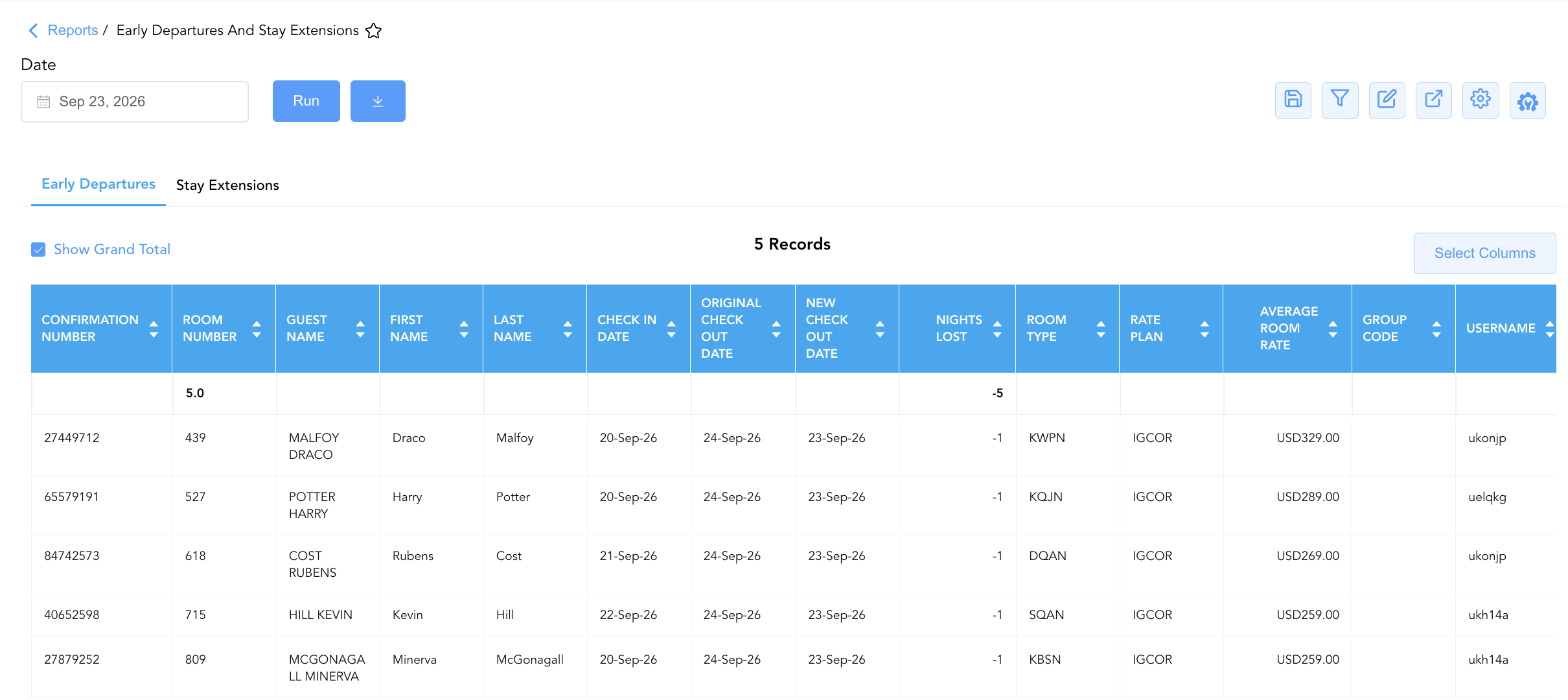
1. Early Departures Section
Monitors all in-house guest reservations where the departure date was moved earlier than originally booked.
-
Primary Use: Identifying early check-out trends, releasing vacated room inventory back to bookable availability, notifying housekeeping for immediate room turnover, and quantifying lost room nights.
-
Key Metrics: Confirmation Number, Room Number, Guest Name, Username, Average Room Rate, Original Check Out Date, New Check Out Date, Nights Lost.
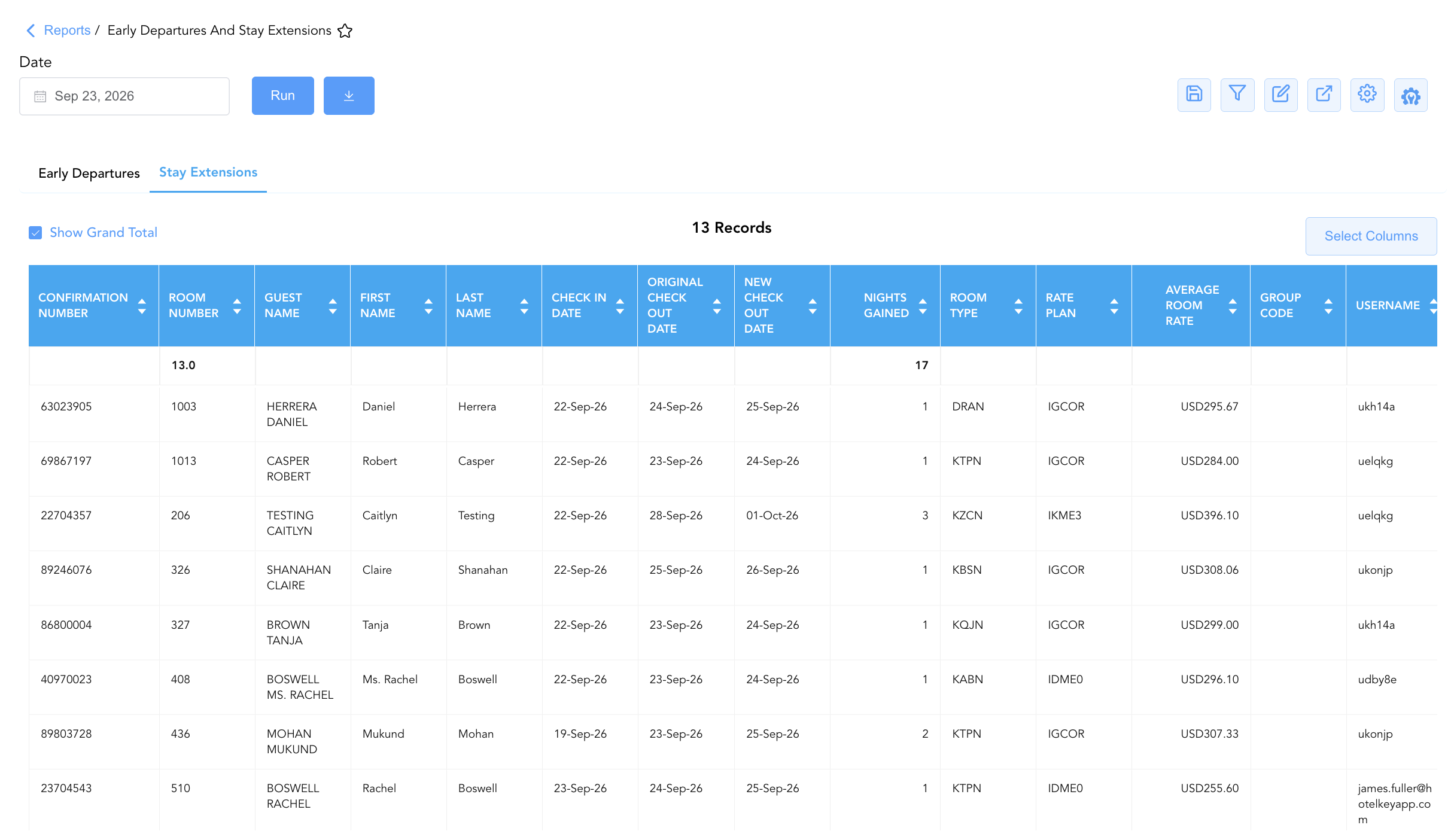
2. Stay Extensions Section
Isolates all in-house guest reservations where the departure date was extended beyond the original booking window.
-
Primary Use: Tracking additional stay production, verifying rate code availability for extended dates, auditing front desk extension processing, and calculating gained room nights.
-
Key Metrics: Confirmation Number, Room Number, Guest Name, Username, Average Room Rate, Original Check Out Date, New Check Out Date, Nights Gained.
Data Dictionary (Dynamic View Columns)
Customize your default view using the Configure (⚙️) icon on the report page. Below is the full data dictionary representing every column available in this report:
💡 Variance Calculation Note: Nights Lost represents the reduction in room nights resulting from an early departure (Nights Lost = New Check Out Date - Original Check Out Date). Nights Gained represents the addition of room nights resulting from a stay extension (Nights Gained = New Check Out Date - Original Check Out Date).
|
Column Name |
Section Applicability |
Description |
Data Source / System Mapping |
Includes Taxes & Fees? |
|
Confirmation Number |
Both Sections |
Unique alphanumeric reservation identifier. |
Reservation System > Confirmation Number |
N/A |
|
Room Number |
Both Sections |
Physical guest room assigned to the reservation. |
PMS > Assigned Room Number |
N/A |
|
Room Type |
Both Sections |
Code representing the room category occupied (e.g., KBSN, KTPN, KQJN, KABN). |
PMS > Room Type Code |
N/A |
|
Guest Name |
Both Sections |
Combined full name of the primary registered guest. |
Guest Profile > Full Name |
N/A |
|
First Name |
Both Sections |
First name of the primary registered guest. |
Guest Profile > First Name |
N/A |
|
Last Name |
Both Sections |
Last name of the primary registered guest. |
Guest Profile > Last Name |
N/A |
|
Username |
Both Sections |
User ID of the staff member who processed the stay alteration. |
Security Audit Trail > User ID |
N/A |
|
Average Room Rate |
Both Sections |
Average daily base room rate charged for the stay. |
Folio Posting > Average Base Rate |
❌ No |
|
Rate Plan |
Both Sections |
Active rate plan code attached to the reservation (e.g., IGCOR, IDME0, IKME3). |
Reservation System > Active Rate Code |
N/A |
|
Group Code |
Both Sections |
Alphanumeric group code associated with the reservation (if applicable). |
Group System > Group Code |
N/A |
|
Check In Date |
Both Sections |
Actual arrival date of the reservation. |
Reservation System > Check-In Date |
N/A |
|
Original Check Out Date |
Both Sections |
Departure date originally scheduled prior to modification. |
Reservation History > Original Departure Date |
N/A |
|
New Check Out Date |
Both Sections |
Updated departure date resulting from the modification. |
Reservation System > Active Departure Date |
N/A |
|
Nights Lost |
Section 1 |
Number of room nights lost due to early check-out. |
Original Departure Date - New Departure Date |
N/A |
|
Nights Gained |
Section 2 |
Number of room nights added due to stay extension. |
New Departure Date - Original Departure Date |
N/A |
Customization & Platform Features
User & Property Preferences
-
Personal Preference: Tailor your individual view by hiding or dragging columns. Your preferences save automatically for future sessions.
-
Property Defaults: System Admins can configure standard default layouts across all property users to streamline operational reporting. To maximize audit efficiency, group the columns into the below logical blocks:
-
Section 1: Early Departures
-
Reservation & Guest Audit (Cols 1–5):
Confirmation Number|Room Number|Guest Name|First Name|Last Name -
Stay Itinerary & Departure Modification (Cols 6–10):
Check In Date|Original Check Out Date|New Check Out Date|Nights Lost|Room Type -
Rate Plan & Group Mapping (Cols 11–13):
Rate Plan|Average Room Rate|Group Code -
Staff Accountability (Col 14):
Username
-
-
Section 2: Stay Extensions
-
Reservation & Guest Audit (Cols 1–5):
Confirmation Number|Room Number|Guest Name|First Name|Last Name -
Stay Itinerary & Extension Modification (Cols 6–10):
Check In Date|Original Check Out Date|New Check Out Date|Nights Gained|Room Type -
Rate Plan & Group Mapping (Cols 11–13):
Rate Plan|Average Room Rate|Group Code -
Staff Accountability (Col 14):
Username
-
-
Report Toolbar & Quick Actions
Use the top-right toolbar icons on the report page to manage and export your data view:
|
Icon |
Action / Feature |
Description |

|
Knowledge Article |
Opens the knowledge base article to learn how to interpret this report. |

|
Saved Views |
Saves your column filtering, sorting, and highlight preferences so you can easily reload your custom view later without reconfiguring the report. |

|
Filter |
Opens filter controls to isolate specific data within a column based on your selected criteria. |

|
Highlight |
Highlights column values in a designated color based on selected conditions. |

|
Export |
Exports and downloads the report in various formats (Excel, PDF, CSV) for offline analysis or printing. |

|
Configure |
Opens column selection controls to toggle visibility, reorder columns, or hide rows with all zeros. |

|
Additional Configuration |
Provides advanced report configuration and display formatting options to customize data presentation. |
Advanced Controls
-
Exporting & Inventory Reconciliation: Download in Excel or PDF format to support daily front desk shift handovers, revenue pace adjustments, and housekeeping priority planning.
-
Filtering: Filter data by specific
Usernameto audit employee activity, or isolate high-impact rate plans (Average Room Rate > $300). -
Highlighting (Conditional Formatting): Apply custom rules to automatically highlight multi-night extensions (
Nights Gained > 2) or significant early departures.
🔗 Related Reports & Next Steps
Within 🛎️ Front Desk & Guest Services & 🧳 Arrivals & Departures:
-
Departures Details – Comprehensive manifest tracking daily scheduled guest departures, folio numbers, and outstanding balances.
-
Arrivals– Detailed daily manifest of expected arriving guests, check-in statuses, and room assignments.
-
In House Guest List – Real-time roster of registered guests currently occupying physical hotel rooms.
-
Booked Reservations – Audit log tracking newly created and modified reservation entries.
Cross-Pillar Deep Dives:
-
📈 Revenue & Analytics: Reconcile stay extensions and early check-outs against Booking Pace and Occupancy Forecast and History.
-
🏷️ Rate Management: Review rate plan availability for extended stays against Rate Code Configuration and Rate Plan Summary.