
Cash Guests List Report Overview
Parent Hub: 🛎️ Front Desk & Guest Services
Category: 🚨 Downtime & Contingency
Target Roles: Night Auditors, Hotel Controllers, Cashier Leads, Front Office Managers, Accounting Supervisors, General Managers
Key Value: Serves as a vital cashiering audit, payment reconciliation, and emergency downtime document to track guests settling folios via cash or check, verify physical drawer balances against system postings, prevent uncollected balances during check-out, and maintain financial accountability.
Date Parameter: Date Range Selector (Start & End) | Past & Future | Maximum Window: No Range
Executive Summary
The Cash Guests List Report is an essential cashiering control, payment audit, and emergency downtime reconciliation document within the 🚨 Downtime & Contingency category of the 🛎️ Front Desk & Guest Services hub. Designed to deliver complete visibility over non-electronic and manual tender settlements, it itemizes every reservation where transactions were settled using cash or check payment methods.
-
By mapping reservation parameters (
Room Number,Confirmation No,Guest Name,First Name,Last Name,Company Name) to stay durations (Arrival Date,Departure Date), billing references (Invoice Number,Folio Name), folio financial metrics (Folio Balance,Credit Balance,Outstanding Balance), and cashiering tender specifics (PAYMENT METHOD:,Amount), this report enables night auditors, controllers, and cashier leads to audit cash drop accuracy, verify paper check tenders, ensure zero outstanding balance before guest departure, and maintain precise physical drawer reconciliations during both routine shifts and system downtime events.
Key Capabilities
-
Cashiering & Drawer Audit: Itemizes all cash and check transactions (
PAYMENT METHOD:,Amount) to audit shift drop totals against physical till cash levels. -
Downtime Payment Contingency Register: Acts as an indispensable paper/PDF backup during network or PMS outages, enabling staff to verify cash-paying guest balances and manual settlement receipts.
-
Folio Balance & Zero-Settlement Verification: Compares total accumulated charges (
Folio Balance) and applied payments (Credit Balance) to confirm zero uncollected liabilities (Outstanding Balance = 0) prior to guest departure. -
Invoice & Transaction Lineage Tracking: Links tender postings directly to official tax invoice numbers (
Invoice Number), specific folio buckets (Folio Name), and reservation confirmation codes (Confirmation No). -
Corporate Account Attachment Review: Identifies corporate billing attachments (
Company Name) to ensure cash/check tenders are credited to the correct guest or corporate sub-folio.
Report Views & Functional Breakdown
The Cash Guests List Report presents cash and check tender data in a unified master manifest supporting three primary operational perspectives:
┌────────────────────────────────────────────────────────────────────────┐
│                        CASH GUESTS LIST REPORT                         │
├────────────────────────────────────────────────────────────────────────┤
│                         Unified Matrix View                            │
├──────────────────────────┬──────────────────────────┬──────────────────┤
│ 1. Guest Identity &      │ 2. Folio Billing &       │ 3. Cashiering    │
│    Stay Timeframe Trace  │    Invoice Lineage       │    Tender Audit  │
└──────────────────────────┴──────────────────────────┴──────────────────┘
1. Guest Identity & Stay Timeframe Trace
Monitors guest names, room assignments, confirmation numbers, company profiles, and stay timeframes.
-
Primary Use: Identifying cash-settled guest rooms during daily operations or emergency downtime check-outs.
-
Key Metrics: Room Number, Confirmation No, Guest Name, First Name, Last Name, Company Name, Arrival Date, Departure Date.
2. Folio Billing & Invoice Lineage
Tracks invoice numbers, target folio buckets, total charges, applied credits, and remaining outstanding balances.
-
Primary Use: Reconciling folio credits against posted charges and ensuring no unpaid balances remain prior to room key deactivation.
-
Key Metrics: Invoice Number, Folio Name, Folio Balance, Credit Balance, Outstanding Balance, Confirmation No.
3. Cashiering Tender Audit
Audits payment method classifications and tendered settlement amounts credited to guest folios.
-
Primary Use: Reconciling front desk shift cash drops, auditing check payments, and verifying cashier drawer balances during night audit.
-
Key Metrics: PAYMENT METHOD:, Amount, Folio Balance, Credit Balance, Room Number.
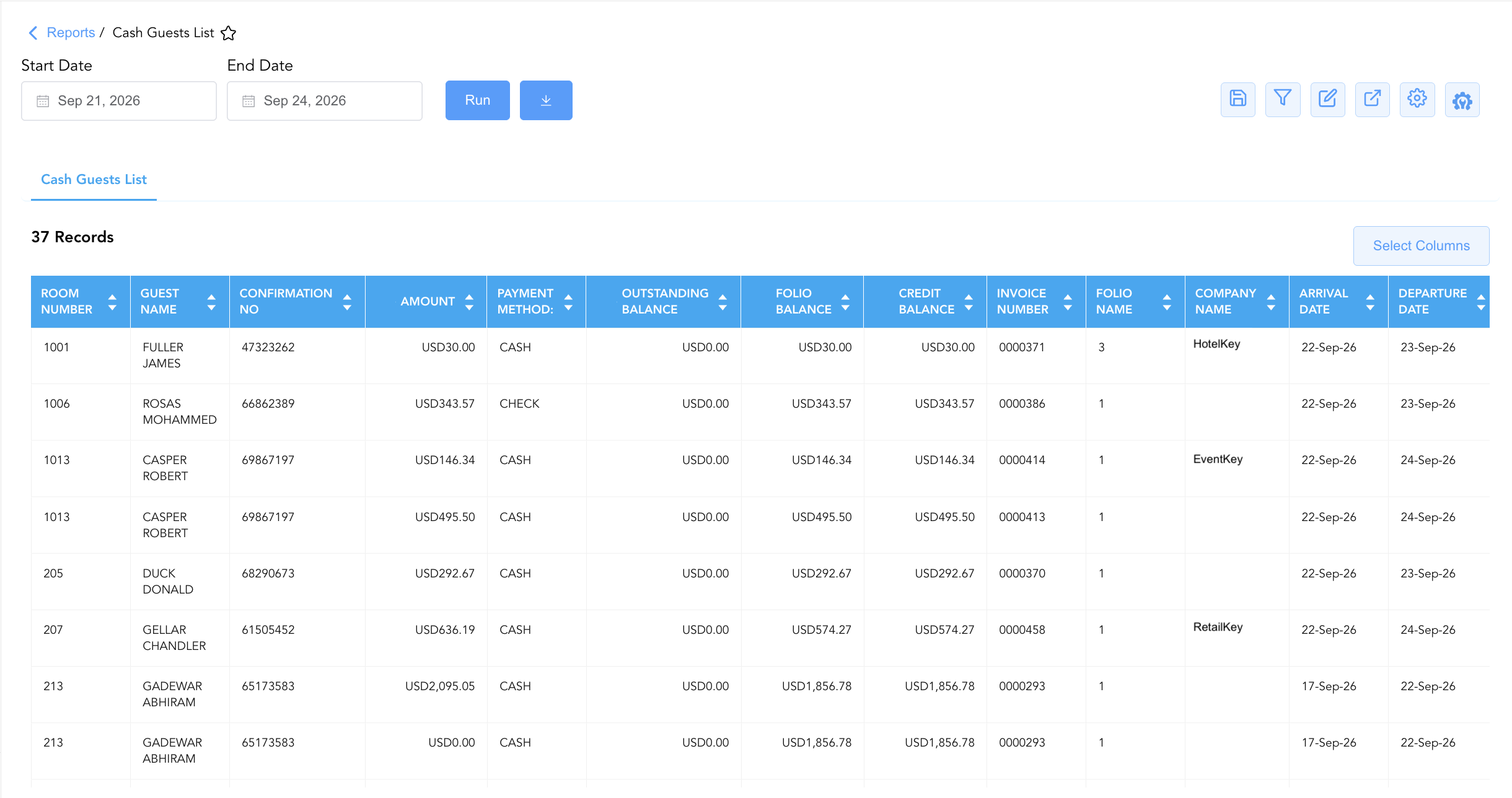
Data Dictionary (Dynamic View Columns)
Customize your default view using the Configure (⚙️) icon on the report page. Below is the full data dictionary representing all 15 columns available in this report:
💡 Coupled Financial Posting Note: Numerical monetary values in this report (
Folio Balance,Credit Balance,Outstanding Balance,Amount) reflect gross ledger transactions. They are marked Yes under "Includes Taxes & Fees?" because taxes and fees are coupled directly with room and incidental charges on guest folios.
|
Column Name |
Description |
Data Source / System Mapping |
Includes Taxes & Fees? |
|
Amount |
Specific dollar amount tendered in cash or check for the transaction line item. |
Cashiering Engine > Tender Amount |
🟢 Yes |
|
Arrival Date |
Scheduled or actual check-in date. |
Reservation System > Arrival Date |
N/A |
|
Company Name |
Corporate company account linked to the reservation (if applicable). |
Reservation System > Company Account |
N/A |
|
Confirmation No |
Primary unique alphanumeric reservation identifier. |
Reservation System > Confirmation ID |
N/A |
|
Credit Balance |
Cumulative total payments and credits applied to the folio. |
Folio Posting > Total Applied Payments |
🟢 Yes |
|
Departure Date |
Scheduled or actual check-out date. |
Reservation System > Departure Date |
N/A |
|
First Name |
First name of the primary registered guest. |
Guest Profile > First Name |
N/A |
|
Folio Balance |
Cumulative gross dollar amount charged to the folio bucket. |
Folio Posting > Gross Charges |
🟢 Yes |
|
Folio Name |
Specific folio bucket or sub-account where the charge/tender was recorded (e.g., |
PMS Billing > Folio Bucket |
N/A |
|
Guest Name |
Combined full name of the primary registered guest. |
Guest Profile > Full Name |
N/A |
|
Invoice Number |
Unique PMS invoice or receipt reference number issued for the settlement. |
PMS Billing > Invoice Number |
N/A |
|
Last Name |
Last name of the primary registered guest. |
Guest Profile > Last Name |
N/A |
|
Outstanding Balance |
Remaining uncollected liability on the folio bucket (Folio Balance - Credit Balance). |
PMS Folio > Net Outstanding Balance |
🟢 Yes |
|
PAYMENT METHOD: |
Specific non-electronic tender type used for settlement (e.g., |
Cashiering Engine > Payment Method |
N/A |
|
Room Number |
Physical guest room assigned to the reservation. |
PMS > Assigned Room Number |
N/A |
Customization & Platform Features
User & Property Preferences
-
Personal Preference: Tailor your individual view by hiding or dragging columns. Your preferences save automatically for future sessions.
-
Property Defaults: System Admins can configure standard default layouts across all property users to streamline operational reporting. To maximize audit efficiency, group the columns into the below logical blocks:
-
Physical & Guest Identity Locators (Cols 1–5):
Room Number|Guest Name|First Name|Last Name|Confirmation No -
Payment & Folio Balances (Cols 6–10):
Amount|PAYMENT METHOD:|Outstanding Balance|Folio Balance|Credit Balance -
Invoice & Folio Accounting Details (Cols 11–13):
Invoice Number|Folio Name|Company Name -
Stay Duration Dates (Cols 14–15):
Arrival Date|Departure Date
-
Report Toolbar & Quick Actions
Use the top-right toolbar icons on the report page to manage and export your data view:
|
Icon |
Action / Feature |
Description |

|
Knowledge Article |
Opens the knowledge base article to learn how to interpret this report. |

|
Bar Chart |
Displays report data in a visual bar chart format. |

|
Filter |
Opens filter controls to isolate specific data within a column based on your selected criteria. |

|
Highlight |
Highlights column values in a designated color based on selected conditions. |

|
Export |
Exports and downloads the report in various formats (Excel, PDF, CSV) for offline analysis or printing. |

|
Configure |
Opens column selection controls to toggle visibility, reorder columns, or hide rows with all zeros. |

|
Additional Configuration |
Provides advanced report configuration and display formatting options to customize data presentation. |
Advanced Controls
-
Downtime Contingency Printing & Exporting: Automatically schedule periodic PDF/Excel exports prior to shift handovers to maintain an updated physical emergency cash register at the front desk.
-
Filtering: Filter data by
PAYMENT METHOD: = CASHto verify front desk cash drawer drops, or isolate non-zero balances (Outstanding Balance > 0) to prevent unpaid check-outs. -
Highlighting (Conditional Formatting): Apply custom rules to automatically highlight high-dollar cash payments (
Amount > $500), check settlements (PAYMENT METHOD: = CHECK), or unexpected outstanding balances.
🔗 Related Reports & Next Steps
Within 🛎️ Front Desk & Guest Services & 🚨 Downtime & Contingency:
-
Arrivals List Report – Essential downtime contingency manifest tracking expected arrivals, room blocking, and payment guarantees.
-
In House List Report – Core downtime contingency manifest detailing active room occupants, rate plans, and guest balances.
-
Departures Details Report – Downtime contingency manifest tracking daily expected check-outs and folio settlement states.
-
Stay Over and Balance Due Report – Focused credit audit report isolating active stayover room balances.
Cross-Pillar Deep Dives:
-
⚖️ Ledgers & Trial Balance: Reconcile total cash and check drawer drops (
Amount) against Cashiering Control Accounts in Clerk Shift Report. -
💳 Payments & Transactions: Cross-reference physical cash drops with Settlement By Payment Type Report and All Transactions Report.