
Today's Guests Report Overview
Parent Hub: 🛎️ Front Desk & Guest Services
Category: 🚨 Downtime & Contingency
Target Roles: Front Office Managers, Front Desk Agents, Night Auditors, Executive Housekeepers, Guest Experience Leads, General Managers
Key Value: Serves as a comprehensive single-day guest activity register and emergency downtime manifest to track all active in-house occupants, expected arrivals, pending departures, and completed check-outs on the current business date, ensuring continuous front desk operational control during system disconnections.
Date Parameter: Current Business Day Only (Dynamic Live Data)
Executive Summary
The Today's Guests Report is a vital operational control, guest movement tracking, and emergency downtime contingency manifest within the 🚨 Downtime & Contingency category of the 🛎️ Front Desk & Guest Services hub. Designed to provide complete 24-hour operational visibility over every guest reservation touching the property on the current business day, it consolidates active in-house stays, expected check-in arrivals, pending check-outs, and completed departures into a single master register.
-
By mapping primary guest identity attributes (
Guest Name,Additional Guests,Local First Name,Local Last Name) to real-time stay statuses (Reservation Status,Pending Status), physical room allocations (Room Number,Room Type), stay timeframes (Arrival Date,Departure Date), rate and commercial classifications (Rate Plan,Company Name,Add On,Market Segment), and guest profile standings (Loyalty Tier,VIP Guest), this report guarantees total front desk continuity, streamlined room turnover, and personalized guest service even during cloud PMS outages or network offline periods.
Key Capabilities
-
Single-Day Master Guest Movement Manifest: Consolidates all current-day guest activity across all operational stages (
Reservation Status, e.g.,In House,Arrival,Pending Departure,Checked Out). -
Downtime & Outage Contingency Register: Serves as an indispensable physical or PDF fallback document during PMS disconnections or software maintenance, enabling front desk staff to verify live guest room assignments and process manual check-ins/check-outs.
-
Pre-Arrival & Departure Turnover Management: Identifies expected arrivals requiring pre-blocked rooms alongside pending departures to coordinate room cleaning releases with housekeeping leads.
-
Commercial & Market Segment Lineage Tracking: Captures corporate company affiliations (
Company Name, e.g.,CLC Direct Bill,BCD TRAVEL), attached rate plans (Rate Plan), and marketing classifications (Market Segment, e.g.,CORPORATE PREFERRED,CORPORATE REGULAR,LONG STAY). -
VIP & Loyalty Tier Standing Audit: Highlights brand loyalty tiers (
Loyalty Tier, e.g.,Diamond Elite,Platinum Elite,Silver Elite,Club) and special status flags (VIP Guest) to enforce high-touch recognition at the front desk.
Report Views & Functional Breakdown
The Today's Guests Report presents current-day guest movement data in a unified single-table master manifest supporting three primary operational perspectives:
┌────────────────────────────────────────────────────────────────────────┐
│                        TODAY'S GUEST REPORT                            │
├────────────────────────────────────────────────────────────────────────┤
│                         Unified Matrix View                            │
├──────────────────────────┬──────────────────────────┬──────────────────┤
│ 1. Guest Identity &      │ 2. Room Assignment &     │ 3. Commercial,   │
│    Stay Status Trace     │    Stay Timeframe Trace  │    Market & VIP  │
└──────────────────────────┴──────────────────────────┴──────────────────┘
1. Guest Identity & Stay Status Trace
Monitors primary registered guest names, accompanying occupants, native character set names, and real-time operational reservation statuses.
-
Primary Use: Verifying guest identity and current stay state during front desk check-in, check-out, or emergency downtime roll-call procedures.
-
Key Metrics: Guest Name, Additional Guests, Local First Name, Local Last Name, Reservation Status, Pending Status.
2. Room Assignment & Stay Timeframe Trace
Tracks assigned physical room numbers, room category codes, scheduled arrival dates, and scheduled departure dates.
-
Primary Use: Locating active guest rooms, checking room blocking readiness for arriving guests, and auditing stay durations.
-
Key Metrics: Room Number, Room Type, Arrival Date, Departure Date, Reservation Status.
3. Commercial, Market & VIP
Audits rate plan codes, corporate company attachments, ancillary add-on packages, market segment groupings, and loyalty/VIP standings.
-
Primary Use: Enforcing corporate direct-bill routing rules, recognizing high-tier loyalty guests, and auditing rate plan entitlements.
-
Key Metrics: Rate Plan, Company Name, Add On, Market Segment, Loyalty Tier, VIP Guest.
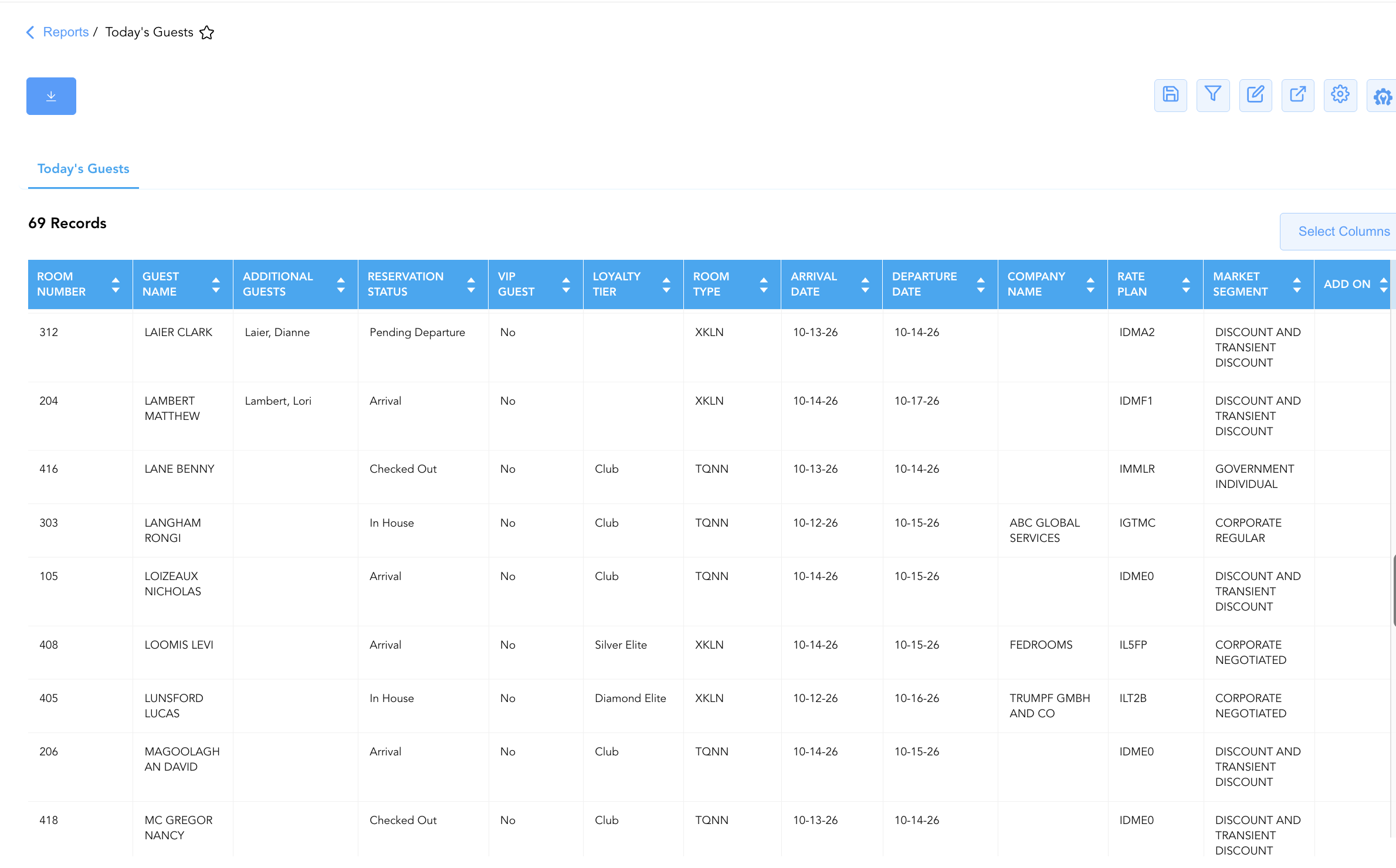
Data Dictionary (Dynamic View Columns)
Customize your default view using the Configure (⚙️) icon on the report page. Below is the full data dictionary representing all 18 dynamic columns available in this report:
|
Column Name |
Description |
Data Source / System Mapping |
Includes Taxes & Fees? |
|
Add On |
Attached package add-ons or ancillary service codes. |
PMS Setup > Add-On Name |
N/A |
|
Additional Guests |
Names of secondary or accompanying occupants sharing the room (e.g., |
Reservation System > Additional Guests |
N/A |
|
Arrival Date |
Scheduled or actual check-in date of the reservation. |
Reservation System > Arrival Date |
N/A |
|
Company Name |
Corporate company account linked to the reservation (e.g., |
Reservation System > Company Account |
N/A |
|
Departure Date |
Scheduled check-out date of the reservation. |
Reservation System > Departure Date |
N/A |
|
First Name |
First name of the primary registered guest. |
Guest Profile > First Name |
N/A |
|
Guest Name |
Combined full name of the primary registered guest. |
Guest Profile > Full Name |
N/A |
|
Last Name |
Last name of the primary registered guest. |
Guest Profile > Last Name |
N/A |
|
Local First Name |
Native language or local character set first name. |
Guest Profile > Local First Name |
N/A |
|
Local Last Name |
Native language or local character set last name. |
Guest Profile > Local Last Name |
N/A |
|
Loyalty Tier |
Brand loyalty program membership level (e.g., |
Loyalty Engine > Membership Tier |
N/A |
|
Market Segment |
Broad commercial marketing classification (e.g., |
Reservation System > Market Segment |
N/A |
|
Pending Status |
Secondary or transition status indicator (e.g., |
Reservation System > Sub-Status |
N/A |
|
Rate Plan |
Active rate plan code attached to the reservation (e.g., |
Reservation System > Active Rate Code |
N/A |
|
Reservation Status |
Real-time primary reservation status (e.g., |
Reservation System > Main Status |
N/A |
|
Room Number |
Physical guest room assigned to the reservation (e.g., |
PMS > Assigned Room ID |
N/A |
|
Room Type |
Alphanumeric code representing the assigned room category (e.g., |
PMS > Room Category Code |
N/A |
|
VIP Guest |
Indicator flag denoting VIP guest status (e.g., |
Guest Profile > VIP Status |
N/A |
Customization & Platform Features
User & Property Preferences
-
Personal Preference: Tailor your individual view by hiding or dragging columns. Your preferences save automatically for future sessions.
-
Property Defaults: System Admins can configure standard default layouts across all property users to streamline operational reporting. To maximize audit efficiency, group the columns into the below logical blocks:
-
Physical Locators & Consolidated Identity (Cols 1–7):
Room Number|Guest Name|First Name|Last Name|Additional Guests|Local First Name|Local Last Name -
Operational Status & Loyalty Recognition (Cols 8–12):
Reservation Status|Pending Status|VIP Guest|Loyalty Tier|Room Type -
Stay Window & Itinerary (Cols 13–14):
Arrival Date|Departure Date -
Corporate & Commercial Classification (Cols 15–18):
Company Name|Rate Plan|Market Segment|Add On
-
Report Toolbar & Quick Actions
Use the top-right toolbar icons on the report page to manage and export your data view:
|
Icon |
Action / Feature |
Description |

|
Knowledge Article |
Opens the knowledge base article to learn how to interpret this report. |

|
Saved Views |
Saves your column filtering, sorting, and highlight preferences so you can easily reload your custom view later without reconfiguring the report. |

|
Filter |
Opens filter controls to isolate specific data within a column based on your selected criteria. |

|
Highlight |
Highlights column values in a designated color based on selected conditions. |

|
Export |
Exports and downloads the report in various formats (Excel, PDF, CSV) for offline analysis or printing. |

|
Configure |
Opens column selection controls to toggle visibility, reorder columns, or hide rows with all zeros. |

|
Additional Configuration |
Provides advanced report configuration and display formatting options to customize data presentation. |
Advanced Controls
-
Downtime Contingency Printing & Exporting: Automatically schedule periodic PDF/Excel exports prior to shift handovers (e.g., 06:00, 14:00, 22:00) to maintain an updated physical single-day guest master binder at the front desk.
-
Filtering: Filter data by
Reservation Status = Arrivalto generate front desk check-in lists, or isolate active in-house stayovers (Reservation Status = In House). -
Highlighting (Conditional Formatting): Apply custom rules to automatically highlight high-tier VIP/loyalty guests (
Loyalty Tier = Diamond Elite), unassigned arrivals, or corporate direct-bill bookings.
🔗 Related Reports & Next Steps
Within 🛎️ Front Desk & Guest Services & 🚨 Downtime & Contingency:
-
In House List Report – Core downtime contingency manifest detailing active room occupants, rate plans, and room assignments.
-
Arrivals List Report – Downtime contingency manifest tracking expected check-in arrivals, room pre-blocking, and payment guarantees.
-
Departures List Report – Downtime contingency manifest tracking daily expected check-outs and folio settlement states.
-
Room Detail Report Report – Master room-by-room physical status and housekeeping audit matrix.
Cross-Pillar Deep Dives:
-
🧹 Housekeeping & Facilities: Cross-reference expected arrivals (
Reservation Status = Arrival) with Housekeeping Sheet Report to prioritize room cleaning releases. -
💳 Payments & Transactions: Verify payment guarantees and corporate direct-bill accounts in Settlement By Payment Type Report.