
Meal Report Overview
Parent Hub: 🛎️ Front Desk & Guest Services
Category: 📱 Self-Service & Packages
Target Roles: Food & Beverage Managers, Restaurant Supervisors, Executive Chefs, Kitchen Line Leads, Front Office Managers, Guest Experience Leads, General Managers
Key Value: Audit guest meal entitlements and package inclusions, forecast daily dining room covers and kitchen prep requirements, verify meal types (rate-included vs. standalone add-ons), review guest dietary/stay remarks, and streamline restaurant outlet check-ins.
Executive Summary
The Meal Report is an essential cross-departmental operational forecasting, dining entitlement audit, and culinary coordination document within the 📱 Self-Service & Packages category of the 🛎️ Front Desk & Guest Services hub. Designed to deliver complete visibility over guest meal entitlements across breakfast and dinner services, it itemizes every reservation holding a rate-included meal plan, standalone meal package add-on, or special dining arrangement.
-
By organizing meal entitlements into 2 defined report sections: Breakfast Report and Dinner Report, this report enables food & beverage managers, restaurant hosts, executive chefs, and front desk agents to audit morning dining entitlements (
Breakfast Report) independently from evening service commitments (Dinner Report). It correlates core stay identifiers (Confirmation No,Room Number,Arrival Date,Departure Date,Rate Plan) with guest demographics (Guest Name,First Name,Last Name,Loyalty Tier,Company,Adults,Children), service classifications (Breakfast Type,Dinner Type,Add-On Name,Add-On Quantity,Package), and operational handling instructions (Stay Request,Stay Remarks).
Key Capabilities
-
Two-Section Service Breakdown: Separates morning meal entitlements (
Breakfast Report) from evening dining plans (Dinner Report) to streamline kitchen prep and podium check-ins. -
Meal Origin & Source Classification: Distinguishes rate-bundled dining plans (
Breakfast Included,Package) from guest-purchased add-on packages (Breakfast Add On,Dinner for 2,Add-On Name,Add-On Quantity). -
Kitchen Cover & Headcount Forecasting: Tracks adult and child occupant headcounts (
Adults,Children) to project accurate dining room covers and culinary purchasing volume. -
Dietary & Special Request Integration: Consolidates guest room requests (
Stay Request) and special operational notes (Stay Remarks, e.g., "Anniversary Stay", "Escort guest to room", "Late arrival") to ensure personalized restaurant service. -
Loyalty & Corporate Account Alignment: Displays guest loyalty program standings (
Loyalty Tier, e.g., Blue) and corporate account attachments (Company, e.g., HOTELKEY, INC.) for VIP dining recognition.
Report Views & Functional Breakdown
The Meal Report presents dining entitlement data in a structured matrix across 2 defined sections:
┌────────────────────────────────────────────────────────────────────────┐
│                          MEAL REPORT                                   │
├────────────────────────────────────────────────────────────────────────┤
│                       2 Defined Report Sections                        │
├──────────────────────────┬──────────────────────────┬──────────────────┤
│ 1. Breakfast Report      │ 2. Dinner Report         │                  │
│    Section (Morning)     │    Section (Evening)     │                  │
└──────────────────────────┴──────────────────────────┴──────────────────┘
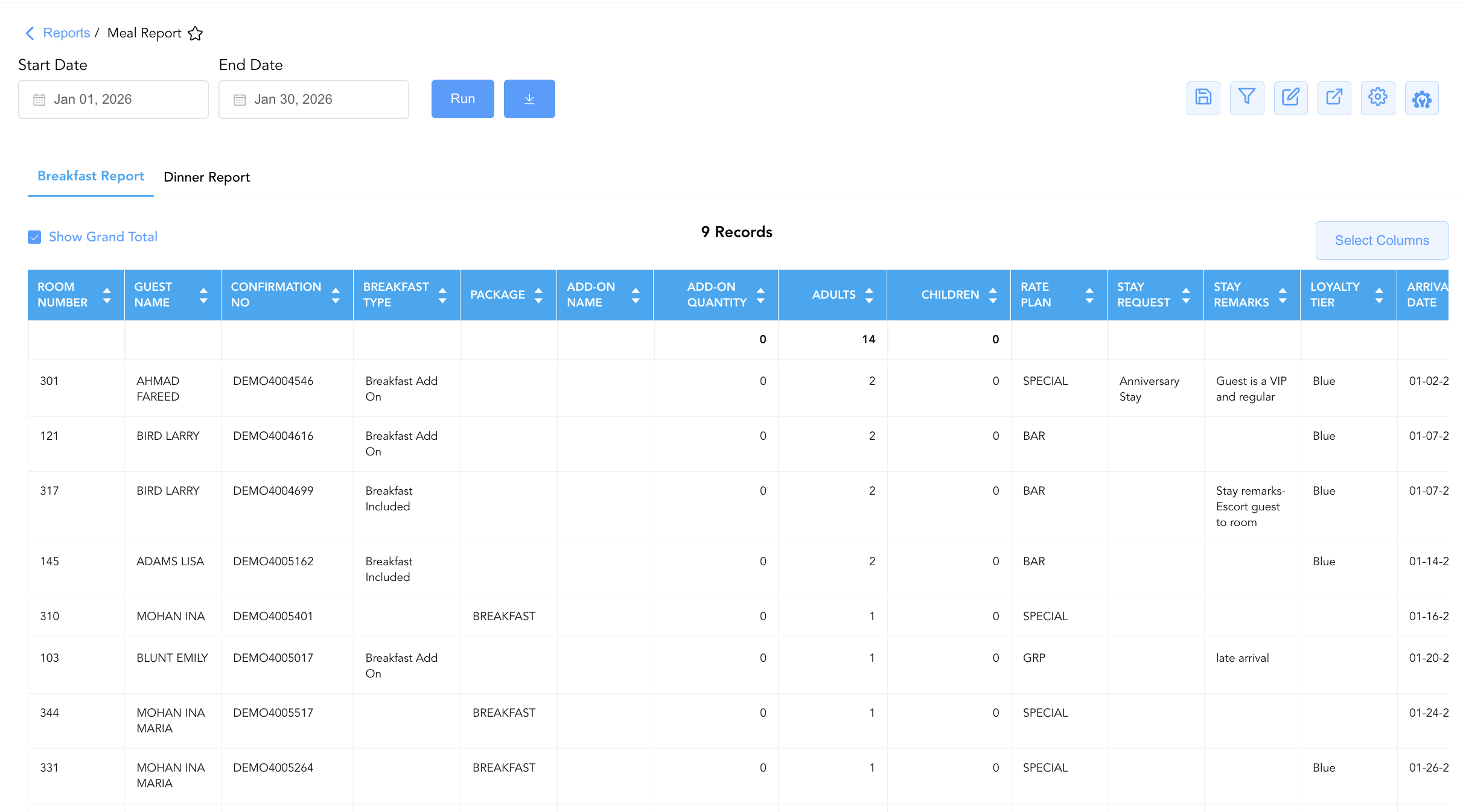
1. Breakfast Report Section
Monitors morning meal entitlements, rate-included breakfast plans, and purchased breakfast add-on packages for active and arriving guests.
-
Primary Use: Verifying breakfast entitlement validity at restaurant podiums, forecasting morning dining room covers, planning kitchen buffet/a-la-carte prep, and auditing rate-bundled breakfast plans.
-
Key Metrics: Confirmation No, Room Number, Guest Name, Adults, Children, Arrival Date, Departure Date, Breakfast Type, Add-On Name, Rate Plan.
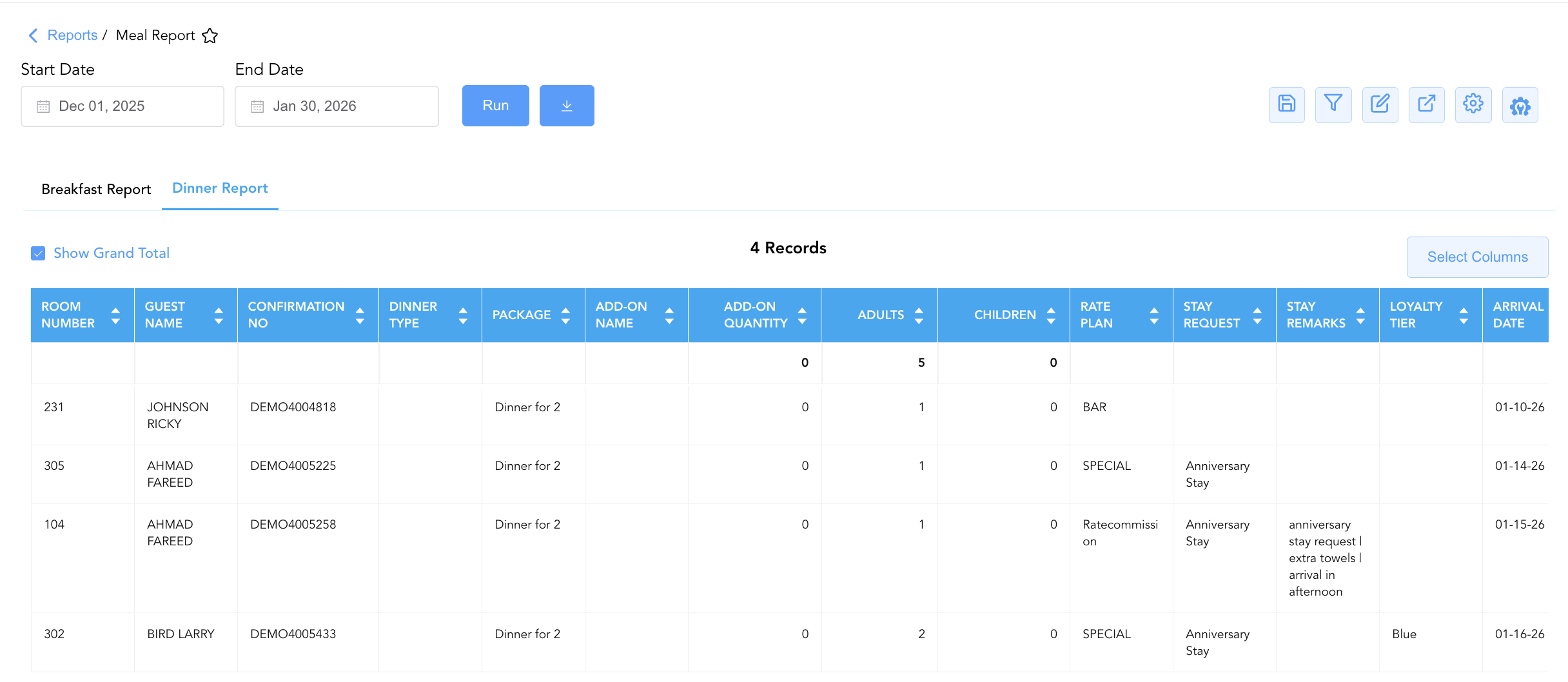
2. Dinner Report Section
Tracks evening meal inclusions, fixed-menu dinner packages, and standalone dinner add-ons.
-
Primary Use: Reserving dinner tables, coordinating multi-course meal prep with kitchen leads, verifying package inclusions (e.g., "Dinner for 2"), and executing special occasion dining requests.
-
Key Metrics: Confirmation No, Room Number, Guest Name, Adults, Children, Arrival Date, Departure Date, Dinner Type, Add-On Name, Rate Plan.
Data Dictionary (Dynamic View Columns)
Customize your default view using the Configure (⚙️) icon on the report page. Below is the full data dictionary representing all 19 unique columns available across the 2 report sections:
💡 Entitlement Calculation Note:
Breakfast TypeandDinner Typespecify the source mechanism of the dining inclusion (e.g.,Breakfast Includedfor rate-plan bundled meals,Breakfast Add Onfor purchased surcharges, orDinner for 2for specialty packages).
|
Column Name |
Section Applicability |
Description |
Data Source / System Mapping |
Includes Taxes & Fees? |
|
Confirmation No |
Both Sections |
Primary unique alphanumeric reservation identifier. |
Reservation System > Confirmation ID |
N/A |
|
Room Number |
Both Sections |
Physical guest room assigned to the stay (Blank if unassigned). |
PMS > Assigned Room Number |
N/A |
|
Loyalty Tier |
Both Sections |
Guest loyalty program membership level (e.g., |
Loyalty Engine > Membership Tier |
N/A |
|
Stay Request |
Both Sections |
Special room feature choice or amenity preference requested by the guest. |
Guest Preferences > Stay Requests |
N/A |
|
Stay Remarks |
Both Sections |
Free-text operational remarks or handling notes (e.g., "Anniversary Stay", "Escort guest to room"). |
PMS Reservation Notes > Stay Remarks |
N/A |
|
Guest Name |
Both Sections |
Combined full name of the registered primary guest. |
Guest Profile > Full Name |
N/A |
|
First Name |
Both Sections |
First name of the primary registered guest. |
Guest Profile > First Name |
N/A |
|
Last Name |
Both Sections |
Last name of the primary registered guest. |
Guest Profile > Last Name |
N/A |
|
Company |
Both Sections |
Corporate company profile linked to the reservation (if applicable). |
Reservation System > Company Account |
N/A |
|
Adults |
Both Sections |
Count of registered adult occupants entitled to meal service. |
Reservation System > Adult Count |
N/A |
|
Children |
Both Sections |
Count of registered child occupants entitled to meal service. |
Reservation System > Child Count |
N/A |
|
Arrival Date |
Both Sections |
Scheduled or actual check-in date. |
Reservation System > Arrival Date |
N/A |
|
Departure Date |
Both Sections |
Scheduled check-out date. |
Reservation System > Departure Date |
N/A |
|
Breakfast Type |
Section 1 |
Classification of morning meal entitlement (e.g., |
PMS Package Setup > Breakfast Type |
N/A |
|
Dinner Type |
Section 2 |
Classification of evening meal entitlement (e.g., |
PMS Package Setup > Dinner Type |
N/A |
|
Add-On Name |
Both Sections |
Commercial name of the attached add-on package (e.g., |
PMS Package Setup > Add-On Title |
N/A |
|
Add-On Quantity |
Both Sections |
Purchased unit quantity of the meal add-on package. |
PMS Package Setup > Quantity |
N/A |
|
Package |
Both Sections |
Package code or title associated with the meal plan. |
PMS Setup > Package Code |
N/A |
|
Rate Plan |
Both Sections |
Active rate plan code attached to the reservation (e.g., |
Reservation System > Active Rate Code |
N/A |
Customization & Platform Features
User & Property Preferences
-
Personal Preference: Tailor your individual view by hiding or dragging columns. Your preferences save automatically for future sessions.
-
Property Defaults: System Admins can configure standard default layouts across all property users to streamline operational reporting. To maximize audit efficiency, group the columns into the below logical blocks:
-
Section 1: Breakfast Report
-
Primary Locators & Guest Identification (Cols 1–6):
Room Number|Guest Name|First Name|Last Name|Confirmation No|Company-
Meal Entitlement & Package Details (Cols 7–10):
Breakfast Type|Package|Add-On Name|Add-On Quantity
-
-
Guest Headcounts & Service Context (Cols11–13):
Adults|Children|Rate Plan -
Special Requests & Guest Remarks (Cols 14–16):
Stay Request|Stay Remarks|Loyalty Tier -
Stay Context & Secondary Profile Metadata (Cols 17–18):
Arrival Date|Departure Date
-
-
Section 2: Dinner Report
-
Primary Locators & Guest Identification (Cols 1–6):
Room Number|Guest Name|First Name|Last Name|Confirmation No|Company -
Meal Entitlement & Package Details (Cols 7–10):
Dinner Type|Package|Add-On Name|Add-On Quantity -
Guest Headcounts & Service Context (Cols 11–13):
Adults|Children|Rate Plan -
Special Requests & Guest Remarks (Cols 14–16):
Stay Request|Stay Remarks|Loyalty Tier -
Stay Context & Secondary Profile Metadata (Cols 17–18):
Arrival Date|Departure Date
-
-
Report Toolbar & Quick Actions
Use the top-right toolbar icons on the report page to manage and export your data view:
|
Icon |
Action / Feature |
Description |

|
Knowledge Article |
Opens the knowledge base article to learn how to interpret this report. |

|
Saved Views |
Saves your column filtering, sorting, and highlight preferences so you can easily reload your custom view later without reconfiguring the report. |

|
Filter |
Opens filter controls to isolate specific data within a column based on your selected criteria. |

|
Highlight |
Highlights column values in a designated color based on selected conditions. |

|
Export |
Exports and downloads the report in various formats (Excel, PDF, CSV) for offline analysis or printing. |

|
Configure |
Opens column selection controls to toggle visibility, reorder columns, or hide rows with all zeros. |

|
Additional Configuration |
Provides advanced report configuration and display formatting options to customize data presentation. |
Advanced Controls
-
Exporting & Kitchen Prep Sheets: Download Section 1 and Section 2 in Excel or PDF format to generate daily morning and evening prep sheets for culinary and kitchen line leads.
-
Filtering: Filter Section 1 by
Breakfast Type = Breakfast Includedfor restaurant podium hosts, or filter Section 2 byStay Remarks = Anniversary Stayfor special occasion seating setups. -
Highlighting (Conditional Formatting): Apply custom rules to automatically highlight high-occupancy guest rooms (
Adults > 2), VIP loyalty tiers, or special dietary/stay remarks.
🔗 Related Reports & Next Steps
Within 🛎️ Front Desk & Guest Services & 📱 Self-Service & Packages:
-
Breakfast and Packages – Four-section comprehensive report detailing package elements, daily cover summaries, and standalone add-on sales.
-
In House – Real-time guest register detailing active room occupants, rate plans, and room assignments.
-
Stay Request Details – Itemized task dispatch report tracking housekeeping and special room feature requests.
Cross-Pillar Deep Dives:
-
🍽️ Food & Beverage / Outlets: Reconcile daily meal cover counts (
Adults,Children) against POS restaurant seating logs and meal voucher redemptions. -
📈 Revenue & Marketing: Evaluate rate-bundled meal conversion and add-on package popularity in Rate Plan Summary and Add on Revenue.