
Recurring Charge Details Report Overview
Parent Hub: 🛎️ Front Desk & Guest Services
Category: 🧾 Guest Folios & Billing
Target Roles: Hotel Controllers, Finance Directors, Night Auditors, Front Office Managers, Accounting Supervisors, Revenue Managers, General Managers
Key Value: Audit automated recurring folio postings, verify posting frequencies and intervals across individual reservations, group blocks, and house accounts, ensure tax and fee compliance, and prevent billing discrepancies prior to night audit processing.
Executive Summary
The Recurring Charge Details Report is a fundamental automated posting audit, revenue control, and folio billing document within the 🧾 Guest Folios & Billing category of the 🛎️ Front Desk & Guest Services hub. Designed to provide complete operational and financial oversight over scheduled repeating charges (such as daily city contribution taxes, parking surcharges, pet fees, or recurring equipment rentals), it itemizes all active recurring charge setups configured in the Property Management System (PMS).
-
By organizing repeating billing schedules into 3 defined report sections: Reservations, Group Block, and House Accounts, this report enables finance directors, controllers, and night auditors to audit individual guest accounts (
Reservations), master group accounts (Group Block), and internal operational accounts (House Accounts). It correlates account profiles and stay timeframes with recurring charge configurations (Recurring Charge,Posting Interval,Posting Frequency,Post Until Departure), daily rate rates (Recurring Amount,Taxes per Day,Fees Per Day), projected cumulative totals (Total Amount,Total Taxes And Fees,Grand Total), and staff setup audit trails (Setup Date,Username).
Key Capabilities
-
Three-Section Account Coverage: Categorizes recurring charge schedules across individual guest stays (
Reservations), group master blocks (Group Block), and internal property accounts (House Accounts) for complete ledger oversight. -
Automated Schedule & Interval Auditing: Displays posting frequency rules (
Posting Frequency, e.g., Daily, Weekly), interval gap settings (Posting Interval), activation dates (Recurring Start Date,Recurring End Date), and auto-termination flags (Post Until Departure). -
Daily Rate & Tax Component Breakdown: Disaggregates daily repeating charges into base rate amounts (
Recurring Amount), daily tax calculations (Taxes per Day), and daily service fee components (Fees Per Day). -
Cumulative Projection Verification: Calculates projected total base charges (
Total Amount), total accrued taxes and fees (Total Taxes And Fees), and gross folio impact (Grand Total) across the entire stay or active schedule window. -
Configuration Staff Audit Trail: Captures the exact calendar date the recurring rule was created (
Setup Date) alongside the login credentials of the staff member who authorized the setup (Username).
Report Views & Functional Breakdown
The Recurring Charge Details Report presents automated repeating billing data in a structured matrix across 3 defined sections:
┌────────────────────────────────────────────────────────────────────────┐
│                  RECURRING CHARGE DETAILS REPORT                       │
├────────────────────────────────────────────────────────────────────────┤
│                       3 Defined Report Sections                        │
├──────────────────────────┬──────────────────────────┬──────────────────┤
│ 1. Reservations Section  │ 2. Group Block Section   │ 3. House Accounts│
│    (Individual Stays)    │    (Master Group Folios) │    (Internal)    │
└──────────────────────────┴──────────────────────────┴──────────────────┘
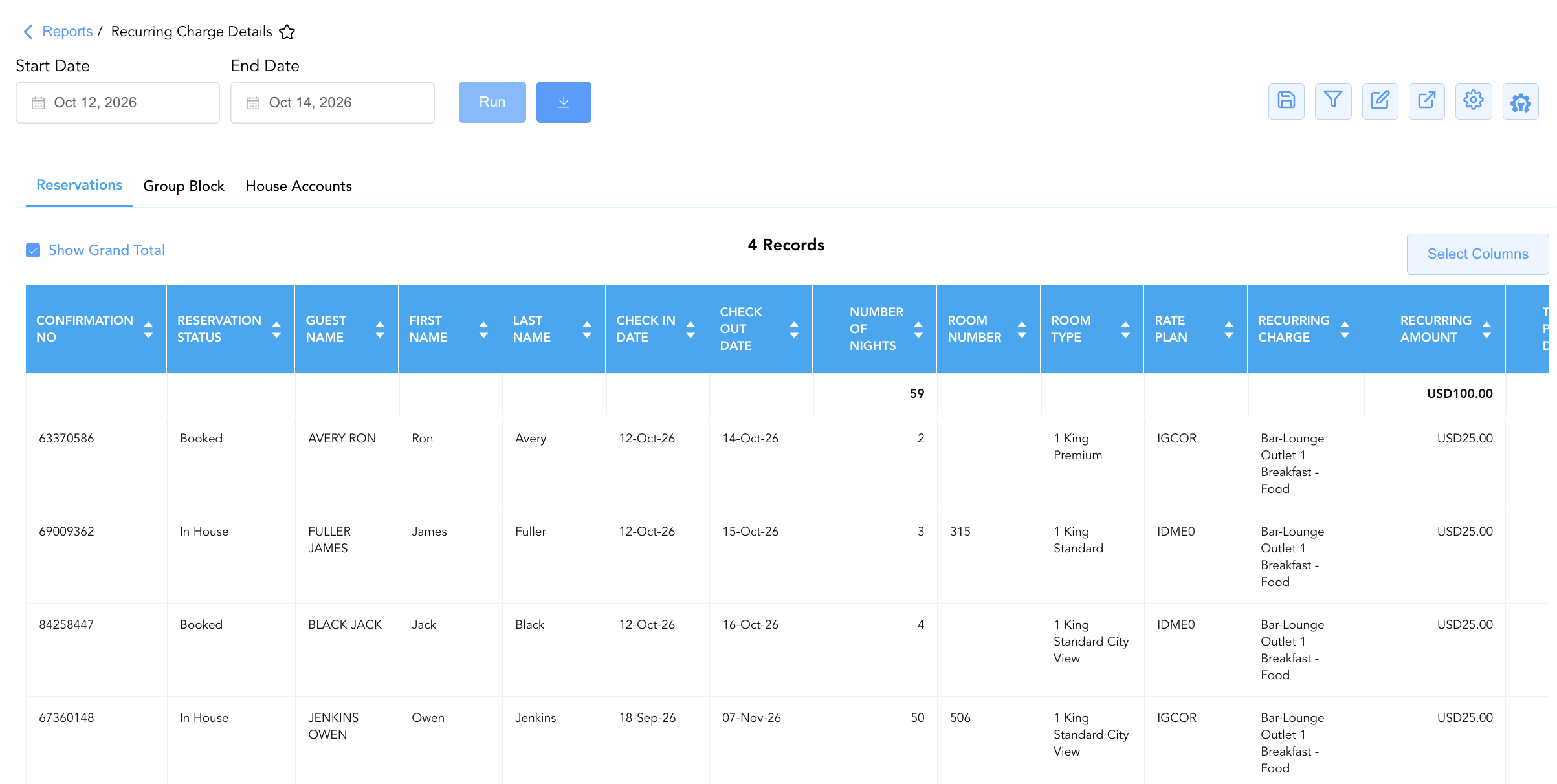
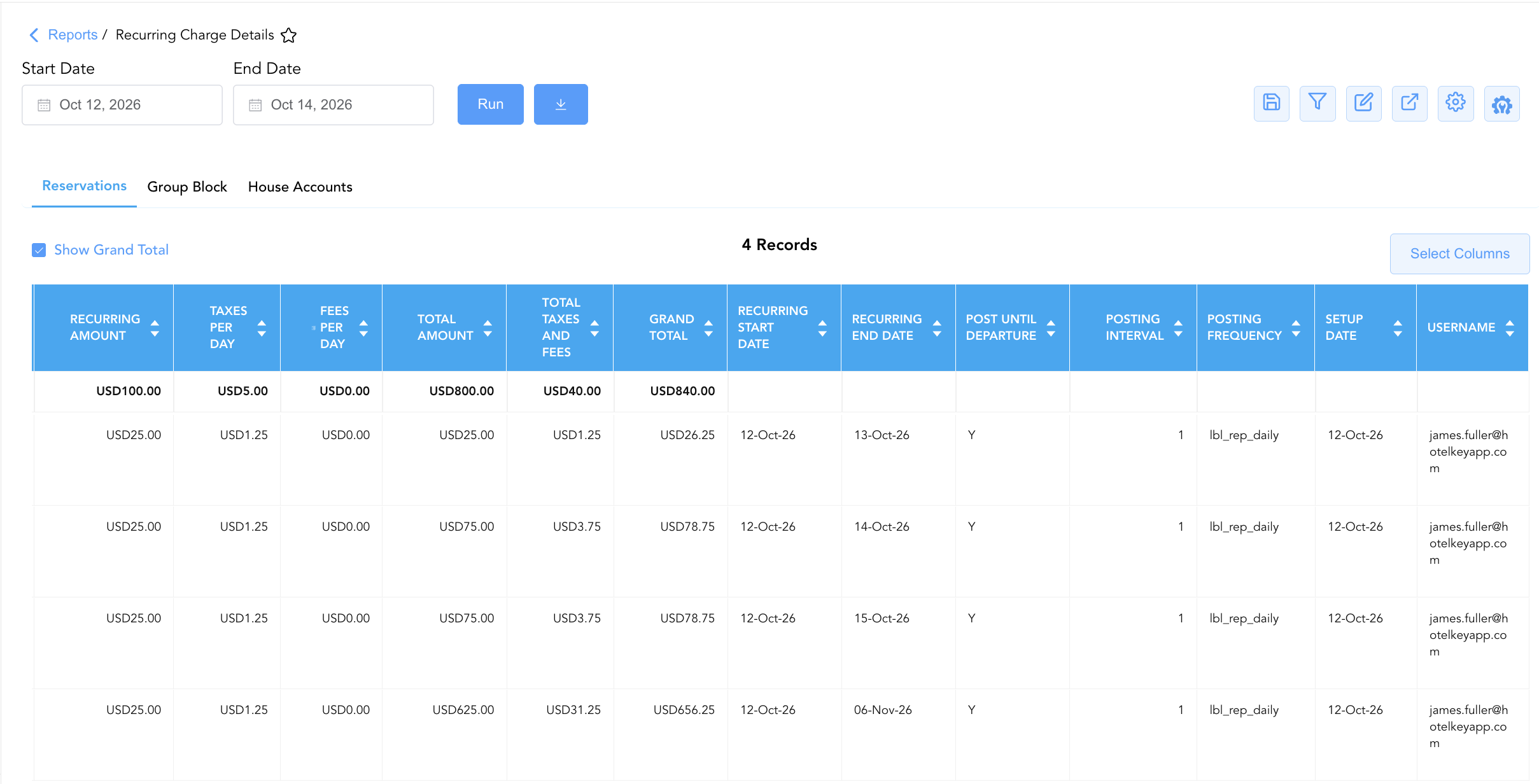
1. Reservations Section
Monitors repeating automated charges attached to individual guest reservations across active, booked, checked-out, or cancelled statuses.
-
Primary Use: Auditing individual guest folio surcharges (e.g., daily city tax, parking, extra person fees), verifying posting start/end dates, and checking rate plan compatibility.
-
Key Metrics: Confirmation No, Reservation Status, Guest Name, Room Number, Rate Plan, Recurring Charge, Recurring Amount, Taxes per Day, Grand Total, Posting Frequency, Username.
2. Group Block Section
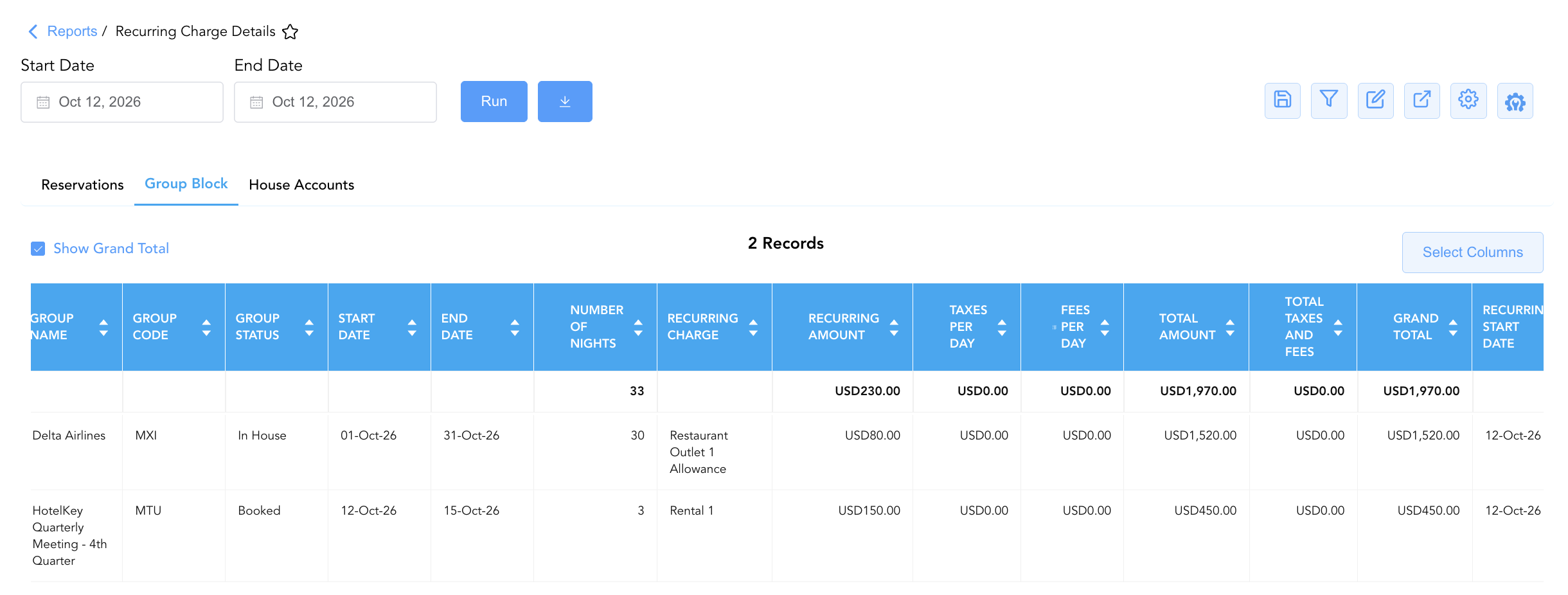
Tracks recurring charges scheduled against master group accounts and corporate tour blocks.
-
Primary Use: Verifying master folio recurring fees (e.g., daily group meeting room surcharges, baggage handling, group resort fees) prior to group check-out.
-
Key Metrics: Group Name, Group Code, Group Status, Start Date, End Date, Recurring Charge, Recurring Amount, Total Amount, Grand Total, Username.
3. House Accounts Section
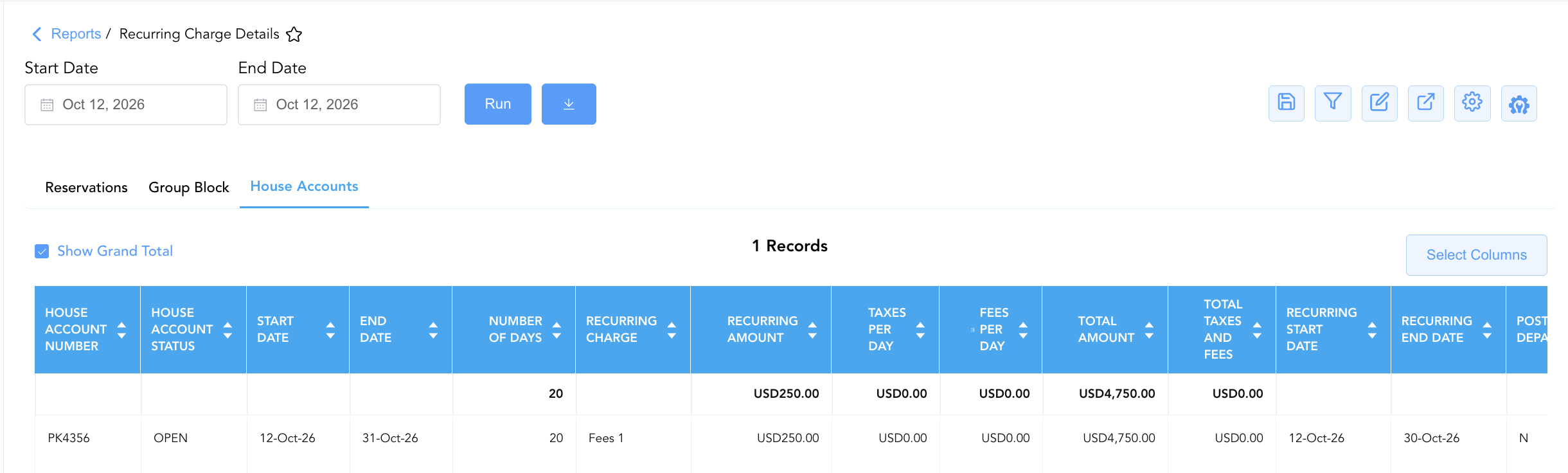
Itemizes automated repeating charges configured on internal house, management, or departmental accounts.
-
Primary Use: Auditing internal operational accounts, verifying recurring vendor charges or inter-departmental service fees, and controlling house account balances.
-
Key Metrics: House Account Name, House Account Number, House Account Status, Start Date, End Date, Recurring Charge, Recurring Amount, Grand Total, Setup Date.
Data Dictionary (Dynamic View Columns)
Customize your default view using the Configure (⚙️) icon on the report page. Below is the full data dictionary representing all 34 unique columns available across the 3 report sections:
💡 Financial Math Formula Note: Total Amount represents the cumulative base recurring charge over the scheduled period (Total Amount = Recurring Amount x Duration). Grand Total reflects the gross financial charge including all daily taxes and fees (Grand Total = Total Amount + Total Taxes And Fees).
|
Column Name |
Section Applicability |
Description |
Data Source / System Mapping |
Includes Taxes & Fees? |
|
Confirmation No |
Section 1 |
Unique alphanumeric reservation identifier. |
Reservation System > Confirmation ID |
N/A |
|
Reservation Status |
Section 1 |
Operational stay status (e.g., |
Reservation System > Main Status |
N/A |
|
Guest Name |
Section 1 |
Combined full name of the registered primary guest. |
Guest Profile > Full Name |
N/A |
|
First Name |
Section 1 |
First name of the registered guest. |
Guest Profile > First Name |
N/A |
|
Last Name |
Section 1 |
Last name of the registered guest. |
Guest Profile > Last Name |
N/A |
|
Check In Date |
Section 1 |
Scheduled or actual check-in date. |
Reservation System > Arrival Date |
N/A |
|
Check Out Date |
Section 1 |
Scheduled check-out date. |
Reservation System > Departure Date |
N/A |
|
Number Of Nights |
Sections 1 & 2 |
Total physical room nights spanned by the stay or group block. |
Reservation System > Total Nights |
N/A |
|
Room Type |
Section 1 |
Code or description of the assigned room category. |
PMS > Room Type Name |
N/A |
|
Rate Plan |
Sections 1 & 2 |
Code of the active rate plan attached to the reservation or group. |
Reservation System > Active Rate Code |
N/A |
|
Room Number |
Section 1 |
Physical guest room assigned to the stay (Blank if unassigned). |
PMS > Assigned Room Number |
N/A |
|
Recurring Charge |
All 3 Sections |
Official title of the repeating charge rule (e.g., |
PMS Charge Setup > Rule Name |
N/A |
|
Recurring Amount |
All 3 Sections |
Base unit charge amount billed per posting interval. |
PMS Charge Setup > Base Rate |
❌ No |
|
Taxes per Day |
All 3 Sections |
Calculated daily tax amount attached to the recurring charge. |
Folio Tax Engine > Daily Tax |
🟢 Yes |
|
Fees Per Day |
All 3 Sections |
Calculated daily service fee amount attached to the recurring charge. |
Folio Fee Engine > Daily Fee |
🟢 Yes |
|
Total Amount |
All 3 Sections |
Cumulative base charge amount across all posting intervals. |
SUM(Base Recurring Charges) |
❌ No |
|
Total Taxes And Fees |
All 3 Sections |
Cumulative taxes and service fees accrued across all posting intervals. |
SUM(Taxes + Fees) |
🟢 Yes |
|
Grand Total |
All 3 Sections |
Gross cumulative dollar impact billed to the folio (Total Amount + Taxes/Fees). |
SUM(Gross Billed Charges) |
🟢 Yes |
|
Recurring Start Date |
All 3 Sections |
Calendar date on which the recurring charge schedule begins posting. |
PMS Setup > Schedule Start Date |
N/A |
|
Recurring End Date |
All 3 Sections |
Calendar date on which the recurring charge schedule terminates. |
PMS Setup > Schedule End Date |
N/A |
|
Post Until Departure |
All 3 Sections |
Indicator flag denoting if the charge posts automatically until check-out. |
PMS Setup > Auto-Dep Flag |
N/A |
|
Posting Interval |
All 3 Sections |
Numerical gap between charge postings (e.g., |
PMS Setup > Interval Step |
N/A |
|
Posting Frequency |
All 3 Sections |
Unit frequency rule governing charge posting (e.g., Daily, Weekly). |
PMS Setup > Frequency Rule |
N/A |
|
Setup Date |
All 3 Sections |
Calendar date when the recurring charge rule was created in the system. |
PMS Security Audit > Entry Date |
N/A |
|
Username |
All 3 Sections |
User login ID or name of the employee who configured the recurring charge. |
Security Audit Trail > User ID |
N/A |
|
Group Name |
Section 2 |
Official title of the corporate or group master block. |
Group Master > Group Name |
N/A |
|
Group Code |
Section 2 |
Unique alphanumeric code identifying the group block. |
Group Master > Group Code |
N/A |
|
Group Status |
Section 2 |
Operational status of the group block (e.g., |
Group Master > Status |
N/A |
|
Start Date |
Sections 2 & 3 |
Contracted start date of the group block or house account. |
Master Account > Start Date |
N/A |
|
End Date |
Sections 2 & 3 |
Contracted end date of the group block or house account. |
Master Account > End Date |
N/A |
|
House Account Name |
Section 3 |
Title of the internal operational house account. |
House Account > Account Name |
N/A |
|
House Account Number |
Section 3 |
Unique identification number assigned to the house account. |
House Account > ID Code |
N/A |
|
House Account Status |
Section 3 |
Operational status of the house account (e.g., |
House Account > Status |
N/A |
|
Number Of Days |
Section 3 |
Total active duration in days configured for the house account. |
House Account > Total Days |
N/A |
Customization & Platform Features
User & Property Preferences
-
Personal Preference: Tailor your individual view by hiding or dragging columns. Your preferences save automatically for future sessions.
-
Property Defaults: System Admins can configure standard default layouts across all property users to streamline operational reporting. To maximize audit efficiency, group the columns into the below logical blocks:
-
Section 1: Reservations
-
Reservation Identification & Status (Cols 1–2):
Confirmation No|Reservation Status -
Guest Profile Identification (Cols 3–5):
Guest Name|First Name|Last Name -
Stay Itinerary & Location (Cols 6–10):
Check In Date|Check Out Date|Number Of Nights|Room Number|Room Type -
Rate Plan & Charge Classification (Cols 11–12):
Rate Plan|Recurring Charge -
Financial Ledger & Valuation (Cols 13–18):
Recurring Amount|Taxes per Day|Fees Per Day|Total Amount|Total Taxes And Fees|Grand Total -
Posting Schedule & Schedule Rules (Cols 19–23):
Recurring Start Date|Recurring End Date|Post Until Departure|Posting Interval|Posting Frequency -
System Audit Trail (Cols 24–25):
Setup Date|Username
-
-
Section 2: Group Block
-
Group Identification & Status (Cols 1–3):
Group Name|Group Code|Group Status -
Group Block Timeline & Rate Plan (Cols 4–7):
Start Date|End Date|Number Of Nights|Rate Plan -
Charge Classification (Col 8):
Recurring Charge -
Financial Ledger & Valuation (Cols 9–14):
Recurring Amount|Taxes per Day|Fees Per Day|Total Amount|Total Taxes And Fees|Grand Total -
Posting Schedule & Schedule Rules (Cols 15–19):
Recurring Start Date|Recurring End Date|Post Until Departure|Posting Interval|Posting Frequency -
System Audit Trail (Cols 20–21):
Setup Date|Username
-
-
Section 3: House Accounts
-
House Account Identification & Status (Cols 1–3):
House Account Name|House Account Number|House Account Status -
Account Timeline & Duration (Cols 4–6):
Start Date|End Date|Number Of Days -
Charge Classification (Col 7):
Recurring Charge -
Financial Ledger & Valuation (Cols 8–12):
Recurring Amount|Taxes per Day|Fees Per Day|Total Amount|Total Taxes And Fees -
Posting Schedule & Schedule Rules (Cols 13–17):
Recurring Start Date|Recurring End Date|Post Until Departure|Posting Interval|Posting Frequency -
System Audit Trail (Cols 18–19):
Setup Date|Username -
Grand Financial Total (Col 20):
Grand Total
-
-
Report Toolbar & Quick Actions
Use the top-right toolbar icons on the report page to manage and export your data view:
|
Icon |
Action / Feature |
Description |

|
Knowledge Article |
Opens the knowledge base article to learn how to interpret this report. |

|
Saved Views |
Saves your column filtering, sorting, and highlight preferences so you can easily reload your custom view later without reconfiguring the report. |

|
Filter |
Opens filter controls to isolate specific data within a column based on your selected criteria. |

|
Highlight |
Highlights column values in a designated color based on selected conditions. |

|
Export |
Exports and downloads the report in various formats (Excel, PDF, CSV) for offline analysis or printing. |

|
Configure |
Opens column selection controls to toggle visibility, reorder columns, or hide rows with all zeros. |

|
Additional Configuration |
Provides advanced report configuration and display formatting options to customize data presentation. |
Advanced Controls
-
Exporting & Financial Audits: Download in Excel or PDF format to support night audit folio reconciliations, monthly tax compliance filings, and general manager revenue controls.
-
Filtering: Filter Section 1 by
Reservation Status = In Houseto verify active repeating charges, or filter by specificRecurring Chargetypes (e.g.,City Contribution Tax). -
Highlighting (Conditional Formatting): Apply custom rules to automatically highlight high-dollar repeating charges (
Recurring Amount > $50), unusual tax calculations, or recent setup dates.
🔗 Related Reports & Next Steps
Within 🛎️ Front Desk & Guest Services & 🧾 Guest Folios & Billing:
-
Dynamic Charge Details – Comprehensive tax and surcharge audit report detailing per-person city tax postings and exemptions.
-
In House List – Real-time guest register detailing active room occupants, rate plans, and folio billing rules.
-
Departures Details – Manifest tracking scheduled guest departures, folio numbers, and outstanding balances.
-
Service Recovery – Audit report tracking guest service recovery rate adjustments and fee allowances.
Cross-Pillar Deep Dives:
-
⚖️ Ledgers & Trial Balance: Reconcile total recurring revenue postings (
Grand Total) against General Ledger control accounts in Trial Balance and Balance Details. -
💳 Payments & Transactions: Cross-reference recurring charge folios with Authorized Payments to verify deposit coverage and credit card authorizations.