
International Guest Report Overview
Parent Hub: 🛎️ Front Desk & Guest Services
Category: ⭐ Guest Insights & Relations
Target Roles: Front Office Managers, Front Desk Agents, Guest Relations Supervisors, Compliance & Legal Officers, Hotel Controllers, Night Auditors, General Managers
Key Value: Audit foreign guest registration records, track primary guest and accompanying guest demographic details, verify stay windows and room allocations, and ensure strict compliance with local municipal or national authority reporting mandates.
⚠️ Market Availability Note: This report is selectively enabled only for properties operating in specific international jurisdictions or municipal markets where local law enforcement, tourism boards, or immigration authorities mandate the formal recording and transmission of foreign guest registration data.
Executive Summary
The International Guest Report is a mandatory legal compliance, municipal audit, and foreign guest register document within the ⭐ Guest Insights & Relations category of the 🛎️ Front Desk & Guest Services hub. Designed to fulfill regulatory authority reporting requirements for international guest stays, it itemizes every foreign or non-resident guest stay recorded in the Property Management System (PMS).
-
By mapping primary guest identity metrics (
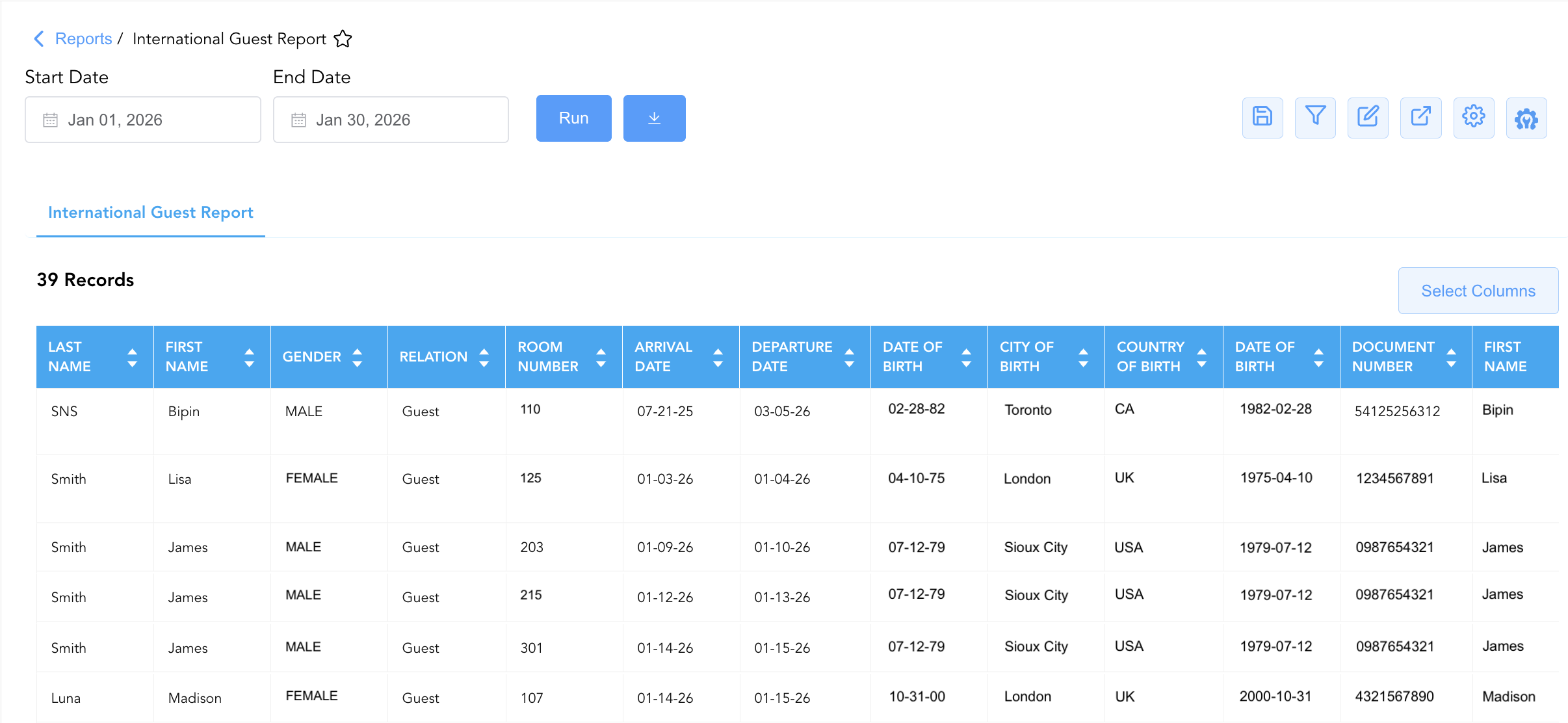
First Name,Last Name,Gender,Relation) to stay timeframes (Arrival Date,Departure Date), room assignments (Room Number), and accompanying guest demographic attributes (First Name,Gender,Last Name), this report enables front desk teams and compliance supervisors to audit foreign guest registrations, compile mandatory police/immigration files, and maintain full statutory compliance across international property operations.
Key Capabilities
-
Regulatory Authority Compliance: Generates a standardized audit manifest of foreign guest stays to satisfy police, immigration, or municipal government reporting requirements.
-
Primary & Accompanying Guest Demographics: Tracks primary guest demographic parameters (
First Name,Last Name,Gender,Relation) alongside secondary or accompanying occupant profiles (First Name,Gender,Last Name). -
Stay Window & Room Allocation Verification: Captures exact check-in dates (
Arrival Date), check-out dates (Departure Date), and assigned physical room numbers (Room Number). -
Relationship Classification: Categorizes guest relationship statuses (
Relation, e.g.,Guest,Spouse,Family) for municipal household registration mandates. -
Auditable Registration Register: Provides an operational audit trail to ensure all required foreign guest data fields are collected during check-in prior to night audit file submission.
Report Views & Functional Breakdown
The International Guest Report presents foreign guest registration data in a unified single-table ledger that supports three primary analytical perspectives:
┌────────────────────────────────────────────────────────────────────────┐
│                   INTERNATIONAL GUEST REPORT                           │
├────────────────────────────────────────────────────────────────────────┤
│                         Unified Matrix View                            │
├──────────────────────────┬──────────────────────────┬──────────────────┤
│ 1. Primary Foreign Guest │ 2. Stay Window & Room    │ 3. Accompanying  │
│    Demographic Matrix    │    Allocation Trace      │    Occupant Trace│
└──────────────────────────┴──────────────────────────┴──────────────────┘
1. Primary Foreign Guest Demographic Matrix
Monitors foreign primary guest identities, gender classifications, and relationship titles.
-
Primary Use: Verifying foreign guest identity details during check-in, auditing primary guest registration completeness, and submitting required law enforcement files.
-
Key Metrics: First Name, Last Name, Gender, Relation.
2. Stay Window & Room Allocation Trace
Tracks physical room assignments and stay timeframes across foreign guest reservations.
-
Primary Use: Cross-referencing foreign guest stay dates against physical room assignments, verifying length of stay, and planning departure schedules.
-
Key Metrics: Arrival Date, Departure Date, Room Number, First Name, Last Name.
3. Accompanying Occupant Trace
Correlates primary guest stays with secondary or accompanying guest demographic details.
-
Primary Use: Ensuring all secondary occupants staying in foreign guest rooms are fully registered with local authorities.
-
Key Metrics: First Name (Accompanying), Gender (Accompanying), Last Name (Accompanying), Room Number, Relation.
Data Dictionary (Dynamic View Columns)
Customize your default view using the Configure (⚙️) icon on the report page. Below is the full data dictionary representing all 10 available columns in this report:
💡 Compliance Note:
GenderandRelationare mandatory data attributes required by local municipal and police authorities in active international markets. Missing demographic details should be remediated by front desk agents upon guest check-in.
|
Column Name |
Description |
Data Source / System Mapping |
Includes Taxes & Fees? |
|
First Name |
First name of the primary foreign guest. |
Guest Profile > First Name |
N/A |
|
Last Name |
Last name of the primary foreign guest. |
Guest Profile > Last Name |
N/A |
|
Gender |
Gender classification of the primary foreign guest (e.g., |
Guest Profile > Gender |
N/A |
|
Relation |
Relationship classification of the guest (e.g., |
Guest Profile > Relationship Type |
N/A |
|
Arrival Date |
Scheduled or actual check-in date of the foreign guest reservation. |
Reservation System > Check-In Date |
N/A |
|
Departure Date |
Scheduled or actual check-out date of the foreign guest reservation. |
Reservation System > Check-Out Date |
N/A |
|
Room Number |
Physical guest room assigned to the foreign guest stay. |
PMS > Assigned Room Number |
N/A |
|
First Name (Accompanying) |
First name of the secondary or accompanying occupant sharing the room. |
Guest Profile > Secondary First Name |
N/A |
|
Gender (Accompanying) |
Gender classification of the accompanying occupant. |
Guest Profile > Secondary Gender |
N/A |
|
Last Name (Accompanying) |
Last name of the secondary or accompanying occupant sharing the room. |
Guest Profile > Secondary Last Name |
N/A |
Customization & Platform Features
User & Property Preferences
-
Personal Preference: Tailor your individual view by hiding or dragging columns. Your preferences save automatically for future sessions.
-
Property Defaults: System Admins can configure standard default layouts across all property users to streamline operational reporting. To maximize audit efficiency, group the columns into the below logical blocks:
-
Guest Details Re-orderable Fields (Cols 1–8):
Last Name|First Name|Gender|Relation|Room Number|Arrival Date|Departure Date|Date Of Birth -
Locked Passport Extracted Fields (Cols 9–18):
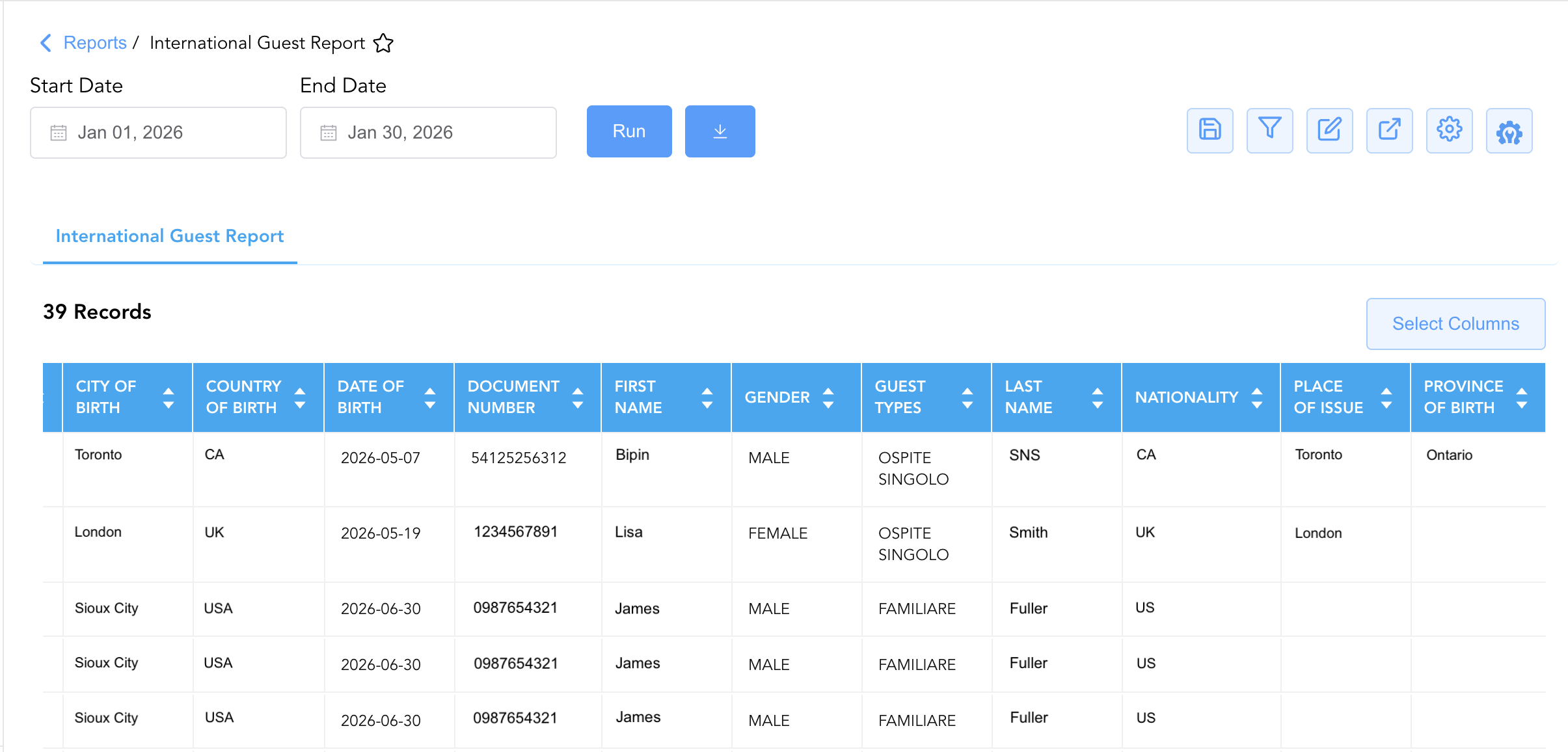
Document Number|Nationality|Place of Issue|Country of Birth|Province of Birth|City of Birth|Guest Types|Last Name|First Name|Gender
-
Report Toolbar & Quick Actions
Use the top-right toolbar icons on the report page to manage and export your data view:
|
Icon |
Action / Feature |
Description |

|
Knowledge Article |
Opens the knowledge base article to learn how to interpret this report. |

|
Saved Views |
Saves your column filtering, sorting, and highlight preferences so you can easily reload your custom view later without reconfiguring the report. |

|
Filter |
Opens filter controls to isolate specific data within a column based on your selected criteria. |

|
Highlight |
Highlights column values in a designated color based on selected conditions. |

|
Export |
Exports and downloads the report in various formats (Excel, PDF, CSV) for offline analysis or printing. |

|
Configure |
Opens column selection controls to toggle visibility, reorder columns, or hide rows with all zeros. |

|
Additional Configuration |
Provides advanced report configuration and display formatting options to customize data presentation. |
Advanced Controls
-
Exporting & Authority Filings: Download in Excel or PDF format to transmit daily foreign guest manifests directly to police or municipal government databases.
-
Filtering: Filter data by
Room Number = BlankorGender = Blankto generate front desk remediation lists prior to night audit. -
Highlighting (Conditional Formatting): Apply custom rules to automatically highlight incomplete accompanying guest details or long-stay foreign reservations.
🔗 Related Reports & Next Steps
Within 🛎️ Front Desk & Guest Services & ⭐ Guest Insights & Relations:
-
International Guest Details – Comprehensive compliance manifest capturing permanent foreign addresses, contact details, and ID card types.
-
Guest Remarks Report – Profile-level audit log displaying permanent guest notes and extended-stay attributes.
-
In House List – Real-time guest register detailing active room occupants, rate plans, and vehicle registration data.
-
Guest Opt In Preferences – Compliance audit report tracking guest marketing consent and communication choices.
Cross-Pillar Deep Dives:
-
🧳 Arrivals & Departures: Cross-reference expected foreign check-ins with Arrivals List and Booked Reservations to ensure foreign demographic details are collected upon check-in.
-
⚖️ Compliance & Legal: Archive exported international guest logs to satisfy statutory record retention periods required by local law.