
Discrepant Rates Report Overview
Parent Hub: 📈 Revenue & Analytics
Category: 🏷️ Rate Management
Target Roles: Directors of Revenue Management, Revenue Analysts, General Managers, Front Office Managers, Night Auditors, Financial Controllers
Key Value: Audit rate overrides and price overrides, identify variances between quoted and charged room rates, track rate code alterations, monitor user-driven price adjustments, and enforce revenue protection and pricing integrity controls.
Executive Summary
The Discrepant Rates Report is a critical pricing audit and revenue protection document within the 🏷️ Rate Management category of the 📈 Revenue & Analytics hub. Designed to deliver full operational transparency over rate modifications, it logs every reservation transaction where the actual rate charged to a guest deviates from the system-quoted rate or established rate code benchmark.
-
By mapping reservation modification metadata (Date, Time, Confirmation No, Change Type, Guest Name, User ID) to rate structures (Original Rate Code, Current Rate Code, Quoted Rate, Charged Rate) and variance amounts (Variance), this report enables revenue directors, controllers, and front office managers to detect unauthorized manual discounts, audit rate code overrides, investigate system integration pricing errors, and prevent revenue leakage.
Key Capabilities
-
Rate Variance & Override Auditing: Itemizes all instances where Quoted Rate differs from Charged Rate, automatically calculating the exact monetary difference (Variance).
-
Change Type Classification: Categorizes rate modifications by alteration source (e.g.,
RATE CODEchanges orUSER ADJUSTMENTS) to distinguish system/code updates from manual staff overrides. -
User Accountability & Traceability: Logs the exact staff user ID (
User) responsible for executing each rate adjustment alongside the exact system timestamp (DateandTime). -
Rate Code Dual Tracking: Displays both the
Original Rate CodeandCurrent Rate Codeto track re-sourcing or rate plan reassignment during check-in or stay modifications.
Report Views & Functional Breakdown
The Discrepant Rates Report presents rate override and modification data in a unified single-table ledger that supports three key analytical perspectives:
┌────────────────────────────────────────────────────────────────────────┐
│                   DISCREPANT RATES REPORT                              │
├────────────────────────────────────────────────────────────────────────┤
│                         Unified Matrix View                            │
├──────────────────────────┬──────────────────────────┬──────────────────┤
│ 1. Rate Variance &       │ 2. Rate Plan & Code      │ 3. User Audit &  │
│    Override Ledger       │    Re-Sourcing            │    Compliance    │
└──────────────────────────┴──────────────────────────┴──────────────────┘
1. Rate Variance & Override Ledger
Monitors the financial impact of price modifications by comparing quoted rate benchmarks against final posted charges.
-
Primary Use: Identifying revenue leakage from unapproved discounts, auditing zero-charge overrides (e.g., complimentary or reward night adjustments), and quantifying total rate variance exposure.
-
Key Metrics: Confirmation No, Guest Name, Quoted Rate, Charged Rate, Variance.
2. Rate Plan & Code Re-Sourcing
Tracks changes made to rate plan codes between original booking creation and check-in or folio posting.
-
Primary Use: Verifying corporate or government rate re-sourcing compliance (e.g., changing from Government to Corporate Rate), auditing reward night postings, and checking corporate agreement rate application.
-
Key Metrics: Confirmation No, Original Rate Code, Current Rate Code, Change Type.
3. User Audit & Compliance
Correlates rate overrides with individual staff credentials and system execution timestamps.
-
Primary Use: Monitoring front desk discount authorization compliance, tracking night audit rate postings, identifying staff training needs, and preventing internal fraud.
-
Key Metrics: Date, Time, User, Change Type, Confirmation No.
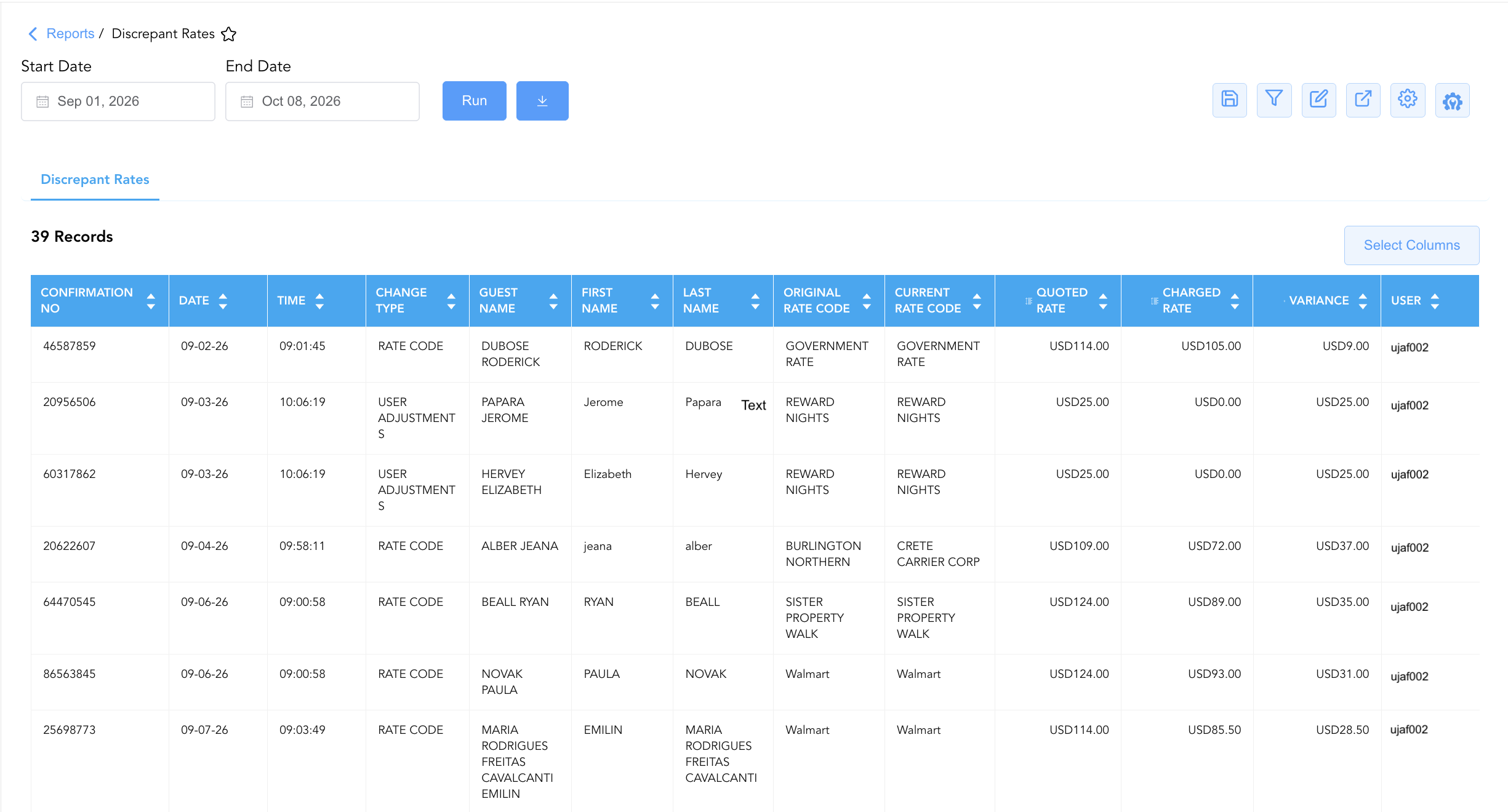
Data Dictionary (Dynamic View Columns)
Customize your default view using the Configure (⚙️) icon on the report page. Below is the full data dictionary representing every column available in this report:
💡 Rate Calculation Note: Rates represent base room charges prior to taxes and fees. Variance is calculated as Variance = Quoted Rate - Charged Rate. A positive variance indicates a rate discount or reduction, whereas a negative variance indicates a surcharge above quoted rates.
|
Column Name |
Description |
Data Source / System Mapping |
Includes Taxes & Fees? |
|
Date |
Calendar date on which the rate modification or posting occurred. |
PMS Audit Trail > Change Date |
N/A |
|
Time |
System timestamp recording the exact time of the rate modification. |
PMS Audit Trail > Change Time |
N/A |
|
Confirmation No |
Unique alphanumeric reservation identifier. |
Reservation System > Confirmation Number |
N/A |
|
Change Type |
Category of modification triggering the discrepancy (e.g., |
PMS Audit Trail > Modification Type |
N/A |
|
Guest Name |
Full name of the primary guest on the reservation. |
Guest Profile > Full Name |
N/A |
|
First Name |
First name of the primary guest. |
Guest Profile > First Name |
N/A |
|
Last Name |
Last name of the primary guest. |
Guest Profile > Last Name |
N/A |
|
Original Rate Code |
Rate code assigned to the reservation prior to modification. |
Reservation History > Original Rate Code |
N/A |
|
Current Rate Code |
Active rate code applied to the reservation at the time of posting. |
Folio Posting > Active Rate Code |
N/A |
|
Quoted Rate |
Baseline benchmark room rate quoted or expected for the active rate code. |
Rate Table > Quoted Base Amount |
❌ No |
|
Charged Rate |
Actual base room rate billed to the guest folio. |
Folio Posting > Actual Charged Base Amount |
❌ No |
|
Variance |
Monetary difference between Quoted Rate and Charged Rate (Quoted Rate - Charged Rate). |
Quoted Rate - Charged Rate |
❌ No |
|
User |
Staff login ID of the user who performed or authorized the rate modification. |
System Security > User ID |
N/A |
Customization & Platform Features
User & Property Preferences
-
Personal Preference: Tailor your individual view by hiding or dragging columns. Your preferences save automatically for future sessions.
-
Property Defaults: System Admins can configure standard default layouts across all property users to streamline operational reporting. To maximize audit efficiency, group the columns into the below logical blocks.
-
Transaction Audit (Cols 1–3):
Confirmation No|Date|Time -
Change Category (Col 4):
Change Type -
Guest Identification (Cols 5–7):
Guest Name|First Name|Last Name -
Rate Code Mapping (Cols 8–9):
Original Rate Code|Current Rate Code -
Rate Variance Metrics (Cols 10–12):
Quoted Rate|Charged Rate|Variance -
Audit Trail & User Accountability (Col 13):
User
-
Report Toolbar & Quick Actions
Use the top-right toolbar icons on the report page to manage and export your data view:
|
Icon |
Action / Feature |
Description |

|
Knowledge Article |
Opens the knowledge base article to learn how to interpret this report. |

|
Saved Views |
Saves your column filtering, sorting, and highlight preferences so you can easily reload your custom view later without reconfiguring the report. |

|
Filter |
Opens filter controls to isolate specific data within a column based on your selected criteria. |

|
Highlight |
Highlights column values in a designated color based on selected conditions. |

|
Export |
Exports and downloads the report in various formats (Excel, PDF, CSV) for offline analysis or printing. |

|
Configure |
Opens column selection controls to toggle visibility, reorder columns, or hide rows with all zeros. |

|
Additional Configuration |
Provides advanced report configuration and display formatting options to customize data presentation. |
Advanced Controls
-
Exporting & Audit Analysis: Download in Excel or PDF format to support daily night audit reviews, monthly financial controller reconciliations, and internal compliance audits.
-
Filtering: Filter data by specific
UserID, isolate high-variance transactions (e.g., Variance > $50), or filter byChange Type = USER ADJUSTMENTS. -
Highlighting (Conditional Formatting): Apply custom rules to automatically highlight high-dollar rate reductions, zero-charge postings, or unauthorized rate plan changes.
🔗 Related Reports & Next Steps
Within 📈 Revenue & Analytics & 🏷️ Rate Management:
-
Rate Plan Summary – High-level overview of active rate code production, revenue, and average rate yield.
-
Rate Override – Detailed log focused specifically on manual user price overrides and authorization approvals.
-
Revenue Summary – Comprehensive property revenue breakdown across room types, charge categories, and ledger codes.
Cross-Pillar Deep Dives:
-
⚖️ Ledgers & Trial Balance: Reconcile total room rate adjustments against General Ledger allowance accounts in Day End Summary.
-
💳 Payments & Transactions: Review guest folio transactions, rate adjustments, and allowance postings in All Transactions.