
Historical Departure Statistics Report Overview
Parent Hub: 📈 Revenue & Analytics
Category: 📊 Performance Summaries
Target Roles: Front Office Managers, Directors of Revenue Management, General Managers, Night Auditors, Guest Services Supervisors
Key Value: Audit historical guest check-outs, monitor departure operational timing, verify zero-balance folio settlements prior to departure, and evaluate guest stay lengths and corporate account checkout activity.
Executive Summary
The Historical Departure Statistics Report is a primary operational audit document within the 📊 Performance Summaries category of the 📈 Revenue & Analytics hub. Designed to provide post-departure analysis and front desk checkout auditing, it logs all completed guest check-outs across a selected historical operational window.
By combining reservation reference IDs (Confirmation Number, Room Number) with primary guest demographics (Guest Name, First Name, Last Name), stay timeline parameters (Check In Date, Departed Time), financial ledger metrics (Total Guest Balance), operational processing states (Status), and corporate profile attachments (Company), this report enables front office managers and controllers to verify checkout completion times, confirm zero-balance folio settlements, and analyze guest departure turnaround performance.
Key Capabilities
-
Comprehensive Departure Audit: Itemizes all completed historical check-outs within the selected date range.
-
Operational Checkout Timestamp Tracking: Captures the exact system time when the guest folio was checked out (Departed Time) to analyze front desk shift workloads and express checkout patterns.
-
Zero-Balance Folio Compliance: Monitors remaining folio account liabilities (Total Guest Balance) to ensure no unpaid balances walk off property at departure.
-
Corporate & Direct-Bill Account Linkage: Identifies corporate stays (Company) transferred to accounts receivable or settled under corporate billing agreements.
Report Views & Functional Breakdown
The Historical Departure Statistics Report presents completed departure records in a single, unified operational ledger that supports three key analytical perspectives:
┌────────────────────────────────────────────────────────────────────────┐
│             HISTORICAL DEPARTURE STATISTICS REPORT                     │
├────────────────────────────────────────────────────────────────────────┤
│                       Unified Operational Ledger                       │
├──────────────────────────┬──────────────────────────┬──────────────────┤
│ 1. Checkout Completion   │ 2. Folio Balance &       │ 3. Corporate &   │
│    & Timing Audit        │    Settlement Compliance │    Account Linkage│
└──────────────────────────┴──────────────────────────┴──────────────────┘
1. Checkout Completion & Timing Audit
Tracks the exact operational execution timestamp for guest check-outs across physical room assignments.
-
Primary Use: Analyzing front desk morning checkout rush windows (
Departed Time), evaluating express vs. desk check-outs, and auditing room turnover readiness for housekeeping. -
Key Metrics: Confirmation Number, Room Number, Guest Name, First Name, Last Name, Check In Date, Departed Time, Status.
2. Folio Balance & Settlement Compliance
Audits the final financial account balance for departed guest folios.
-
Primary Use: Confirming that all checked-out reservations carry zero outstanding liability (
Total Guest Balance = $0.00) and detecting uncollected ledger balances after guest departure. -
Key Metrics: Confirmation Number, Room Number, Guest Name, Status, Total Guest Balance.
3. Corporate & Account Linkage
Isolates corporate accounts, direct-bill company profiles, and commercial account stays.
-
Primary Use: Auditing commercial corporate check-outs (
Company), verifying direct-bill folio transfers prior to city ledger invoicing, and analyzing corporate guest departure volumes. -
Key Metrics: Confirmation Number, Guest Name, Check In Date, Departed Time, Company.
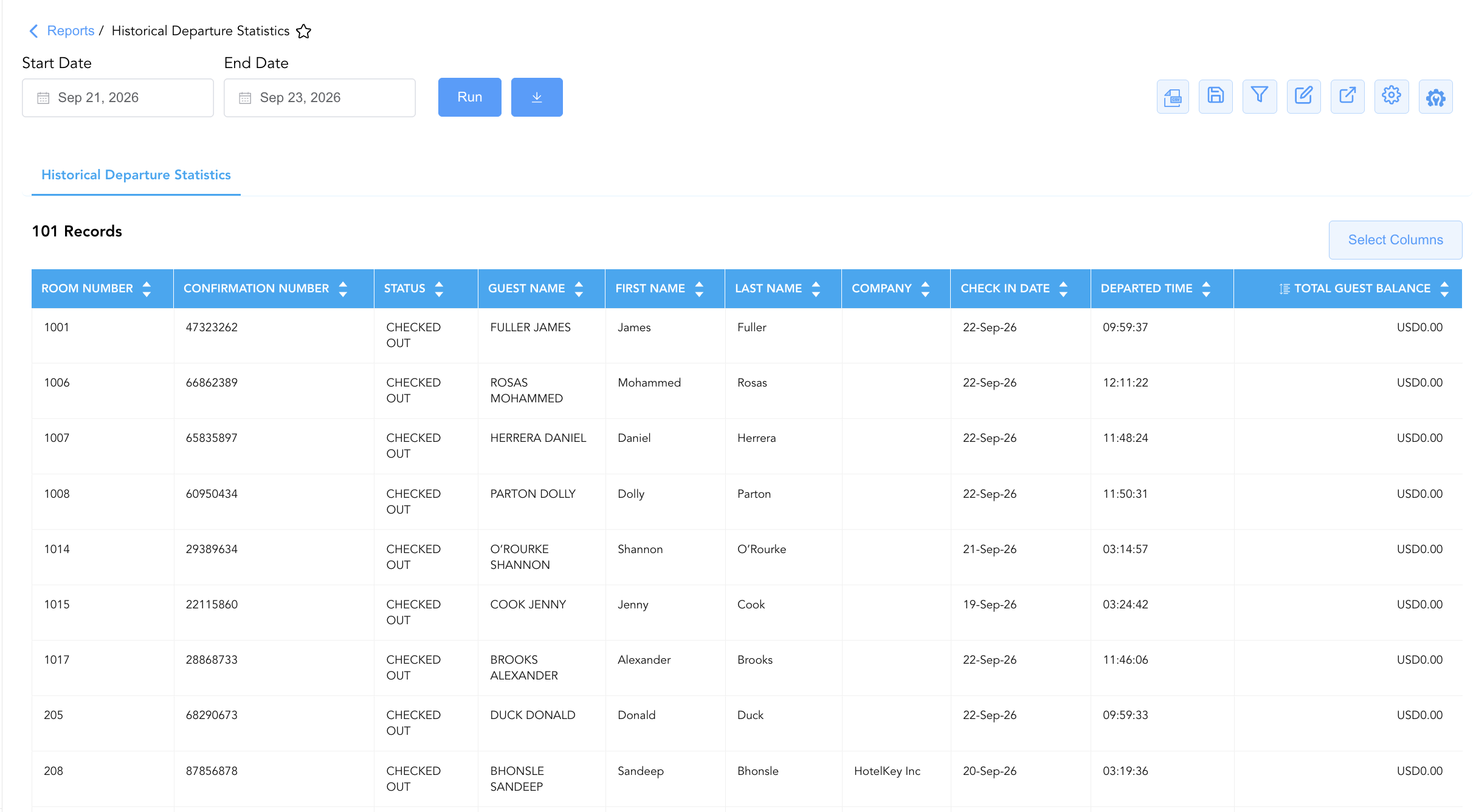
Data Dictionary (Dynamic View Columns)
Customize your default view using the Configure (⚙️) icon on the report page. Below is the full data dictionary representing every column available in this report:
💡 Monetary & Balance Treatment Note: Total Guest Balance represents the Gross Financial Amount (Includes Taxes & Fees) remaining on the guest folio at checkout time. Fully settled checked-out folios display a balance of
$0.00.
|
Column Name |
Description |
Data Source / System Mapping |
Includes Taxes & Fees? |
|
Confirmation Number |
Unique reference code assigned to the guest reservation. |
System Reservation ID |
N/A |
|
Room Number |
Physical guest room occupied during the stay (e.g., |
|
N/A |
|
Guest Name |
Combined full primary guest name ( |
|
N/A |
|
First Name |
Primary guest registered first name. |
|
N/A |
|
Last Name |
Primary guest registered last name. |
|
N/A |
|
Check In Date |
Official arrival date of the guest reservation. |
|
N/A |
|
Status |
Final operational state of the reservation ( |
System Reservation Engine |
N/A |
|
Total Guest Balance |
Net unpaid financial liability remaining on the guest folio at checkout. |
|
🟢 Yes |
|
Departed Time |
Exact system timestamp when the check-out process was finalized (e.g., |
System Checkout Audit Log |
N/A |
|
Company |
Contracting corporate account or company sponsoring the stay (e.g., HotelKey Inc). |
|
N/A |
Customization & Platform Features
User & Property Preferences
-
Personal Preference: Tailor your individual view by hiding or dragging columns. Your preferences save automatically for future sessions.
-
Property Defaults: System Admins can configure standard default layouts across all property users to streamline operational reporting. To maximize audit efficiency, group the columns into 6 logical blocks:
-
Primary Room & Reservation Anchors (Cols 1–3):
Room Number|Confirmation Number|Status -
Guest Profile & Corporate Context (Cols 4–7):
Guest Name|First Name|Last Name|Company -
Stay Window & Departure Timestamps (Cols 8–9):
Check In Date|Departed Time -
Financial Settlement Balance (Col 10):
Total Guest Balance
-
Report Toolbar & Quick Actions
Use the top-right toolbar icons on the report page to manage and export your data view:
|
Icon |
Action / Feature |
Description |

|
Knowledge Article |
Opens the knowledge base article to learn how to interpret this report. |

|
Background Export |
Allows users to download up to 365 days of data directly to their computer in CSV format. |

|
Saved Views |
Saves your column filtering, sorting, and highlight preferences so you can easily reload your custom view later without reconfiguring the report. |

|
Filter |
Opens filter controls to isolate specific data within a column based on your selected criteria. |

|
Highlight |
Highlights column values in a designated color based on selected conditions. |

|
Export |
Exports and downloads the report in various formats (Excel, PDF, CSV) for offline analysis or printing. |

|
Configure |
Opens column selection controls to toggle visibility, reorder columns, or hide rows with all zeros. |

|
Additional Configuration |
Provides advanced report configuration and display formatting options to customize data presentation. |
Advanced Controls
-
Exporting & Front Office Handovers: Download in Excel or PDF format to support housekeeping room status turnarounds, front desk shift handovers, and Accounts Receivable direct-bill audits.
-
Filtering: Filter data by specific Departed Time ranges, non-zero Total Guest Balance entries (
Balance > $0.00), or Company account names. -
Highlighting (Conditional Formatting): Apply custom rules to automatically highlight late departures (e.g., check-outs after 12:00 PM) or non-zero guest balances.
🔗 Related Reports & Next Steps
Within 📈 Revenue & Analytics & 📊 Performance Summaries:
-
General Manager Report – Review property-wide macro statistics, daily departures, room revenues, and ADR performance.
-
Historical Arrivals Statistics – Review past arrival records, realized average room rates (ARR), and agent booking attributions.
-
Daily Revenue Summary – Deep dive into daily line-item room, tax, fee, and outlet revenue breakdowns.
Cross-Pillar Deep Dives:
-
🛎️ Front Desk & Guest Services: Cross-reference departure schedules against live operational records in Departures List.
-
💳 Payments & Transactions: To inspect final payments and settlement postings on departed guest folios, review All Transactions.