
Historical In House Statistics Report Overview
Parent Hub: 📈 Revenue & Analytics
Category: 📊 Performance Summaries
Target Roles: Directors of Revenue Management, General Managers, Front Office Managers, Guest Services Supervisors, Operations Analysts
Key Value: Audit historical in-house guest profiles, track realized length-of-stay metrics, verify guest contact and identification compliance, and evaluate guest profile completeness across historical stays.
Executive Summary
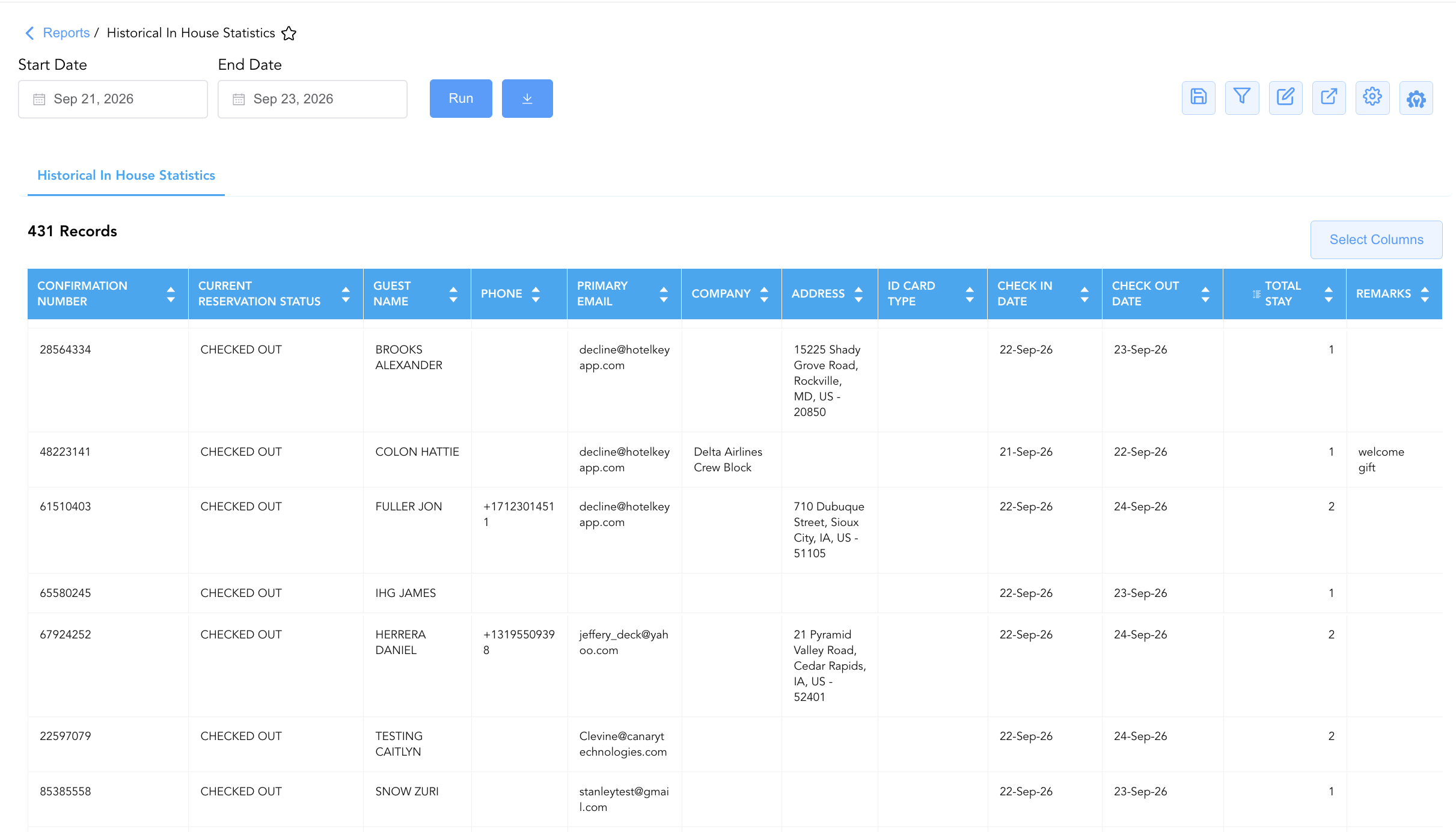
The Historical In House Statistics Report is a primary guest demographic audit and operational intelligence document within the 📊 Performance Summaries category of the 📈 Revenue & Analytics hub. Designed to provide comprehensive post-stay profile auditing, it logs all past in-house guest stays across a selected historical operational window to analyze guest stay behavior and demographic completeness.
By pairing reservation identifiers (Confirmation Number, Current Reservation Status) with guest demographic profiles (Guest Name, First Name, Last Name, Address, Phone, Primary Email, Secondary Email, ID card type), stay parameters (Check In Date, Check Out Date, Total Stay), corporate account links (Company), and operational notes (Remarks), this report enables revenue managers, front office managers, and marketing analysts to audit guest contact data quality, verify identification compliance, analyze length-of-stay trends, and review guest preferences recorded during historical stays.
Key Capabilities
-
Comprehensive Historical In-House Audit: Itemizes historical guest stays within the selected reporting window across operational reservation states (CHECKED OUT, IN HOUSE).
-
Guest Contact & Data Quality Audit: Captures complete contact profiles—including mailing addresses (Address), phone numbers (Phone), and email addresses (Primary Email, Secondary Email)—to evaluate guest database accuracy.
-
Length-of-Stay (LOS) Tracking: Calculates realized total stay duration in nights (Total Stay) across historical stay dates (Check In Date, Departure Date).
-
Identity & Governance Verification: Logs official guest identification classifications (ID card type) and corporate company profile linkages (Company).
-
Operational Remarks & Notes Traceability: Captures special guest requests, amenity delivery records, and front desk cashier notes (Remarks).
Report Views & Functional Breakdown
The Historical In House Statistics Report presents line-item guest stay records in a unified operational ledger that supports three key analytical perspectives:
┌────────────────────────────────────────────────────────────────────────┐
│            HISTORICAL IN HOUSE STATISTICS REPORT                       │
├────────────────────────────────────────────────────────────────────────┤
│                       Unified Operational Ledger                       │
├──────────────────────────┬──────────────────────────┬──────────────────┤
│ 1. Guest Profile &       │ 2. Stay Duration &       │ 3. Corporate &   │
│    Contact Quality Audit │    Timeline Analytics    │    Special Request│
│                          │                          │    Traceability  │
└──────────────────────────┴──────────────────────────┴──────────────────┘
1. Guest Profile & Contact Quality Audit
Audits the completeness and accuracy of guest contact information collected at booking and check-in.
-
Primary Use: Evaluating front desk guest profile data capture rates, auditing primary/secondary email entries for CRM marketing compliance, and checking physical mailing address data quality.
-
Key Metrics: Confirmation Number, Guest Name, First Name, Last Name, Address, Phone, Primary Email, Secondary Email.
2. Stay Duration & Timeline Analytics
Monitors arrival dates, departure dates, and total realized length of stay across historical stays.
-
Primary Use: Analyzing guest length-of-stay (LOS) distributions, identifying extended stay reservations (
Total Stay$\ge 7$ nights), and validating stay timeline consistency. -
Key Metrics: Confirmation Number, Guest Name, Check In Date, Check Out Date, Total Stay, Current Reservation Status.
3. Corporate & Special Request Traceability
Tracks corporate account affiliations, government ID compliance, and operational notes logged during the guest stay.
-
Primary Use: Auditing corporate company profile linkages (
Company), verifying driver's license/passport compliance (ID card type), and reviewing special amenity or service remarks (Remarks). -
Key Metrics: Confirmation Number, Guest Name, Company, ID card type, Remarks.
Data Dictionary (Dynamic View Columns)
Customize your default view using the Configure (⚙️) icon on the report page. Below is the full data dictionary representing every column available in this report:
💡 Stay Duration Treatment Note: Total Stay represents the Gross Number of Nights occupied by the guest during the historical stay window (
Check Out Date - Check In Date).
|
Column Name |
Description |
Data Source / System Mapping |
Includes Taxes & Fees? |
|
Confirmation Number |
Unique reference code assigned to the guest reservation. |
System Reservation ID |
N/A |
|
Guest Name |
Combined full primary guest name ( |
|
N/A |
|
First Name |
Primary guest registered first name. |
|
N/A |
|
Last Name |
Primary guest registered last name. |
|
N/A |
|
Address |
Full physical mailing address registered on the guest profile. |
|
N/A |
|
Phone |
Primary contact telephone or mobile phone number on file. |
|
N/A |
|
Primary Email |
Primary electronic mail address registered for guest communications and folios. |
|
N/A |
|
Secondary Email |
Secondary or alternative email address logged on the profile. |
|
N/A |
|
Company |
Contracting corporate account or company sponsoring the stay (e.g., HotelKey Inc, Delta Airlines Crew Block). |
|
N/A |
|
ID card type |
Form of official government identification presented at check-in (e.g., |
|
N/A |
|
Check In Date |
Historical arrival date of the guest stay. |
|
N/A |
|
Check Out Date |
Historical departure date of the guest stay. |
|
N/A |
|
Total Stay |
Total length of stay calculated in nights ( |
|
N/A |
|
Current Reservation Status |
Operational state of the historical stay ( |
System Reservation Engine |
N/A |
|
Remarks |
Special requests, front desk cashier comments, or amenity fulfillment notes entered during the stay. |
Transaction / Reservation Notes |
N/A |
Customization & Platform Features
User & Property Preferences
-
Personal Preference: Tailor your individual view by hiding or dragging columns. Your preferences save automatically for future sessions.
-
Property Defaults: System Admins can configure standard default layouts across all property users to streamline operational reporting. To maximize audit efficiency, group the columns into 6 logical blocks:
-
Primary Reservation Anchors (Cols 1–2):
Confirmation Number|Current Reservation Status -
Guest Profile & Contact Information (Cols 3–8):
Guest Name|First Name|Last Name|Phone|Primary Email|Secondary Email -
Corporate Context & Identity Verification (Cols 9–11):
Company|Address|ID card type -
Stay Window Parameters & Audit Notes (Cols 12–15):
Check In Date|Check Out Date|Total Stay|Remarks
-
Report Toolbar & Quick Actions
Use the top-right toolbar icons on the report page to manage and export your data view:
|
Icon |
Action / Feature |
Description |

|
Knowledge Article |
Opens the knowledge base article to learn how to interpret this report. |

|
Saved Views |
Saves your column filtering, sorting, and highlight preferences so you can easily reload your custom view later without reconfiguring the report. |

|
Filter |
Opens filter controls to isolate specific data within a column based on your selected criteria. |

|
Highlight |
Highlights column values in a designated color based on selected conditions. |

|
Export |
Exports and downloads the report in various formats (Excel, PDF, CSV) for offline analysis or printing. |

|
Configure |
Opens column selection controls to toggle visibility, reorder columns, or hide rows with all zeros. |

|
Additional Configuration |
Provides advanced report configuration and display formatting options to customize data presentation. |
Advanced Controls
-
Exporting & CRM Data Cleanup: Download in Excel or PDF format to support guest profile database auditing, loyalty program reconciliation, and marketing contact list verification.
-
Filtering: Filter data by specific Total Stay night thresholds (
Total Stay > 3), Company profiles, or entries missing email/phone contact information. -
Highlighting (Conditional Formatting): Apply custom rules to automatically highlight long-stay reservations or profiles with incomplete address records.
🔗 Related Reports & Next Steps
Within 📈 Revenue & Analytics & 📊 Performance Summaries:
-
General Manager Report – Review property-wide macro statistics, in-house guest headcounts, room revenues, and occupancy performance.
-
Historical Arrivals Statistics – Audit past arrival records, realized average room rates (ARR), and agent booking attributions.
-
Historical Departure Statistics – Review completed guest check-outs, departure timestamps, and zero-balance folio settlements.
Cross-Pillar Deep Dives:
-
🛎️ Front Desk & Guest Services: Cross-reference active in-house guest profiles against live operational records in In-House Guest List.
-
💳 Payments & Transactions: To inspect specific charges and payment transactions posted during historical in-house stays, review All Transactions.