
Pending Room Report Overview
Parent Hub: 🧹 Rooms & Facilities
Category: 🛏️ Room Status
Target Roles: Executive Housekeepers, Housekeeping Supervisors, Floor Operations Leads, Front Office Managers, Guest Experience Leads, General Managers
Key Value: Monitor expected guest arrivals assigned to rooms that are currently uncleaned or uninspected, track real-time room readiness bottlenecks, prioritize rush arrival cleans, dispatch room attendants, and streamline front desk guest check-in flows.
Executive Summary
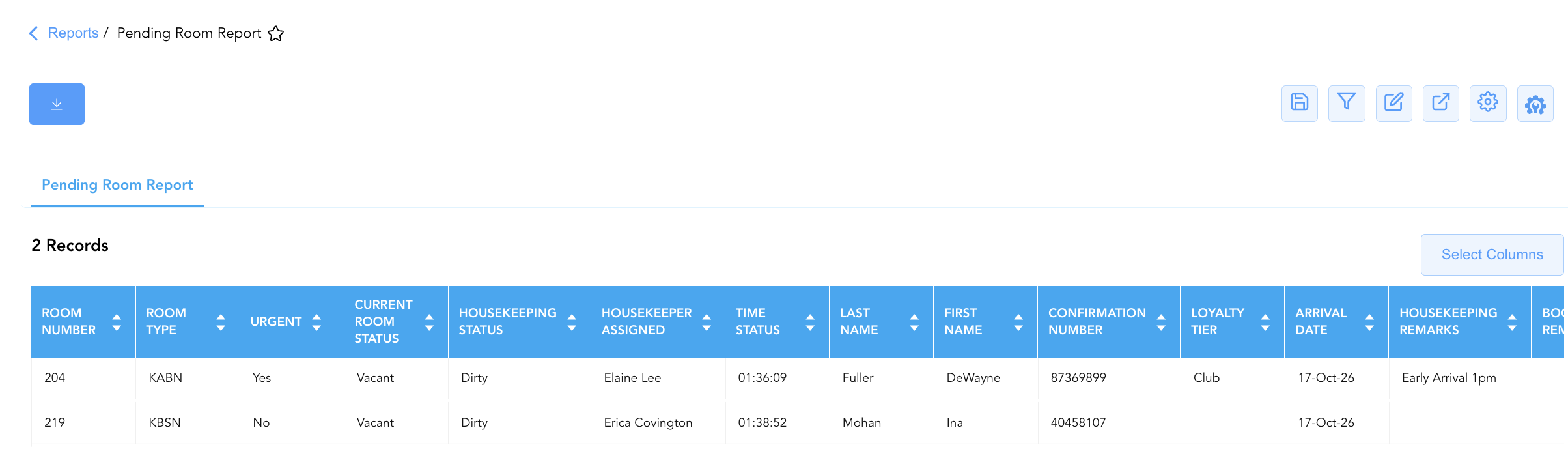
The Pending Room Report is an essential cross-departmental operational dispatch, room readiness audit, and guest arrival synchronization document within the 🛏️ Room Status category of the 🧹 Rooms & Facilities hub. Designed to eliminate check-in lobby congestion and prevent front desk room assignment delays, it provides a real-time operational view of expected guest arrivals whose pre-assigned physical rooms are not yet cleaned, inspected, or released for check-in.
-
By mapping reservation parameters (
Confirmation Number,First Name,Last Name,Loyalty Tier,Arrival Date,Nights,Booking Remarks) to physical room allocations (Room Number,Room Type), real-time cleanliness states (Current Room Status,Housekeeping Status,Time status), assigned attendant coverage (Housekeeper Assigned), priority indicators (Urgent), and operational floor notes (Housekeeping Remarks), this report enables housekeeping supervisors and front desk leads to identify unready arrival rooms, dispatch attendants for expedited cleaning, and communicate live room release progress.
Key Capabilities
-
Real-Time Room Readiness Audit: Isolates arriving guest reservations assigned to rooms currently in unready states (
Housekeeping Status = Dirtyor uninspected). -
Rush Arrival & Priority Dispatch Escalation: Highlights urgent room cleaning requirements (
Urgent = Yes) and priority operational requests (Housekeeping Remarks, e.g., "Early Arrival 1pm") to accelerate turnover for early arrivals. -
Attendant & Floor Coverage Traceability: Identifies the specific assigned room attendant (
Housekeeper Assigned) responsible for preparing each pending arrival room. -
Arrival Timestamp & Wait-Time Tracking: Captures real-time status update timestamps (
Time status) to monitor floor inspection bottlenecks and room turnover response times. -
VIP & Loyalty Tier Visibility: Displays brand loyalty tier standings (
Loyalty Tier, e.g.,Club, Diamond Elite) to ensure high-priority guests receive pre-blocked, check-in ready accommodations.
Report Views & Functional Breakdown
The Pending Room Report presents unready arrival room data in a unified single-table master matrix supporting three primary operational perspectives:
┌────────────────────────────────────────────────────────────────────────┐
│                        PENDING ROOM REPORT                             │
├────────────────────────────────────────────────────────────────────────┤
│                         Unified Matrix View                            │
├──────────────────────────┬──────────────────────────┬──────────────────┤
│ 1. Arrival Identity &    │ 2. Physical Room State & │ 3. Attendant &   │
│    Stay Timeframe Trace  │    Readiness Status      │    Priority Dispatch
└──────────────────────────┴──────────────────────────┴──────────────────┘
1. Arrival Identity & Stay Timeframe Trace
Monitors expected arriving guest names, confirmation numbers, loyalty tier standings, arrival dates, and total stay lengths.
-
Primary Use: Cross-referencing arriving guest profiles with physical room assignments during front desk shift handovers.
-
Key Metrics: Confirmation Number, First Name, Last Name, Loyalty Tier, Arrival Date, Nights, Booking Remarks.
2. Physical Room State & Readiness Status
Tracks assigned physical room numbers, category codes, real-time physical occupancy, cleanliness states, and status update timestamps.
-
Primary Use: Identifying floor readiness bottlenecks and monitoring physical room turnover progression from dirty to ready.
-
Key Metrics: Room Number, Room Type, Current Room Status, Housekeeping Status, Time status.
3. Attendant & Priority Dispatch
Correlates pending rooms with assigned room attendants, rush priority flags, and operational floor remarks.
-
Primary Use: Dispatching floor supervisors and room attendants to prioritize early arrival rooms and execute special cleaning notes.
-
Key Metrics: Housekeeper Assigned, Urgent, Housekeeping Remarks, Room Number.
Data Dictionary (Dynamic View Columns)
Customize your default view using the Configure (⚙️) icon on the report page. Below is the full data dictionary representing all 15 dynamic columns available in this report:
|
Column Name |
Description |
Data Source / System Mapping |
Includes Taxes & Fees? |
|
Confirmation Number |
Primary unique alphanumeric reservation identifier. |
Reservation System > Confirmation ID |
N/A |
|
Last Name |
Last name of the primary registered arriving guest. |
Guest Profile > Last Name |
N/A |
|
First Name |
First name of the primary registered arriving guest. |
Guest Profile > First Name |
N/A |
|
Loyalty Tier |
Brand loyalty program membership level (e.g., |
Loyalty Engine > Membership Tier |
N/A |
|
Room Number |
Physical guest room assigned to the arriving reservation (e.g., |
PMS > Assigned Room ID |
N/A |
|
Room Type |
Alphanumeric code representing the assigned room category (e.g., |
PMS > Room Category Code |
N/A |
|
Time status |
Timestamp recording the most recent room status or workflow update. |
Housekeeping Engine > Status Timestamp |
N/A |
|
Current Room Status |
Real-time physical occupancy condition (e.g., |
PMS Inventory Engine > Occupancy Flag |
N/A |
|
Housekeeping Status |
Real-time physical cleanliness state (e.g., |
Housekeeping Engine > Clean Status |
N/A |
|
Arrival Date |
Scheduled check-in date for the reservation. |
Reservation System > Arrival Date |
N/A |
|
Booking Remarks |
Free-text operational notes recorded during reservation creation. |
Reservation Notes > Booking Remarks |
N/A |
|
Housekeeping Remarks |
Free-text floor handling instructions or arrival notes (e.g., "Early Arrival 1pm"). |
Housekeeping Engine > Remarks |
N/A |
|
Housekeeper Assigned |
Full name of the room attendant assigned to clean the room (e.g., |
Housekeeping Engine > Attendant Name |
N/A |
|
Nights |
Total physical room nights spanned by the stay. |
Reservation System > Total Nights |
N/A |
|
Urgent |
Rush priority indicator flag denoting an immediate arrival room requirement (e.g., |
Housekeeping Dispatch > Urgent Flag |
N/A |
Customization & Platform Features
User & Property Preferences
-
Personal Preference: Tailor your individual view by hiding or dragging columns. Your preferences save automatically for future sessions.
-
Property Defaults: System Admins can configure standard default layouts across all property users to streamline operational reporting. To maximize audit efficiency, group the columns into the below logical blocks:
-
Physical Locators & Urgency Flags (Cols 1–4):
Room Number|Room Type|Urgent|Current Room Status -
Cleaning Condition & Staff Assignment (Cols 5–7):
Housekeeping Status|Housekeeper Assigned|Time status -
Guest Profile & Arrival Itinerary (Cols 8–13):
Last Name|First Name|Confirmation Number|Loyalty Tier|Arrival Date|Nights -
Operational Remarks & Instructions (Cols 14–15):
Housekeeping Remarks|Booking Remarks
-
Report Toolbar & Quick Actions
Use the top-right toolbar icons on the report page to manage and export your data view:
|
Icon |
Action / Feature |
Description |

|
Knowledge Article |
Opens the knowledge base article to learn how to interpret this report. |

|
Saved Views |
Saves your column filtering, sorting, and highlight preferences so you can easily reload your custom view later without reconfiguring the report. |

|
Filter |
Opens filter controls to isolate specific data within a column based on your selected criteria. |

|
Highlight |
Highlights column values in a designated color based on selected conditions. |

|
Export |
Exports and downloads the report in various formats (Excel, PDF, CSV) for offline analysis or printing. |

|
Configure |
Opens column selection controls to toggle visibility, reorder columns, or hide rows with all zeros. |

|
Additional Configuration |
Provides advanced report configuration and display formatting options to customize data presentation. |
Advanced Controls
-
Shift Board Exporting: Schedule automated periodic exports throughout peak arrival windows (e.g., 11:00, 13:00, 15:00) to generate real-time pending room dispatch sheets.
-
Filtering: Filter data by
Urgent = Yesto generate an immediate priority dispatch list for floor supervisors, or isolate unassigned housekeepers. -
Highlighting (Conditional Formatting): Apply custom rules to automatically highlight urgent rush rooms (
Urgent = Yes), early arrival notes (Housekeeping Remarks != Blank), or high-tier loyalty stays.
🔗 Related Reports & Next Steps
Within 🧹 Rooms & Facilities & 🛏️ Room Status:
-
Housekeeping Sheet – Comprehensive multi-section daily housekeeping board, priority dispatch, and ready room matrix.
-
All Rooms – Master physical room inventory, cleanliness state, and housekeeping schedule manifest.
-
Housekeeping Summary – Single-table daily operational summary of attendant assignments and room statuses.
-
Room Detail – Master room-by-room physical status, housekeeping, and maintenance audit matrix.
Cross-Pillar Deep Dives:
-
🛎️ Front Desk & Guest Services: Reconcile pending arrival rooms with the Arrivals List to notify front desk agents as soon as priority rooms are inspected and released for check-in.