
Service Denial Report Overview
Parent Hub: 🧹 Rooms & Facilities
Category: 📋 Operations Analytics
Target Roles: Executive Housekeepers, Housekeeping Supervisors, Floor Operations Leads, Front Office Managers, Guest Relations Directors, General Managers
Key Value: Monitor guest-initiated housekeeping service refusals, track Do Not Disturb (DND) and service denial audit trails, evaluate staff resolution cycle times, maintain compliance with property cleaning policies, and protect guest privacy while ensuring operational transparency.
Executive Summary
The Service Denial Report is an essential operational analytics dashboard, guest service exception audit, and floor compliance document within the 📋 Operations Analytics category of the 🧹 Rooms & Facilities hub. Designed to deliver complete operational visibility over rooms where housekeeping service was declined, deferred, or cancelled, it itemizes every service denial event logged across property accommodations over specified date windows.
-
By mapping physical room allocations (
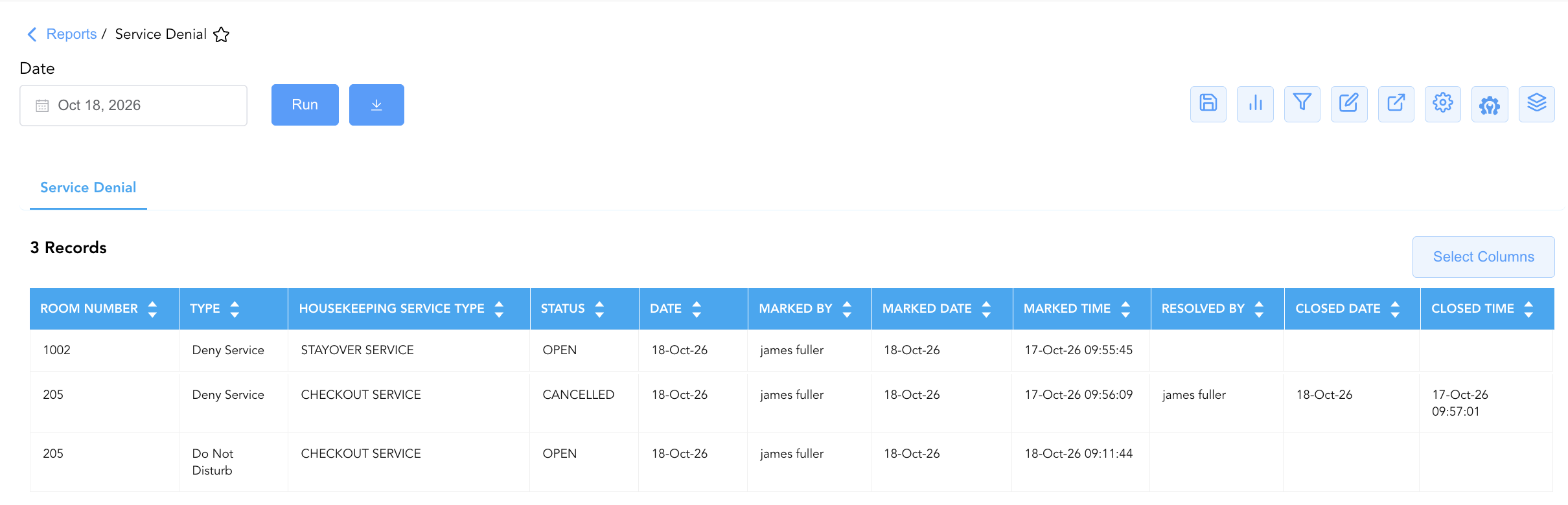
Room Number) to denial classifications (Type, e.g.,Deny ServiceorDo Not Disturb), operational status states (Status, e.g.,OPEN,CANCELLED,CLOSED), and service categories (Housekeeping Service Type, e.g.,STAYOVER SERVICE,CHECKOUT SERVICE), this report tracks complete creation and resolution audit trails—including logging credentials (Marked By,Marked Date,Marked Time) and supervisor resolution details (Resolved By,Closed Date,Closed Time). This enables executive housekeepers, floor supervisors, and front office managers to verify unserviced room claims, audit staff logging compliance, ensure multi-day refusal safety checks, and maintain detailed service records for guest billing and complaint resolution.
Key Capabilities
-
Service Refusal Lifecycle Audit: Tracks complete service denial events from initial logging (
Marked Date,Marked Time) through formal supervisor resolution or cancellation (Closed Date,Closed Time). -
Staff Accountability & User Tracking: Identifies the specific staff member who logged the denial (
Marked By) and the supervisor or agent who resolved the record (Resolved By). -
Service Type & Impact Categorization: Differentiates service denials across specific cleaning types (
Housekeeping Service Type, e.g., Stayover Service vs. Checkout Service) to adjust daily floor workload calculations. -
Real-Time Operational Lifecycle States: Itemizes active pending denials (
Status = OPEN), cancelled refusal flags (Status = CANCELLED), and finalized closed audits (Status = CLOSED). -
Multi-Day Denial Risk Management: Provides property leads with clear documentation to enforce property safety policies (e.g., mandatory room inspections after consecutive days of declined service).
Report Views & Functional Breakdown
The Service Denial Report presents service refusal and audit data in a unified single-table master matrix supporting three primary operational perspectives:
┌────────────────────────────────────────────────────────────────────────┐
│                      SERVICE DENIAL REPORT                             │
├────────────────────────────────────────────────────────────────────────┤
│                         Unified Matrix View                            │
├──────────────────────────┬──────────────────────────┬──────────────────┤
│ 1. Room Identity &       │ 2. Denial Logging &      │ 3. Resolution &  │
│    Service Classification│    Timestamp Trace       │    Closure Audit │
└──────────────────────────┴──────────────────────────┴──────────────────┘
1. Room Identity & Service Classification
Monitors assigned physical room numbers, exception types, operational status states, and impacted housekeeping service categories.
-
Primary Use: Scanning unserviced rooms during daily floor audits and categorizing declined tasks by cleaning type.
-
Key Metrics: Room Number, Type, Status, Housekeeping Service Type, Date.
2. Denial Logging & Timestamp Trace
Tracks initial service refusal creation dates, exact timestamps, and reporting staff credentials.
-
Primary Use: Verifying when a room attendant encountered a DND sign or explicit guest service refusal, holding attendants accountable for prompt logging.
-
Key Metrics: Marked By, Marked Date, Marked Time, Room Number.
3. Resolution & Closure Audit
Audits final resolution timestamps and user credentials for closed or cancelled denial records.
-
Primary Use: Evaluating supervisor response times, confirming resolved refusal tickets, and reviewing cancelled exception flags.
-
Key Metrics: Resolved By, Closed Date, Closed Time, Status, Room Number.
Data Dictionary (Dynamic View Columns)
Customize your default view using the Configure (⚙️) icon on the report page. Below is the full data dictionary representing all 11 dynamic columns available in this report, sorted in alphabetical order by column name:
|
Column Name |
Description |
Data Source / System Mapping |
Includes Taxes & Fees? |
|
Closed Date |
Calendar date on which the service denial record was resolved or closed. |
Audit Log > Closure Date |
N/A |
|
Closed Time |
Exact timestamp recording when the service denial record was formally closed. |
Audit Log > Closure Timestamp |
N/A |
|
Date |
Calendar date on which the service denial request was active or logged. |
PMS Calendar > Record Date |
N/A |
|
Housekeeping Service Type |
Classification of housekeeping service impacted by the denial (e.g., |
Housekeeping Engine > Service Code |
N/A |
|
Marked By |
Username or full name of the staff member who recorded the service denial in the system. |
Security Audit Trail > Logging User |
N/A |
|
Marked Date |
Calendar date on which the service denial was originally flagged or marked. |
Audit Log > Logging Date |
N/A |
|
Marked Time |
Exact timestamp recording when the service denial was initially logged. |
Audit Log > Logging Timestamp |
N/A |
|
Resolved By |
Username or full name of the staff member who investigated, resolved, or cancelled the service denial. |
Security Audit Trail > Resolving User |
N/A |
|
Room Number |
Physical guest room number associated with the service refusal (e.g., |
PMS > Physical Room ID |
N/A |
|
Status |
Operational lifecycle state of the denial event (e.g., |
Housekeeping Engine > Record Status |
N/A |
|
Type |
Category classification of the service exception (e.g., |
Housekeeping Engine > Exception Type |
N/A |
Customization & Platform Features
User & Property Preferences
-
Personal Preference: Tailor your individual view by hiding or dragging columns. Your preferences save automatically for future sessions.
-
Property Defaults: System Admins can configure standard default layouts across all property users to streamline operational reporting. To maximize audit efficiency, group the columns into the below logical blocks:
-
Physical Locators & Exception Type (Cols 1–3):
Room Number|Type|Housekeeping Service Type -
Lifecycle Status & Reporting Context (Cols 4–5):
Status|Date -
Discovery & Staff Logging Audit (Cols 6–8):
Marked By|Marked Date|Marked Time -
Resolution & Closure Audit (Cols 9–11):
Resolved By|Closed Date|Closed Time
-
Report Toolbar & Quick Actions
Use the top-right toolbar icons on the report page to manage and export your data view:
|
Icon |
Action / Feature |
Description |

|
Knowledge Article |
Opens the knowledge base article to learn how to interpret this report. |

|
Saved Views |
Saves your column filtering, sorting, and highlight preferences so you can easily reload your custom view later without reconfiguring the report. |

|
Filter |
Opens filter controls to isolate specific data within a column based on your selected criteria. |

|
Highlight |
Highlights column values in a designated color based on selected conditions. |

|
Export |
Exports and downloads the report in various formats (Excel, PDF, CSV) for offline analysis or printing. |

|
Configure |
Opens column selection controls to toggle visibility, reorder columns, or hide rows with all zeros. |

|
Additional Configuration |
Provides advanced report configuration and display formatting options to customize data presentation. |

|
Group By |
Summarize and group report data dynamically in real time. |
Interactive Visualizations & Grouping Controls
-
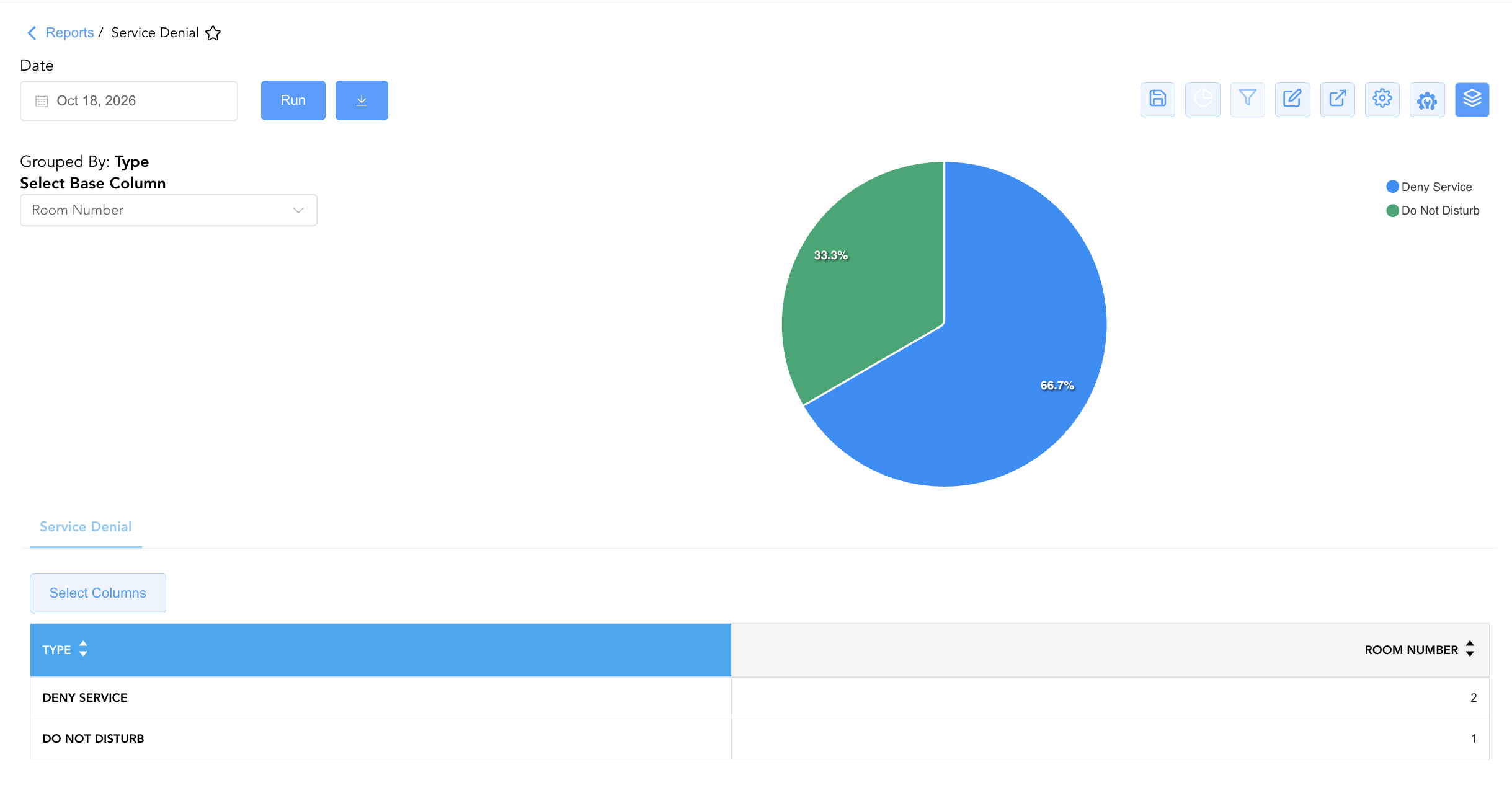
Group By & Pie Chart Visualization: The Service Denial report features an interactive pie chart to help analyze guest service refusal drivers and housekeeping denial volume distributions. Users can group denial entries on the fly by Type, Status, Housekeeping Service type, Marked By, or Resolved By to evaluate active open cases, service type impacts, or staff logging volumes. By selecting Room Number from the Select Base Column dropdown menu, the chart dynamically renders percentage share breakdowns accompanied by an interactive color-coded legend.
Advanced Controls
-
Daily Refusal Audit Exporting: Schedule automated daily afternoon exports to review all rooms logged as
Deny Serviceand coordinate necessary towel/trash drops or welfare checks. -
Filtering: Filter data by
Status = OPENto generate an immediate floor inspection list for supervisors, or filter byHousekeeping Service Type = STAYOVER SERVICE. -
Highlighting (Conditional Formatting): Apply custom rules to automatically highlight open service denials (
Status = OPEN), long-pending closure times, or specific room floors.
🔗 Related Reports & Next Steps
Within 🧹 Rooms & Facilities & 📋 Operations Analytics / 🛏️ Room Status:
-
Housekeeping Summary – Streamlined daily operational summary tracking attendant assignments, DND flags, and guest service refusals.
-
Housekeeping Detail – Granular line-item audit tracking individual attendant cleaning speeds, durations, and inspection times.
-
Housekeeping Room Log – Immutable audit trail tracking room status changes and attendant cleaning actions.
-
All Rooms – Master physical room inventory, cleanliness state, and housekeeping schedule manifest.
Cross-Pillar Deep Dives:
-
🛎️ Front Desk & Guest Services: Reconcile service denial rooms (
Status = OPEN) with Guest Service Recovery to resolve guest complaints regarding unserviced rooms. -
🛡️ Security & Loss Prevention: Audit consecutive multi-day service denials (
Type = Deny Service) to conduct room wellness checks and ensure property safety.