
Housekeeping Room Log Report Overview
Parent Hub: 🧹 Rooms & Facilities
Category: 🛏️ Room Status
Target Roles: Executive Housekeepers, Housekeeping Supervisors, Floor Operations Managers, Front Office Managers, Quality Assurance Auditors, General Managers
Key Value: Serves as an immutable audit trail and operational log of all housekeeping status changes, room cleaning actions, inspection approvals, staff assignments, and service priority transitions executed across property guest rooms.
Executive Summary
The Housekeeping Room Log Report is an essential operational audit, quality control, and staff productivity document within the 🛏️ Room Status category of the 🧹 Rooms & Facilities hub. Designed to deliver complete historical and real-time visibility over room cleaning workflows, it itemizes every status transition, inspection update, and manual override recorded in the Property Management System (PMS) across specified date windows.
-
By capturing audit timestamps (
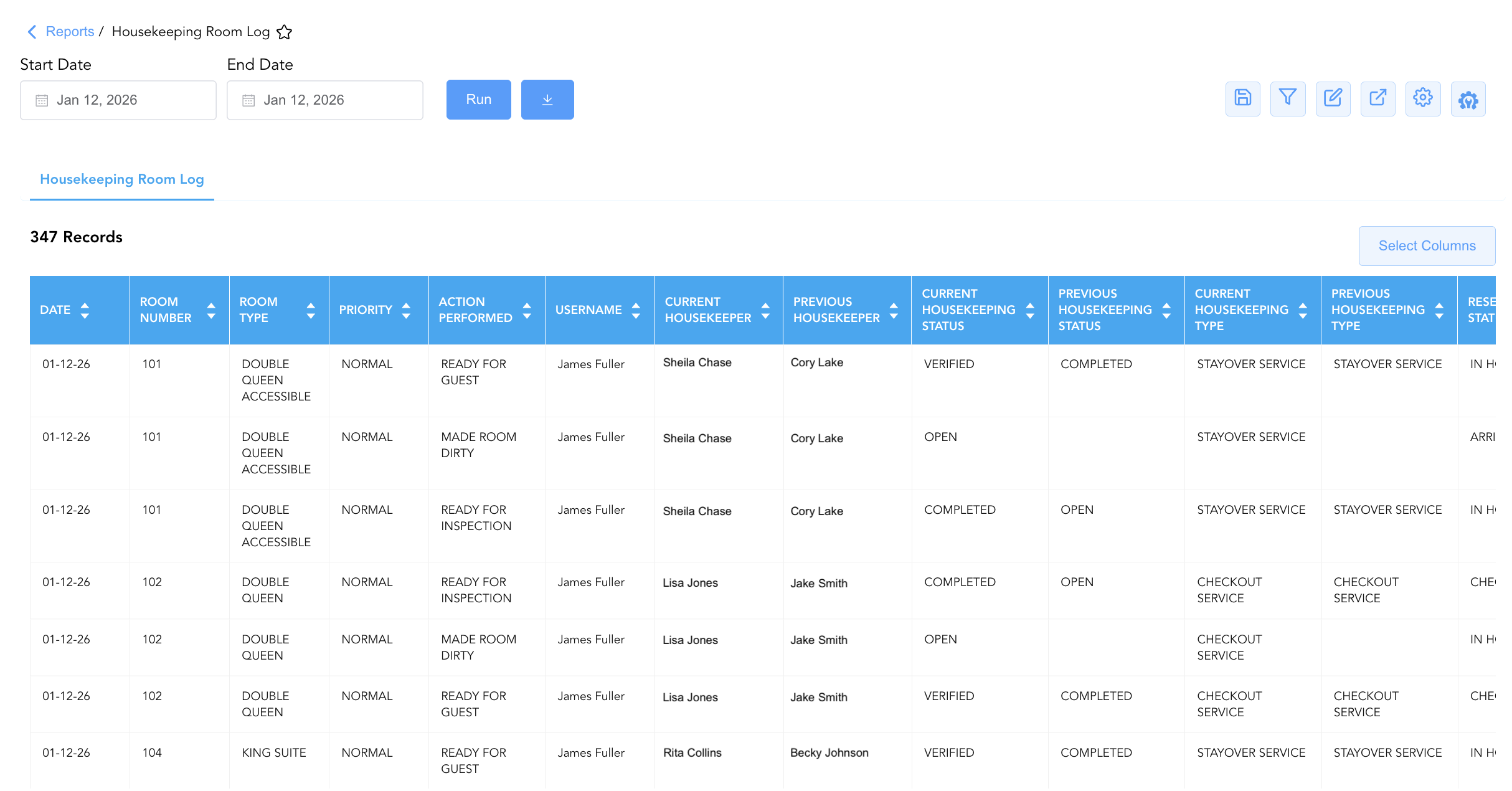
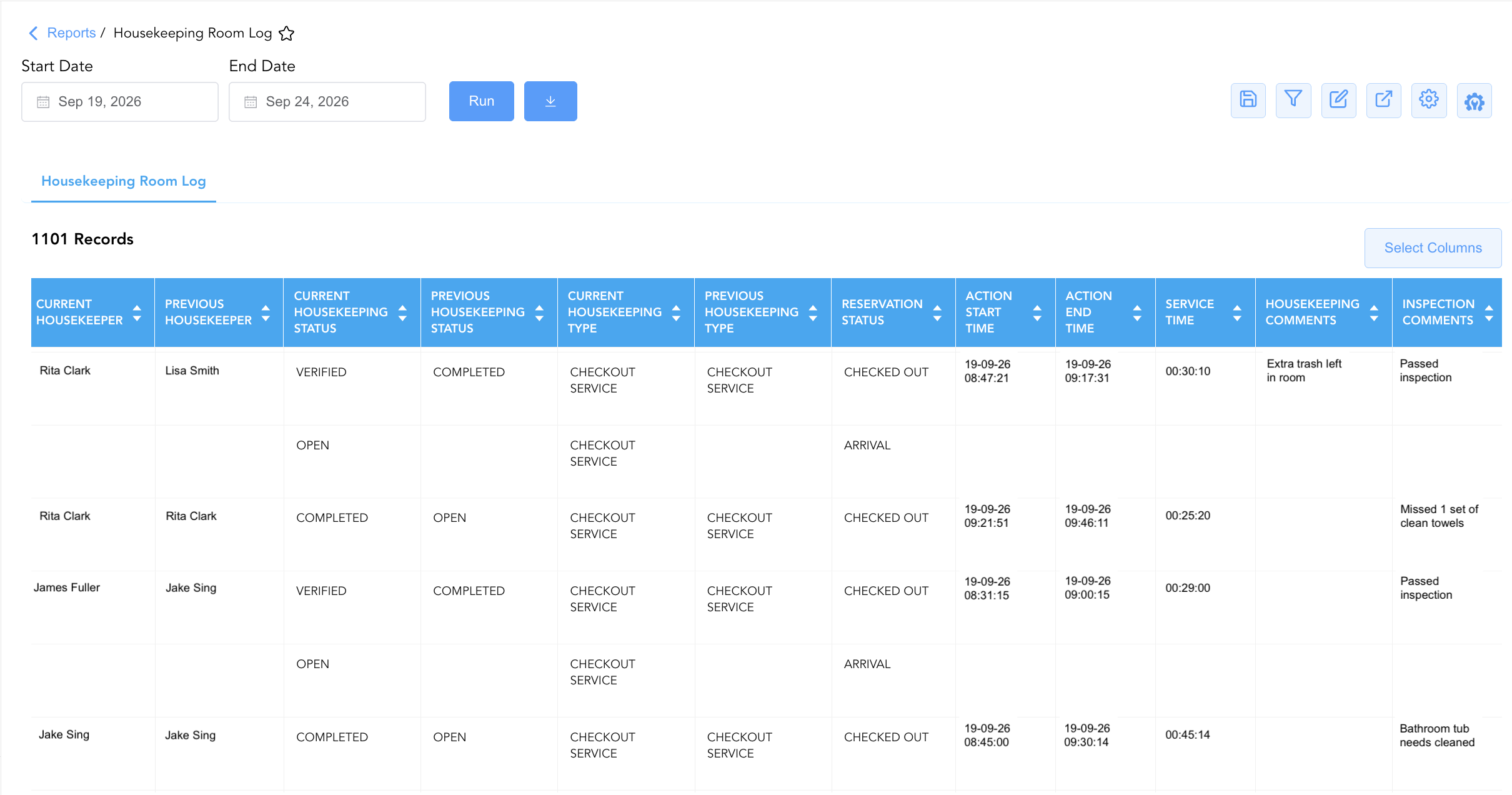
Date,Action Start Time,Action End Time) and physical room allocations (Room Number,Room Type) alongside operational workflow events (Action Performed, e.g.,READY FOR GUEST,MADE ROOM DIRTY,READY FOR INSPECTION), staff user credentials (Username,Houseperson,Previous Housekeeper,Current Housekeeper), service classifications (Previous Housekeeping Type,Current Housekeeping Type, e.g.,CHECKOUT SERVICE,STAYOVER SERVICE,TOWEL AND TRASH SERVICE), housekeeping readiness states (Previous Housekeeping Status,Current Housekeeping Status, e.g.,OPEN,COMPLETED,VERIFIED), active stay states (Reservation Status, e.g.,IN HOUSE,ARRIVAL,CHECKED OUT,NO SHOW), room cleaning priorities (Priority, e.g.,NORMAL,URGENT), and operational notes (Housekeeping Comments,Inspection Comments), this report enables executive housekeepers, supervisors, and front office leads to audit staff accountability, track room turnaround durations, verify supervisor inspection compliance, and resolve guest room availability disputes.
Key Capabilities
-
Comprehensive Status Action Audit: Records every state change executed on a guest room (
Action Performed, e.g., marking dirty, submitting for inspection, or approving for guest check-in). -
Staff & Supervisor Accountability Trail: Identifies the exact user (
Username) and assigned room attendants (Houseperson,Previous Housekeeper,Current Housekeeper) responsible for cleaning and inspecting each room. -
Service Type & Workflow State Disaggregation: Tracks transitions between service categories (
Previous Housekeeping TypetoCurrent Housekeeping Type, e.g., Checkout vs. Stayover vs. Towel & Trash) and cleanliness states (Previous Housekeeping StatustoCurrent Housekeeping Status). -
Priority & Rush Room Monitoring: Flags priority dispatch designations (
Priority, e.g.,URGENTvs.NORMAL) to verify if VIP or expedited arrival rooms were serviced promptly. -
Timestamp & Productivity Tracking: Logs action start/end timestamps (
Action Start Time,Action End Time) and service durations (Service Time) to measure attendant efficiency and supervisor inspection response times.
Report Views & Functional Breakdown
The Housekeeping Room Log Report presents room cleaning audit data in a unified single-table master matrix supporting three primary operational perspectives:
┌────────────────────────────────────────────────────────────────────────┐
│                   HOUSEKEEPING ROOM LOG REPORT                         │
├────────────────────────────────────────────────────────────────────────┤
│                         Unified Matrix View                            │
├──────────────────────────┬──────────────────────────┬──────────────────┤
│ 1. Room Identity &       │ 2. Housekeeping Action & │ 3. Staff Audit & │
│    Cleaning Workflow     │    Inspection State      │    Priority Trace│
└──────────────────────────┴──────────────────────────┴──────────────────┘
1. Room Identity & Cleaning Workflow
Monitors physical room allocations, room categories, service timeframes, and active guest reservation states.
-
Primary Use: Verifying room cleaning event sequences for specific rooms and correlating cleaning actions with guest reservation movements (e.g., arrivals or checkouts).
-
Key Metrics: Date, Room Number, Room Type, Reservation Status, Action Start Time, Action End Time, Service Time.
2. Housekeeping Action & Inspection State
Tracks exact status transitions, service types, and cleanliness progression from dirty to inspected and ready.
-
Primary Use: Auditing quality control workflows, verifying supervisor inspection sign-offs (
VERIFIED), and checking service type assignments. -
Key Metrics: Action Performed, Previous Housekeeping Type, Current Housekeeping Type, Previous Housekeeping Status, Current Housekeeping Status.
3. Staff Audit & Priority Trace
Correlates room status changes directly with employee credentials, priority flags, and operational comments.
-
Primary Use: Evaluating individual staff productivity, auditing supervisor overrides, reviewing room comments, and monitoring rush room handling (
URGENT). -
Key Metrics: Username, Houseperson, Current Housekeeper, Priority, Housekeeping Comments, Inspection Comments.
Data Dictionary (Dynamic View Columns)
Customize your default view using the Configure (⚙️) icon on the report page. Below is the full data dictionary representing all 21 dynamic columns available in this report:
|
Column Name |
Description |
Data Source / System Mapping |
Includes Taxes & Fees? |
|---|---|---|---|
|
Date |
Calendar date on which the housekeeping status action occurred. |
PMS Housekeeping Audit > Action Date |
N/A |
|
Room Number |
Physical guest room number assigned on property (e.g., |
PMS > Physical Room ID |
N/A |
|
Room Type |
Commercial description or code representing the room category (e.g., |
PMS > Room Category Description |
N/A |
|
Action Performed |
Specific status change or workflow action logged in the system (e.g., |
Housekeeping Engine > Action Code |
N/A |
|
Username |
User login credential or full name of the staff member who logged the action in the PMS. |
Security Audit Trail > User ID |
N/A |
|
Service Time |
Calculated time duration taken to complete the room service or action. |
Calculated: Action End Time−Action Start Time |
N/A |
|
Action Start Time |
Timestamp recording when the housekeeping action or cleaning began. |
Housekeeping Audit > Start Timestamp |
N/A |
|
Action End Time |
Timestamp recording when the housekeeping action or cleaning was completed. |
Housekeeping Audit > End Timestamp |
N/A |
|
Houseperson Start Time |
Timestamp recording when a houseperson began support tasks for the room. |
Houseperson Log > Start Timestamp |
N/A |
|
Houseperson End Time |
Timestamp recording when a houseperson completed support tasks for the room. |
Houseperson Log > End Timestamp |
N/A |
|
Houseperson |
Name or ID of the assigned houseperson providing utility support. |
Housekeeping Engine > Houseperson ID |
N/A |
|
Housekeeping Comments |
Operational remarks entered by the room attendant during cleaning. |
Housekeeping Mobile App > Room Notes |
N/A |
|
Inspection Comments |
Operational remarks entered by the supervisor during room inspection. |
Housekeeping Mobile App > Inspection Notes |
N/A |
|
Previous Housekeeper |
Name or ID of the room attendant assigned prior to the action. |
Housekeeping Engine > Previous Attendant |
N/A |
|
Current Housekeeper |
Name or ID of the room attendant actively assigned to the room. |
Housekeeping Engine > Active Attendant |
N/A |
|
Previous Housekeeping Type |
Service category assigned prior to the action (e.g., |
Housekeeping Engine > Prior Service Code |
N/A |
|
Current Housekeeping Type |
Service category assigned following the action. |
Housekeeping Engine > Active Service Code |
N/A |
|
Previous Housekeeping Status |
Cleanliness status prior to the action (e.g., |
Housekeeping Engine > Prior Clean Status |
N/A |
|
Current Housekeeping Status |
Cleanliness status following the action (e.g., |
Housekeeping Engine > Active Clean Status |
N/A |
|
Reservation Status |
Real-time guest reservation state linked to the room (e.g., |
Reservation System > Main Status |
N/A |
|
Priority |
Dispatch urgency rating assigned to the room cleaning task (e.g., |
Housekeeping Dispatch > Priority Code |
N/A |
Customization & Platform Features
User & Property Preferences
-
Personal Preference: Tailor your individual view by hiding or dragging columns. Your preferences save automatically for future sessions.
-
Property Defaults: System Admins can configure standard default layouts across all property users to streamline operational reporting. To maximize audit efficiency, group the columns into the below logical blocks:
-
Physical Locators & Action Completed (Cols 1–5):
Date|Room Number|Room Type|Priority|Action Performed -
Staff Accountability & Audit Users (Cols 6–9):
Username|Current Housekeeper|Previous Housekeeper|Houseperson -
Housekeeping & Reservation Status Transitions (Cols 10–14):
Current Housekeeping Status|Previous Housekeeping Status|Current Housekeeping Type|Previous Housekeeping Type|Reservation Status -
Service Timings & Task Durations (Cols 15–19):
Action Start Time|Action End Time|Service Time|Houseperson Start Time|Houseperson End Time -
Comments & Operational Notes (Cols 20–21):
Housekeeping Comments|Inspection Comments
-
Report Toolbar & Quick Actions
Use the top-right toolbar icons on the report page to manage and export your data view:
|
Icon |
Action / Feature |
Description |

|
Knowledge Article |
Opens the knowledge base article to learn how to interpret this report. |

|
Saved Views |
Saves your column filtering, sorting, and highlight preferences so you can easily reload your custom view later without reconfiguring the report. |

|
Filter |
Opens filter controls to isolate specific data within a column based on your selected criteria. |

|
Highlight |
Highlights column values in a designated color based on selected conditions. |

|
Export |
Exports and downloads the report in various formats (Excel, PDF, CSV) for offline analysis or printing. |

|
Configure |
Opens column selection controls to toggle visibility, reorder columns, or hide rows with all zeros. |

|
Additional Configuration |
Provides advanced report configuration and display formatting options to customize data presentation. |
Advanced Controls
-
Exporting & Productivity Audits: Download in Excel or PDF format to evaluate room cleaning cycle times and verify supervisor verification ratios.
-
Filtering: Filter data by
Priority = URGENTto verify if rush rooms were prioritized, or filter byAction Performed = READY FOR GUESTto audit final room releases. -
Highlighting (Conditional Formatting): Apply custom rules to automatically highlight urgent tasks (
Priority = URGENT), manual status overrides, or extended cleaning durations.
🔗 Related Reports & Next Steps
Within 🧹 Rooms & Facilities & 🛏️ Room Status:
-
All Rooms Report – Master physical room inventory, cleanliness state, and housekeeping schedule manifest.
-
Room Detail – Master room-by-room physical status, housekeeping, and maintenance audit matrix.
-
Discrepant Rooms – Dual-section audit tracking physical occupancy mismatches between Housekeeping and Front Desk.
-
Maintenance Activity – Comprehensive maintenance log tracking rooms removed from service for repair.
Cross-Pillar Deep Dives:
-
🛎️ Front Desk & Guest Services: Cross-reference final room releases (
Action Performed = READY FOR GUEST) with Arrivals List to streamline check-in assignments.