
Housekeeping Forecast Report Overview
Parent Hub: 🧹 Rooms & Facilities
Category: 📋 Operations Analytics
Target Roles: Executive Housekeepers, Housekeeping Supervisors, Floor Operations Managers, Operations Directors, Hotel Controllers, General Managers
Key Value: Project future daily room cleaning workloads across room categories and building wings, forecast required room attendant staffing levels, evaluate cleaning credit point volumes, balance floor labor schedules, and optimize departmental labor costs.
Executive Summary
The Housekeeping Forecast Report is an essential operational planning, workload projection, and labor optimization document within the 📋 Operations Analytics category of the 🧹 Rooms & Facilities hub. Designed to provide forward-looking visibility into future departmental labor requirements and room turnover demand, it projects daily cleaning workloads across specified forecast windows.
-
By organizing projections into 2 defined report sections: Housekeeping Forecast (Category Level) and Building (Facility Level), this report enables executive housekeepers, floor supervisors, and hotel controllers to evaluate daily service demand by room category (
Housekeeping Forecast) and by physical building structure (Building). It maps calendar dates (Date), room categories (Room Type,Room Type Code), building wings (Building Name), and guest movement counts (Arrivals,Departures) to individual service task requirements—including turnover cleans (CHECKOUT SERVICE Rooms,CHECKOUT SERVICE Value), heavy maintenance cleans (DEEP CLEAN Rooms,DEEP CLEAN Value), eco-friendly stays, unserviced rooms (NO SERVICE Rooms,NO SERVICE Value), continuing stays (STAYOVER SERVICE Rooms,STAYOVER SERVICE Value), and linen replacement stays (STAYOVER SERVICE WITH LINEN CHANGE Rooms,STAYOVER SERVICE WITH LINEN CHANGE Value) alongside aggregated daily totals (Total Rooms,Total Value).
Key Capabilities
-
Two-Section Dual-Perspective Forecasting Structure: Evaluates projected workload requirements by room category (
Housekeeping Forecast) and by physical property structure (Building). -
Multi-Day Workload Projection: Forecasts daily room service volumes across future date ranges to anticipate peak turnover days and balance labor allocation.
-
Granular Service Type Disaggregation: Separates projected workloads into specific service categories—Checkout Services, Stayover Services, Stayover Services with Linen Change, Deep Cleans, and No Service requests.
-
Cleaning Credit & Point Weighting: Calculates total projected cleaning credit point values (
CHECKOUT SERVICE Value,DEEP CLEAN Value,STAYOVER SERVICE Value,Total Value) to determine exact attendant staffing requirements based on labor productivity benchmarks. -
Guest Movement Correlation: Integrates projected arrival and departure headcounts (
Arrivals,Departures) in Section 2 to align housekeeping turnover velocity with front desk arrival flows.
Report Views & Functional Breakdown
The Housekeeping Forecast Report presents forward-looking operational workload projections across 2 defined sections:
┌────────────────────────────────────────────────────────────────────────┐
│                   HOUSEKEEPING FORECAST REPORT                         │
├────────────────────────────────────────────────────────────────────────┤
│                       2 Defined Report Sections                        │
├──────────────────────────┬──────────────────────────┬──────────────────┤
│ 1. Housekeeping Forecast │ 2. Building Section      │                  │
│    (Category Level)      │    (Facility Level)      │                  │
└──────────────────────────┴──────────────────────────┴──────────────────┘
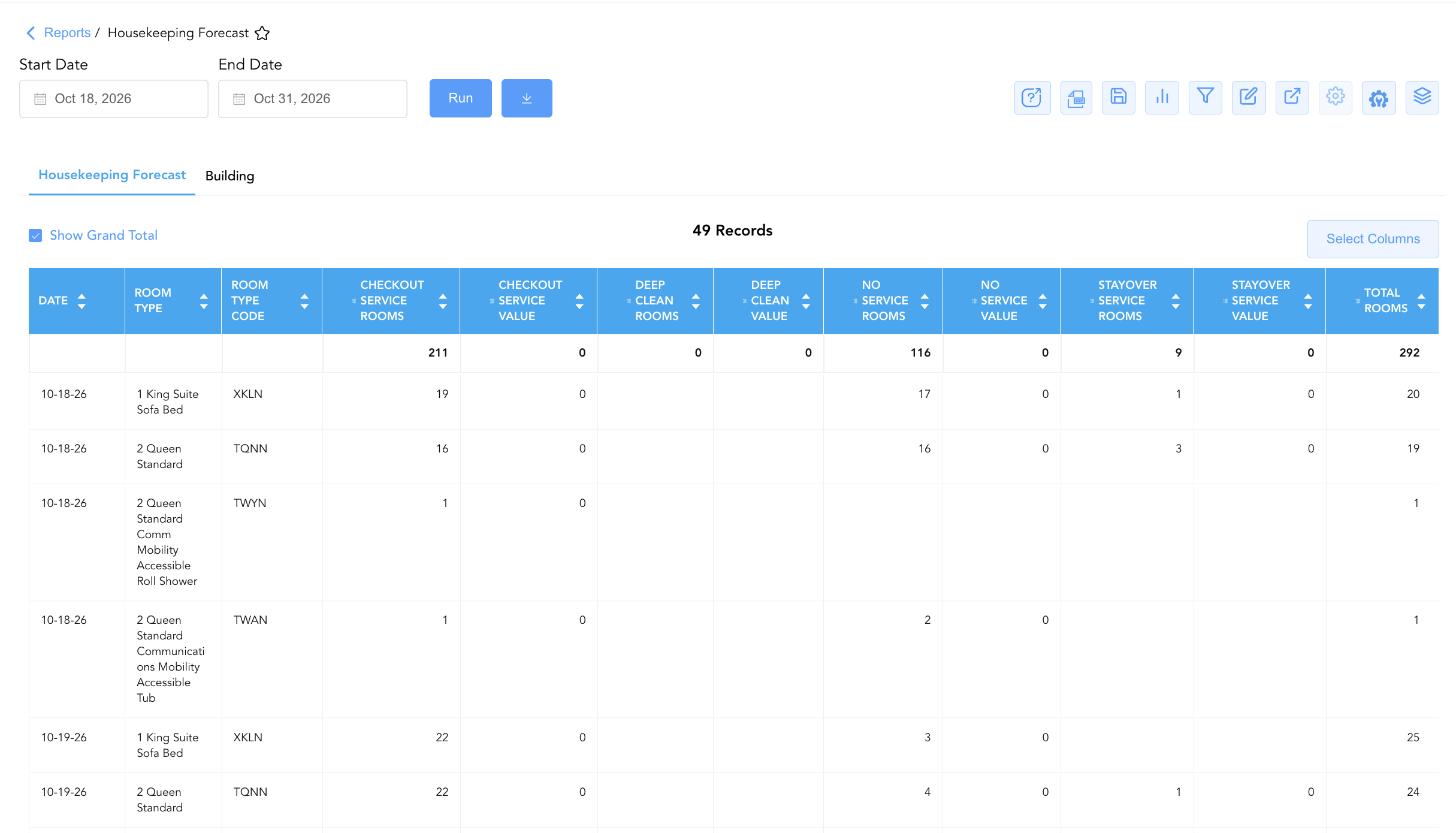
1. Housekeeping Forecast Section (Category Level)
Monitors projected daily room service demand disaggregated by specific room categories and room type codes across the forecast window.
-
Primary Use: Analyzing room category turnover complexity (e.g., King Suites vs. Queen Standards) to assign room attendants and set shift schedules.
-
Key Metrics: Date, Room Type, Room Type Code, Checkout Service Rooms, Checkout Service Value, Deep Clean Rooms, No Service Rooms, Stayover Service Rooms, Stayover Service with Linen Change Rooms, Total Rooms, Total Value.
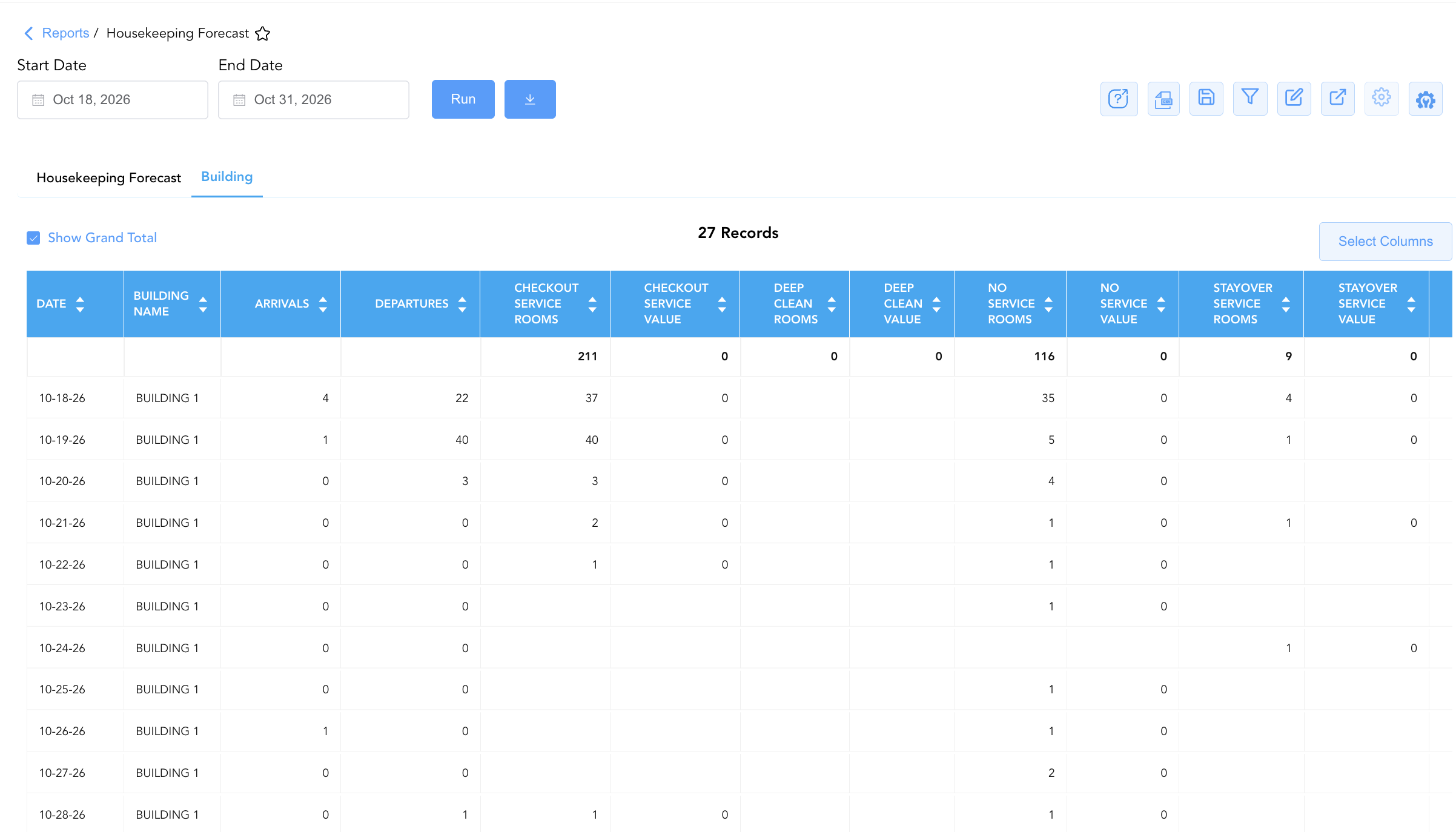
2. Building Section (Facility Level)
Aggregates projected daily room service volumes and cleaning credit totals by physical building structure or wing, integrating expected guest arrival and departure movements.
-
Primary Use: Allocating houseperson utility support, distributing linen inventory across building wings, and aligning floor staffing with guest movement flows.
-
Key Metrics: Date, Building Name, Arrivals, Departures, Checkout Service Rooms, Checkout Service Value, No Service Rooms, Stayover Service Rooms, Total Rooms, Total Value.
Data Dictionary (Dynamic View Columns)
Customize your default view using the Configure (⚙️) icon on the report page. Below is the full data dictionary representing all 20 unique columns available across the 2 report sections, sorted in alphabetical order by column name:
|
Column Name |
Section Applicability |
Description |
Data Source / System Mapping |
Includes Taxes & Fees? |
|
Arrivals |
Section 2 |
Projected count of guest check-in arrivals scheduled for the target date. |
Reservation System > Projected Arrivals |
N/A |
|
Building Name |
Section 2 |
Designation or name of the physical building structure or wing (e.g., |
PMS Setup > Building Structure |
N/A |
|
Checkout Service Rooms |
Both Sections |
Forecasted count of departing rooms requiring full departure turnover cleaning. |
Housekeeping Engine > Projected Checkouts |
N/A |
|
Checkout Service Value |
Both Sections |
Calculated cleaning credit value for forecasted checkout service rooms. |
Calculated: Checkout Rooms x Credit Points |
N/A |
|
Date |
Both Sections |
Calendar date within the forecast window. |
PMS Calendar > Target Date |
N/A |
|
Deep Clean Rooms |
Both Sections |
Forecasted count of rooms scheduled for periodic deep cleaning or heavy maintenance cleans. |
Housekeeping Engine > Scheduled Deep Cleans |
N/A |
|
Deep Clean Value |
Both Sections |
Calculated cleaning credit value for forecasted deep clean rooms. |
Calculated: Deep Clean Rooms x Credit Points |
N/A |
|
Departures |
Section 2 |
Projected count of guest check-out departures scheduled for the target date. |
Reservation System > Projected Departures |
N/A |
|
No Service Rooms |
Both Sections |
Forecasted count of occupied or vacant rooms where no housekeeping service is required or requested. |
Housekeeping Engine > Projected No Service |
N/A |
|
No Service Value |
Both Sections |
Calculated cleaning credit value for no-service rooms. |
Calculated: No Service Rooms x Credit Points |
N/A |
|
Room Type |
Section 1 |
Full commercial name or description of the room category (e.g., |
PMS > Room Category Description |
N/A |
|
Room Type Code |
Section 1 |
Alphanumeric code representing the room category (e.g., |
PMS > Room Category Code |
N/A |
|
Stayover Service Rooms |
Both Sections |
Forecasted count of continuing guest stay rooms requiring daily stayover servicing. |
Housekeeping Engine > Projected Stayovers |
N/A |
|
Stayover Service Value |
Both Sections |
Calculated cleaning credit value for forecasted stayover service rooms. |
Calculated: Stayover Rooms x Credit Points |
N/A |
|
Stayover Service With Linen Change Rooms |
Both Sections |
Forecasted count of continuing stayover rooms scheduled for full bed linen replacement. |
Housekeeping Engine > Projected Linen Changes |
N/A |
|
Stayover Service with Linen Change Value |
Both Sections |
Calculated cleaning credit value for stayover rooms with linen change. |
Calculated: Linen Change Rooms x Credit Points |
N/A |
|
Total Rooms |
Both Sections |
Total aggregated count of forecasted rooms requiring service or maintenance on the target date. |
SUM(Projected Rooms per Date) |
N/A |
|
Total Value |
Both Sections |
Total aggregated cleaning credit points projected for all services on the target date. |
SUM(Projected Credit Values per Date) |
N/A |
Customization & Platform Features
Report Toolbar & Quick Actions
Use the top-right toolbar icons on the report page to manage and export your data view:
|
Icon |
Action / Feature |
Description |

|
Knowledge Article |
Opens the knowledge base article to learn how to interpret this report. |

|
Background Export |
Allows users to download up to 365 days of data directly to their computer in CSV format. |

|
Saved Views |
Saves your column filtering, sorting, and highlight preferences so you can easily reload your custom view later without reconfiguring the report. |

|
Bar Chart |
Displays report data in a visual bar chart format. |

|
Filter |
Opens filter controls to isolate specific data within a column based on your selected criteria. |

|
Highlight |
Highlights column values in a designated color based on selected conditions. |

|
Export |
Exports and downloads the report in various formats (Excel, PDF, CSV) for offline analysis or printing. |

|
Configure |
Opens column selection controls to toggle visibility, reorder columns, or hide rows with all zeros. |

|
Additional Configuration |
Provides advanced report configuration and display formatting options to customize data presentation. |

|
Group By |
Summarize and group report data dynamically in real time. |
Interactive Visualizations & Grouping Controls
-
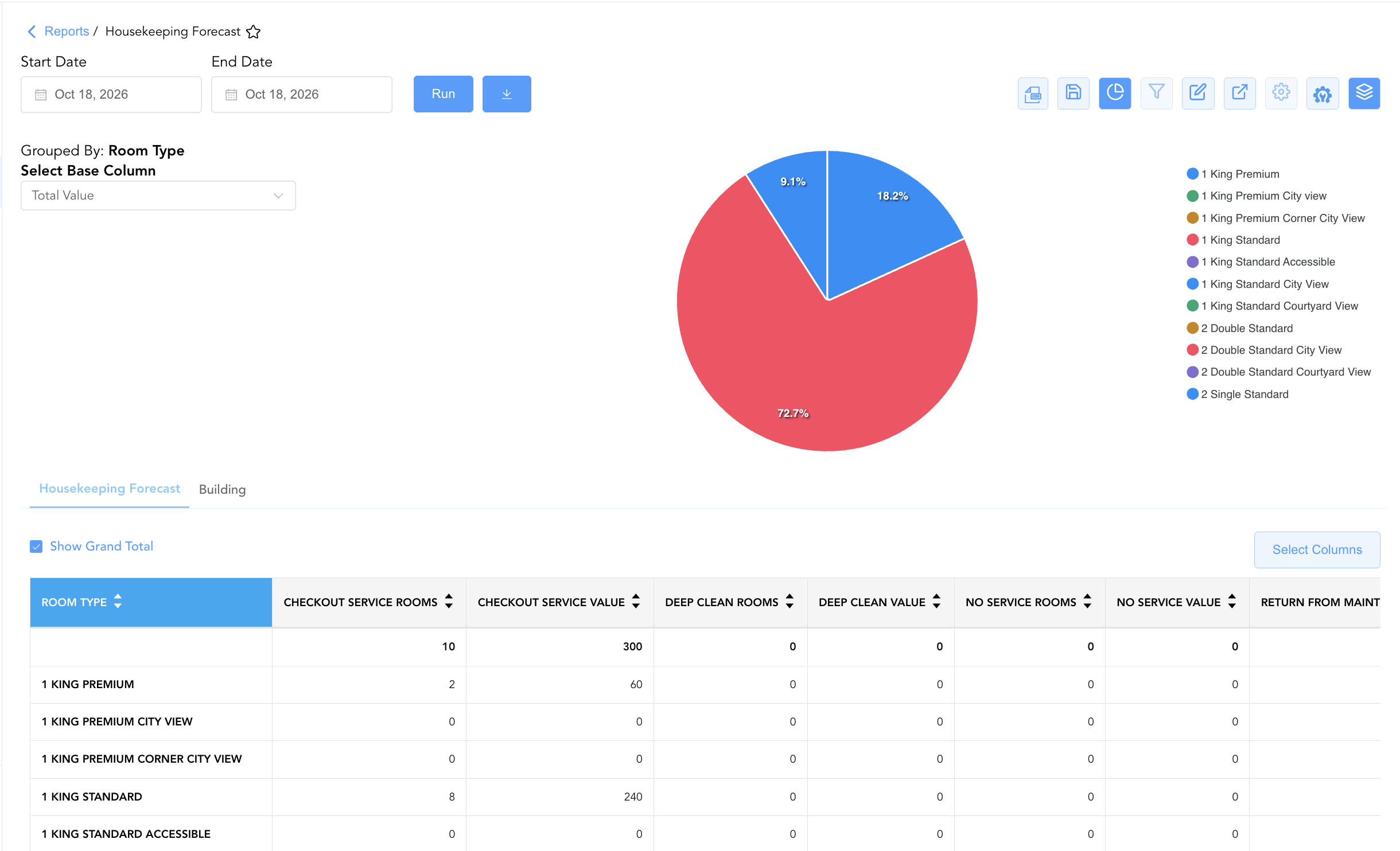
Group By & Pie Chart Visualization: The Housekeeping Forecast report features an interactive pie chart to help analyze projected cleaning task volume and departmental labor requirements. Users can group forecast entries on the fly by Date or Room Type across report tabs to evaluate daily total labor demand or room-category workload distributions. By selecting a metric from the Select Base Column dropdown menu—such as room counts (Rooms) or estimated effort values (Value) across CHECKOUT SERVICE, DEEP CLEAN, or NO SERVICE—the chart dynamically renders percentage share breakdowns accompanied by an interactive color-coded legend.
-
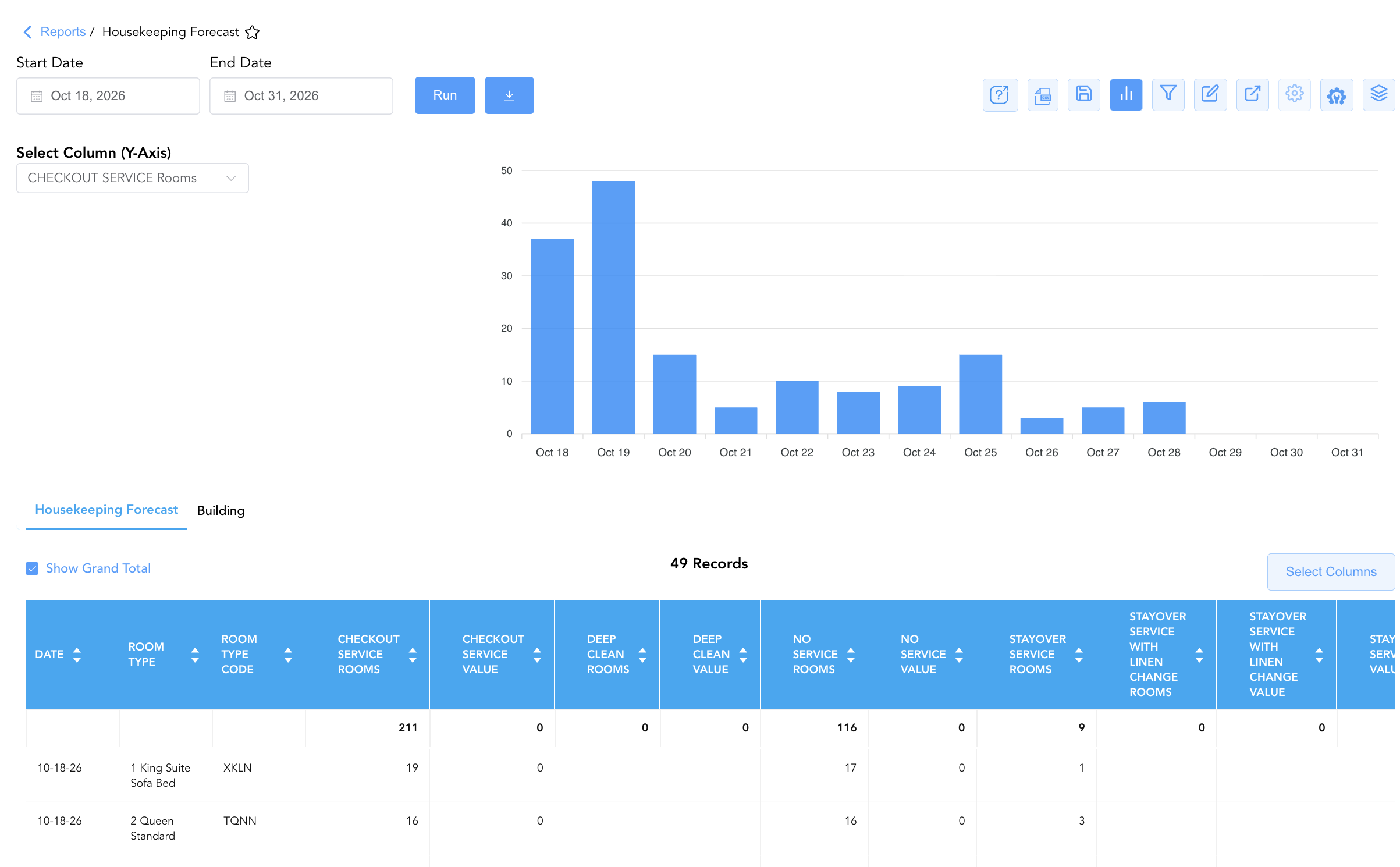
Bar Chart Visualizer: The Housekeeping Forecast report includes an interactive bar chart to help analyze projected cleaning volume and daily labor effort trends over time. By adjusting the Select Column (Y-Axis) dropdown menu, users can dynamically toggle the chart view to plot metrics such as room counts (Rooms) or effort units (Value) across CHECKOUT SERVICE, DEEP CLEAN, or NO SERVICE chronologically alongside the detailed forecast data grid.
Advanced Controls
-
Labor Schedule Integration: Export projected daily credit point values (
Total Value) to align weekly employee shift schedules with expected operational demand. -
Filtering: Filter data by
CHECKOUT SERVICE Rooms > 20to identify high-turnover peak check-out days requiring additional room attendant shifts or houseperson support. -
Highlighting (Conditional Formatting): Apply custom rules to automatically highlight peak turnover dates, high stayover volumes, or heavy deep-clean schedules.
🔗 Related Reports & Next Steps
Within 🧹 Rooms & Facilities & 📋 Operations Analytics / 🛏️ Room Status:
-
Housekeeping Detail– Granular line-item audit tracking individual attendant cleaning speeds, durations, and inspection times.
-
Housekeeping Sheet – Comprehensive multi-section daily housekeeping board, priority dispatch, and ready room matrix.
-
Housekeeping Summary – Streamlined daily operational summary of attendant assignments and real-time room statuses.
-
All Rooms – Master physical room inventory, cleanliness state, and housekeeping schedule manifest.
Cross-Pillar Deep Dives:
-
🛎️ Front Desk & Guest Services: Reconcile forecasted checkout volumes (
CHECKOUT SERVICE Rooms) with the Departures List to anticipate check-out timing and room turnover flow.