
Vacant Room List Report Overview
Parent Hub: 🧹 Rooms & Facilities
Category: 🛏️ Room Status
Target Roles: Executive Housekeepers, Housekeeping Supervisors, Front Office Managers, Front Desk Agents, Maintenance Supervisors, General Managers
Key Value: Serves as a focused operational inventory manifest isolating all physically unoccupied guest rooms on property, tracking room cleanliness states, idle days without guest occupancy, out-of-order conditions, and room turnover readiness to accelerate check-in allocations and prevent revenue loss.
Date Parameter: Current Business Day Only (Dynamic Live Data)
Executive Summary
The Vacant Room List Report is a primary physical inventory control, housekeeping turnover, and room assignment document within the 🛏️ Room Status category of the 🧹 Rooms & Facilities hub. Designed to provide real-time operational visibility over all physically unoccupied guest accommodations, it filters out active in-house stayover rooms to present an unencumbered register of all vacant room inventory across the property.
-
By mapping physical room allocations (
Room Number,Room Type) to historical occupancy metrics (Last Occupied,Days Without Occupancy) and physical cleanliness/maintenance conditions (Room Status, e.g.,Vacant and Ready,Vacant and Dirty,Out of Order and Clean,Out of Order and Dirty,Ready), this report enables housekeeping managers, front desk leads, and maintenance supervisors to identify immediate check-in ready inventory, prioritize dirty vacant rooms for attendant cleaning, audit out-of-order room turnover, and prevent idle rooms from remaining unassigned during high-demand arrival windows.
Key Capabilities
-
Focused Unoccupied Inventory Audit: Isolates all physically vacant rooms across property floors, filtering out occupied stayovers to streamline room assignment decisions.
-
Combined Cleanliness & Maintenance Status Trace: Categorizes unoccupied rooms by both cleanliness state and physical availability (
Room Status, e.g.,Vacant and Ready,Vacant and Dirty,Out of Order and Clean,Out of Order and Dirty). -
Idle Room & Turnover Tracking: Logs the exact date a room was last inhabited (
Last Occupied) and calculates cumulative idle days (Days Without Occupancy) to identify long-vacant rooms requiring refresh cleaning or maintenance inspections. -
Check-In Ready Inventory Isolation: Identifies clean, inspected vacant rooms (
Vacant and Ready,Ready) to communicate immediate check-in availability to front desk agents. -
Out-of-Order (OOO) Impact Monitoring: Flags unoccupied rooms removed from sellable inventory due to maintenance (
Out of Order and Clean,Out of Order and Dirty) to coordinate repair timelines with engineering teams.
Report Views & Functional Breakdown
The Vacant Room List Report presents unoccupied room inventory in a unified single-table master matrix supporting three primary operational perspectives:
┌────────────────────────────────────────────────────────────────────────┐
│                        VACANT ROOM LIST REPORT                         │
├────────────────────────────────────────────────────────────────────────┤
│                         Unified Matrix View                            │
├──────────────────────────┬──────────────────────────┬──────────────────┤
│ 1. Physical Room &       │ 2. Idle Occupancy &      │ 3. Cleanliness & │
│    Category Mapping      │    Turnover History      │    Maintenance   │
└──────────────────────────┴──────────────────────────┴──────────────────┘
1. Physical Room & Category Mapping
Monitors physical room numbers and assigned room category codes across all building floors.
-
Primary Use: Scanning unoccupied rooms by category to pre-block accommodations for arriving guests or assign room walk-ins.
-
Key Metrics: Room Number, Room Type.
2. Idle Occupancy & Turnover History
Tracks historical guest departure dates and cumulative days elapsed since the room was last inhabited.
-
Primary Use: Identifying rooms that have been vacant for extended periods (
Days Without Occupancy) to schedule refresh cleans or air quality checks prior to guest arrival. -
Key Metrics: Last Occupied, Days Without Occupancy, Room Number.
3. Cleanliness & Maintenance Status
Audits real-time cleanliness and out-of-order maintenance flags across all unoccupied rooms.
-
Primary Use: Dispatching room attendants to clean dirty vacant rooms (
Vacant and Dirty), releasing inspected rooms for check-in (Vacant and Ready), and auditing maintenance progress (Out of Order). -
Key Metrics: Room Status, Room Number, Room Type, Days Without Occupancy.
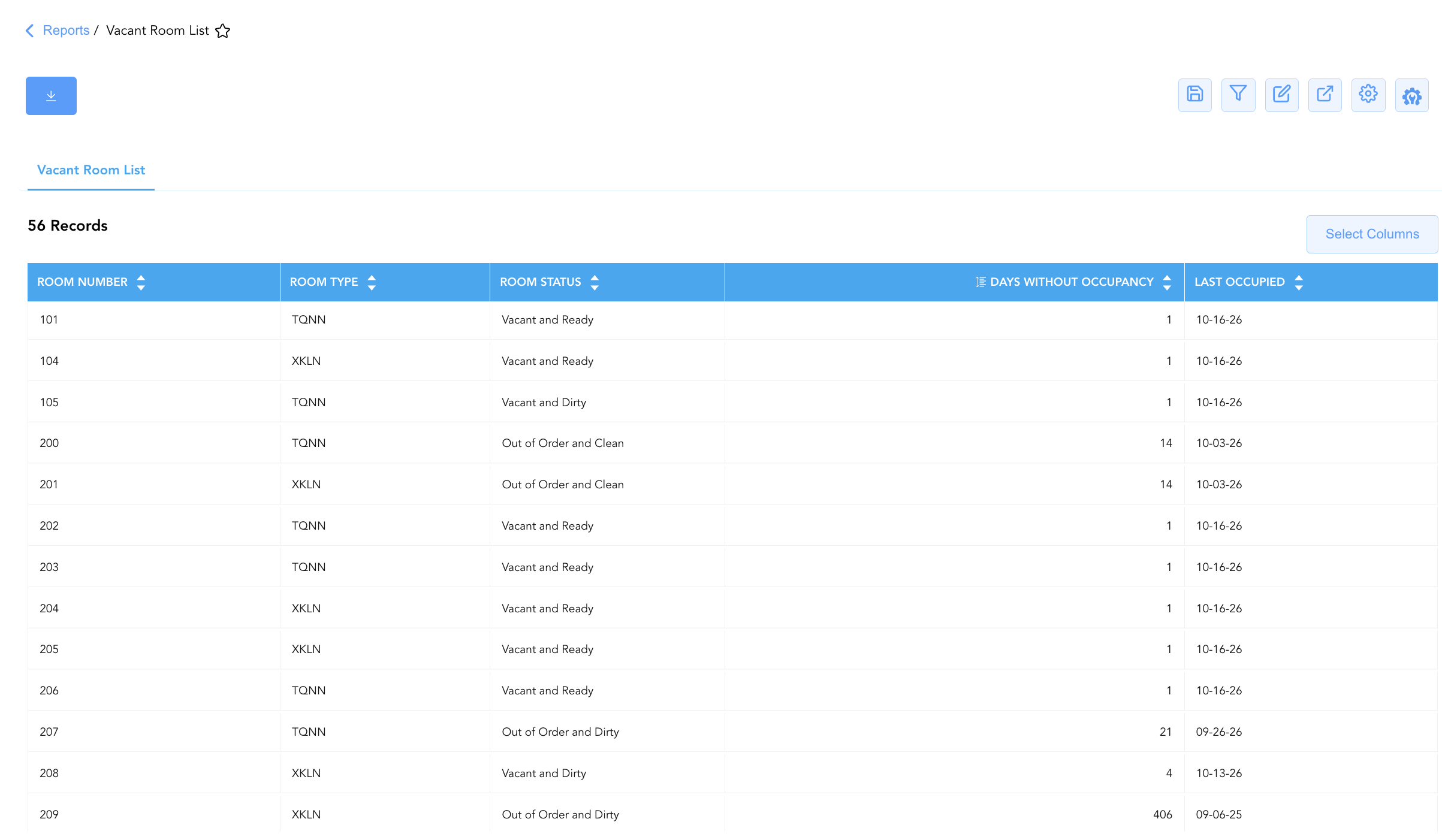
Data Dictionary (Dynamic View Columns)
Customize your default view using the Configure (⚙️) icon on the report page. Below is the full data dictionary representing all 5 dynamic columns available in this report:
|
Column Name |
Description |
Data Source / System Mapping |
Includes Taxes & Fees? |
|
Days Without Occupancy |
Cumulative count of physical days the room has remained unoccupied (Current Date - Last Occupied). |
Calculated: Idle Days Count |
N/A |
|
Last Occupied |
Calendar date when the physical room was last inhabited by a registered guest. |
PMS Inventory Audit > Last Occupied Date |
N/A |
|
Room Number |
Physical guest room number assigned on property (e.g., |
PMS > Physical Room ID |
N/A |
|
Room Status |
Real-time combined physical cleanliness and availability condition (e.g., |
Housekeeping & PMS Engine > Combined Status |
N/A |
|
Room Type |
Alphanumeric code representing the assigned room category (e.g., |
PMS > Room Category Code |
N/A |
Customization & Platform Features
User & Property Preferences
-
Personal Preference: Tailor your individual view by hiding or dragging columns. Your preferences save automatically for future sessions.
-
Property Defaults: System Admins can configure standard default layouts across all property users to streamline operational reporting. To maximize audit efficiency, group the columns into the below logical blocks:
-
Physical Locators & Physical Condition (Cols 1–3):
Room Number|Room Type|Room Status -
Inactivity & Historical Audit Metrics (Cols 4–5):
Days Without Occupancy|Last Occupied
-
Report Toolbar & Quick Actions
Use the top-right toolbar icons on the report page to manage and export your data view:
|
Icon |
Action / Feature |
Description |

|
Knowledge Article |
Opens the knowledge base article to learn how to interpret this report. |

|
Saved Views |
Saves your column filtering, sorting, and highlight preferences so you can easily reload your custom view later without reconfiguring the report. |

|
Filter |
Opens filter controls to isolate specific data within a column based on your selected criteria. |

|
Highlight |
Highlights column values in a designated color based on selected conditions. |

|
Export |
Exports and downloads the report in various formats (Excel, PDF, CSV) for offline analysis or printing. |

|
Configure |
Opens column selection controls to toggle visibility, reorder columns, or hide rows with all zeros. |

|
Additional Configuration |
Provides advanced report configuration and display formatting options to customize data presentation. |
Advanced Controls
-
Shift Board Exporting: Schedule automated periodic exports throughout the day (e.g., 08:00, 12:00, 16:00) to provide front desk agents with updated lists of check-in ready vacant rooms.
-
Filtering: Filter data by
Room Status = Vacant and Dirtyto generate an immediate turnover dispatch sheet for housekeeping attendants. -
Highlighting (Conditional Formatting): Apply custom rules to automatically highlight long-vacant rooms (
Days Without Occupancy > 7), out-of-order rooms (Room Status = Out of Order...), or check-in ready inventory.
🔗 Related Reports & Next Steps
Within 🧹 Rooms & Facilities & 🛏️ Room Status:
-
All Rooms Report – Master physical room inventory, cleanliness state, and housekeeping schedule manifest.
-
Room Detail Report – Master room-by-room physical status, housekeeping, and maintenance audit matrix.
-
Housekeeping Sheet Report – Comprehensive multi-section daily housekeeping board, priority dispatch, and ready room matrix.
-
Pending Room Report – Operational view of unready rooms pre-assigned to expected arriving guests.
Cross-Pillar Deep Dives:
-
🛎️ Front Desk & Guest Services: Reconcile ready vacant rooms (
Room Status = Vacant and ReadyorReady) with Arrivals List Report to assign clean rooms to arriving guests. -
🛠️ Facilities Maintenance: Coordinate out-of-order vacant rooms (
Room Status = Out of Order...) with Maintenance Activity Report to expedite repairs and restore sellable inventory.