
Maintenance Checklist Summary Report Overview
Parent Hub: 🧹 Rooms & Facilities
Category: 🛠️ Facilities Maintenance
Target Roles: Chief Engineers, Maintenance Supervisors, Facilities Leads, Quality Assurance Managers, Executive Housekeepers, General Managers
Key Value: Monitor high-level preventive and corrective maintenance checklist progress, track overall room inspection completion rates, audit engineering sign-off timestamps, and ensure total facility inspection compliance.
Executive Summary
The Maintenance Checklist Summary Report is an essential executive facilities management, engineering audit, and task completion dashboard within the 🛠️ Facilities Maintenance category of the 🧹 Rooms & Facilities hub. Designed to deliver high-level operational visibility over preventive maintenance routines and work order inspection progress, it aggregates checklist execution metrics across property guest rooms and facilities.
-
By mapping work order classifications (
Maintenance Type,Reason) and location parameters (Room Number) to completion progress metrics (Completion Percentage), completion timestamps (Completed At), and technician credentials (Completed By), this report enables chief engineers, facilities supervisors, and property managers to evaluate overall inspection progress (e.g., $100\%$ fully completed vs. $75\%$ partially completed vs. $0\%$ pending), audit engineering sign-offs, and ensure room quality standards are met across all property accommodations.
Key Capabilities
-
High-Level Task Progress Tracking: Measures overall inspection progress per room or work order (
Completion Percentage, e.g., 100%, 75%, or 0%). -
Sign-Off & Audit Accountability: Records the exact date and time a checklist was finalized (
Completed At) along with the email or user ID of the signing technician (Completed By). -
Preventive Maintenance Management: Tracks scheduled preventive maintenance routines (
Maintenance Type = PREVENTATIVE MAINTENANCE,Reason = Guest Room Preventative Maintenance) to prevent equipment failures. -
Location & Room Identification: Correlates checklist completion metrics directly with specific guest room numbers (
Room Number, e.g.,205,720,315,526). -
Partial & Incomplete Inspection Isolation: Highlights partially completed ($75\%$) or unstarted ($0\%$) maintenance checklists to dispatch engineers for immediate task completion.
Report Views & Functional Breakdown
The Maintenance Checklist Summary Report presents aggregated inspection progress data in a unified single-table master matrix supporting three primary operational perspectives:
┌────────────────────────────────────────────────────────────────────────┐
│               MAINTENANCE CHECKLIST SUMMARY REPORT                     │
├────────────────────────────────────────────────────────────────────────┤
│                         Unified Matrix View                            │
├──────────────────────────┬──────────────────────────┬──────────────────┤
│ 1. Work Order & Location │ 2. Completion Progress   │ 3. Sign-Off &    │
│    Classification        │    & Percentage Audit    │    Technician Log│
└──────────────────────────┴──────────────────────────┴──────────────────┘
1. Work Order & Location Classification
Monitors work order categories, inspection reasons, scheduled dates, and assigned guest room numbers.
-
Primary Use: Scanning scheduled preventive maintenance work orders across property rooms and date ranges.
-
Key Metrics: Maintenance Type, Reason, Date, Room Number.
2. Completion Progress & Percentage Audit
Tracks overall task completion percentages to distinguish fully executed inspections from pending or partial work.
-
Primary Use: Identifying partially completed or unstarted maintenance checklists to ensure no inspection steps are skipped.
-
Key Metrics: Completion Percentage, Room Number, Maintenance Type.
3. Sign-Off & Technician Log
Audits final completion timestamps and staff credentials for finalized work orders.
-
Primary Use: Verifying engineering sign-off compliance and holding technicians accountable for timely checklist completion.
-
Key Metrics: Completed At, Completed By, Completion Percentage, Room Number.
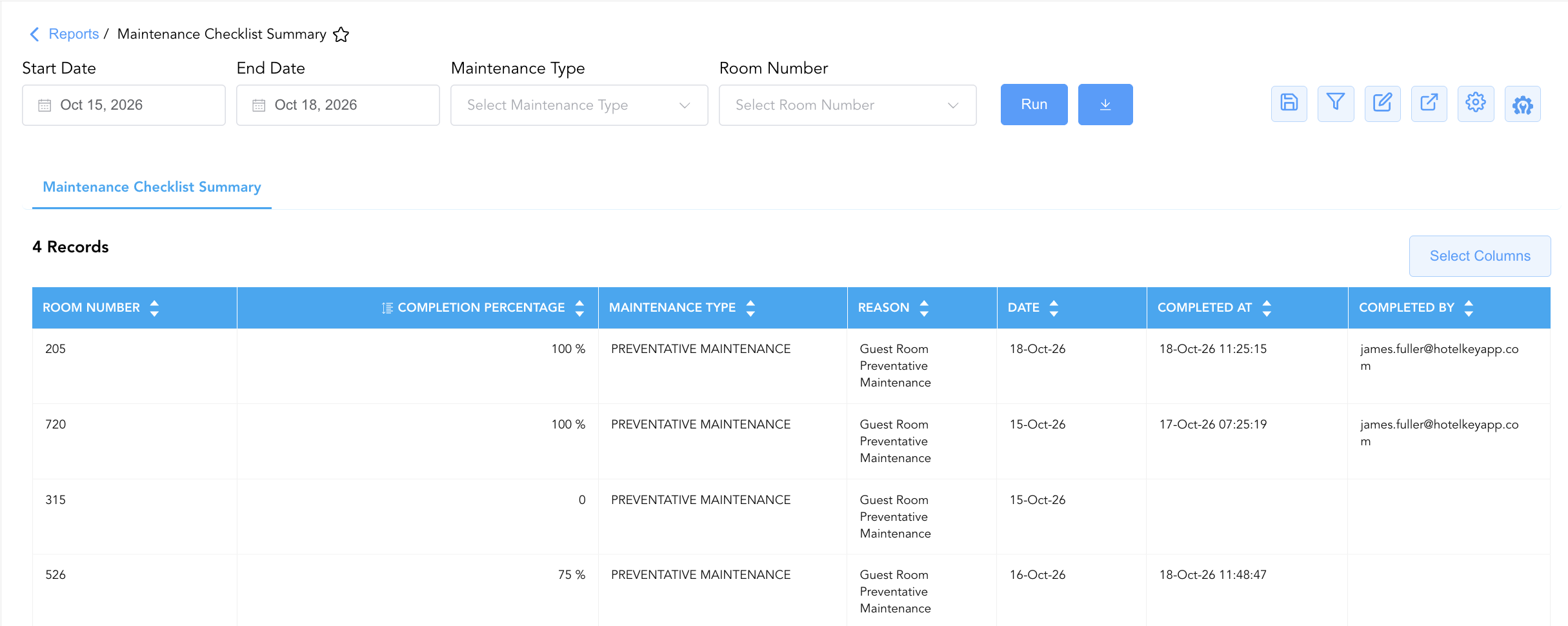
Data Dictionary (Dynamic View Columns)
Customize your default view using the Configure (⚙️) icon on the report page. Below is the full data dictionary representing all 7 dynamic columns available in this report:
|
Column Name |
Description |
Data Source / System Mapping |
Includes Taxes & Fees? |
|
Completed At |
Date and time timestamp recording when the checklist was finalized (Blank if pending). |
Audit Log > Final Completion Timestamp |
N/A |
|
Completed By |
Email address or user credential of the staff member who signed off on the checklist (Blank if pending). |
Audit Log > Signing User ID |
N/A |
|
Completion Percentage |
Numerical ratio representing completed checklist items over total items (e.g., 100%, 75%, 0%). |
Calculated: Completed Items ÷ Total Items |
N/A |
|
Date |
Calendar date on which the maintenance checklist was scheduled or initiated. |
Work Order System > Start Date |
N/A |
|
Maintenance Type |
High-level classification of the maintenance task (e.g., |
Work Order Engine > Task Type |
N/A |
|
Reason |
Primary trigger or descriptive title for the maintenance work order (e.g., |
Work Order Engine > Reason Title |
N/A |
|
Room Number |
Physical guest room number assigned to the maintenance checklist (e.g., |
PMS / Maintenance > Room ID |
N/A |
Customization & Platform Features
User & Property Preferences
-
Personal Preference: Tailor your individual view by hiding or dragging columns. Your preferences save automatically for future sessions.
-
Property Defaults: System Admins can configure standard default layouts across all property users to streamline operational reporting. To maximize audit efficiency, group the columns into the below logical blocks:
-
Physical Locator & Completion KPI (Cols 1–2):
Room Number|Completion Percentage -
Maintenance Type & Reason (Cols 3–4):
Maintenance Type|Reason -
Scheduled & Completion Timestamps (Cols 5–6):
Date|Completed At -
Staff Audit Accountability (Col 7):
Completed By
-
Report Toolbar & Quick Actions
Use the top-right toolbar icons on the report page to manage and export your data view:
|
Icon |
Action / Feature |
Description |

|
Knowledge Article |
Opens the knowledge base article to learn how to interpret this report. |

|
Saved Views |
Saves your column filtering, sorting, and highlight preferences so you can easily reload your custom view later without reconfiguring the report. |

|
Filter |
Opens filter controls to isolate specific data within a column based on your selected criteria. |

|
Highlight |
Highlights column values in a designated color based on selected conditions. |

|
Export |
Exports and downloads the report in various formats (Excel, PDF, CSV) for offline analysis or printing. |

|
Configure |
Opens column selection controls to toggle visibility, reorder columns, or hide rows with all zeros. |

|
Additional Configuration |
Provides advanced report configuration and display formatting options to customize data presentation. |
Advanced Controls
-
Executive Audit Exporting: Schedule automated periodic exports to review overall preventive maintenance compliance and present completion ratios to property leadership.
-
Filtering: Filter data by
Completion Percentage < 1.0to generate an immediate escalation list of pending or partial room inspections. -
Highlighting (Conditional Formatting): Apply custom rules to automatically highlight unstarted checklists (0%), partially completed checklists (75%), or completed sign-offs.
🔗 Related Reports & Next Steps
Within 🧹 Rooms & Facilities & 🛠️ Facilities Maintenance:
-
Maintenance Checklist Details – Itemized line-item audit tracking individual inspection task pass/fail states and technician notes.
-
Maintenance Activity – Comprehensive two-section log tracking overall work order lifecycles and overdue issues.
-
Lock Error – Hardware diagnostic report tracking door lock defects and keyless connectivity failures.
-
All Rooms – Detailed tracking of rooms removed from service for repair.
Cross-Pillar Deep Dives:
-
🛏️ Room Status: Cross-reference fully completed room checklists (
Completion Percentage = 100%) with Room Detail and All Rooms to release inspected rooms for guest check-in.