
Housekeeping Detail Report Overview
Parent Hub: 🧹 Rooms & Facilities
Category: 📋 Operations Analytics
Target Roles: Executive Housekeepers, Housekeeping Supervisors, Floor Operations Managers, Front Office Managers, Quality Assurance Auditors, Operations Directors, General Managers
Key Value: Monitor line-item room attendant productivity, audit cleaning start and end timestamps, evaluate room inspection lag times, analyze cleaning durations across room categories, and optimize daily housekeeping labor efficiency.
Executive Summary
The Housekeeping Detail Report is an essential operational analytics dashboard, room attendant productivity audit, and labor efficiency document within the 📋 Operations Analytics category of the 🧹 Rooms & Facilities hub. Designed to deliver deep, granular visibility into room cleaning execution and inspection workflows, it itemizes every individual room cleaning task recorded across property accommodations over specified date windows.
-
By mapping room attendant credentials (
Housekeeper Name) to operational timeframes (Day Of Week,Date,Cleaning Start Time,Cleaning End Time,Duration), physical room allocations (Room Number,Room Type,Room Type Category), service classifications (Service Type, e.g.,CHECKOUT SERVICE,STAYOVER SERVICE,TOWEL AND TRASH SERVICE), and supervisor quality controls (Inspection End Time,Duration From Clean to Ready,Inspection Quality), this report enables executive housekeepers, supervisors, and operations analysts to measure attendant cleaning speeds, track inspection approval bottlenecks, audit room turnover performance, and optimize daily floor labor allocation.
Key Capabilities
-
Granular Room Attendant Productivity Tracking: Records individual cleaning assignments by attendant (
Housekeeper Name) to measure room cleaning output and labor time distribution. -
Timestamp & Cleaning Duration Analytics: Captures exact cleaning start (
Cleaning Start Time) and end (Cleaning End Time) timestamps to compute precise room cleaning durations (Duration). -
Inspection Lag Time Audit: Tracks supervisor inspection completion timestamps (
Inspection End Time) and calculates the elapsed duration between room cleaning completion and final check-in release (Duration From Clean to Ready). -
Service Type & Category Disaggregation: Categorizes cleaning performance by room type (
Room Type,Room Type Category, e.g., King Suite vs. Double Queen) and service complexity (Service Type, e.g., Checkout vs. Stayover vs. Towel & Trash). -
Quality Assurance & Standards Compliance: Integrates supervisor inspection metrics (
Inspection Quality) to evaluate cleaning thoroughness alongside productivity speed.
Report Views & Functional Breakdown
The Housekeeping Detail Report presents line-item cleaning performance data in a unified single-table master matrix supporting three primary operational perspectives:
┌────────────────────────────────────────────────────────────────────────┐
│                   HOUSEKEEPING DETAIL REPORT                           │
├────────────────────────────────────────────────────────────────────────┤
│                         Unified Matrix View                            │
├──────────────────────────┬──────────────────────────┬──────────────────┤
│ 1. Attendant Identity &  │ 2. Room Allocation &     │ 3. Cleaning &    │
│    Stay Timeframe Trace  │    Service Classification│    Inspection SLA│
└──────────────────────────┴──────────────────────────┴──────────────────┘
1. Attendant Identity & Stay Timeframe Trace
Monitors assigned room attendant credentials, day of week designations, and calendar service dates.
-
Primary Use: Filtering individual attendant performance records and analyzing daily floor cleaning workloads.
-
Key Metrics: Housekeeper Name, Day Of Week, Date, Room Number.
2. Room Allocation & Service Classification
Tracks physical room numbers, specific room type descriptions, broad category classifications, and required service types.
-
Primary Use: Evaluating cleaning complexity across different room layouts (e.g., Suites vs. Standard Rooms) and service types (Checkout vs. Stayover).
-
Key Metrics: Room Number, Room Type, Room Type Category, Service Type.
3. Cleaning & Inspection SLA
Audits start, end, and inspection timestamps to calculate total cleaning durations and supervisor approval lag times.
-
Primary Use: Identifying cleaning duration anomalies, auditing supervisor inspection delays, and verifying room turnover efficiency prior to guest arrival.
-
Key Metrics: Cleaning Start Time, Cleaning End Time, Duration, Inspection End Time, Duration From Clean to Ready, Inspection Quality.
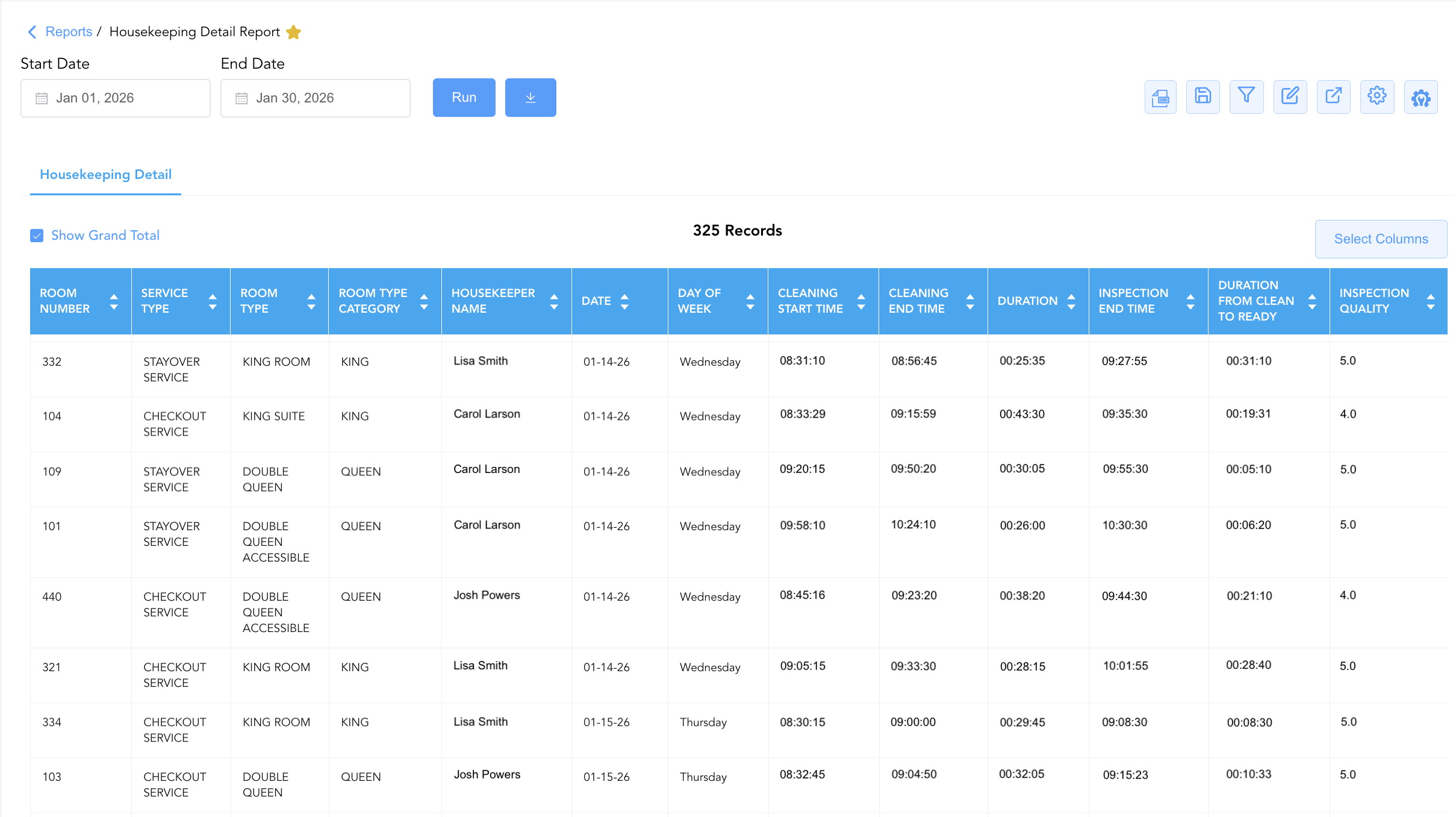
Data Dictionary (Dynamic View Columns)
Customize your default view using the Configure (⚙️) icon on the report page. Below is the full data dictionary sorted in alphabetical order by column name:
|
Column Name |
Description |
Data Source / System Mapping |
Includes Taxes & Fees? |
|
Cleaning End Time |
Timestamp recording when the attendant finished servicing the guest room (Blank if unrecorded). |
Housekeeping Engine > End Timestamp |
N/A |
|
Cleaning Start Time |
Timestamp recording when the attendant began servicing the guest room (Blank if unrecorded). |
Housekeeping Engine > Start Timestamp |
N/A |
|
Date |
Calendar date on which the housekeeping service was logged or executed. |
Housekeeping Engine > Action Date |
N/A |
|
Day Of Week |
Day of the week corresponding to the service date (e.g., |
Calculated: Day of Week |
N/A |
|
Duration |
Calculated labor duration taken by the attendant to complete room cleaning (Cleaning End Time - Cleaning Start Time). |
Calculated: Cleaning Duration |
N/A |
|
Duration From Clean to Ready |
Calculated elapsed time between cleaning completion and final supervisor inspection approval (Inspection End Time - Cleaning End Time). |
Calculated: Inspection Lag Time |
N/A |
|
Housekeeper Name |
Full name of the room attendant assigned to service the room (e.g., |
Housekeeping Engine > Attendant Name |
N/A |
|
Inspection End Time |
Timestamp recording when the floor supervisor completed room inspection and released it for check-in. |
Housekeeping Engine > Inspection Timestamp |
N/A |
|
Inspection Quality |
Supervisor quality assurance score or rating assigned during room inspection audit. |
Housekeeping Engine > Quality Rating |
N/A |
|
Room Number |
Physical guest room number assigned on property (e.g., |
PMS > Physical Room ID |
N/A |
|
Room Type |
Commercial description or code representing the room category (e.g., |
PMS > Room Category Description |
N/A |
|
Room Type Category |
Broad room category classification (e.g., |
PMS > Room Broad Category |
N/A |
|
Service Type |
Classification of housekeeping service required (e.g., |
Housekeeping Engine > Service Type |
N/A |
Customization & Platform Features
User & Property Preferences
-
Personal Preference: Tailor your individual view by hiding or dragging columns. Your preferences save automatically for future sessions.
-
Property Defaults: System Admins can configure standard default layouts across all property users to streamline operational reporting. To maximize audit efficiency, group the columns into the below logical blocks:
-
Physical Locators & Task Classification (Cols 1–4):
Room Number|Service Type|Room Type|Room Type Category -
Staff Accountability & Calendar Context (Cols 5–7):
Housekeeper Name|Date|Day Of Week -
Cleaning Execution & Time Durations (Cols 8–10):
Cleaning Start Time|Cleaning End Time|Duration -
Inspection Timings & Turnaround Durations (Cols 11–13):
Inspection End Time|Duration From Clean to Ready|Inspection Quality
-
Report Toolbar & Quick Actions
Use the top-right toolbar icons on the report page to manage and export your data view:
|
Icon |
Action / Feature |
Description |

|
Knowledge Article |
Opens the knowledge base article to learn how to interpret this report. |

|
Background Export |
Allows users to download up to 365 days of data directly to their computer in CSV format. |

|
Saved Views |
Saves your column filtering, sorting, and highlight preferences so you can easily reload your custom view later without reconfiguring the report. |

|
Filter |
Opens filter controls to isolate specific data within a column based on your selected criteria. |

|
Highlight |
Highlights column values in a designated color based on selected conditions. |

|
Export |
Exports and downloads the report in various formats (Excel, PDF, CSV) for offline analysis or printing. |

|
Configure |
Opens column selection controls to toggle visibility, reorder columns, or hide rows with all zeros. |

|
Additional Configuration |
Provides advanced report configuration and display formatting options to customize data presentation. |
Advanced Controls
-
Labor Productivity Exporting: Schedule automated weekly exports to evaluate room attendant cleaning speeds and compare performance against labor standards.
-
Filtering: Filter data by
Housekeeper Name = Blankto identify unassigned cleaned rooms, or filter byService Type = CHECKOUT SERVICEto audit turnover efficiency. -
Highlighting (Conditional Formatting): Apply custom rules to automatically highlight extended cleaning durations (
Duration > 45 mins), long inspection lag times, or unassigned cleaning tasks.
🔗 Related Reports & Next Steps
Within 🧹 Rooms & Facilities & 📋 Operations Analytics / 🛏️ Room Status:
-
Housekeeping Sheet – Comprehensive multi-section daily housekeeping board, priority dispatch, and ready room matrix.
-
Housekeeping Room Log – Immutable audit trail tracking all room status changes and attendant cleaning actions.
-
Housekeeping Summary – Streamlined daily operational summary of attendant assignments and room statuses.
-
All Rooms – Master physical room inventory, cleanliness state, and housekeeping schedule manifest.
Cross-Pillar Deep Dives:
-
🛎️ Front Desk & Guest Services: Reconcile inspected ready rooms (
Inspection End Time != Blank) with Arrivals List to accelerate check-in allocations.