
Group Recap By Arrival Report Overview
Parent Hub: 🤝 Sales, Groups & Events Reports
Category: 👥 Group Block
Target Roles: Directors of Sales, Group Sales Managers, Convention Services Managers, Revenue Managers, Front Office Managers, Hotel Controllers, General Managers
Key Value: Monitor upcoming group block arrivals sorted chronologically by start date, evaluate contractual rate and billing setups, track block pick-up against remaining inventory, audit cutoff enforcement, and streamline operational arrival handovers for group contracts.
Executive Summary
The Group Recap By Arrival Report is a vital group sales management, arrival schedule audit, and block contract tracking document within the 👥 Group Block category of the 🤝 Sales, Groups & Events Reports hub. Designed to deliver comprehensive operational and commercial visibility over incoming group blocks ordered by their arrival dates, it aggregates master block contract terms, booking channel rules, billing instructions, pick-up realization metrics, and reservation guest counts.
-
By mapping master block identifiers (
Group Name,Group Code,Group Number) and contractual stay windows (Start Date,End Date,Cut Off Date) to booking rules (Pickup Restriction,Method of Guarantee), rate structures (Rate Plan,Pricing Method), billing setups (Billing Type,Billing Remarks), corporate/agency linkages (Company,Travel Agent Company Name,Sales Coordinator), pick-up realization (Available For Pick Up,Reservations,Room Nights), guest demographics (Adults,Children), and financial commitments (Deposit Paid,Group Confirmation Status,Group Remarks), this report enables sales managers, revenue directors, and front office teams to prepare for incoming group check-ins, verify billing routing, manage cut-off dates, and ensure seamless event execution.
Key Capabilities
-
Chronological Arrival Order Tracking: Displays incoming group blocks sorted strictly by contractual arrival date (
Start Date) to align sales handovers with daily front desk operations. -
Master Billing & Routing Verification: Itemizes agreed billing settlement methods (
Billing Type, e.g.,Custom Billing,Consolidated Billing,Individual Billing) and special folio routing instructions (Billing Remarks) prior to group arrival. -
Pick-Up Realization & Inventory Audit: Monitors current reservation pick-up counts (
Reservations), accumulated room night volume (Room Nights), and unreserved block allocations (Available For Pick Up) to manage block wash and public inventory availability. -
Channel Restriction & Guarantee Control: Tracks booking channel distribution rules (
Pickup Restriction, e.g.,Open To All Channels,Restrict to PMS Only) and reservation guarantee policies (Method of Guarantee). -
Cut-Off & Contractual Terms Enforcement: Displays contractual cut-off dates (
Cut Off Date), pricing structures (Pricing Method), deposit postings (Deposit Paid), and contract status (Group Confirmation Status, e.g.,Definitive).
Report Views & Functional Breakdown
The Group Recap By Arrival Report presents master group block contract and arrival data in a unified single-table master matrix supporting three primary operational perspectives:
┌────────────────────────────────────────────────────────────────────────┐
│                   GROUP RECAP BY ARRIVAL REPORT                        │
├────────────────────────────────────────────────────────────────────────┤
│                         Unified Matrix View                            │
├──────────────────────────┬──────────────────────────┬──────────────────┤
│ 1. Group Identity &      │ 2. Billing Setup &       │ 3. Pick-Up Pace  │
│    Stay Timeframe Trace  │    Contractual Terms     │    & Guest Count │
└──────────────────────────┴──────────────────────────┴──────────────────┘
1. Group Identity & Stay Timeframe Trace
Monitors master block names, alphanumeric block codes, PMS group numbers, attached company/agency profiles, and contractual arrival/departure dates.
-
Primary Use: Scanning upcoming group arrivals by date and identifying account managers and corporate profile attachments.
-
Key Metrics: Start Date, End Date, Group Name, Group Code, Group Number, Company, Travel Agent Company Name, Sales Coordinator.
2. Billing Setup & Contractual Terms
Tracks agreed billing settlement types, special folio remarks, pricing structures, rate codes, channel restrictions, and deposit statuses.
-
Primary Use: Reviewing master billing setups before guest arrival to ensure charges route accurately to group master folios or individual guests.
-
Key Metrics: Billing Type, Billing Remarks, Pricing Method, Rate Plan, Pickup Restriction, Method of Guarantee, Deposit Paid, Group Confirmation Status.
3. Pick-Up Pace & Guest Count
Audits reserved room counts, occupied room nights, remaining pick-up availability, cut-off dates, and registered guest headcounts.
-
Primary Use: Evaluating block pick-up realization prior to cut-off dates and projecting front desk arrival staffing and breakfast requirements.
-
Key Metrics: Available For Pick Up, Reservations, Room Nights, Cut Off Date, Adults, Children, Group Remarks.
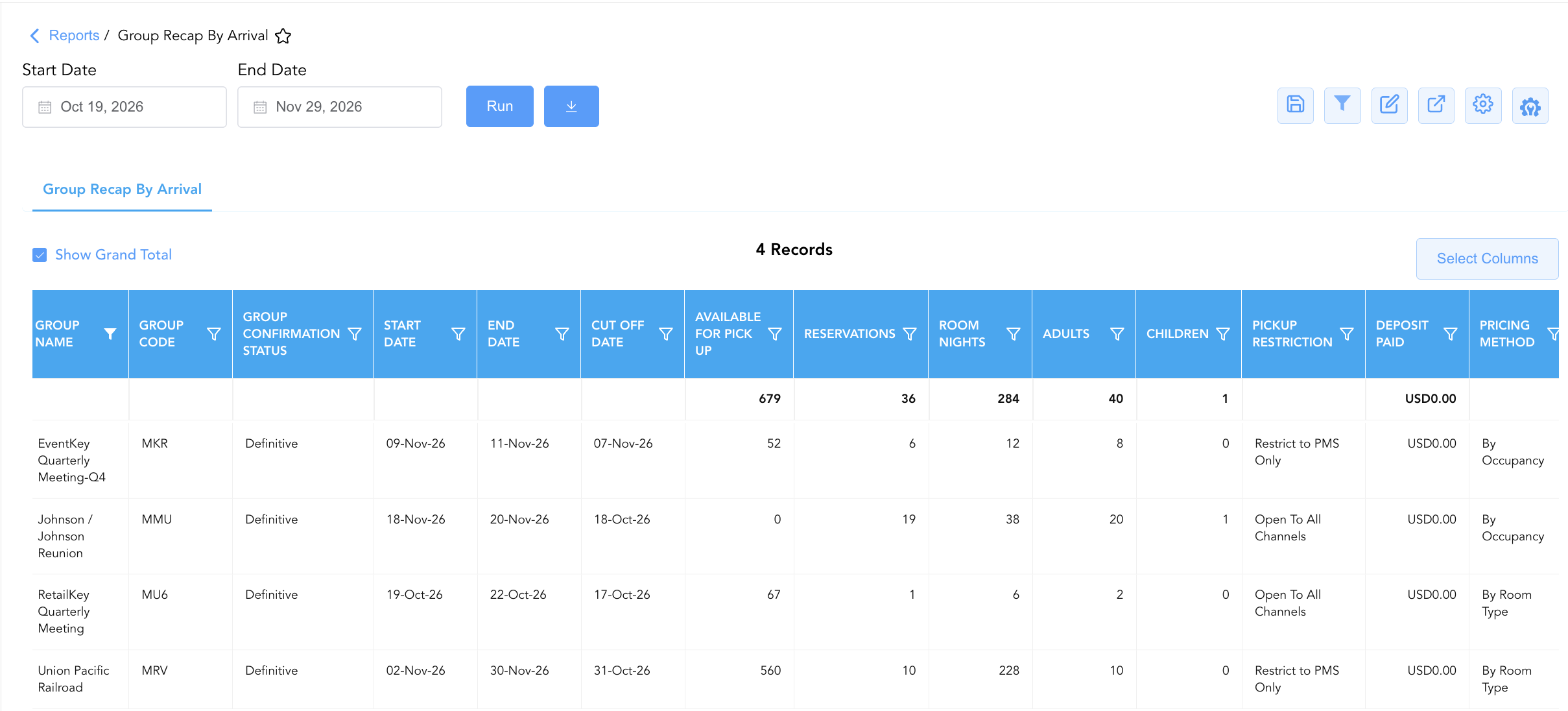
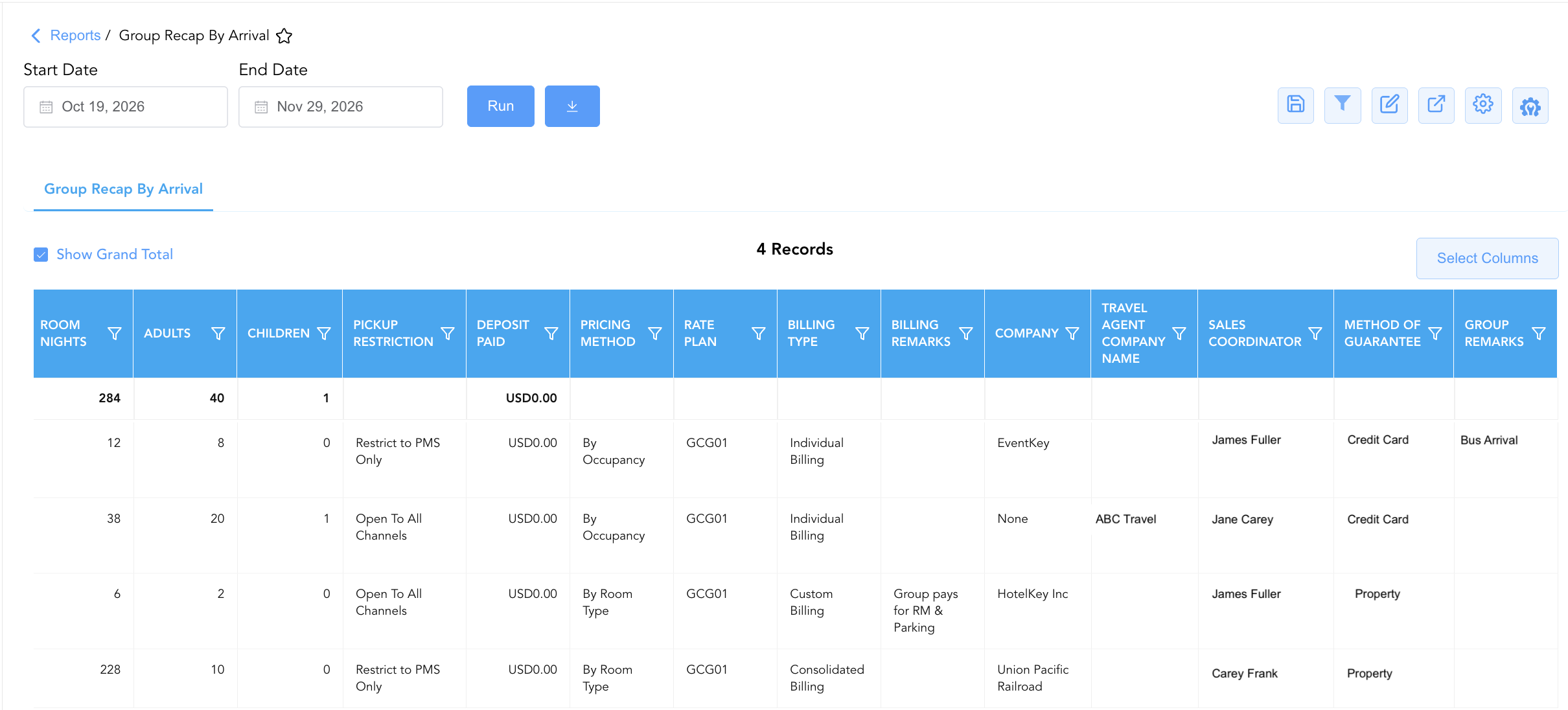
Data Dictionary (Dynamic View Columns)
Customize your default view using the Configure (⚙️) icon on the report page. Below is the full data dictionary representing all 23 dynamic columns available in this report, sorted in alphabetical order by column name:
|
Column Name |
Description |
Data Source / System Mapping |
Includes Taxes & Fees? |
|---|---|---|---|
|
Adults |
Total registered adult headcount across reservations booked under the group block. |
Group Res Engine > Adult Count |
N/A |
|
Available For Pick Up |
Count of remaining unreserved rooms in the group block available for attendee pick-up. |
Group Block Engine > Remaining Allocation |
N/A |
|
Billing Remarks |
Special billing notes, folio routing instructions, or payment terms linked to the group contract. |
Group Block Master > Billing Notes |
N/A |
|
Billing Type |
Method of folio payment and billing settlement configured for the group block (e.g., |
Group Block Master > Settlement Type |
N/A |
|
Children |
Total registered child headcount across reservations booked under the group block. |
Group Res Engine > Child Count |
N/A |
|
Company |
Name of the corporate company profile attached to the group block (e.g., |
Account Master > Profile Name |
N/A |
|
Cut Off Date |
Contractual cut-off date after which unpicked-up group block allocations release back to general property inventory. |
Group Block Master > Cutoff Date |
N/A |
|
Deposit Paid |
Monetary advance deposit amount collected and posted toward the group block. |
Group Ledger > Deposit Posted |
Yes |
|
End Date |
Contractual end date (check-out date) of the group block stay window. |
Group Block Master > Departure Date |
N/A |
|
Group Code |
Alphanumeric short block code assigned to identify the group in the PMS/CRS (e.g., |
Group Block Master > Block Code |
N/A |
|
Group Confirmation Status |
Official contract status of the group block (e.g., |
Group Block Master > Status Code |
N/A |
|
Group Name |
Official descriptive title or event name of the group block (e.g., |
Group Block Master > Block Name |
N/A |
|
Group Number |
Primary unique master identification number assigned to the group block in the PMS (e.g., |
Group Block Master > Group ID |
N/A |
|
Group Remarks |
General operational notes or special event handling instructions recorded on the group profile. |
Group Block Master > General Notes |
N/A |
|
Method of Guarantee |
Required reservation guarantee type or credit card policy attached to the group block. |
Group Block Master > Guarantee Policy |
N/A |
|
Pickup Restriction |
Channel distribution restriction governing how group reservations can be booked (e.g., |
Group Block Master > Distribution Rule |
N/A |
|
Pricing Method |
Pricing structure model applied to the group block rate agreement (e.g., |
Group Block Master > Rate Model |
N/A |
|
Rate Plan |
Contracted group rate code linked to the block agreement (e.g., |
Group Block Master > Attached Rate |
N/A |
|
Reservations |
Total numerical count of attendee reservations picked up under the group block. |
Group Res Engine > Booked Count |
N/A |
|
Room Nights |
Total cumulative room nights picked up across all reservations under the group block. |
Group Res Engine > Total Nights |
N/A |
|
Sales Coordinator |
Full name of the sales manager or coordinator managing the group account. |
Group Block Master > Account Owner |
N/A |
|
Start Date |
Contractual start date (arrival date) of the group block stay window. |
Group Block Master > Arrival Date |
N/A |
|
Travel Agent Company Name |
Name of the travel agency or intermediary profile linked to the group block. |
Travel Agency Profile > Company Name |
N/A |
Customization & Platform Features
User & Property Preferences
-
Personal Preference: Tailor your individual view by hiding or dragging columns. Your preferences save automatically for future sessions.
-
Property Defaults: System Admins can configure standard default layouts across all property users to streamline operational reporting. To maximize audit efficiency, group the columns into the below logical blocks:
-
Block Identification & Confirmation Status (Cols 1–4):
Group Name|Group Code|Group Number|Group Confirmation Status -
Event Schedule & Cutoff Dates (Cols 5–7):
Start Date|End Date|Cut Off Date -
Pickup Availability & Conversion Volume (Cols 8–12):
Available For Pick Up|Reservations|Room Nights|Adults|Children -
Financial Deposit & Pricing Configuration (Cols 13–15):
Deposit Paid|Pricing Method|Rate Plan -
Billing Setup & Account Metadata (Cols 16–20):
Billing Type|Billing Remarks|Company|Travel Agent Company Name|Sales Coordinator -
Distribution Restrictions & Remarks (Cols 21–23):
Pickup Restriction|Method of Guarantee|Group Remarks
-
Report Toolbar & Quick Actions
Use the top-right toolbar icons on the report page to manage and export your data view:
|
Icon |
Action / Feature |
Description |

|
Knowledge Article |
Opens the knowledge base article to learn how to interpret this report. |

|
Saved Views |
Saves your column filtering, sorting, and highlight preferences so you can easily reload your custom view later without reconfiguring the report. |

|
Filter |
Opens filter controls to isolate specific data within a column based on your selected criteria. |

|
Highlight |
Highlights column values in a designated color based on selected conditions. |

|
Export |
Exports and downloads the report in various formats (Excel, PDF, CSV) for offline analysis or printing. |

|
Configure |
Opens column selection controls to toggle visibility, reorder columns, or hide rows with all zeros. |

|
Additional Configuration |
Provides advanced report configuration and display formatting options to customize data presentation. |
Advanced Controls
-
Pre-Arrival Billing Audits: Filter data by
Start Datewithin the next 7 days to reviewBilling TypeandBilling Remarksfor upcoming group arrivals and ensure routing rules are active. -
Cut-Off Date Inventory Recovery: Filter by
Cut Off Dateto identify blocks reaching contractual cutoff and release unpicked rooms (Available For Pick Up) back to general inventory. -
Highlighting (Conditional Formatting): Apply custom rules to automatically highlight impending arrivals (
Start Date <= Today + 3), unpicked blocks (Available For Pick Up > 10), or unpaid required deposits.
🔗 Related Reports & Next Steps
Within 🤝 Sales, Groups & Events Reports & 👥 Group Block:
-
Group Activity Report – Two-section report tracking operational stay statistics and financial revenue production across group blocks.
-
Group Pickup Details – Daily block inventory pick-up velocity and contractual release rule tracking.
-
Group Rooming List – Detailed attendee reservation list associated with active group blocks.
-
Group Ledger – Financial transaction ledger tracking master account charges, payments, and outstanding balances.
Cross-Pillar Deep Dives:
-
🛎️ Front Desk & Guest Services: Reconcile group recap arrivals (
Start Date) with Today's Guests and Arrivals List to ensure smooth check-in handling. -
📊 Financial & Revenue Management: Cross-reference remaining block allocations (
Available For Pick Up) with occupancy forecast and history to optimize public rate availability.