
Company Analysis Report Overview
Parent Hub: 🤝 Sales, Groups & Events Reports
Category: 🏢 Corporate Accounts
Target Roles: Directors of Sales, Corporate Account Managers, Revenue Managers, General Managers, Hotel Controllers, Regional Sales Leads
Key Value: Evaluate monthly and annual corporate account production, track company-driven accommodation, food, and ancillary revenues, analyze room night volume alongside cancellations and no-shows, and audit negotiated account performance.
Executive Summary
The Company Analysis Report is a vital corporate sales dashboard, revenue performance matrix, and account production tracking document within the 🏢 Corporate Accounts category of the 🤝 Sales, Groups & Events Reports hub. Designed to deliver clear month-by-month and annual performance visibility, it itemizes both financial revenues and room stay statistics associated with corporate account profiles across the calendar year.
-
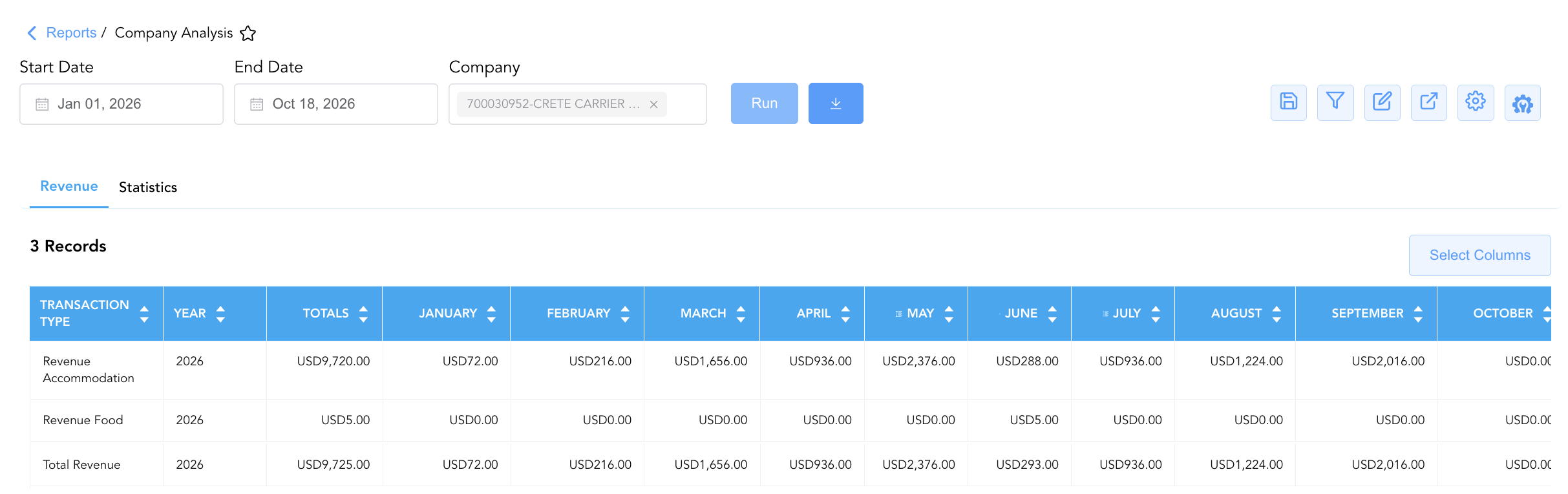
Flexible Account Filtering: Users can run this report without selecting a specific company account to generate an aggregated sum of overall property-wide corporate production, OR apply a filter for a specific corporate account (e.g., HotelKey, Inc.) to isolate and analyze production strictly for that selected account.
-
By organizing corporate production data into 2 defined report sections: Revenue and Statistics, this report enables sales directors, corporate account managers, and revenue leaders to separate financial postings (
Revenue) from operational volume metrics (Statistics). It maps annual reporting periods (Year) and monthly performance columns (JanuarythroughDecember, plusTotals) against financial posting types (Revenue Accommodation,Revenue Food,Revenue Other,Total Revenue) and room movement categories (Arrival Rooms,Cancelled Rooms,Day Use Rooms,Departure Rooms,No Show Rooms,Room Nights).
Key Capabilities
-
Two-Section Production Matrix: Separates monetary financial performance (
Revenue) from operational volume counters (Statistics) for streamlined sales auditing. -
Macro & Account-Specific Reporting Flexibility: Supports unrestricted property-wide execution to audit overall corporate market segment production, or single-account filtering (e.g., HotelKey, Inc.) to review individual negotiated contract performance.
-
Full-Year Monthly Trend Analysis: Spans all 12 calendar months (
JanuarythroughDecember) alongside cumulative annual totals (Totals) to identify corporate booking seasonality and peak travel months. -
Revenue Category Breakdown: Disaggregates gross corporate revenue into core room charges (
Revenue Accommodation), dining/beverage spend (Revenue Food), and incidental or meeting charges (Revenue Other). -
Room Movement & Slippage Tracking: Monitors actual corporate room night volume (
Room Nights,Arrival Rooms,Departure Rooms,Day Use Rooms) alongside account attrition and slippage (Cancelled Rooms,No Show Rooms).
Report Views & Functional Breakdown
The Company Analysis Report presents corporate account performance data across 2 defined sections:
┌────────────────────────────────────────────────────────────────────────┐
│                        COMPANY ANALYSIS REPORT                         │
├────────────────────────────────────────────────────────────────────────┤
│                       2 Defined Report Sections                        │
├──────────────────────────┬──────────────────────────┬──────────────────┤
│ 1. Revenue Section       │ 2. Statistics Section    │                  │
│    (Financial Postings)  │    (Room Night Volume)   │                  │
└──────────────────────────┴──────────────────────────┴──────────────────┘
1. Revenue Section
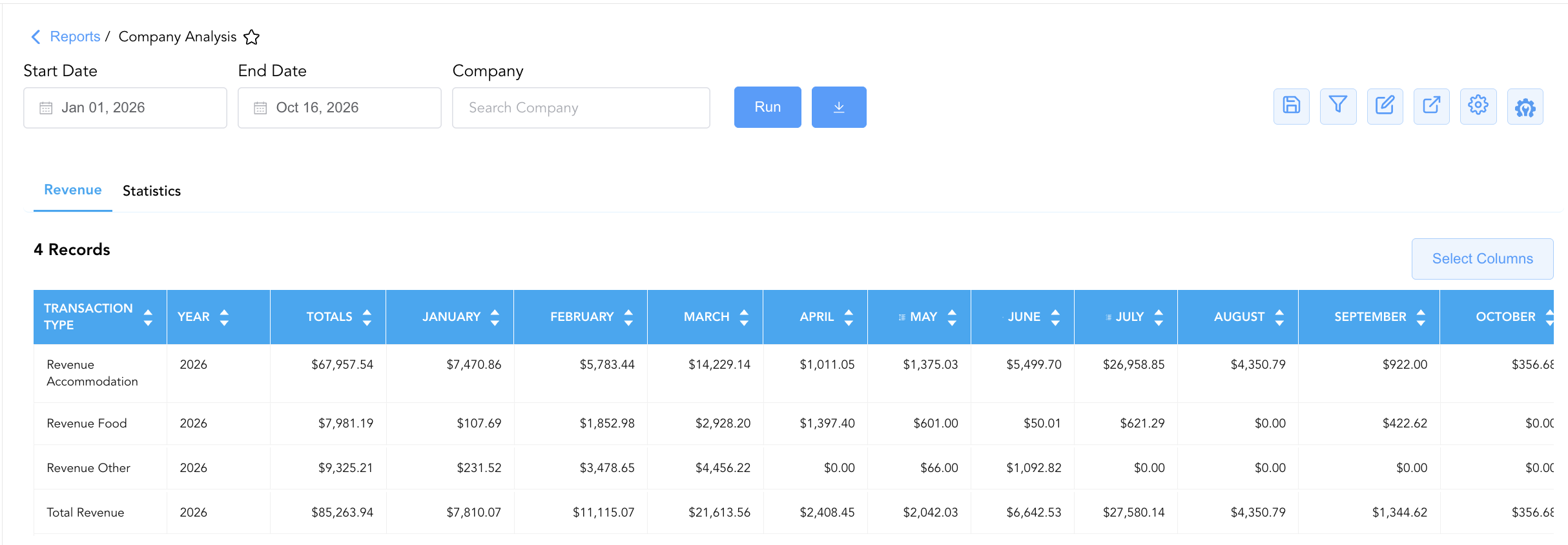
Monitors monetary financial posting totals generated by corporate accounts disaggregated across monthly calendar columns.
-
Primary Use: Evaluating corporate account spend, auditing room rate revenue versus food/beverage spend, and reviewing account contract threshold fulfillment.
-
Key Metrics: Transaction Type (
Revenue Accommodation,Revenue Food,Revenue Other,Total Revenue), Year, January – December, Totals.
2. Statistics Section
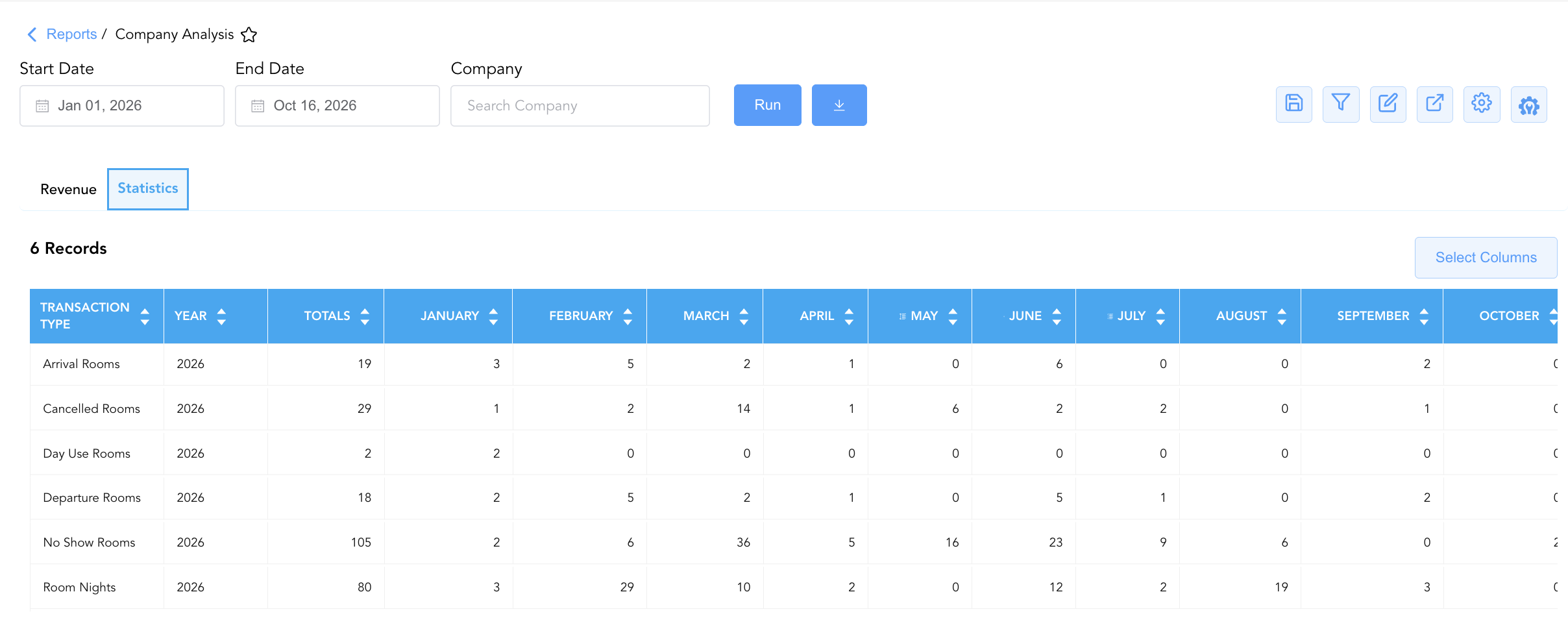
Tracks physical room volume, arrival/departure counts, and reservation turnover metrics generated by corporate accounts.
-
Primary Use: Analyzing corporate room night production, evaluating account cancellation ratios, and identifying high no-show patterns.
-
Key Metrics: Transaction Type (
Arrival Rooms,Cancelled Rooms,Day Use Rooms,Departure Rooms,No Show Rooms,Room Nights), Year, January – December, Totals.
Data Dictionary (Dynamic View Columns)
Customize your default view using the Configure (⚙️) icon on the report page. Below is the full data dictionary representing all 15 unique columns available across the 2 report sections, sorted in alphabetical order by column name:
💰 Financial Posting Logic: All monetary figures in the Revenue section reflect net posted charges inclusive of applied taxes and fees where configured in corporate rate rules.
|
Column Name |
Description |
Data Source / System Mapping |
Includes Taxes & Fees? |
|---|---|---|---|
|
Totals |
Aggregated annual sum across all 12 calendar months for the specified transaction type. |
SUM(January – December) |
🟢 Yes |
|
Transaction Type |
Specific financial revenue category ( |
Corporate Ledger > Metric Code |
N/A |
|
Year |
Calendar year for which corporate account production data is reported (e.g., |
Corporate Ledger > Fiscal Year |
N/A |
|
January |
Monthly financial revenue or statistical metric total for January. |
Corporate Account Ledger > January Sum |
🟢 Yes |
|
February |
Monthly financial revenue or statistical metric total for February. |
Corporate Account Ledger > February Sum |
🟢 Yes |
|
March |
Monthly financial revenue or statistical metric total for March. |
Corporate Account Ledger > March Sum |
🟢 Yes |
|
April |
Monthly financial revenue or statistical metric total for April. |
Corporate Account Ledger > April Sum |
🟢 Yes |
|
May |
Monthly financial revenue or statistical metric total for May. |
Corporate Account Ledger > May Sum |
🟢 Yes |
|
June |
Monthly financial revenue or statistical metric total for June. |
Corporate Account Ledger > June Sum |
🟢 Yes |
|
July |
Monthly financial revenue or statistical metric total for July. |
Corporate Account Ledger > July Sum |
🟢 Yes |
|
August |
Monthly financial revenue or statistical metric total for August. |
Corporate Account Ledger > August Sum |
🟢 Yes |
|
September |
Monthly financial revenue or statistical metric total for September. |
Corporate Account Ledger > September Sum |
🟢 Yes |
|
October |
Monthly financial revenue or statistical metric total for October. |
Corporate Account Ledger > October Sum |
🟢 Yes |
|
November |
Monthly financial revenue or statistical metric total for November. |
Corporate Account Ledger > November Sum |
🟢 Yes |
|
December |
Monthly financial revenue or statistical metric total for December. |
Corporate Account Ledger > December Sum |
🟢 Yes |
Customization & Platform Features
User & Property Preferences
-
Personal Preference: Tailor your individual view by hiding or dragging columns. Your preferences save automatically for future sessions.
-
Property Defaults: System Admins can configure standard default layouts across all property users to streamline operational reporting. To maximize audit efficiency, group the columns into the below logical blocks:
-
Standardized Optimal Layout (Both Sections)
-
Transaction Identifiers & Annual Total (Cols 1–3):
Transaction Type|Year|Totals -
Monthly Breakdown (Cols 4–15):
January|February|March|April|May|June|July|August|September|October|November|December
-
-
Report Toolbar & Quick Actions
Use the top-right toolbar icons on the report page to manage and export your data view:
|
Icon |
Action / Feature |
Description |

|
Knowledge Article |
Opens the knowledge base article to learn how to interpret this report. |

|
Saved Views |
Saves your column filtering, sorting, and highlight preferences so you can easily reload your custom view later without reconfiguring the report. |

|
Filter |
Opens filter controls to isolate specific data within a column based on your selected criteria. |

|
Highlight |
Highlights column values in a designated color based on selected conditions. |

|
Export |
Exports and downloads the report in various formats (Excel, PDF, CSV) for offline analysis or printing. |

|
Configure |
Opens column selection controls to toggle visibility, reorder columns, or hide rows with all zeros. |

|
Additional Configuration |
Provides advanced report configuration and display formatting options to customize data presentation. |
Advanced Controls
-
Annual Contract Renewal Audits: Run the report for a specific corporate client prior to rate renegotiations to verify if negotiated room night thresholds (
TotalsunderRoom Nights) were achieved. -
Filtering: Leave the Company Account filter blank to generate total property-wide corporate production, or select an individual company profile from the search dropdown.
-
Highlighting (Conditional Formatting): Apply custom rules to automatically highlight peak revenue months, high no-show months (
No Show Rooms > 10), or low room night volume quarters.
🔗 Related Reports & Next Steps
Within 🤝 Sales, Groups & Events Reports & 🏢 Corporate Accounts:
-
Company Accounts – Summary and detailed production breakdown across all active corporate account profiles.
-
Direct Bill Ledger Details – Detailed transaction ledger tracking direct-bill charges, payments, and outstanding balances for corporate accounts.
-
Group Reservation Details – Performance and room block realization matrix for group contracts and event blocks.
Cross-Pillar Deep Dives:
-
🛎️ Front Desk & Guest Services: Reconcile corporate arrivals (Arrivals List) with In House Guest Balances to monitor direct-bill credit limits.
-
📊 Financial & Revenue Management: Cross-reference corporate rate revenues (
Revenue Accommodation) with monthly financial trial balances and Booking Pace.