
Group Room List Report Overview
Parent Hub: 🤝 Sales, Groups & Events Reports
Category: 👥 Group Block
Target Roles: Group Sales Managers, Front Office Managers, Convention Services Managers, Front Desk Supervisors, Executive Housekeepers, Hotel Controllers
Key Value: Monitor individual attendee room assignments within group blocks, verify guest rooming list Pickups, audit rate and billing routing parameters, track special guest stay requests, and ensure seamless front desk check-in readiness for group arrivals.
Executive Summary
The Group Room List Report (also designated as the Group Rooming List Report) is a vital operational management, guest arrival audit, and rooming list verification document within the 👥 Group Block category of the 🤝 Sales, Groups & Events Reports hub. Designed to provide line-item transparency over attendee reservations booked under active group contracts, it itemizes guest names, room assignments, stay windows, rate structures, financial postings, and special handling preferences across specified date ranges.
-
By mapping master block identifiers (
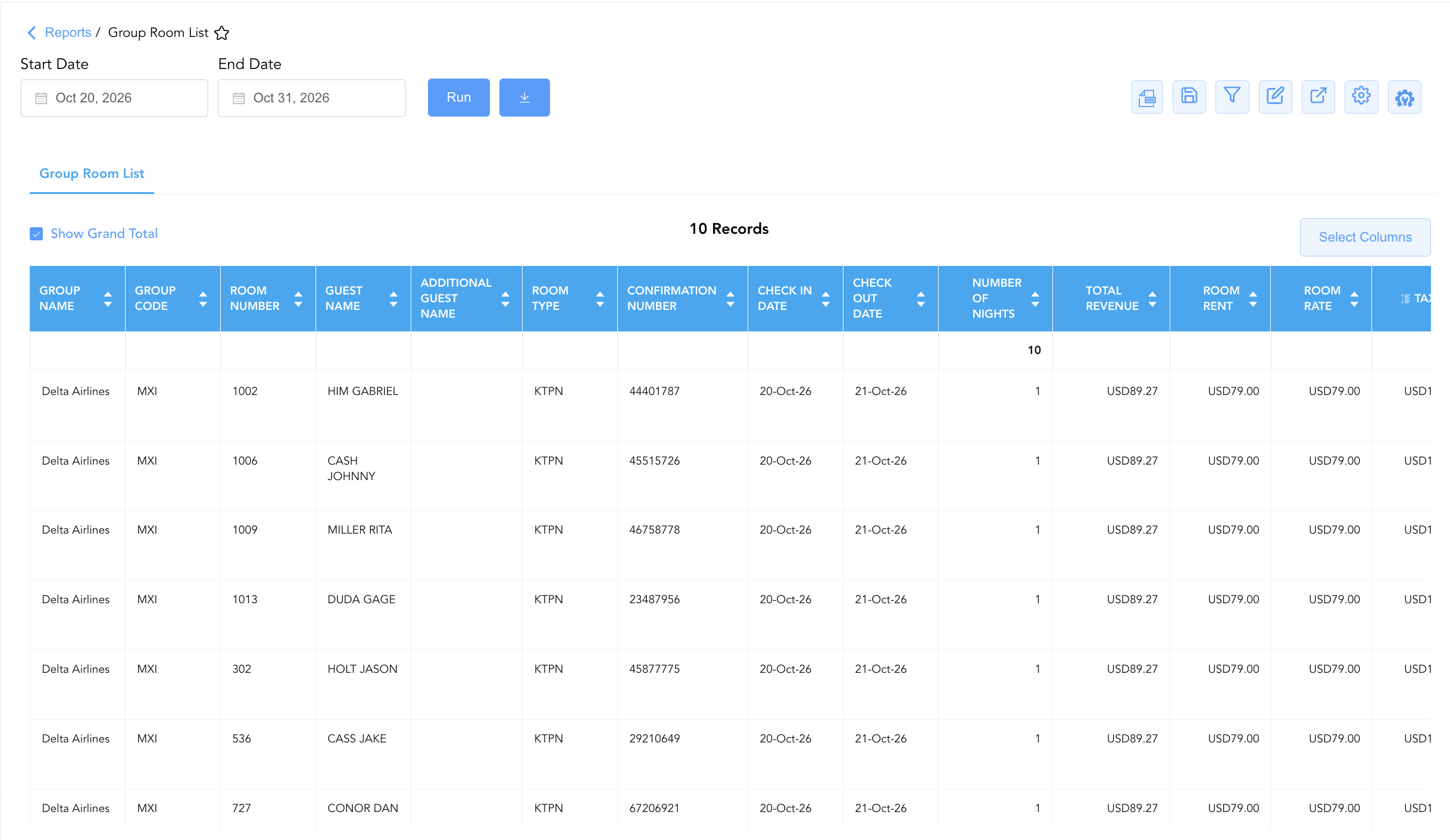
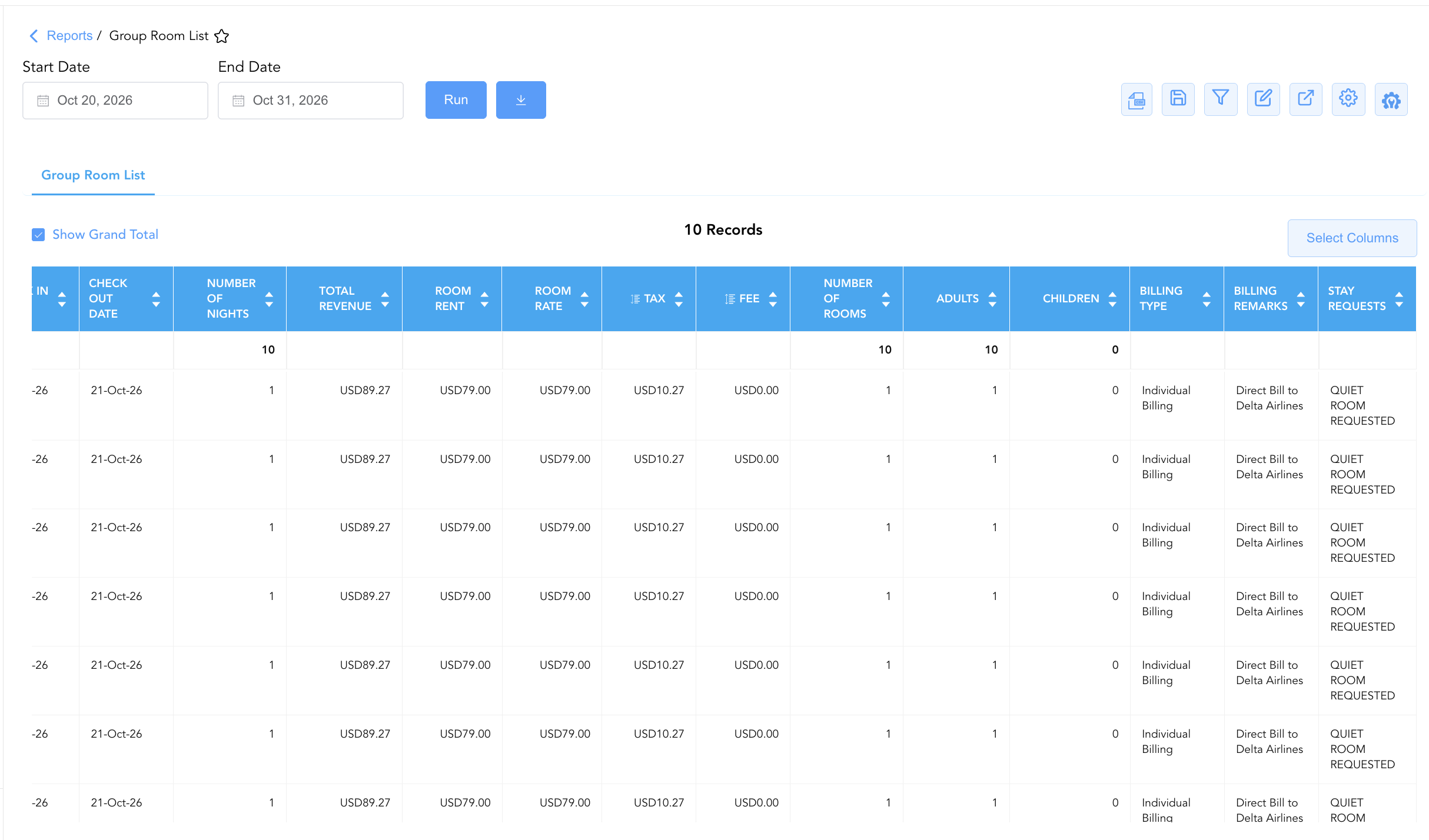
Group Name,Group Number,Group Code) to individual reservation profiles (Confirmation Number,Guest Name,First Name,Last Name,Additional Guest Name), physical room allocations (Room Type,Room Number), stay timeframes (Check In Date,Check Out Date,Number Of Nights), guest headcounts (Adults,Children,Number Of Rooms), contractual rate terms (Room Rate,Room Rent,Tax,Fee,Total Revenue), billing parameters (Billing Type,Billing Remarks), and special preferences (Stay Requests, e.g.,QUIET ROOM REQUESTED), this report enables front desk teams, sales managers, and housekeeping leads to prepare for group check-ins, confirm rooming list accuracy, verify billing routing, and fulfill guest stay requests.
Key Capabilities
-
Line-Item Group Attendee Audit: Consolidates all individual guest reservations attached to active group blocks into a single operational manifest.
-
Physical Room & Inventory Assignment Tracking: Real-time visibility into assigned physical room numbers (
Room Number) and room categories (Room Type) to identify unassigned reservations prior to arrival. -
Financial Posting & Revenue Disaggregation: Breaks down gross stay revenue (
Total Revenue) into net lodging charges (Room Rent), applied taxes (Tax), surcharges (Fee), and daily contracted rates (Room Rate). -
Billing & Folio Routing Verification: Displays configured settlement terms (
Billing Type, e.g.,Individual Billing,Master Billing) and routing instructions (Billing Remarks) to ensure proper charge routing. -
Guest Preference & Special Request Fulfillment: Captures special room location notes, amenity preferences, and handling instructions (
Stay Requests) to enhance attendee guest satisfaction.
Report Views & Functional Breakdown
The Group Room List Report presents attendee reservation data in a unified single-table master matrix supporting three primary operational perspectives:
┌────────────────────────────────────────────────────────────────────────┐
│                      GROUP ROOM LIST REPORT                            │
├────────────────────────────────────────────────────────────────────────┤
│                         Unified Matrix View                            │
├──────────────────────────┬──────────────────────────┬──────────────────┤
│ 1. Guest Identity &      │ 2. Room Allocation &     │ 3. Financial &   │
│    Stay Timeframe Trace  │    Billing Routing       │    Request Audit │
└──────────────────────────┴──────────────────────────┴──────────────────┘
1. Guest Identity & Stay Timeframe Trace
Monitors master block identifiers, confirmation numbers, primary/additional guest names, and arrival/departure stay dates.
-
Primary Use: Verifying rooming list completeness, matching attendee names against group manifests, and tracking daily group check-in flows.
-
Key Metrics: Group Name, Group Number, Group Code, Confirmation Number, Guest Name, First Name, Last Name, Additional Guest Name, Check In Date, Check Out Date, Number Of Nights.
2. Room Allocation & Billing Routing
Tracks assigned physical room numbers, room category codes, guest headcounts, settlement methods, and folio remarks.
-
Primary Use: Pre-assigning guest rooms, auditing unassigned reservations, and confirming whether charges route to master or individual folios.
-
Key Metrics: Room Type, Room Number, Adults, Children, Number Of Rooms, Billing Type, Billing Remarks, Group Name.
3. Financial & Request Audit
Audits daily contracted rates, net lodging charges, taxes, fees, total stay revenue, and special guest preference requests.
-
Primary Use: Verifying rate plan accuracy, checking expected folio charges, and communicating special guest requests to housekeeping and front desk teams.
-
Key Metrics: Room Rate, Room Rent, Tax, Fee, Total Revenue, Stay Requests, Confirmation Number.
Data Dictionary (Dynamic View Columns)
Customize your default view using the Configure (⚙️) icon on the report page. Below is the full data dictionary representing all 24 dynamic columns available in this report, sorted in alphabetical order by column name:
💰 Financial Posting Logic: Figures in
Room Rent,Tax,Fee, andTotal Revenuereflect net or gross charges posted to individual guest folios or group master folios.Total Revenueis dynamically calculated as Room Rent+Tax+Fee.
|
Column Name |
Description |
Data Source / System Mapping |
Includes Taxes & Fees? |
|---|---|---|---|
|
Additional Guest Name |
Full name of any accompanying guest registered on the room reservation. |
Guest Profile > Additional Guest |
N/A |
|
Adults |
Total registered adult headcount on the individual room reservation. |
Reservation System > Adult Count |
N/A |
|
Billing Remarks |
Special billing instructions or routing notes attached to the guest reservation. |
Reservation System > Billing Notes |
N/A |
|
Billing Type |
Method of folio payment and billing settlement configured for the room stay (e.g., |
Reservation System > Settlement Type |
N/A |
|
Check In Date |
Scheduled or actual check-in arrival date for the guest stay. |
Reservation System > Arrival Date |
N/A |
|
Check Out Date |
Scheduled or actual check-out departure date for the guest stay. |
Reservation System > Departure Date |
N/A |
|
Children |
Total registered child headcount on the individual room reservation. |
Reservation System > Child Count |
N/A |
|
Confirmation Number |
Primary unique alphanumeric reservation identifier assigned in the PMS. |
Reservation System > Confirmation ID |
N/A |
|
Fee |
Total net surcharge fees or amenity charges posted to the reservation. |
Folio Ledger > Fee Charges |
Yes |
|
First Name |
First name of the primary registered guest occupant. |
Guest Profile > First Name |
N/A |
|
Group Code |
Alphanumeric short block code identifying the group contract (e.g., |
Group Block Master > Block Code |
N/A |
|
Group Name |
Official descriptive title or event name of the group block (e.g., |
Group Block Master > Block Name |
N/A |
|
Group Number |
Primary unique master identification number assigned to the group block in the PMS (e.g., |
Group Block Master > Group ID |
N/A |
|
Guest Name |
Combined full name of the primary registered guest occupant (e.g., |
Guest Profile > Full Name |
N/A |
|
Last Name |
Last name of the primary registered guest occupant. |
Guest Profile > Last Name |
N/A |
|
Number Of Nights |
Total length of stay in room nights reserved for the guest. |
Reservation System > Length of Stay |
N/A |
|
Number Of Rooms |
Count of physical rooms assigned to the guest reservation. |
Reservation System > Room Count |
N/A |
|
Room Number |
Physical guest room number assigned on property (e.g., |
PMS > Physical Room ID |
N/A |
|
Room Rate |
Daily contracted room rate applied to the reservation. |
Rate Engine > Daily Rate |
❌ No |
|
Room Rent |
Total net room lodging revenue generated by the reservation stay. |
Folio Ledger > Net Room Revenue |
❌ No |
|
Room Type |
Alphanumeric code or description representing the room type category (e.g., |
PMS Setup > Room Category Code |
N/A |
|
Stay Requests |
Special guest preference notes, room location requests, or amenity requests (e.g., |
Reservation System > Special Requests |
N/A |
|
Tax |
Total sales, occupancy, and lodging taxes posted to the room reservation. |
Folio Ledger > Tax Charges |
🟢 Yes |
|
Total Revenue |
Total gross stay revenue generated combining room rent, taxes, and fees (Room Rent+Tax+Fee). |
Calculated: Gross Stay Revenue |
🟢 Yes |
Customization & Platform Features
User & Property Preferences
-
Personal Preference: Tailor your individual view by hiding or dragging columns. Your preferences save automatically for future sessions.
-
Property Defaults: System Admins can configure standard default layouts across all property users to streamline operational reporting. To maximize audit efficiency, group the columns into the below logical blocks:
-
Group Block Anchors (Cols 1–3):
Group Name|Group Code|Group Number -
Physical Locators & Guest Identity (Cols 4–9):
Room Number|Guest Name|First Name|Last Name|Additional Guest Name|Room Type -
Booking Keys & Stay Schedule (Cols 10–13):
Confirmation Number|Check In Date|Check Out Date|Number Of Nights -
Financial Revenue & Rate Metrics (Cols 14–18):
Total Revenue|Room Rent|Room Rate|Tax|Fee -
Stay Volume & Occupancy Counts (Cols 19–21):
Number Of Rooms|Adults|Children -
Billing Setup & Master Accounts (Cols 22–23):
Billing Type|Billing Remarks -
Special Guest Requests (Col 24):
Stay Requests
-
Report Toolbar & Quick Actions
Use the top-right toolbar icons on the report page to manage and export your data view:
|
Icon |
Action / Feature |
Description |

|
Knowledge Article |
Opens the knowledge base article to learn how to interpret this report. |

|
Background Export |
Allows users to download up to 365 days of data directly to their computer in CSV format. |

|
Saved Views |
Saves your column filtering, sorting, and highlight preferences so you can easily reload your custom view later without reconfiguring the report. |

|
Filter |
Opens filter controls to isolate specific data within a column based on your selected criteria. |

|
Highlight |
Highlights column values in a designated color based on selected conditions. |

|
Export |
Exports and downloads the report in various formats (Excel, PDF, CSV) for offline analysis or printing. |

|
Configure |
Opens column selection controls to toggle visibility, reorder columns, or hide rows with all zeros. |

|
Additional Configuration |
Provides advanced report configuration and display formatting options to customize data presentation. |
Advanced Controls
-
Pre-Arrival Room Assignment Audits: Filter data by
Room Number = Blankprior to group arrival to identify unassigned reservations and assign rooms in advance. -
Special Request Verification: Filter by
Stay Requeststo isolate guest requests (e.g., high floor, quiet room, ADA accessible) and coordinate placement with housekeeping. -
Highlighting (Conditional Formatting): Apply custom rules to automatically highlight unassigned rooms, reservations with billing remarks, or multi-night stays.
🔗 Related Reports & Next Steps
Within 🤝 Sales, Groups & Events Reports & 👥 Group Block:
-
Group Activity Report – Two-section report tracking operational stay statistics and financial revenue production across group blocks.
-
Group Pickup Details – Daily block inventory pick-up velocity and contractual release rule tracking.
-
Group Recap By Arrival – Chronological arrival summary of upcoming group blocks and master billing setups.
-
Group Reservation Details – Two-section report tracking room-category pick-up and daily master block totals.
-
Group Reservations – Master group block contract, inventory realization, and folio ledger audit.
Cross-Pillar Deep Dives:
-
🛎️ Front Desk & Guest Services: Reconcile group rooming list arrivals (
Check In Date) with Today's Guests and Arrivals List for seamless check-in handling. -
🧹 Rooms & Facilities: Cross-reference rooming list assignments (
Room Number) with Housekeeping Sheet and Room Detail to prioritize room cleaning order.